There’s a particular joy in holding a photo you just printed from your phone, and these days you don’t need a pricey setup to chase that feeling. Whether you’re decorating a dorm wall, filling a scrapbook, or printing party favors for a kid’s birthday, the right pocket-friendly printer makes it happen in seconds. The trick is matching the format, the ink system, and the connection style to how you actually plan to use it.
A Snapshot Of The Selections

Canon IVY 2 Mini Photo Printer (Blush Pink) with 100-Sheet ZINK Paper Pack

Fujifilm Instax Mini Link 3 Smartphone Printer (Rose Pink)

instax Mini Link 3 Smartphone Photo Printer (Rose Pink)
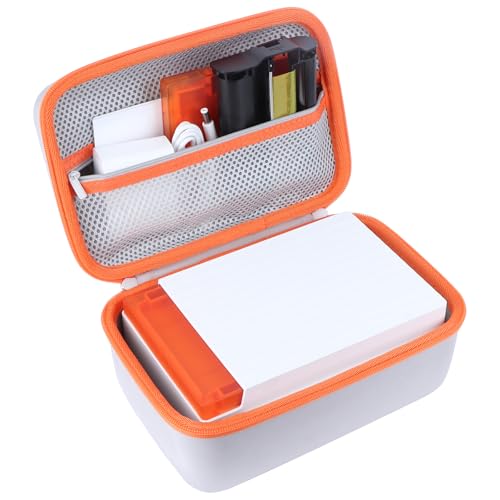
Lebakort Storage Case for Liene Amber M110 Photo Printer

Canon IVY Mini Photo Printer (Rose Gold)

HP Sprocket Portable Color Photo Printer (Pink) with 50-Sheet Bundle

HPRT CP4100 4×6 Bluetooth Photo Printer with 108 Sheets

HPRT CP4100 4×6 Wi-Fi Photo Printer with 108 Sheets

Liene M100 4×6 Wi-Fi Photo Printer 180-Pack Bundle
Why These Options Stand Out
Slip this little Canon into a crossbody bag and you’ve got an instant party tool. The IVY 2 uses ZINK paper, which is short for Zero Ink, meaning the color crystals live inside the paper itself rather than in a cartridge you have to swap. That single design choice eliminates the most annoying part of small-format printing: running out of ink mid-event.
Paired with the Canon Mini Print app on iOS or Android, the workflow feels familiar to anyone who’s edited a photo on a phone. You crop, add a filter or text, hit print, and a 2×3 sticky-backed photo slides out within about a minute. For journaling fans, the adhesive back peels off cleanly without leaving residue on most surfaces.
A Few Strong Suits
- No ink cartridges to buy or replace, which keeps long-term ownership simple.
- Sticky-back paper turns every print into a label or journal sticker.
- The bundled 100-sheet pack means you can print freely at first without ordering supplies.
- Pairs smoothly with the Canon Mini Print app for filters, frames, and collage layouts.
- Light enough at roughly pocket size to toss in a jacket or small purse.
Things To Consider
- ZINK color depth is softer than dye-sublimation output, so vibrant landscapes may look muted.
- Owners commonly report the battery needing a top-up after roughly 20 prints in a session.
Built For Busy Social Schedules
Anyone who wants to hand out photo stickers at parties, on trips, or in class will find the IVY 2 easy to live with.
Swap It Out When
Pick the Fujifilm Instax Mini Link 3 if you prefer the warm, analog film look for scrapbook pages.
Fujifilm’s Mini Link 3 leans hard into the retro instant-camera aesthetic, which is half the appeal. The companion app adds collage tools, sketch overlays, and a feature that lets you draw on a frame before sending it to print, useful for labeling photos for a guest book or a gift box.
It uses actual Instax Mini film packs rather than ZINK paper, which gives prints that characteristic soft, slightly desaturated look. Compared to the Canon IVY 2 above, this one trades ink-free convenience for a more nostalgic finish, and the film does cost more per sheet over time.
Reasons It Performs
- Prints carry the warm Instax film look that many scrapbookers specifically want.
- The Mini Link app offers sketch and frame modes that go beyond basic cropping.
- Rose Pink finish stands out on a desk without looking gaudy.
- Battery life tends to handle a full 10-pack of film between charges.
Points To Keep In Mind
- Instax film costs more per print than ZINK, so heavy users will notice the difference.
- Prints emerge gradually, so impatient users may find the pace slower than the IVY 2.
Right Fit For
Visual journalers and gift-makers who prefer film-style prints over inkjet color will get the most out of this pick.
Look Elsewhere When
The HPRT CP4100 makes more sense if you want full 4×6 prints that look closer to traditional photo-lab output.
The instax Mini Link 3 listing you see here is the same printer hardware as the Fujifilm-branded Mini Link 3 above, just retitled under the instax label, so the print quality and app behavior match closely. The distinguishing detail is the Air Studio mode, which adds 3D AR effects, confetti, spotlights, and animated flourishes to your photo before printing.
Think of it as a fun-house filter for events. You pick a background, drop in some decor, and the app overlays a moving AR effect on the photo, which feels novel the first few times you try it. For birthday parties or engagement dinners, that little extra flair is the selling point.
Everyday Advantages
- AR effects add a layer of play that standard printers skip entirely.
- Compact shell fits easily in a coat pocket.
- Charges over standard USB-C, so most phone cables work.
- Print speed is quick enough for handing out photos mid-event.
Honest Caveats
- AR features can drain the battery faster during extended sessions.
- Instax film cost applies here too, so heavy use adds up.
Feature Snapshot
Perfect Match For
Hosts who want to make a party feel extra festive without renting a photo booth will love the AR touch.
Skip It When
You only want a quiet tool for journaling; in that case the Canon IVY 2 is the calmer choice.
The Lebakort case isn’t a printer at all, but it earns a spot on this list because it solves a real ownership problem: keeping a portable printer safe on the road. The outer nylon resists dust and light moisture, an EVA mid-layer absorbs shocks, and a soft inner lining keeps the finish from getting scratched during transport.
It’s shaped specifically for the Liene Amber M110, so the fit is snug rather than loose. If you already own that printer or plan to buy one, this is the kind of accessory that pays for itself the first time it saves you from a scratched corner after a backpack ride.
The Good Stuff
- Three-layer protection handles drops better than a soft pouch alone.
- Tailored cutouts keep the printer’s ports accessible without removing it.
- Lightweight build doesn’t bulk up your bag.
Less-Strong Areas
- Model-specific, so it won’t fit other printers on this list.
- Adds a step before printing, since you have to unzip the case each time.
Whose Shelf It Belongs On
Liene Amber M110 owners who toss their printer in a backpack or travel tote will appreciate the protection most.
Reach For A Different Pick When
You don’t yet own the Amber M110; in that case start with the Liene M100 bundle below for the printer itself.
The original Canon IVY Mini holds up well even a few generations in, which is why it still shows up on shortlists like this one. It uses thermal printing with ZINK paper, the same ink-free approach the IVY 2 uses, but in a slightly older shell that some shoppers prefer for its softer, more understated look.
Connectivity is Bluetooth-based, and you print through the Canon Mini Print app. Social media imports work too, so you can pull a photo straight from Instagram without saving it to your camera roll first. Compared to the IVY 2 reviewed earlier, the older model sometimes appears at a friendlier price, which is the main reason to consider it.
Positive Points
- No ink means no smelly cartridges or waiting on replacement parts.
- Sticky-back paper works well for planners and journal spreads.
- Rose Gold finish ages gracefully and hides small scratches.
- App imports directly from connected social accounts.
Softer Spots
- Newer IVY 2 prints colors slightly more vividly, in side-by-side comparisons.
- Battery is built in and not user-replaceable, so long-term replacement may be limited.
At A Glance
Who Will Love This
Journal keepers and casual crafters who want a simple, dependable sticker printer will find this fits the bill.
Where A Sibling Pick Shines
The IVY 2 is the better pick for shoppers who want slightly sharper color reproduction from a newer generation.
The HP Sprocket leans into the same 2×3 sticky-back format as the Canon IVY printers, but the appeal here is the bundle. A 50-sheet pack of HP Zink paper ships in the box, so you can start printing right away without placing a separate order for supplies.
The pink finish is brighter and more saturated than the Canon IVY 2’s blush, which matters to some shoppers and not to others. Functionally, the Sprocket app handles the basics well: cropping, filtering, and printing from your camera roll. It skips some of the more playful collage tools the Canon app offers.
Key Advantages
- Bundled paper pack means no waiting on supplies to get started.
- HP’s Sprocket app is beginner-friendly and pairs quickly over Bluetooth.
- Slips easily into a pocket, purse, or small backpack.
- Sticky-back prints peel cleanly for labeling water bottles and notebooks.
A Few Limitations
- Color depth can feel a touch washed out on darker scenes.
- HP-branded Zink paper can cost more than third-party alternatives, depending on availability.
Best Suited To
First-time printer shoppers who want everything they need in one box without ordering accessories later.
Consider Something Else When
The Canon IVY 2 makes more sense if app creative tools like collage layouts matter to your workflow.
This is where the format jumps from pocket to wallet-sized photo. The HPRT CP4100 prints 4×6 dye-sublimation photos, which is the same lab-style technology used in commercial kiosks at drugstores and theme parks. Colors layer in passes, and a final laminate coating goes over the top to resist fingerprints, water, and fading.
The included 108 sheets and two ribbons cover a lot of ground, so most casual users can run for a few months before restocking. Bluetooth pairing keeps the cable clutter down. The editing app covers the basics, like cropping and brightness, plus a few fun frames.
Everyday Perks
- Dye-sublimation output looks closer to a traditional photo than ZINK prints.
- Laminate coating helps prints survive being passed around at events.
- 4×6 size fits standard frames without trimming.
- App-driven editing means no computer required.
Trade-Offs To Consider
- Bigger and heavier than the pocket-format printers reviewed earlier.
- Each print cycle takes a bit longer because the printer applies multiple color passes.
Feature Rundown
Made For
Home photographers and gift-makers who want 4×6 prints that look closer to lab output than pocket stickers.
Not Your Match When
You mostly want sticker-sized prints for planners, in which case the Canon IVY 2 is the lighter, easier pick.
Where the previous HPRT CP4100 listing leaned on Bluetooth, this variant adds Wi-Fi into the mix. That extra connection option matters in shared households, since anyone on the same network can send a print without needing to pair a phone by hand each time.
The print engine, paper size, and bundled supplies are otherwise identical. You still get 108 sheets and two ribbons in the box, plus the same dye-sublimation quality and laminate finish. The choice between this and the Bluetooth version mostly comes down to how many people in your home plan to print regularly.
The Case For It
- Wi-Fi support removes the need to re-pair every new device.
- 4×6 dye-sub output with laminate overlay feels substantial in hand.
- 108-sheet bundle is generous for the asking category.
- Works with a dedicated editing app for filters and frames.
Where It May Fall Short
- Wi-Fi setup can take a few minutes longer than a simple Bluetooth pair.
- Larger footprint than the pocket-format printers covered above.
Quick Facts
Who Should Grab It
Families or roommates sharing one printer will appreciate not having to hand off a Bluetooth connection every time.
A Better Fit Elsewhere
The Liene M100 bundle is worth a look if you want even more paper included out of the box for a busy home.
The Liene M100 bundle goes big on supplies: 180 sheets of 4×6 paper and five ink cartridges ship in the box, so casual home users can print for months without restocking. The five cartridges cover the full 180-sheet run, which removes the awkward pause when one ribbon runs out mid-batch.
Print technology is dye-sublimation with a final protective laminate, similar to the HPRT printers reviewed above, so colors look continuous rather than dotted and the surface resists smudges. Wi-Fi connectivity keeps multiple phones in the household happy. Compared to the smaller bundles, this one is built for people who actually print a lot.
Useful Strengths
- Bundle of 180 sheets and 5 ink cartridges removes early refilling.
- Dye-sublimation output with laminate holds up well to handling.
- Wi-Fi support works across iPhone, Android, and computer setups.
- Paper design includes crop-area handles so you avoid fingerprint smudges during refills.
Practical Considerations
- Bulk bundle means a higher upfront cost than basic starter kits.
- Printer body is larger than the pocket-format options covered earlier.
Feature Card
Made For
Households that print weekly or run craft sessions will get full value out of the bundled supplies.
Consider Something Else When
You’re a casual user printing only a handful of photos a month, in which case the HP Sprocket starter bundle is easier on the wallet.
Picking The Right Format And Connection
Choosing a small photo printer really comes down to three decisions: print size, ink system, and how you’ll connect. Pocket-format 2×3 printers like the Canon IVY 2 or HP Sprocket are the lightest to carry and tend to cost less upfront, but the small paper size limits how the prints get used. They shine for journals, planners, and quick stickers.
Print Size And How You Plan To Use It
Step back and picture where finished photos will live. Stickers and journal entries love the 2×3 format because they fit on a page without trimming. Gifts, frames, and fridge displays usually want 4×6, since that’s a standard frame size. If you can name a specific use, the right format becomes obvious.
Ink System Trade-Offs
ZINK paper embeds the color inside the sheet, so there’s no cartridge to swap, but the color depth sits a notch below dye sublimation. Dye-sublimation printers like the HPRT CP4100 or Liene M100 layer color onto the paper and finish with a laminate, which costs more per print but looks closer to a photo-lab result. Instax film sits somewhere in between, with that warm, slightly soft look many people love for scrapbooks.
Connectivity And Household Habits
Single-phone users do fine with Bluetooth-only models, since pairing once keeps things simple. Shared households, where multiple people send prints from their own devices, benefit from Wi-Fi support so nobody has to re-pair every session. A few models offer both, which covers the most situations without forcing a choice.
Key Considerations Across These Picks
Where Shoppers Go Wrong
The most common slip-up is focusing on the printer’s upfront cost and forgetting the consumables. ZINK paper and Instax film both cost more per print than you’d expect from a casual glance at the box. A bundle like the HP Sprocket starter pack or the Liene M100 180-sheet bundle softens that pain early on, but heavy users should still budget for ongoing paper and ribbon costs.
What The Higher Tier Buys
Stepping up to 4×6 dye-sublimation models brings noticeably richer color and a laminated finish that resists fingerprints and water. You’re paying for better print engine technology and a larger footprint, but the difference shows up the moment you hold the finished photo. If you’re printing for display or gifting, that upgrade is usually worth it.