Coaches who film every practice and parents tired of missing fast breaks both know the frustration. You point a camera at the court and end up with shaky clips that miss the actual play. A dedicated auto tracking camera for basketball solves this by following the action on its own, so you can coach, watch, or simply enjoy the game. This roundup walks through ten options built for sideline recording, live streaming, and team analysis, including true sports cameras, pro-grade PTZ systems, and the tripods that hold everything steady.
Your Options, Compared
XbotGo Chameleon AI Auto Sports Action Camera 4K 60FPS (Lava Graphite)

FoMaKo 4K HDMI PTZ Camera NDI HX3, AI Auto-Tracking Gen 3 (Flat Black)

EMEET PIXY Dual-Camera AI-Powered PTZ Camera 4K, AI Tracking

AVKANS Go Wireless Live Streaming Camera 4K with NDI HX3, HDMI, USB

XbotGo Chameleon AI Auto Sports Action Camera 4K 60FPS (Lemon Green)
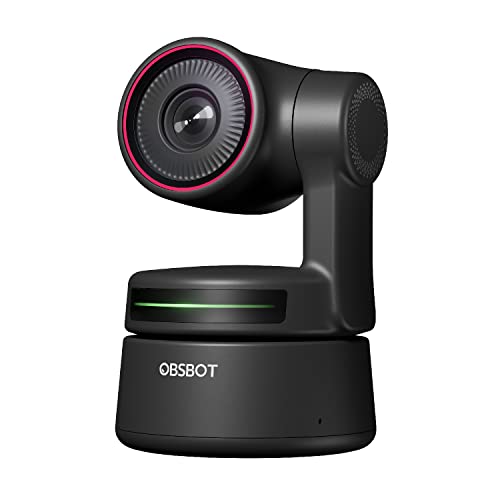
OBSBOT Tiny PTZ 4K Webcam, AI Tracking and Autofocus

XbotGo Falcon All-in-One 4K Action Camera, AI Sports Camera (Green)

XbotGo Update T4 Tripod for Soccer and Basketball Recording (13 ft)

XbotGo Falcon All-in-One AI Action Camera, 4K Sports Camera

XbotGo NT4 PRO Carbon Fiber Tripod, 12.8 ft Extra Tall Sport Stand
Meet The Standout Selections
Picture a Friday night game where the coach needs to watch the defense instead of fumbling with a tripod-mounted phone. The Chameleon steps into that exact gap, using on-device AI tracking to follow the action while you stay engaged with the team.
It captures 4K at 60 frames per second, which means a fast break looks smooth instead of stuttering. The companion app pairs with iOS and Android phones, and a no-subscription model keeps monthly fees off the books. Lava Graphite gives it a low-key look on the sideline.
The Upside
- Hands-free tracking lets coaches stay locked on the play
- 4K 60FPS keeps sprints and quick cuts looking sharp
- No subscription, so one purchase covers the whole season
- Works across iOS and Android, handy for mixed-device teams
Worth Noting
- You depend on the app for most setup steps, so an older phone may slow the workflow
- Busy gym lighting can occasionally confuse tracking for a beat
Feature Snapshot
Who It Suits Best
High school and travel basketball coaches who film every game and need reliable tracking without paying a subscription.
Consider Something Else When
The XbotGo Falcon All-in-One 4K Action Camera fits better if you want an even simpler workflow that skips phone pairing entirely.
Unlike the XbotGo Chameleon’s sideline-focused build, this PTZ (pan-tilt-zoom) camera sits in the broadcast world, where HDMI, SDI, and NDI outputs are part of the daily vocabulary. AI auto-tracking Gen 3 keeps subjects framed even as they sprint from one end to the other.
The 20X optical zoom pulls in a coach’s reaction from across the gym without any pixel mush, and a 1/2.8-inch CMOS sensor with 8.42 effective megapixels handles mixed indoor lighting well. Power over Ethernet support simplifies cable runs in permanent installations.
Strengths Worth Knowing
- 20X optical zoom pulls in tight shots without digital grain
- Multiple output options (HDMI, SDI, USB, NDI) cover most broadcast workflows
- AI tracking handles long court sprints cleanly
- Power over Ethernet trims cable clutter in fixed setups
Trade Offs
- The interface assumes some familiarity with broadcast gear, which may overwhelm first-timers
- It is overkill for a casual parent just wanting a highlight reel
Quick Facts
Made For
Program directors and AV teams at schools, churches, and broadcast setups running real production workflows.
Look Elsewhere When
The XbotGo Chameleon AI Auto Sports Action Camera 4K 60FPS suits parents and coaches better if HDMI outputs and zoom lenses aren’t part of the plan.
The PIXY brings something different to the court: two cameras working together, with the main lens capturing the game while a secondary AI sensor keeps faces in focus. PDAF (phase-detection autofocus) helps it lock on quickly as players cut across the lane.
This dual setup is helpful when lighting shifts under those tall gym windows. Skin tones stay natural, and the 0.2-second focus response is a real step up from basic webcams. The 1/2.55-inch sensor adds headroom for low-light sections of the schedule.
The Practical Payoff
- Dual-camera design keeps skin tones natural under changing gym lights
- PDAF focus locks on quickly during fast direction changes
- AI tracking frames the action without manual panning
- 4K resolution gives editors room to crop on the timeline
Points To Note
- More moving parts inside mean firmware updates are worth watching for
- It is more capable than a casual user may ever use
Right Fit For
Coaches and streamers who split time between the court and a remote desk, and want one camera that handles both.
A Better Fit Elsewhere
The OBSBOT Tiny PTZ 4K Webcam is the smarter pick if desktop size matters more than dual-camera intelligence.
The AVKANS Go Wireless leans into flexibility. It streams over Wi-Fi while recording locally to an SD card, so a flaky venue connection doesn’t kill your footage. NDI HX3 and HDMI outputs round out a wide-angle lens that grabs the whole half-court.
This camera pairs cleanly with sideline broadcasting apps used in volleyball and baseball too, so clubs covering multiple sports get one piece of gear that pulls double duty. Setup is generally quick once the network is configured.
A Few Highlights
- Wireless streaming keeps cables off the gym floor
- SD card recording offers a backup if Wi-Fi drops mid-game
- Wide-angle lens covers most of the half-court
- NDI HX3 and HDMI outputs suit several broadcasting platforms
Honest Caveats
- Wi-Fi performance depends heavily on the venue’s network
- Wide-angle framing means closer action may look small on stream
Best Suited To
Schools, churches, and clubs that stream multiple sports and want one camera to handle them all.
Swap It Out When
The XbotGo Chameleon AI Auto Sports Action Camera 4K 60FPS is a more focused fit for basketball-only setups that want automatic tracking.
This is the same Chameleon camera as Item 1, dressed in a brighter Lemon Green finish. If you keep losing your Lava Graphite unit in a pile of black sideline bags, the brighter color solves that problem on its own.
Internally, you get the same 4K 60FPS capture and AI tracking that earned the Chameleon its editor’s spot. The color swap doesn’t change performance; it just changes how easy the camera is to find after a long tournament weekend.
The Good Stuff
- Lemon Green finish makes it easy to spot on a crowded bench
- Same 4K 60FPS tracking performance as the Lava Graphite sibling
- No subscription fee keeps long-term costs low
- Works with both iOS and Android phones
Points To Keep In Mind
- The bright color may not match a club’s neutral sideline aesthetic
- Tracking still relies on the companion app running smoothly
Who Will Love This
Coaches and parents who travel to away games and want a camera they can actually find in their bag.
Not Your Match When
The XbotGo Falcon All-in-One AI Action Camera, 4K Sports Camera is the better fit if you prefer a one-piece setup without phone pairing.
The OBSBOT Tiny lives on a desk or small tripod rather than a 12-foot stand. The Sony 1/2.8-inch sensor pushes 4K at 60FPS, while HDR (high dynamic range) auto-correction sorts out uneven window light that often hits a half-court.
AI tracking pans and tilts the camera itself, rather than relying on digital zoom tricks. That difference shows up when a coach walks across the room during film review, with the subject staying full-frame instead of fading into the background.
Notable Gains
- Real mechanical pan and tilt, not just digital zoom
- Small footprint fits on any score table
- HDR handles backlit windows in older gyms
- Plug-and-play USB works with most streaming apps
Factors To Consider
- Limited reach from a desk, so full-court coverage isn’t realistic
- Tracking range tops out at small-room distances
Perfect Match For
Coaches who coach from a desk, host remote film sessions, or run a small training space rather than a full gym.
Reach For A Different Pick When
The XbotGo Update T4 Tripod for Soccer and Basketball Recording pairs well if you want full-court views from up high.
Where the Chameleon leans on a phone app, the Falcon folds tracking, recording, and live streaming into one self-contained unit. The 6 TOPS AI chip and 8-core processor handle subject recognition on-device, which removes a layer of friction for less tech-savvy volunteers.
It is built for the moment you arrive at a gym, mount the camera, and need it to start tracking in minutes. For a club that rotates videographers every season, that simplicity is genuinely valuable.
Positive Takeaways
- All-in-one design removes phone-pairing steps
- On-device AI keeps tracking responsive without app lag
- 4K recording and live streaming work side by side
- Green finish stays visible on the sideline
Worth Bearing In Mind
- Less flexible than a modular Chameleon-and-tripod setup
- Replacement parts may be harder to source if the lens takes a hit
Whose Shelf It Belongs On
Travel ball clubs and rec leagues that hand off filming duties and need a forgiving, all-in-one solution.
Another Choice May Suit
The XbotGo Chameleon AI Auto Sports Action Camera 4K 60FPS is the better match if your coach prefers fine-grained app control.
A tracking camera only works as well as the stand holding it. The T4 reaches 13 feet, which puts the lens above backboards for full-court coverage. The 1/4-inch screw on top pairs with most DSLR and action cameras, so it isn’t locked to one ecosystem.
Non-slip feet and a wind-resistant design help on outdoor courts, where a cheap tripod tends to wobble. The quick-release mount and included storage bag make transport between venues straightforward.
Practical Advantages
- 13-foot height clears most backboards comfortably
- Universal 1/4-inch screw works across camera brands
- Non-slip feet help on polished gym floors
- Storage bag simplifies transport between gyms
A Few Limitations
- Aluminum build is lighter than carbon fiber, so very windy outdoor courts may still challenge it
- Setup takes a few minutes longer than a desktop-sized stand
Built With In Mind
Coaches setting up sideline filming for the first time who want one tripod that covers most venues.
Where Another Pick Suits Better
The XbotGo NT4 PRO Carbon Fiber Tripod is the better fit if you film outdoors often and need lighter weight with extra height.
The Falcon returns in a neutral finish, with the same 6 TOPS AI engine and 4K capture that defined its sibling. For clubs that prefer a less flashy look on the bench, this is the same camera in a quieter color.
It runs the same all-in-one workflow: mount it, turn it on, and let the AI follow the play. Storage and stream paths stay identical, which is helpful when a club already standardized on Falcon gear.
Advantages To Know
- Same AI tracking engine as the green Falcon
- Neutral finish suits formal sideline setups
- Records and streams from one device
- Compact body fits in most gym bags
Some Limits To Know
- The neutral color can be harder to spot in a busy equipment pile
- Not much room to grow into modular setups later
The Right Fit
Clubs standardizing gear across teams who want a consistent, low-key Falcon experience.
Skip It When
The XbotGo Chameleon AI Auto Sports Action Camera 4K 60FPS is a smarter buy if you want flexibility to pair with different mounts over time.
The NT4 PRO takes the T4 tripod concept and moves it firmly into professional territory. Carbon fiber keeps the weight at around 6.57 pounds while reaching 153 inches (3.9 meters), giving you a scouting-tower view of the court.
An air-cushioned center column protects your camera during height adjustments, and horseshoe foot pads grip polished hardwood better than flat rubber. Owners commonly report that the air-cushion feature prevents sudden drops when retracting the column.
Real Benefits
- Carbon fiber keeps the tripod light enough to carry to away games
- 12.8-foot height offers a true bird’s-eye perspective
- Air-cushioned center column protects cameras from sudden drops
- Horseshoe foot pads add stability on glossy gym floors
Practical Considerations
- The taller profile needs more setup space behind the baseline
- Premium materials make it a heavier purchase than entry-level tripods
Should Grab It
Outdoor tournament crews and serious program directors who film regularly and need a stand that lasts season after season.
Where A Sibling Pick Shines
The XbotGo Update T4 Tripod for Soccer and Basketball Recording is the friendlier pick if 13 feet is enough height and you want a lighter cost.
Factors To Consider Before Buying Auto Tracking Cameras For Basketball
Match The Camera To The Venue
Indoor gyms with low light push cameras toward larger sensors. Outdoor courts demand weather-resistant builds and tripods that won’t tip in a breeze. Before anything else, picture your most common venue and work backward from there.
Decide Between All-In-One And Modular
Some cameras, like the XbotGo Falcon, fold tracking and streaming into one device. Others, like the FoMaKo PTZ, slot into a larger broadcast stack. Pick the one that matches how hands-on your filming crew wants to be.
Think About Tracking Range And Zoom
Optical zoom (true lens magnification, not digital cropping) matters when filming from across the gym. A 20X optical lens lets you pull in bench reactions without losing detail. Short-range desktop webcams trade zoom for compactness, so weigh both needs honestly.
Plan For Mounting And Power
A tall tripod widens your angles but adds setup time. PTZ cameras often accept Power over Ethernet (PoE), which sends power and data through one cable and simplifies permanent installs. Match the mount and power plan to how often you actually relocate the gear.
Key Considerations Across These Picks
Common Buying Mistakes To Sidestep
Choosing a webcam because it is cheaper usually backfires on a basketball court, where the camera needs range and tracking, not just resolution. Another common miss is ignoring tripod height, since a low mount sacrifices most of the court’s worth of footage. Finally, locking into a subscription model before checking competitors can quietly add up across a season.
Why Premium Models Cost More
Higher-tier cameras like the FoMaKo PTZ or XbotGo NT4 PRO carbon fiber tripod charge more because they ship with stronger sensors, optical zoom, and sturdier materials. That cost translates into sharper footage in tough gym lighting, fewer dropped shots in wind, and gear that survives multi-season use. For programs filming every game, the upgrade often pays for itself in usable footage rather than reshoots.
Frequently Asked Questions
Do Auto Tracking Cameras For Basketball Need A Subscription?
Not always. The XbotGo Chameleon and Falcon both skip monthly fees, while some broadcast-grade PTZ systems may tie advanced features to software licenses. Check the listing before checkout.
Can These Cameras Stream Live To YouTube Or Social Platforms?
Several models here, including the AVKANS Go Wireless and XbotGo Chameleon, support live streaming through their companion apps. Confirm the specific app’s compatibility with your preferred platform before purchasing.
How High Should The Camera Or Tripod Be For Basketball?
For full-court coverage from the sideline, mounts between 10 and 13 feet generally work well. Anything lower tends to clip the far end of the court during fast breaks.
Will These Cameras Work In Low-Light Gyms?
Most modern options here handle moderate gym lighting, but very dim venues benefit from larger sensors like the 1/2.8-inch CMOS in the FoMaKo and OBSBOT models. HDR (high dynamic range) auto-correction also helps when bright windows fight against overhead lights.
Are These Cameras Beginner Friendly?
The XbotGo Falcon and OBSBOT Tiny lean toward simpler setup, while the FoMaKo PTZ assumes some broadcast experience. Match the camera to your crew’s comfort level rather than the spec sheet alone.
Closing Thoughts
Pick the camera that matches your most common court, your crew’s tech comfort, and how often you actually film. For most coaches, an all-in-one sports camera like the XbotGo Chameleon or Falcon covers the essentials. Programs running real broadcasts should look at PTZ options, and don’t forget the tripod, since it quietly decides how much of the court ends up on screen.