Tiny printers that spit out sticky-backed snapshots have grown from a novelty into a real creative tool, and 2026’s lineup makes it easier than ever to start. Whether you’re scrapbooking on the couch, journaling at a café, or pulling double duty as a guest book at a wedding, a 2×3 pocket printer earns its keep in moments a phone screen cannot. The hardest part is sorting through cases, bundles, and competing brands without ending up with the wrong fit.
That’s exactly why this guide exists. Below, you’ll find ten thoughtful options across printers and protective cases, each matched to a specific kind of user. Scan the table, jump into the reviews that match your situation, and you’ll walk away knowing which one belongs in your bag.
An Overview Of The Picks

Boobowl Hard Case for HP Sprocket 2×3
co2CREA Hard Case for HP Sprocket 2×3

CaseSack Case for HP Sprocket 2×3

KODAK Step Instant Photo Printer (Pink)

KODAK Step Instant Photo Printer (Blue)

JCHPINE Hard Case for Polaroid Hi-Print

Canboc Hard Case for HP Sprocket 2×3

HP Sprocket Photo Printer (Pink) + Paper

Aenllosi Hard Case for Polaroid Hi-Print

KODAK Step Instant Photo Printer (White)
The Strengths Of Each Pick
If you already own an HP Sprocket 2×3 and want a no-fuss travel shell, the Boobowl case is the kind of accessory you forget you even packed. Its external dimensions sit around 5.9 by 4.05 by 2.05 inches, which slides easily into a tote, a backpack pouch, or the side pocket of a carry-on.
The built-in elastic band cradles the printer so it stays put, and the rigid exterior absorbs the everyday knocks that come with tossing it next to a water bottle. Compared with the broader co2CREA case later in this guide, this one is more form-fitting and less of a catch-all organizer.
Where It Delivers
- Tight internal cradle that holds the Sprocket steady during travel
- Compact footprint fits purses and small backpacks
- Rigid shell guards against drops and pressure in crowded bags
- Designed specifically for Sprocket Select and 2nd Edition models
Things To Consider
- Printer and accessories are sold separately from the case
- Minimal extra room for cables or extra paper
Who It Suits Best
Owners of the HP Sprocket Select or 2nd Edition who want a slim, tailored case and don’t need to haul extra paper.
Where Another Pick Suits Better
Shoppers who want room for cables and a paper ream should consider the co2CREA Hard Case instead.
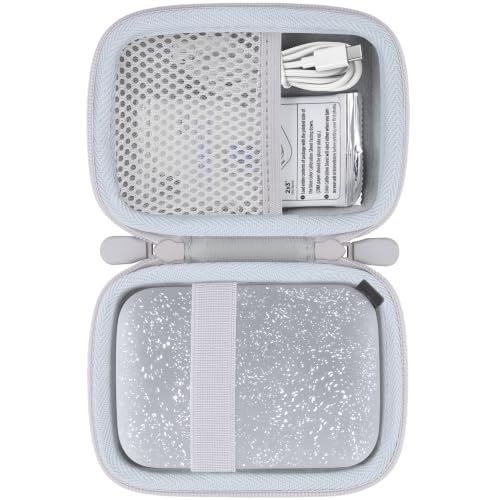
The co2CREA case leans into protection more than pure compactness. A durable EVA exterior absorbs bumps, and the soft velvet lining keeps the Sprocket’s finish pristine between uses. If you’ve ever pulled a scratched printer out of a backpack, you’ll appreciate that contrast right away.
Unlike the tighter Boobowl option, this case leaves breathing room for a charging cable, a small stack of paper, and other accessories. Travelers and café-printers tend to love the extra space, while minimalists sometimes find it bulkier than they need.
What Works In Its Favor
- Velvet-lined interior that resists scuffs on the printer body
- EVA shell holds up to drops, splashes, and dust
- Extra storage room for paper and cables
- Lightweight enough to carry daily without noticing
Worth Noting
- Slightly larger than minimalist shell-only options
- Only the case ships; printer not included
Made For
Commuters and travelers who carry a Sprocket, paper, and cables together and want them all in one protected pouch.
Not Your Match When
If you want a slimmer, more sculpted fit, the Boobowl Hard Case is a tighter match.
CaseSack takes a different angle by playing the field. This semi-hard case lists compatibility across the HP Sprocket 2×3, the Polaroid Snap Touch, the Polaroid Zip, and the PRT 2×3 MT53, which makes it unusually flexible if your household owns more than one pocket printer.
The build uses PEVA, a soft, water-resistant material that absorbs shock and shrugs off splashes. A mesh pocket in the lid holds a charger and a paper sleeve. Compared with the Boobowl and co2CREA cases above, this one trades custom-fit aesthetics for practical versatility.
The Case For It
- Compatible with several pocket printer models in one shell
- Water-resistant PEVA construction handles surprise splashes
- Mesh pocket organizes paper and charging accessories
- Light enough for shoulder bags and suitcases alike
Honest Caveats
- Looser fit than brand-specific cases, so printers may shift inside
- No elastic strap to lock the printer in place during rough handling
Best Suited To
Multi-device households or shared spaces where the same case may need to handle different pocket printers over time.
Skip It When
If your printer model is locked in and you value a snug fit, the Boobowl Hard Case is a more tailored option.
The KODAK Step is the printer most people picture when they imagine pocket photo printing. Pair it with your phone over Bluetooth, edit in the companion app, and a full-color, sticky-backed 2×3 print lands in your hand in under a minute. Zink paper (a no-ink stock with crystals embedded inside that activate under heat) keeps the whole setup mess-free.
The blush pink finish leans playful, and the printer is genuinely pocketable. Where the protective cases above serve existing hardware, this is the actual printing hardware, and it earns its spot as the most well-rounded option in the lineup. Travelers, scrapbookers, and casual gift-givers tend to land here.
The Helpful Details
- No ink cartridges needed thanks to Zink technology
- Sticky-backed prints are ready for journals and laptops
- Bluetooth works with both iOS and Android
- Companion app adds filters, frames, and editing tools
Trade Offs
- Zink paper costs more per sheet than traditional photo prints
- Battery needs charging between sessions on heavy-use days
Feature Snapshot
Whose Shelf It Belongs On
Smartphone-first creators and casual gift-givers who want a balanced mix of print quality, app features, and pocket-friendly design.
A Better Fit Elsewhere
Anyone who already owns a KODAK Step and only needs a carrying case should look at the JCHPINE or Aenllosi options for Polaroid Hi-Print owners, or the Canboc case for cross-brand use.
If the previous KODAK Step’s specs win you over but pink isn’t your color, this blue version offers the exact same hardware in a cooler finish. Spec for spec, it shares its sibling’s Zink engine, Bluetooth pairing, and app integration, so your decision here is mostly aesthetic.
For gift-giving especially, the color shift opens up options that match a friend’s taste or a dorm-room setup. Compared with the pink model, this one reads slightly more understated, and a small number of shoppers report that darker finishes show fingerprints more readily.
Features That Help
- Same dependable Zink prints as the pink variant
- Bluetooth pairing works across both major mobile platforms
- Sticky-back paper simplifies craft and journaling projects
- App editing tools let you customize before each print
Points To Note
- Functionally identical to the pink Step, so no new features
- Glossy finish may show smudges on the printer body
Perfect Match For
Style-conscious shoppers who want the same print experience as the pink Step in a cooler, more neutral finish.
Consider Something Else When
Shoppers who prefer a brighter aesthetic should look at the pink KODAK Step instead.
Polaroid’s Hi-Print 9046 is a different beast than the HP Sprocket line, and JCHPINE built this case around that exact model. The fit is intentionally snug, which means less printer wiggle inside the shell and more confidence during travel.
The case is shockproof, dustproof, and water-resistant, so it handles the day-to-day abuse of being tossed into a backpack pocket. Compared with the Aenllosi case covered later, JCHPINE leans into a more sculpted design language that mirrors the printer’s own curves.
Well-Handled Touches
- Custom fit designed around the Hi-Print 9046
- Shock-absorbing interior reduces risk of impact damage
- Dust- and water-resistant exterior for daily travel
- Room for a paper cartridge alongside the printer
Some Limits To Know
- Specifically built for Hi-Print 9046, so no cross-brand flexibility
Who Should Grab It
Polaroid Hi-Print 9046 owners who want a tailored case that matches their printer’s footprint exactly.
Look Elsewhere When
If you carry multiple printer brands, the Canboc case offers more flexibility.
The Canboc case is the bridge between brand-specific fits and true multi-device compatibility. It’s listed for the HP Sprocket 2×3, the KODAK Step wireless mobile printer, and the Lifeprint 2×3 portable photo and video printer, which means one case can rotate through different devices in a household.
The build combines fabric material with a hard-shell structure, and the inside includes a mesh pocket sized for paper and a charging cable. Where the CaseSack option above leans PEVA-soft, this one feels more rigid and structured in the hand.
Good Reasons To Consider
- Compatible with HP Sprocket, KODAK Step, and Lifeprint printers
- Mesh interior pocket organizes paper and cables
- Hard exterior with fabric wrap for a balanced feel
- Reasonable size for backpacks and totes
Possible Compromises
- Fabric wrap may scuff over time with rough handling
- Printer and accessories sold separately from the case
The Right Fit
Multi-device households or anyone rotating between Sprocket, KODAK Step, and Lifeprint printers and wanting one case to handle all three.
Swap It Out When
If you only ever use the HP Sprocket 2×3, the Boobowl case offers a more sculpted fit.
This bundle pairs the HP Sprocket portable photo printer in pink with a 50-pack of HP Zink sticky-backed paper, which means you can start printing the moment the box arrives. The smartphone-sized printer slips into a pocket, purse, or backpack without ceremony.
The included paper removes one of the most common beginner friction points: running out of stock after the first five prints and having to hunt down refills. Compared with buying the printer alone, this bundle delivers a noticeably smoother start, which is why it earns the top-pick slot for first-timers.
The Value In It
- Printer plus 50 sheets of paper in one purchase
- Pocket-sized footprint for travel and daily carry
- Zink technology eliminates ink cartridge hassles
- Sticky-back paper ready for scrapbooks and laptops
Where It May Fall Short
- Bundle paper count may run out quickly with heavy use
- Zink prints trade some color depth for convenience
Built With In Mind
First-time printer shoppers who want a complete starter kit without tracking down paper separately.
Reach For A Different Pick When
Shoppers who already own a Sprocket and only need paper refills should pick up paper on its own.
Aenllosi’s take on a Hi-Print case leans hard into durability. The exterior uses EVA, a semi-rigid foam that resists crushing, while the interior includes a mesh pocket for small accessories. The shell shrugs off bumps, splashes, and the kind of pressure that comes from a packed suitcase.
It’s a near-twin of the JCHPINE case covered earlier, with comparable protection and a similar interior layout. Where Aenllosi edges ahead is in the perceived toughness of the EVA, which feels slightly more substantial in the hand. Travelers and daily commuters are the natural audience.
What Earns Its Place
- Crush-resistant EVA shell handles rough bags
- Anti-shock construction protects the printer body
- Internal mesh pocket stores cables or paper
- Water-resistant exterior for surprise weather
Things To Weigh Up
- Bulkier than soft sleeve alternatives
- Single-printer fit with limited cross-brand use
Right Fit For
Commuters and frequent travelers who pack their Hi-Print into crowded luggage or daily bags.
A Better Fit Elsewhere
Shoppers who prefer a more sculpted look should consider the JCHPINE case.
The white KODAK Step rounds out the trio of color options for the same underlying printer. Its clean finish fits naturally into minimalist desks, photography studios, and gift setups where the printer is meant to blend in rather than stand out.
Underneath the finish, it shares the same Zink engine, Bluetooth pairing, and app editing suite as its pink and blue siblings. If you’ve been weighing those two, this one offers a quieter visual profile without giving up any of the underlying print performance.
Reasons It Performs
- Neutral white finish suits minimalist spaces
- Zink prints skip the ink-cartridge learning curve
- Bluetooth works across iOS and Android devices
- Companion app unlocks filters and creative edits
Practical Considerations
- White finish shows scuffs and marks more readily than darker shells
- No functional differences from the pink and blue Step variants
Feature Snapshot
Who Will Love This
Aesthetes and minimalists who want a printer that disappears into a clean workspace rather than shouting for attention.
Where A Sibling Pick Shines
Shoppers drawn to brighter colorways should consider the pink KODAK Step for a more expressive setup.
Choosing The Right Pocket Printer And Case Combo
Picking a 2×3 printer is less about chasing the loudest spec sheet and more about matching the device to the way you actually print. A traveler who pulls a printer out at a wedding reception has very different needs from a stay-at-home scrapbooker printing once a week at the kitchen table.
Print Technology And Paper Cost
Most pocket printers use Zink paper, a stock with embedded dye crystals activated by heat. That means no ink cartridges, ever, but it also means your ongoing cost is paper itself. Heavy users should factor refills into the budget; light users barely notice.
Connectivity And App Quality
Bluetooth is the standard pairing method across the picks here. What varies is the app experience, from filters and frames to collage tools and sticker overlays. Spend five minutes in the listing’s screenshots before buying to confirm the app style matches your creative habits.
Size, Weight, And Battery
Pocket printers live or die on portability. Anything over about half a pound starts to feel heavy in a small bag. Battery life matters more than people expect; a single charge should cover a weekend event without panic.
Case Fit And Protection
Cases fall into two camps: brand-specific molded shells and flexible cross-brand sleeves. If you only own one printer, a custom fit pays off. Households with multiple devices often prefer the flexibility of cases like the Canboc or CaseSack.
Smart Shopper Notes For 2×3 Photo Printers
Common Shopping Slip Ups
The biggest miss is buying a printer without confirming paper availability in your region. Zink paper for one brand doesn’t always work in another, and locking yourself into an orphaned paper supply is a common frustration. Another trap is underestimating bundle value. Buying a printer plus paper from the same listing often saves more than assembling pieces separately.
What The Higher Tier Buys
Stepping up in price usually means better app software, longer battery life, and more refined print color. For casual users, a basic Zink printer delivers most of the experience. The upgrade matters most for crafters who print often enough to notice subtle color shifts, and for travelers who need a printer that won’t die mid-event.