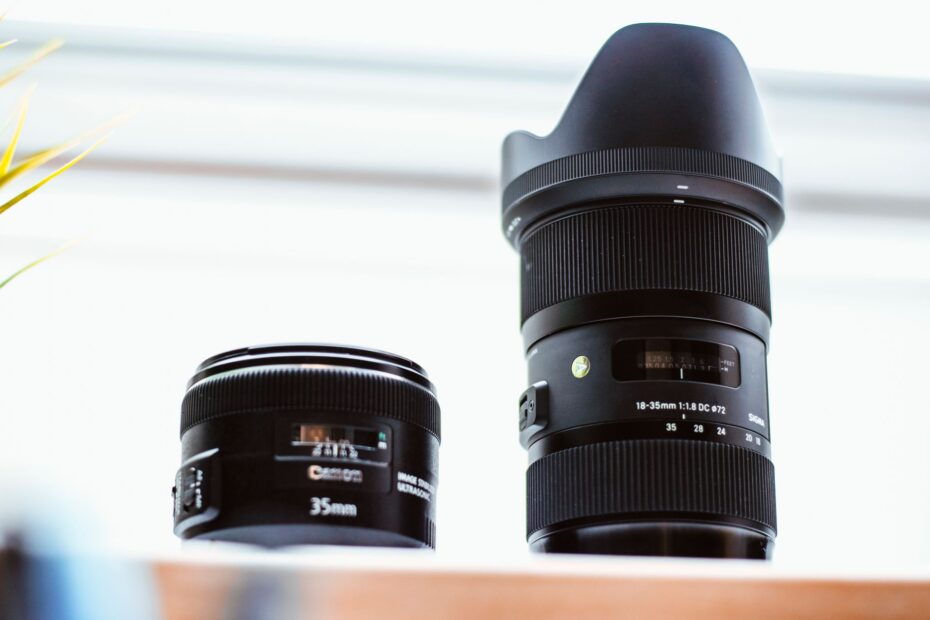
Inside a camera, hardware can move a lens element or sensor during capture, while software shifts video frames afterward to reduce shake. Your handheld photo may stay sharp at 1/15 s with optical correction, while EIS smooths walking footage by trimming image edges.
You’ll see how OIS, EIS, DIS, and IBIS affect photos, video framing, low-light photography, phone footage, camera settings, and your choice of shooting support.
Camera Shake Creates Blur Before Stabilization Starts
A small hand tremor can smear fine detail across several pixels during a slow exposure. Camera shake is movement of the camera during capture, and it becomes more visible as focal length rises or shutter speed drops.
Your hands never hold a camera in a fixed position, even with elbows tucked close. At 24 mm, a slight tilt may barely show. At 200 mm, that same tilt shifts the scene farther across the sensor and can soften text, eyelashes, or tree branches.
Still Photos and Video Show Shake in Different Ways
A still image records shake as blur during one exposure. Handheld video records a chain of jolts, drifts, and rotations across dozens of frames, so your footage can feel unstable even where each frame appears reasonably sharp.
Low-light photography makes the problem obvious. A dim restaurant, indoor gym, or evening street can move your shutter speed from 1/250 s toward 1/30 s, giving hand movement enough time to blur a handheld image.
Stabilization Does Not Freeze Subject Motion
A child crossing the frame, a dog shaking its head, or a passing car creates subject movement. Stabilization corrects movement from your camera, not movement inside the scene, so a moving subject still needs a shutter speed fast enough to stay sharp.
At 1/15 s, OIS can steady a parked bicycle, but it cannot keep a pedaling cyclist sharp. Raise shutter speed for the cyclist, then accept higher ISO or add light.
That limit explains the practical role of stabilization. You gain sharper handheld stills, steadier clips, and more usable dim-light shots without a tripod, but only where the subject is not moving too quickly.
That boundary matters because preventing camera motion at the lens or sensor differs fundamentally from rescuing it afterward.
Optical Systems Correct Movement Before the Sensor Records It
Blur forms during exposure, so a physical correction works before the sensor records the image. Optical Image Stabilization, or OIS, uses moving hardware and gyro sensors that detect pitch and yaw from your hands.
Lens-Based OIS Shifts Optical Elements
Inside a stabilized lens, a small group of lens elements sits on an actuator. The lens shifts that group against detected shake, keeping the projected image steadier on the sensor during your exposure.
Your viewfinder may also look steadier with lens-based stabilization, which matters at long focal lengths. Tamron calls its version Vibration Compensation, or VC, but the working principle remains optical correction inside the lens barrel.
IBIS Shifts the Sensor Instead
In-Body Image Stabilization, or IBIS, moves the camera sensor rather than a lens element. A five-axis IBIS system can counter pitch, yaw, roll, and small horizontal or vertical shifts, giving unstabilized lenses added help.
A sensor-shift stabilization system matters in a camera body used with several lenses. Your 35 mm prime, vintage manual lens, and macro lens can gain stabilization from the body, though results depend on focal-length data and the camera’s control system.
| Optical method | Moving part | What your capture gains |
|---|---|---|
| Lens-based OIS | Correcting lens group | Steadier framing and sharper handheld shots, especially with telephoto lenses |
| Sensor-shift IBIS | Camera sensor | Stabilization across compatible lenses, including unstabilized prime lenses |
| Coordinated OIS plus IBIS | Lens group and sensor | Added correction in systems designed for both parts to communicate |
Optical correction preserves the full recorded frame because hardware keeps the image aligned before capture. That gives OIS a clear advantage for handheld stills at slow shutter speeds, where every sensor pixel remains part of your image.
Video can tolerate a different compromise, because software can trade unused frame edges for smoother motion.
Digital Stabilization Reframes Video With Software
Video has movement across time rather than within one exposure. Electronic Image Stabilization, or EIS, analyzes nearby frames and shifts, rotates, or warps them so your subject travels through a calmer frame.
Frame Analysis Smooths Motion Across a Clip
Digital Image Stabilization, also called DIS, tracks visual detail from frame to frame or uses gyro data recorded during capture. Software then offsets frames to reduce visible jolts from walking, turning, or holding your phone at arm’s length.
Your handheld video benefits because the system reads the direction of shake across many frames. A brief sideways bump can be softened through nearby footage, leaving a smoother path than optical hardware alone can show.
Camera and Editing Tools Need Spare Image Area
Some cameras stabilize video during recording, while editing software stabilizes footage after capture. Both methods need extra picture area beyond the final composition, because a frame cannot shift left without usable image data on its left side.
Post-capture tools can use stronger correction, but your source clip still sets the limit. A 4K recording with clean edge detail gives software more room than a heavily cropped clip with blur, noise, or a blank white wall.
The difference between optical and digital image stabilization appears clearly here. OIS corrects the light path during capture, while EIS alters recorded framing across time and introduces a visible trade-off.
The Digital Crop Limits EIS Framing
A stabilized video frame needs a safety border around it. EIS spends that border while repositioning frames, so a digital image stabilization crop can make your footage look tighter than the lens focal length listed in the specifications.
Extra Pixels Become Movement Margin
Suppose your phone records a wide room with a doorframe near the edge. During a rightward shake, software shifts the frame left to hide motion, and the doorframe can disappear because your final crop no longer includes that outer area.
Your field of view becomes narrower at stronger settings. An action mode may smooth walking better than standard stabilization, yet it can make a 24 mm-equivalent view feel closer to 28 mm or more, depending on the device and recording mode.
Difficult Footage Shows Software Limits
Fine tree branches, window blinds, water ripples, and fast foreground motion can confuse frame tracking. The result may include rubbery corners, bent straight lines, small jumps, or a wobble resembling gelatin across the frame.
Low light makes EIS harder to use well. Noise shifts frame to frame, moving subjects overlap the background, and slow-shutter blur removes the detail software needs for a stable reference.
Inspect the outer 10 percent of a stabilized clip, not only the center. Warped edges and clipped hands reveal crop and distortion more clearly than a face in the middle.
Digital stabilization does not automatically reduce quality, but heavy correction can soften fine detail through cropping, resampling, and warping. Your cleanest footage comes from moderate movement, ample light, and a wider starting angle than your final composition needs.
Those framing costs make the best approach depend less on labels than on how and where you shoot.
OIS, EIS, and IBIS Suit Different Shooting Conditions
A dim indoor portrait and a walking video place different demands on your camera. Optical systems hold an advantage during slow still exposures, while EIS can make movement look smoother by reducing frame-to-frame shifts.
| Factor | OIS or IBIS | EIS or DIS |
|---|---|---|
| Mechanism | Moves lens elements or sensor hardware | Shifts, rotates, or warps recorded frames |
| Crop | No inherent crop | Crop is part of correction |
| Field of view | Preserves captured lens framing | Becomes narrower as correction grows stronger |
| Fine detail | Retains sensor resolution during capture | Can lose edge detail through resampling or warping |
| Low-light value | Strong for stationary handheld subjects at slower shutter speeds | Limited by noisy or blurred frames and crop |
| Video strength | Reduces small camera tremors | Smooths visible movement across a sequence of frames |
| Hardware burden | Adds moving parts to a lens or body | Relies on processing power and image margin |
| Strong fit | Handheld photos, telephoto work, dim scenes | Walking clips, casual video, action-focused recording |
Your practical choice is direct. Use OIS or IBIS for a handheld still of a still subject in dim light; use EIS for a walking clip where smoother motion matters more than the widest view; use both where your phone or camera allows it.
Zoom Does Not Stabilize the Camera
Optical zoom changes focal length with lens optics. Digital zoom enlarges a cropped part of the recorded image, so it does not steady your camera and cannot replace optical image stabilization vs electronic image stabilization.
That difference matters on a phone screen. A 3x optical telephoto camera changes the lens view, while a digital 3x crop enlarges fewer captured pixels. EIS may crop that view further during video, leaving less area around your subject.
Photos, Handheld Video, and Action Footage Need Different Priorities
A quiet museum interior and a brisk walk through a market call for opposite choices. Your still photo needs control during one exposure, while your video needs a stable path across consecutive frames.
Still Photography Favors Optical Correction
For low-light photography, stabilize the camera and set shutter speed around subject motion. A vase on a table can tolerate 1/10 s with a capable stabilized system, while a person talking and gesturing needs a much faster exposure.
Your claimed stabilization stops are a starting point, not a promise. A six-stop claim describes correction under defined conditions; your breathing, grip, focal length, and subject movement can reduce that margin.
Video Favors Smooth Motion Across Frames
Walking footage benefits from EIS because software reads each bump as part of a longer pattern. Start wider than your desired final shot, keep elbows close, and avoid sudden direction changes that demand a heavy crop.
- Still indoor scenes: Favor OIS or IBIS, then use a shutter speed suited to your subject’s movement.
- Walking clips: Favor EIS and leave extra width around your composition for the crop.
- Fast action: Raise shutter speed before relying on stabilization because subject blur remains visible.
- Long telephoto work: Use lens OIS, brace your body, and avoid abrupt reframing movements.
- Locked-off video: Use a tripod and disable correction only where your equipment shows idle drift.
Physical Support Still Matters
A gimbal separates your camera from walking motion through motors and mechanical balance. It handles longer, smoother moves than EIS alone, though a gimbal does not stop a subject from blurring during a slow shutter exposure.
Tripods, monopods, and a wall for bracing solve another part of the problem. Your camera needs less correction before capture, which preserves framing and lowers the chance of software artifacts in demanding footage.
Modern Phones Layer Optical and Digital Correction
A phone can steady the camera module before recording, then calm remaining movement after recording starts. That two-stage process explains why an Apple iPhone or Samsung Galaxy can produce steadier handheld video than OIS or EIS alone.
Hardware and Software Split the Work
OIS in a phone moves a compact lens or sensor module to counter small hand tremors. EIS then uses gyro data and frame analysis to smooth remaining movement, especially during walking or a slow pan.
Your video can look stable without becoming rigid because the optical stage handles fine shake before it reaches the sensor. The digital stage has less correction left to perform, so it may need a smaller crop than software acting alone.
| Phone recording mode | Likely correction pattern | What you should watch |
|---|---|---|
| Standard rear-camera video | OIS plus moderate EIS on stabilized modules | Small crop and steady handheld framing |
| High-resolution or high-frame-rate mode | Digital features can be reduced or unavailable | Mode-specific crop, shake, and heat limits |
| Ultra-wide action mode | Heavy EIS from a wide starting image | Tighter final view and edge warping |
| Front-camera video | Software correction varies by device and mode | Crop changes during walking or arm movement |
Interchangeable-Lens Cameras Split Correction Differently
A mirrorless body with IBIS can coordinate with a stabilized lens, but exact behavior depends on the lens and body. Some systems assign pitch and yaw correction to the lens while the body handles roll and shift.
Your phone specification may reveal less than it seems. “OIS” can apply to one rear camera but not the ultra-wide or selfie camera, and EIS behavior can change across 4K, 60 fps, slow motion, and cinematic modes.
Your Shooting Style Determines the Useful Stabilization Feature
The right feature depends on the shot you repeatedly miss, not a label in a specification sheet. A photographer shooting dim interiors needs different equipment from someone filming a child riding a bicycle.
Your Stabilization Decision Checklist
- Low-light stills: Put OIS or IBIS ahead of EIS because your full frame stays intact during a slow exposure.
- Handheld video: Check EIS crop at your preferred resolution and frame rate, not only in a store demonstration mode.
- Mixed phone use: Look for optical correction on your main camera plus electronic correction for video.
- Long lenses: Give extra weight to lens OIS because shake becomes more visible as focal length rises.
- IBIS bodies: Check lens-body coordination before paying for a stabilized lens your system does not need.
- Action footage: Favor a wide starting view, fast shutter speed, and steady walking technique before heavy software correction.
An image-stabilized lens earns its place in your kit where you shoot handheld at longer focal lengths, photograph in dim places, or lack IBIS in the camera body. A body with strong sensor shift reduces the need for stabilization in short primes, yet lens OIS remains useful at telephoto lengths.
Some Situations Favor Disabling Correction
A tripod-mounted camera can confuse older stabilization systems. With no real hand shake to correct, the mechanism can hunt for motion and introduce a small drift during long exposures or locked-off video.
Your camera manual matters here because newer systems can detect tripod use. Disable stabilization for intentional panning only after selecting a panning mode or confirming that your lens recognizes horizontal movement correctly.
Real-World Checks Show More Than a Specification Label
Record a stationary clip, then walk 10 to 20 steps with the same composition. Your comparison should show stabilized and unstabilized framing, because the crop reveals how much image margin the system uses.
Inspect straight edges near the border, fine hair, leaves, and distant text at full size. Then shoot the same dim, stationary subject at 1/60 s, 1/30 s, and 1/15 s while keeping your stance consistent.
That routine turns optical vs digital image stabilization from vague specification language into visible behavior. Your chosen system should retain the framing, detail, and motion character that suit the shots you make.
Final Thoughts on Stabilization Choices
Optical stabilization works before the image reaches the sensor, so it preserves full framing and works well for handheld stills. Digital stabilization works across video frames, so it can calm movement while spending image area through crop. Your strongest mixed-use setup pairs both, then uses shutter speed, bracing, or a gimbal where physics still wins.
FAQ
What is the difference between optical and digital image stabilization?
Optical stabilization moves lens elements or the sensor during capture to counter camera shake. Digital stabilization shifts, rotates, or warps recorded video frames with software, which can smooth your footage but needs a crop margin around the final frame.
Is optical image stabilization better than digital stabilization?
Optical stabilization is stronger for your handheld photos in dim light because it preserves the full sensor image during exposure. Digital stabilization is stronger for your walking video because it smooths movement across a sequence of frames, though your view becomes tighter.
Does digital image stabilization reduce video quality or crop the image?
Digital stabilization crops video because software needs spare pixels around the final frame for repositioning. Heavy correction can soften fine edge detail or produce warped lines and jitter, especially in low light, fast motion, or scenes with thin branches.
Can OIS and EIS work together on a smartphone?
Yes. Your phone can use OIS to steady the camera module during capture and EIS to smooth remaining motion in recorded video. This layered approach can reduce visible shake, though some resolution, frame-rate, or camera modes still use a stronger crop.
Why does OIS help more in low-light photography?
OIS helps in low light because it steadies your camera during a longer exposure without cropping the sensor image. A stationary object may remain sharp at 1/15 s, while EIS mainly smooths video framing after capture and cannot restore motion-blurred detail.
What is the difference between OIS, EIS, and IBIS?
OIS moves lens elements or a camera module, while IBIS moves the sensor inside the camera body. EIS uses software and a crop margin to shift recorded frames, making it especially useful for smoothing your handheld video.