Starting a podcast on a tight budget means juggling two needs: a camera that looks halfway decent and a microphone that doesn’t make your voice sound like it’s coming through a tin pipe. Many starter bundles lean on USB webcams that bundle their own mic, while serious setups split into a separate condenser or dynamic mic paired with a video option. Either path works, but the trade-offs differ: built-in mics are convenient and limited, while separate audio gear adds cost and complexity but pays you back in sound quality.
The picks below mix both routes. Several entries are dedicated USB or XLR microphones that you can pair with almost any camera, plus a few webcam options, a studio condenser pair, and one boom arm to keep your desk tidy. Use this list to build a setup that matches your room, your editing comfort, and the kind of show you want to record.
The Main Contenders

Hollyland Lark M2 Wireless Mini Lapel Microphone USB-C
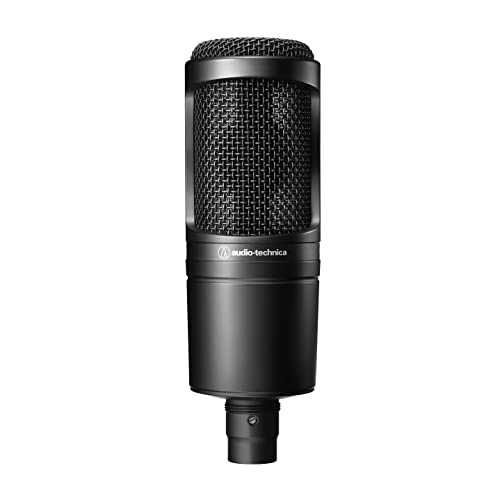
Audio-Technica AT2020 Cardioid Condenser XLR Microphone

Logitech Brio 100 Full HD Webcam with Built-in Microphone

Shure MV7+ USB-C and XLR Dynamic Microphone White

1080P HD Webcam with Tripod and Mic

Logitech C920x HD Pro PC Webcam 1080p

BEHRINGER C-2 Matched Condenser Pair

InnoGear Webcam Stand Desk Boom Arm

UGREEN 4K Webcam with Noise-Canceling Mics
The Picks, Examined More Closely
The Lark M2 is built for podcasters who don’t want to sit at a desk. Unlike the Audio-Technica AT2020 covered next, which anchors a fixed home setup, this wireless lavalier clips to your shirt and travels with you. The transmitter is genuinely tiny, around 9 grams, so it disappears on camera even on tighter framing.
For mobile podcasters shooting on a phone or USB-C tablet, the plug-and-play pairing removes the usual driver headaches. The included noise cancellation helps when you’re recording near streets, fans, or humming appliances.
Key Advantages
- Up to 1,000ft wireless range gives you freedom to roam
- Around 30 hours of total battery life with the charging case
- USB-C receiver pairs instantly with modern phones and tablets
- Built-in noise cancellation reduces ambient room tone
Honest Caveats
- Lavalier placement picks up clothing rustle if the mic isn’t clipped carefully
- You still need a camera, since this is audio-only gear
Who It Suits Best
Mobile hosts who interview on location or stream from a phone, where wireless freedom matters more than studio polish.
Skip It When
You sit at a desk in a quiet room and want richer spoken-word tone; the Audio-Technica AT2020 is the better fit for that scenario.
The AT2020 is the classic starter studio condenser, and it remains a sensible anchor for a home podcast rig. A condenser microphone uses a thin, electrically charged diaphragm to capture vocal detail, which is why it tends to sound more present than dynamic mics in quiet rooms. Pair it with any of the webcams later in this list and you get a sensible split between video and audio.
It’s an XLR microphone, meaning it outputs analog audio over a three-pin cable rather than USB, so you’ll need an audio interface or mixer to connect it to a computer. Once that’s sorted, the cardioid pickup pattern (a heart-shaped sensitivity zone that favors the front and rejects the back) keeps keyboard clatter and room echo in check.
Real Benefits
- Wide dynamic range handles loud laughs and quiet asides
- Cardioid pattern focuses on your voice and ignores the room
- Durable all-metal body holds up to years of daily use
- Plays nicely with budget audio interfaces from Focusrite and similar brands
Trade Offs To Consider
- Requires an audio interface, adding to the total cost
- No hardware gain knob on the mic itself
Quick Facts
Right Fit For
Home studio podcasters who already own (or plan to buy) a basic audio interface and want clean, detailed voice capture.
Reach For A Different Pick When
You need a one-cable USB solution; the Shure MV7+ or any webcam with a built-in mic will save you the interface step.
The Brio 100 is the easiest entry point on this list. Plug the USB-A cable into a laptop, open your recording software, and you’re live in a few seconds. Compared to the wireless Lark M2 covered first, this is a fixed desk solution that doubles as your camera and your audio source.
It records at Full HD 1080p, which is more than enough for most podcast feeds, and the auto light correction brightens dim rooms without making your face look washed out. The built-in privacy cover slides across the lens when you’re off camera.
Everyday Wins
- 1080p resolution at 30fps handles weekly podcast uploads cleanly
- RightLight auto-exposure lifts shadows up to about 50% in dim rooms
- Integrated mic removes the need for a separate audio purchase
- Built-in privacy shutter protects you when not recording
Worth Bearing In Mind
- The built-in mic sounds decent, but won’t match a dedicated condenser in tone
- USB-A connector may need an adapter for modern USB-C laptops
Made For
Beginners running video-first podcasts who want a single plug-and-play device that handles camera and mic duties.
A Better Fit Elsewhere
Audio-quality-first podcasters should step up to the Audio-Technica AT2020 and pair it with any 1080p webcam on this list.
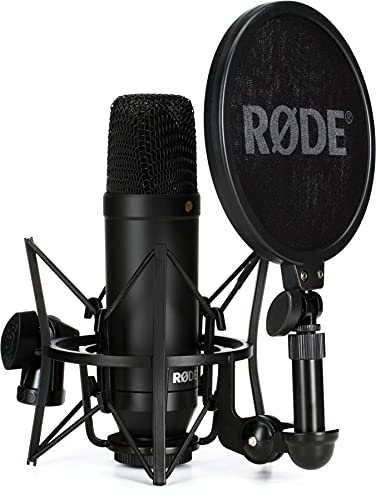
The Rode NT1 is the upgrade path for podcasters who have outgrown entry-level condensers. Where the AT2020 delivers solid clarity, the NT1 pushes further with an unusually low self-noise rating, around 4 dBA, which means the mic itself adds almost no hiss to quiet recordings. That matters when you’re whispering into a podcast or capturing long, quiet pauses.
The kit version includes the SM6 shock mount and pop filter. The shock mount isolates the mic from desk vibrations (typing, mouse clicks, sneezes), and the pop filter softens plosive consonants like “P” and “B” that otherwise thump into the recording.
Everyday Perks
- Extremely low self-noise preserves quiet vocal moments
- Included shock mount reduces desk vibration transfer
- Cardioid pattern keeps room noise out of the recording
- Large-diaphragm design adds warmth to spoken voice
Trade-Offs To Consider
- Higher price than the AT2020, even before adding an audio interface
- Still XLR-based, so you need an interface to connect it
Spec Overview
Who Should Grab It
Spoken-word creators recording in treated or quiet rooms who want near-studio sound without stepping into truly premium price tiers.
Look Elsewhere When
You record on the road or in untreated spaces; the Shure MV7+ handles background noise more gracefully thanks to its dynamic design.
The Shure MV7+ solves a real problem: it works today over USB-C and tomorrow over XLR. A dynamic microphone uses a moving coil rather than a charged diaphragm, which makes it less sensitive to room noise and a smarter pick for untreated home spaces than the condensers covered earlier. You can start with a simple laptop connection and upgrade to a full audio interface later without replacing the mic.
The Voice Isolation Technology focuses pickup on the speaker, which helps when you’re recording in a noisy home office with traffic, appliances, or family in the background. The white finish looks clean on camera, which matters for video-led podcasts.
What Stands Out
- Hybrid USB-C and XLR outputs grow with your studio setup
- Voice isolation tech keeps your voice clean in noisy rooms
- Built-in headphone jack allows real-time monitoring without latency
- Touch panel for adjusting gain, mute, and monitor mix on the fly
Some Limits To Know
- Pricier than most condensers on this list
- Heavier body needs a solid desk stand or boom arm
Quick Facts
Whose Shelf It Belongs On
Growing creator studios that want one mic to bridge beginner USB workflows and advanced XLR rigs.
Swap It Out When
You’re on a strict starter budget; the Audio-Technica AT2020 delivers clean tone at a noticeably lower price.
This webcam is the cheapest full kit on the list: camera, tripod, and built-in mic in one box. For casual chat-style podcasts where the conversation matters more than audio fidelity, it does the job without burning through your launch budget. The 1080p resolution runs at 30fps, which is standard for entry-level streaming.
Unlike the Logitech Brio 100 covered earlier, this one ships with a small tripod rather than a monitor clip, so you can set it on a shelf or stack of books. The wide-angle lens helps when you’re hosting two people in the same frame.
Bright Spots
- 1080p Full HD at 30fps handles casual video podcasts cleanly
- Wide-angle lens fits two hosts in one shot
- Built-in noise cancellation tames fan and keyboard noise
- Privacy cover slides over the lens when off camera
Where It May Fall Short
- Auto light correction works best in mild backlight, not pitch-dark rooms
- Mic audio is functional but won’t rival a standalone mic for tonal depth
Best Suited To
First-time podcasters who want the lowest possible entry point and don’t plan to invest in separate audio gear right away.
Where Another Pick Suits Better
Long-running shows that need more reliable image quality should consider the Logitech C920x for its stronger glass lens.
The Logitech C920x has been a workhorse webcam for so long that “C920-quality” has basically become shorthand for “reliable.” It records at 1080p/30fps with a five-element glass lens, which gives it a small but real edge over the cheaper Shcngqio model covered earlier. The HD autofocus stays locked on your face even when you lean in or gesture.
It also has dual microphones, one on each side of the lens, which capture stereo sound. That’s a step up from single-mic webcams when you want a slightly more natural sense of space. Owners commonly report that the included monitor clip holds steady on most laptop screens and external monitors.
A Few Strong Suits
- Glass lens delivers sharper image than typical plastic webcam optics
- Autofocus keeps your face crisp during movement
- Dual stereo mics give a wider soundstage than single-mic designs
- Light correction adjusts for dim home office setups
Points To Note
- Plastic body feels lighter than the Shure MV7+ or Audio-Technica AT2020
- Microphone audio is fine for video calls but limited for serious podcasting
Feature Card
Perfect Match For
Weekly podcasters running long interview series who need consistent image quality without fussing over settings each session.
Not Your Match When
You want sharper image detail and 4K futureproofing; the UGREEN 4K webcam covered last covers that use case.
The Behringer C-2 ships as a matched pair, meaning two condensers tuned to nearly identical sensitivity. That makes it the practical pick for two-host podcast setups where you want each speaker to sound balanced on the same recording. By contrast, the single-mic options covered earlier all assume one host at a time.
The cardioid pattern and switchable low-frequency roll-off help control room rumble and proximity effect (a bass boost that happens when you get very close to a directional mic). Sold as a pair, the per-mic cost lands in entry-level territory.
Good Reasons To Consider
- Matched pair delivers consistent tone across two hosts
- Cardioid pattern rejects off-axis room noise
- Switchable low-cut filter reduces rumble and proximity bass boost
- Low-mass diaphragm captures vocal detail
Potential Drawbacks
- Sold only as a pair, so solo hosts pay for a second mic they won’t use
- Still requires an audio interface with at least two XLR inputs
Who Will Love This
Two-person interview and co-host podcasts who want balanced stereo capture without buying two separate microphones.
Skip It When
You’re a solo host; the single-mic Audio-Technica AT2020 or Shure MV7+ is a smarter spend.
Most of the picks on this list are cameras or microphones, but the InnoGear boom arm solves a real-world problem: cluttered desks. A boom arm lifts your webcam or mic off the surface, freeing up keyboard space and letting you angle the gear exactly where you need it. That’s especially handy if you’re using a heavier mic like the Shure MV7+ covered earlier.
Two screw adapters (1/4″ to 3/8″ and 3/8″ to 5/8″) ship in the box, so the arm works with both standard webcam mounts and typical mic threads. The 135° back-and-forth and 180° side-to-side adjustments let you dial in the exact height and reach.
Everyday Advantages
- Clears desk space for keyboards, notebooks, and drinks
- Adjustable angles frame your face at eye level
- Includes two thread adapters for broad compatibility
- Clamp mount fits most desk thicknesses without drilling
Worth Noting
- Doesn’t include a webcam or mic, so it’s an add-on to one of the other picks
- Boom arms can transmit desk vibrations, so pair with a shock mount for mics
Built With In Mind
Podcasters with cramped desks who need vertical clearance and flexible positioning for their existing camera or mic.
Where A Sibling Pick Shines
If you don’t yet own a webcam, the Logitech C920x bundles its own monitor clip and works straight from the box without extra mounting.
The UGREEN 4K webcam sits at the sharper end of the list. Its 8MP sensor records at 4K/30fps, which gives you noticeably more detail than the 1080p webcams covered earlier, especially when viewers stream on modern displays. For video-first creators, that extra resolution is the headline.
The dual noise-canceling mics use software processing to reduce constant background hums like air conditioners or PC fans. A practical note: to actually record at 4K/30fps, both your computer hardware and your recording software need to support that mode. If either falls short, the camera falls back to 1080p/60fps.
Where It Delivers
- 4K resolution at 30fps captures crisp detail for video-heavy shows
- 8MP CMOS sensor improves low-light performance
- Dual noise-canceling mics reduce ambient hum
- USB plug-and-play setup works on PC and Mac
Honest Caveats
- Requires a 4K-capable computer and recording software for full resolution
- Higher resolution means larger video files that need more storage
Feature Snapshot
Perfect Match For
Video-led creators with modern computers who want extra sharpness and don’t mind managing larger recording files.
A Better Fit Elsewhere
Audio-priority podcasters should pair the Logitech C920x with a dedicated mic instead, since webcam mics still can’t match a real condenser or dynamic.
What Matters Most When Shopping For Budget Cameras For Podcasting
Image Resolution Versus Real-World Use
A 1080p webcam is plenty for most podcast feeds, since viewers often watch on phone screens where 4K detail gets compressed anyway. Reach for 4K, like the UGREEN model above, only when you want futureproofing and your editing machine can handle the file sizes. Anything below 1080p tends to look soft on modern displays and ages quickly as viewing hardware improves.
Audio Source And The Trade-Offs There
Built-in webcam microphones keep things simple, but a dedicated mic always wins on tone. Condensers like the Audio-Technica AT2020 and Rode NT1 capture vocal detail in quiet rooms, while dynamics like the Shure MV7+ reject room noise better in untreated spaces. The smart play is matching the mic type to your room, not chasing the most expensive option.
Connection Type And Studio Growth
USB mics plug straight into a laptop, which is the fastest path to a first episode. XLR mics need an audio interface, which adds cost but gives you cleaner signal and room to grow. Hybrid designs like the Shure MV7+ bridge both worlds so you can start simple and step up later.
Mounting, Lighting, And Desk Space
Webcams ship with monitor clips, while heavier mics usually need a stand or boom arm. For cluttered desks, the InnoGear boom arm covered earlier solves the height and clearance problem. Lighting matters more than most beginners expect: even a budget clip-on ring light transforms webcam image quality.
Smart Tradeoffs To Weigh Before You Pick
Mistakes Worth Dodging
A common slip-up is buying a 4K webcam for a computer that only outputs 1080p over its USB port, which means you pay for resolution you can’t actually record. Another trap is choosing a condenser mic for a noisy, untreated room; a dynamic mic handles that environment better. Many first-timers also forget to budget for a pop filter or shock mount, both of which noticeably clean up spoken-word audio.
When Paying More Pays Off
Stepping up from a budget USB webcam to a mid-tier 1080p model like the Logitech C920x gets you a glass lens and dual mics, which together lift both image and sound quality. Moving from an entry condenser to the Shure MV7+ adds hybrid USB and XLR flexibility, so the mic grows with your studio. The upgrade is worth it once you’ve committed to weekly recording and want gear that holds up over years, not months.