Dusty shoeboxes of film negatives tend to sit untouched for years. Whether you shoot analog and want a digital backup, or you inherited a relative’s slides and want to share them with family, the right scanning tool turns a chore into a weekend project. This roundup covers dedicated digitizers, smartphone-based rigs, simple viewers, and a few clever accessories that make the actual scanning cleaner and faster.
A Quick View Of The Lineup

JJC Film Digitizer Replaces Nikon ES-2

JJC Negative Slide Film Cutter for 35mm and 120

DIGITNOW 35mm Slide and Film Viewer

DigitConvert 35mm Slide and Film Viewer

Plustek Film Holder Kit for OpticFilm Series

DIGITNOW 35mm Slide Viewer USB or Battery
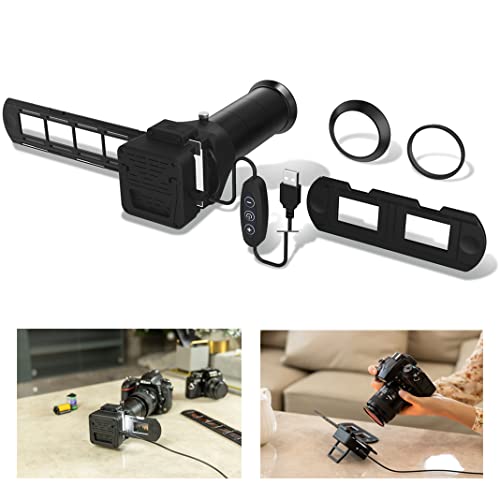
JJC Film Digitizer Scanner with Backlight

JJC Film Digitizer for 35mm and 120 Format

JJC Mobile Film Scanner with Phone Clamp
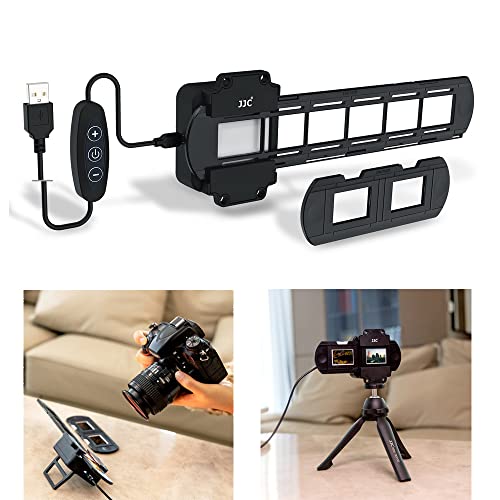
JJC 35mm Digitizing LED Backlight
A Closer Look At Each Pick
Hybrid shooters who already own a mirrorless or DSLR get a lot of mileage out of this JJC rig. It’s built to re-photograph 35mm negatives and mounted slides through your existing macro lens, which generally produces sharper files than cheap box scanners can manage.
The kit ships with seven lens adapters covering Canon, Nikon, and Sony mounts, so most photographers can attach it without hunting for a third-party ring. For the right user, it sidesteps the need for a dedicated film scanner entirely.
Where It Helps
- Replaces the discontinued Nikon ES-2 and ES-1 adapters, saving you from a used-market hunt
- Works with popular macro lenses like the Canon RF 100mm f/2.8, giving you sharp, true-to-life captures
- Adapts across three major camera brands out of the box
- Slides and negative strips both supported, no separate kit needed
Things To Consider
- You’ll need a compatible macro lens separately, which adds real cost if you don’t already own one
- Setup takes patience the first time; expect to spend an evening dialing in exposure and color
Quick Facts
Who It Suits Best
Photographers who already shoot with a Canon, Nikon, or Sony camera and a dedicated macro lens.
Where Another Pick Suits Better
Catalogue browsers who don’t want to drag out a camera should consider the DIGITNOW 35mm Slide and Film Viewer instead.
Cutting film strips by hand with household scissors is the kind of step people skip until it ruins a scan. This JJC cutter solves that problem by giving you a straight, clean edge across 35mm strips and 120-format negatives alike.
An adjustable LED backlight sits underneath the cutting area, so you can inspect frames without grabbing a loupe. It’s the kind of prep tool that quietly earns its place in any workflow.
Where It Excels
- Cuts 35mm strips plus 6×4.5, 6×6, 6×7, and other 120 sizes
- Built-in backlight helps you frame the cut before slicing
- Useful for prep before scanning or for slipping strips into archival sleeves
Worth Noting
- It’s a prep accessory, not a scanner, so budget for a separate digitization tool
- Replacement blades aren’t easy to source once the factory edge dulls over time
Made For
Anyone with stacks of long uncut rolls who wants straight, scanner-ready strips without fumbling with scissors.
Skip It When
You only need to look at slides on a light table, not cut them, in which case the DigitConvert 35mm Slide and Film Viewer covers browsing without prep work.
Not every old archive needs to become a hard drive. Sometimes you just want to flip through slides on the couch, see Aunt Marge’s wedding, and put them back. This DIGITNOW viewer handles exactly that.
A built-in magnifier enlarges the image three times, while a daylight LED panel lights it from behind. Four AA batteries come in, so you can take it to a relative’s house and start looking through their box of memories on arrival.
The Case For It
- 3X magnifier built in, so you don’t need a separate loupe
- LED backlight gives even, daylight-balanced illumination across the frame
- Battery-powered and portable for visits to family or estate sorting
Trade Offs
- It views film but doesn’t digitize it, so you’ll need a separate tool for files
- Battery-only operation means swapping cells on long browsing sessions
Best Suited To
People sorting through inherited boxes who want to triage what’s worth digitizing before committing to a real scanner.
Look Elsewhere When
You actually want digital files, not just a closer look, in which case the JJC Film Digitizer Scanner with Backlight is the better fit.
This DigitConvert unit looks similar to the DIGITNOW viewer at first glance, but the dual-power setup makes it more flexible. You can run it from a USB cable at your desk or pop in four AAs and take it to the kitchen table.
It accepts 2×2 mounted slides and 35mm negatives with no special adapters, and the 3X magnifier sits flush with the eyepiece. For someone who doesn’t want to think about power sources, that’s a small but real convenience.
A Few Highlights
- USB or battery operation covers desk and travel use
- Includes both USB cable and AA batteries in the box
- Direct viewing of 35mm strips and mounted slides
Points To Keep In Mind
- Browsing only; you’ll need a digitizer for actual file conversion
- No way to store or share what you see without photographing the screen separately
The Right Fit
Casual browsers who want one viewer that works plugged in at home or untethered on the road.
Reach For A Different Pick When
You want a more travel-focused experience with no batteries at all, in which case the JJC Mobile Film Scanner with Phone Clamp is a sensible alternative.
Plustek OpticFilm scanners are still widely used, and the original plastic film holders tend to crack or lose tension after years of sliding. This replacement kit brings a fresh negative holder and a fresh positive holder to a tired scanner.
It’s a niche buy, but a meaningful one for anyone whose scanner is still chugging along but whose holders have started misbehaving. Owners of the SmartPhoto F50 will also find these fit their unit.
The Value In It
- Covers a wide range of OpticFilm models from the 7200 through the 8300i AI series
- Includes both negative and positive holders in one kit
- SmartPhoto F50 owners can use the same holders
Softer Spots
- It’s a holder kit, not a scanner, so don’t expect it to digitize on its own
- Useless without a compatible Plustek scanner on your desk
Whose Shelf It Belongs On
Anyone with an aging OpticFilm scanner whose holders have cracked, warped, or simply disappeared over the years.
Consider Something Else When
You don’t already own a Plustek scanner, in which case the JJC Film Digitizer for 35mm and 120 Format is a more useful starting point.
This DIGITNOW viewer shares the same basic design as the brand’s earlier model but adds USB power alongside the battery option. If you’ve ever run out of AAs halfway through sorting a box of slides, you’ll understand why that matters.
The unit accepts 2×2 mounted slides from the back and 35mm film strips from the front. A 3X glass magnifier enlarges the image without obvious distortion, which is the main difference between cheap viewers and slightly-less-cheap viewers.
A Favorable Mix
- Two power modes (USB cable or AA batteries) reduce mid-session interruptions
- 3X glass magnifier keeps the image sharp across the frame
- Works with mounted slides and 35mm negatives
Small Caveats
- Still a viewer, not a scanner, so digital files require a separate purchase
- 4AA batteries are included but you’ll want spares for long sessions
Who Should Grab It
Anyone planning marathon sorting sessions where outlets aren’t always within reach.
Swap It Out When
You’d rather turn the slides into files than just look at them, in which case the JJC Film Digitizer Replaces Nikon ES-2 earns its place on your desk.
Where the first JJC adapter kit in this list assumes you already own a strong macro lens and a separate light source, this version folds the backlight into the body. That’s a real time-saver when you’re setting up at the kitchen table after dinner.
It still mounts to your camera like a fixed accessory and still re-photographs 35mm slides and negatives, but you skip the step of balancing a separate LED panel underneath the film. For most casual archives, that’s enough.
What Stands Out
- Integrated backlight removes the need for a separate LED panel
- Works with the same Canon, Nikon, and Sony macro lenses as the original kit
- Cuts the gear count for a one-evening scanning session
Honest Caveats
- Still requires a macro lens you may need to buy separately
- Doesn’t cover 120 medium format, unlike the JJC kit reviewed later
Built With In Mind
Shooters who want one tidy setup on a small desk rather than a multi-component rig.
A Better Fit Elsewhere
Anyone working with medium format negatives should reach for the JJC Film Digitizer for 35mm and 120 Format instead.
Medium format shooters have always had a harder time finding affordable digitizers, and this JJC rig speaks directly to them. It handles both 35mm strips and 120 medium format negatives using your existing camera and lens.
A sliding rail adjusts the front-to-back shooting distance from roughly 10.4 to 18.5 inches, with a knob for fine focusing. That’s a useful range when you’re switching between 35mm frames and larger 6×7 negatives that demand more breathing room.
Good Reasons To Consider
- One rig for both 35mm and 120 formats, no need to own two scanners
- Sliding rail covers a wide shooting distance for varied film sizes
- Designed to work with the macro lens already in your bag
Things To Weigh
- 35mm slides aren’t supported here; this is negatives only
- You’ll still need a camera body and macro lens to make it work
Perfect Match For
Shooters with both 35mm and 120 format negatives who want a single digitizing rig for their archive.
Another Choice May Suit
Strict 35mm-only shooters who don’t need the rail adjustment will find the JJC Film Digitizer Replaces Nikon ES-2 lighter and simpler.
If you don’t own a mirrorless camera and don’t plan to buy one just to scan a shoebox of negatives, this phone-based rig is the most accessible entry point. It mounts your phone above a backlit film holder and uses the phone’s camera as the sensor.
A wireless remote triggers the shutter without touching the screen, which is the detail that prevents blurry captures. You bring the phone; everything else is in the box. That’s an honest trade-off most casual users will accept.
Real Benefits
- Uses the phone you already own, no camera gear required
- Wireless remote cuts vibration when snapping each frame
- Adjustable clamp fits most modern smartphones
- Works with 35mm and 120 format negatives
Practical Considerations
- Result quality depends heavily on your phone’s camera; older phones may disappoint
Who Will Love This
Casual archivists with no mirrorless body who want digital files using gear they already carry every day.
Not Your Match When
You shoot with a dedicated camera and want the sharpest results, in which case the JJC Film Digitizer Replaces Nikon ES-2 is a better fit.
Sometimes the right answer is the smallest piece of gear. This JJC panel is a 42-LED daylight backlight meant to sit under a negative while your camera shoots from above, and nothing more. No clamps, no rails, no holders.
Ten brightness steps let you tune the exposure without swapping ND filters, and the 6500K color temperature mimics natural daylight. CRI (Color Rendering Index) is a measure of how accurately a light source reveals true colors; this unit scores 95 or higher, which is high enough for serious color work.
Notable Upsides
- 10 brightness levels give fine control over exposure
- High CRI rating (95+) means colors stay true to the original film
- 6500K daylight balance keeps your white point predictable
Where It May Fall Short
- It’s only the light; you’ll still need a camera and a way to hold the film flat
The Right Fit
DIY scanners who already own a tripod, a camera, and a macro lens and just need a stable light source.
A Better Fit Elsewhere
Anyone wanting an all-in-one setup should look at the JJC Film Digitizer Scanner with Backlight, which bundles the light into the rig.
What Matters Most Before Choosing 35mm Film Negative Scanners
Format compatibility is the first fork in the road. Most household archives are 35mm, but anything shot on a Hasselblad or Pentax 67 is 120 medium format, which won’t fit a 35mm-only rig. Decide between strips and slides before anything else, since slide mounts add thickness that a strip-only holder can’t grip.
Output method shapes the rest of the decision. A camera-based digitizer uses your existing mirrorless or DSLR plus a macro lens, producing the sharpest files but requiring the most gear. A phone-based scanner uses your everyday smartphone, which is convenient but ties image quality to your phone model. A standalone viewer is best when you only need to look, not capture.
Dedicated film scanners, like the Plustek OpticFilm line, work without any camera at all. They tend to be the most consistent, but they require matching holders, and replacement holders (like the Plustek kit covered above) may eventually be needed.
Light source quality affects every other choice. A high-CRI daylight LED panel under the film gives you accurate colors and predictable exposure; a weak or uneven backlight produces muddier scans that need aggressive editing. If a kit includes a backlight, check whether it has brightness steps rather than a single fixed output.
Where Shoppers Go Wrong
Assuming any negative viewer will digitize. Many handheld viewers in this category only enlarge and light the film. They look like scanners but produce no file. Read the distinction before you buy.
Forgetting the macro lens. Camera-based rigs require a dedicated macro lens to focus close enough. Without one, the rig won’t reach focus and you’ll spend hours troubleshooting before realizing the lens is the missing piece.
Picking the wrong format holder. A 35mm strip holder cannot grip a mounted slide, and a slide holder can’t accept a strip. If your archive mixes both, look for a kit that handles both or budget for two holders.
Frequently Asked Questions
What is a 35mm film negative scanner, exactly? It’s any device that captures a 35mm film negative or mounted slide and turns it into a digital image. Some use your camera or phone as the sensor; others are standalone units with their own optics and light source.
Do phone-based scanners really work well? They work surprisingly well with modern phones, especially those with strong cameras. Older or budget phones tend to produce softer files with more noise, so a mirrorless setup is a smarter pick if image quality matters most.
Can one device handle both 35mm and 120 medium format? A few do, including the JJC Film Digitizer for 35mm and 120 Format covered above. Most standalone scanners and viewers handle one or the other, so check the spec sheet before committing.
Do I need a dedicated light panel if the kit has a built-in backlight? You don’t. Built-in backlights in the JJC kits are calibrated for the holder, which keeps your setup tidy. Standalone panels matter when you’re building a DIY scanning rig from scratch.
How long does scanning an archive actually take? A few minutes per frame is realistic once you settle into a rhythm, so a hundred-frame roll takes a few hours. Holders, lights, and a stable setup cut that time noticeably, which is why the right prep tools matter.
Final Verdict
The right scanner depends on what you’re working with and what gear you already own. Camera-based rigs reward mirrorless shooters with the sharpest files, while phone-based kits make sense for anyone avoiding extra gear. Viewers and prep tools cover the rest of the workflow, from cutting strips to sorting archives. Match the format first, then match the workflow, and the rest tends to fall into place.