Boxes of old negatives and faded slide carousels gather dust in closets everywhere. You probably inherited some, or stashed them yourself years ago, and watched the colors shift with every year that passed. The picks below cover the full spectrum: dedicated DSLR digitizers, smartphone-based solutions, standalone scanners, and the small accessories that make any workflow smoother.
A Fast Comparison Of The Options

JJC Film Digitizer (Replaces Nikon ES-2)

JJC Negative Slide Film Cutter (35mm & 120)

Plustek Film Holder Kit (Negative + Positive)
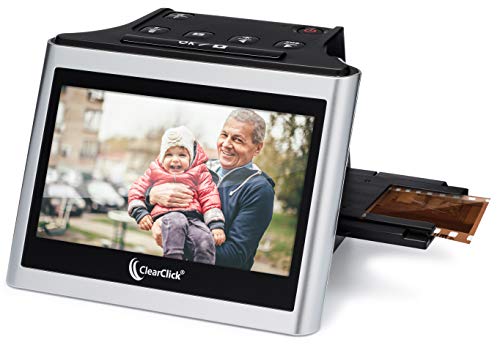
ClearClick Virtuoso 2.0 22MP Film & Slide Scanner

JJC Mobile Film Scanner Set (11-Level LED)
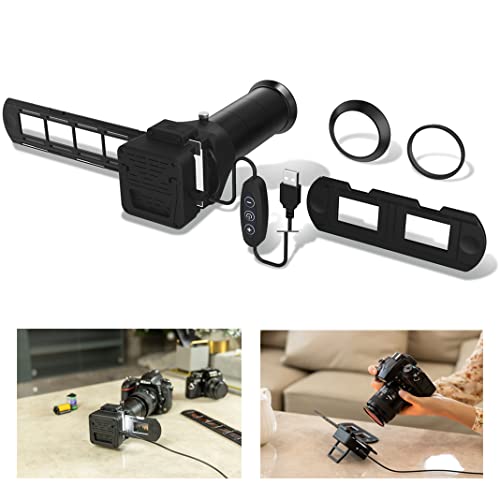
JJC Film Digitizer Scanner w/Backlight

JJC Film Digitizer for 35mm & 120 Format

JJC Mobile Film Scanner (35mm & 120)
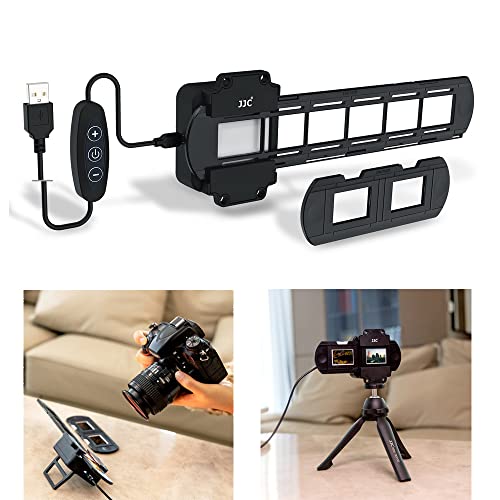
JJC 35mm Digitizing LED Backlight (10-Level)
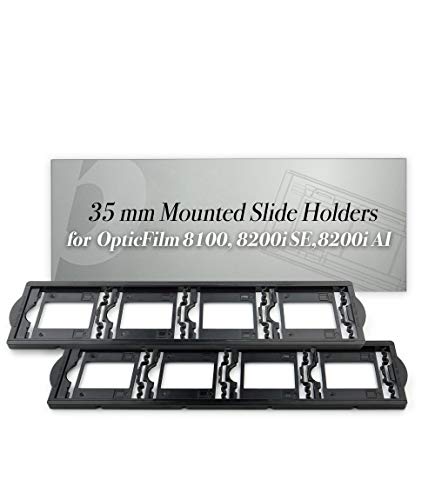
Plustek 35mm Mounted Slide Holders (x2)
A Closer Look At Each Pick
Built as a direct substitute for the Nikon ES-2 film digitizing adapter, this JJC kit opens up re-photographing 35mm slides and negatives to shooters who never owned a Nikon body in the first place. Seven different lens adapters ship in the box, giving you mounting options across Canon, Nikon, and Sony cameras when paired with a compatible macro lens.
The appeal here is flexibility. Where some digitizers lock you into one brand, this one travels well between systems, which is handy for households with mixed gear. You’ll still need a dedicated macro lens and a sturdy tripod, but that’s standard for any DSLR-based scanning workflow. For anyone with a closet full of slides and a camera already on the shelf, this is the kind of add-on that turns existing equipment into a proper digitizing station.
Advantages To Know
- Cross-brand adapter kit covers Canon, Nikon, and Sony setups
- Compatible with popular macro lenses like the Canon EF 100mm f/2.8L and RF 100mm macro options
- Substantially less expensive than buying the original Nikon ES-2 adapter
- Designed specifically for 35mm negatives and mounted slides
Points To Keep In Mind
- You supply the camera and macro lens, which adds to the total cost
- No backlight is included, so you’ll need a separate light source
- Setup takes patience: aligning a digitizer with a macro lens is fiddly the first time
Key Product Details
Who It Suits Best
Mirrorless and DSLR owners with a fast macro lens who want to digitize 35mm material without buying a dedicated scanner.
A Better Fit Elsewhere
For purely phone-based digitizing without a camera, the JJC Mobile Film Scanner Set is the friendlier option.
Scissors and film strips have an uneasy relationship, and that’s exactly the gap this JJC cutter fills. It produces clean, straight edges on 35mm strips plus 120 medium format widths including 6×4.5, 6×6, and 6×7, which is more formats than most home cutters handle.
The built-in adjustable backlight doubles as a tiny inspection lamp, so you can preview frames before trimming. For anyone with shoeboxes of mixed-format negatives, this is the kind of small tool that turns a frustrating prep job into a quick station. It pairs naturally with any of the digitizers further down the list, since clean-cut strips feed into holders and scanners far more smoothly than ragged ones.
A Favorable Mix
- Handles both 35mm and multiple 120 medium format sizes in one tool
- Integrated backlight makes frame selection easier than guessing by feel
- Clean cuts help strips feed reliably into scanner holders
- Useful for archival sleeve storage as well as scanning prep
Honest Caveats
- It’s a prep tool, not a scanner, so it won’t digitize anything on its own
- Replacement blades aren’t always easy to source
Made For
Archivists and family historians preparing large batches of mixed-format film before scanning.
Swap It Out When
If you need actual digitizing rather than prep, the ClearClick Virtuoso 2.0 handles scanning directly without extra steps.
Plustek’s OpticFilm scanners are popular with serious archivists, but the film holders take a beating over years of use. This replacement kit includes both a negative holder and a positive holder, refreshing the two parts that wear out fastest on a working scanner.
The kit works across a wide range of OpticFilm models, from the older 7200 and 7400 series through the 8200i and 8300i scanners. Compatibility with the SmartPhoto F50 broadens its reach too. For anyone whose original holders have warped, cracked, or vanished into the bottom of a drawer, this is a direct path back to clean scans without replacing the whole unit.
Where It Excels
- Broad compatibility spanning OpticFilm 7200 through 8300i models
- Includes both negative and positive holders in one purchase
- Compatible with the SmartPhoto F50 as well
Trade Offs
- Only useful for owners of compatible Plustek scanners
- Doesn’t add new scanning capability, only restores existing workflow
Right Fit For
Existing Plustek OpticFilm owners whose original holders have degraded or gone missing.
Consider Something Else When
If you don’t already own a Plustek scanner, the JJC Film Digitizer (Replaces Nikon ES-2) is a better starting point for a new setup.
The Virtuoso 2.0 takes a different approach from most of the picks on this list: it’s a fully standalone unit with a 5-inch LCD preview screen built right in. You load film, scan, and save to an SD card without touching a computer, which lowers the entry barrier considerably.
It handles 35mm negatives and slides along with 110 and 126 formats, so the family archives from the 70s and 80s that include Instamatic and pocket film are in scope too. A mini HDMI output lets you push scans to a TV for group viewing, a small but genuinely fun touch. The 22-megapixel output is interpolated, meaning the sensor captures a lower native resolution and software stretches the file size, so don’t expect the pixel-peeping detail of a DSLR rig. For casual home archiving, though, the convenience is hard to beat.
Practical Advantages
- Standalone design means no computer or driver setup
- Large 5-inch screen for live preview as you scan
- Supports 35mm, 110, and 126 film plus 50mm slides
- Mini HDMI output for TV playback of scanned images
Things To Consider
- SD card required and sold separately
- 22MP output is interpolated, so detail ceiling is lower than DSLR-based scanning
- Mini HDMI cable not included for TV output
Key Product Details
Whose Shelf It Belongs On
Casual archivists and gift-givers who want a one-box solution without tethering to a computer.
Reach For A Different Pick When
Pixel-level detail matters more than convenience, in which case the JJC Film Digitizer with a DSLR delivers sharper results.
If your scanning tool of choice is already in your pocket, this JJC kit turns your phone into a digitizer. The package includes a magnetic film holder for both 35mm and 120 strips, a backlit panel with eleven brightness levels, and an adjustable phone clip to keep your camera aligned.
The eleven brightness steps are unusually granular for this category, letting you tune exposure for dense negatives versus thin positives. A Type-C powered backlight keeps the panel running through long sessions. The trade-off, as with all phone-based scanning, is alignment: small wobbles in the phone mount translate into uneven crops, so a steady hand or a flat tabletop matters.
A Few Highlights
- Eleven-step brightness gives fine control over exposure
- Magnetic holders swap between 35mm and 120 quickly
- Phone clip accommodates a wide range of handset sizes
- Detachable backlight panel is Type-C powered
Small Caveats
- Phone mount stability depends on a flat surface for best results
- You’ll need to source a scanning app on your own since none is bundled
Best Suited To
Phone-first shooters who want quick digitizing without investing in a camera or dedicated scanner.
Look Elsewhere When
Higher resolution is the priority, in which case the JJC Film Digitizer Scanner w/Backlight works better with a DSLR.
Unlike the bare digitizer earlier on this list, this version of the JJC kit bundles a built-in backlight into the same unit. You still supply the camera and macro lens, but the lighting piece of the puzzle is solved in one purchase, which simplifies setup considerably.
Seven lens adapters span Canon, Nikon, and Sony mounts, much like its sibling product. The integrated light source is particularly helpful for first-time users who haven’t yet learned what kind of illumination produces the cleanest scans. For anyone stepping into DSLR-based digitizing for the first time, the all-in-one nature of the package removes one of the more confusing variables.
Where It Delivers
- Built-in backlight removes the need for a separate lighting purchase
- Multi-brand adapter set covers Canon, Nikon, and Sony
- Streamlined setup for first-time DSLR digitizing users
Points To Keep In Mind
- Still requires you to bring a camera and macro lens to the party
- Backlight is fixed, with no adjustable brightness levels listed
- Best results assume a tripod for steady alignment
Key Product Details
Perfect Match For
Beginners setting up a DSLR digitizing station who want one kit instead of two purchases.
Skip It When
You already own a high-CRI backlight, in which case the adapter-only version saves money.
Most digitizers on the market handle either 35mm or 120, not both. This JJC model covers the two most common film widths in a single rig, and a slide rail lets you adjust shooting distance from 10.4 inches to 18.5 inches, so you can frame either format correctly with the same camera and lens combination.
The rail adjustment knob is a small but meaningful detail: it lets you fine-tune focus and framing without moving the tripod, which speeds up batch scanning considerably. The kit is designed for negatives only, so slide shooters will want to look elsewhere, but for negative-only archives mixing 35mm snapshots with medium format frames, this is a tidy single-solution.
Noteworthy Benefits
- Handles both 35mm and 120 medium format negatives
- Slide rail covers 10.4″ to 18.5″ shooting distance for proper framing
- Adjustment knob simplifies batch scanning workflow
- Works with a wide range of DSLR and mirrorless bodies
A Few Limitations
- Not designed for 35mm slides, so slide-only shooters need a different tool
- Camera, lens, and lighting are still separate purchases
Built With In Mind
Photographers with mixed 35mm and 120 negative collections who want one rig instead of two.
Another Choice May Suit
If you mostly shoot slides rather than negatives, the ClearClick Virtuoso 2.0 covers mounted slides out of the box.
Phone wobble is the enemy of clean scans, and that’s where this JJC mobile kit separates itself: a detachable wireless remote triggers the shutter without touching the screen, eliminating the blur that comes from tapping the capture button.
It supports both 35mm and 120 medium format strips with an adjustable cellphone clamp, plus an LED backlight panel for consistent illumination. As with the other JJC mobile kit on this list, you’ll need to bring your own scanning app. The wireless remote is the standout feature here, and for anyone who has tried phone scanning and lost patience with soft frames, it solves a real problem.
Everyday Advantages
- Wireless remote eliminates shake from tapping the screen
- Compatible with both 35mm and 120 format strips
- Adjustable cellphone clamp fits a wide range of phones
- LED backlight provides consistent illumination
Room For Improvement
- Remote needs batteries or charging, which adds a small step to setup
- Scanning app is not bundled, so you choose your own
Who Should Grab It
Phone-based scanners who want sharper results by removing screen-tap shake from the workflow.
A Better Fit Elsewhere
If you don’t already own a phone you’re happy to use as a scanner, the ClearClick Virtuoso 2.0 is the more self-contained option.
Lighting makes or breaks a digitizing setup, and this dedicated LED panel is built specifically for film work. It uses 42 LEDs with a CRI (Color Rendering Index, a measure of how accurately a light source reveals true colors compared to natural daylight) of 95+, meaning colors in your scans will read close to their original tones, and a 6500K color temperature that mimics standard daylight.
Ten brightness levels are dialed in via plus and minus buttons on the controller, giving you meaningful control without cycling through endless options. This is an accessory rather than a complete scanner, so it’s aimed at photographers who already have a camera-and-lens setup and want to upgrade their illumination. For anyone chasing color accuracy in their scans, a high-CRI source like this is one of the most worthwhile upgrades you can make.
The Value In It
- CRI 95+ for accurate color reproduction
- 6500K color temperature matches daylight reference
- 10 brightness levels for fine exposure control
- Designed specifically for re-photographing 35mm film with macro lenses
Small Caveats
- Accessory only, so you still need a camera, lens, and digitizer
- Limited to 35mm strips, not wider medium format
Key Product Details
The Right Fit
DSLR-based digitizers who want a high-color-accuracy backlight to upgrade an existing workflow.
Where A Sibling Pick Shines
For an all-in-one starting point that includes both adapter and backlight, the JJC Film Digitizer Scanner w/Backlight bundles both pieces.
Slides live in cardboard mounts, and those mounts need a holder that fits the scanner’s feed slot precisely. This Plustek pack ships two 35mm mounted slide holders designed for the OpticFilm 8100, 8200i, and 8300i series, plus the broader 7200 to 9000 range.
If your original holders have warped from years of storage heat, or if you’ve simply lost one, a fresh pair keeps the workflow moving without babysitting misaligned frames. It pairs naturally with the Plustek Film Holder Kit earlier on the list, which covers negatives and positives, while this pair rounds out the slide side of the same ecosystem.
Real Benefits
- Two holders included so you can swap batches without unloading
- Compatible with OpticFilm 8100, 8200i, 8300i and similar models
- Restores a worn part rather than replacing the whole scanner
Some Limits To Know
- Only useful for Plustek scanner owners
- Designed for mounted 35mm slides, not unmounted strips
Who Will Love This
Plustek OpticFilm owners with stacks of mounted 35mm slides waiting in carousels and sleeves.
Not Your Match When
You don’t already own a compatible Plustek scanner, since these holders have no use elsewhere.
What To Weigh Before Choosing Your Digitizer
Film digitizing falls into three broad approaches, and your existing gear matters as much as your film collection. Standalone scanners like the ClearClick Virtuoso 2.0 need nothing else and run from an SD card, making them friendly for casual projects but limited in pure detail. DSLR rigs paired with a JJC digitizer and macro lens deliver the sharpest results because the camera sensor outclasses most scanner optics, but you need a camera and lens already on hand. Phone-based kits sit in the middle, offering convenience and surprisingly good results when paired with a wireless remote and steady mount.
Film format is the other big decision. Shooters with mixed 35mm and 120 collections save money with a dual-format rig like the JJC Film Digitizer for 35mm & 120. Slide-only archivists need mounted-slide compatibility, which narrows the field to Plustek accessories and dedicated scanners. Color accuracy hinges on backlight CRI (Color Rendering Index), where 95 or higher keeps scans faithful to the original tones.
Mistakes Worth Dodging In This Category
Skipping the backlight is the most common early stumble. Many digitizers ship without one, and shooting negatives without even illumination produces scans full of banding and uneven exposure. Pairing your digitizer with a dedicated high-CRI panel pays off immediately in image quality.
Another trap is assuming any macro lens will do. Focal length matters more than aperture for film digitizing, since longer focal lengths (90mm to 105mm) let you work farther from the film, reducing the risk of casting shadows with your lens hood. Short macro lenses under 60mm can work, but they demand more careful lighting placement.
Finally, don’t overlook film holders. A warped holder produces crooked scans no matter how good your camera is, and replacement holders for Plustek scanners cost far less than replacing the whole unit.
The Case For Spending Up On Premium Models
Higher-tier models in this category typically cost more for two reasons: better illumination and broader format support. A scanner or digitizer with a high-CRI LED panel renders color accurately on the first pass, reducing the post-processing work needed to correct color casts from cheap lighting. For large archives, that time savings add up fast.
Multi-format support is the other premium pay-off. A single rig handling 35mm negatives, 35mm slides, and 120 medium format saves the cost and shelf space of separate tools. For archivists with several thousand frames waiting, the upgrade math works out in favor of a more capable kit.
Frequently Asked Questions
What’s the difference between a dedicated film scanner and a DSLR digitizer? A dedicated film scanner like the ClearClick Virtuoso 2.0 is a self-contained unit with its own sensor and light source. A DSLR digitizer uses your existing camera and macro lens to re-photograph each frame. Dedicated scanners are simpler; DSLR rigs typically produce sharper, more detailed results.
Do I need a macro lens to use these digitizers? DSLR-based digitizers require a compatible macro lens with the right filter thread for the included adapter. Phone-based kits use your phone’s built-in lens. Standalone scanners need no lens at all.
Can these tools handle old, damaged film? Most digitizers work best with clean, flat film strips. Severely curled or scratched negatives benefit from gentle flattening before scanning, and any physical damage to the emulsion will show up in scans as it appears on the film.
What file format will my scans be in? Standalone scanners typically save JPEGs to an SD card. DSLR workflows let you choose any format your camera supports, including RAW, giving you more flexibility for color correction later.
How long does digitizing a roll of film usually take? A 36-exposure roll takes anywhere from 10 minutes with a phone kit to over an hour with a careful DSLR setup. The bottleneck is usually alignment and exposure adjustment per frame rather than the actual capture.
The Takeaway
Your starting point depends on what you already own. Camera-equipped photographers chasing the sharpest scans will find the most flexibility in the JJC DSLR digitizers, while smartphone archivists get the fastest path to shareable images from the mobile options. Standalone scanners like the ClearClick Virtuoso 2.0 make the most sense when the goal is a low-fuss one-box solution without computer setup. Whatever you choose, the days of letting those boxes of negatives sit in the closet are numbered.