There’s a particular kind of joy in rediscovering a shoebox full of family slides at the back of a closet, but the frustration sets in when you realize most people haven’t owned a projector in decades. Digitizing that stash used to mean expensive photo labs and slow turnarounds. Today’s 35mm slide scanners handle the work at home, turning faded Kodachromes into JPEGs you can share in minutes. Whether you’re working through a few dozen vacation snaps or a serious archive, this list covers dedicated scanners plus the accessories that make any setup run smoother.
A Closer Look At The Lineup

JJC Film Digitizer Replaces Nikon ES-2

JJC Negative Slide Film Cutter 35mm 120
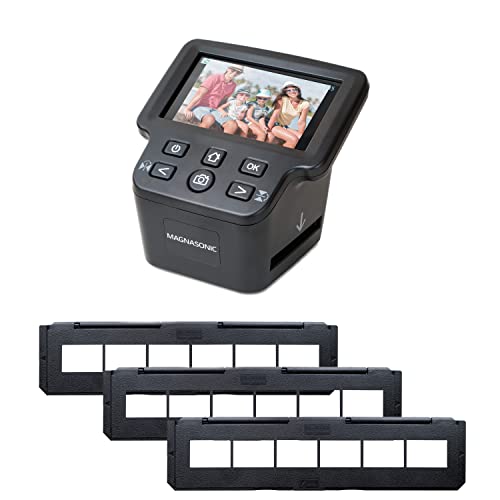
Magnasonic All-In-One 24MP Film Scanner
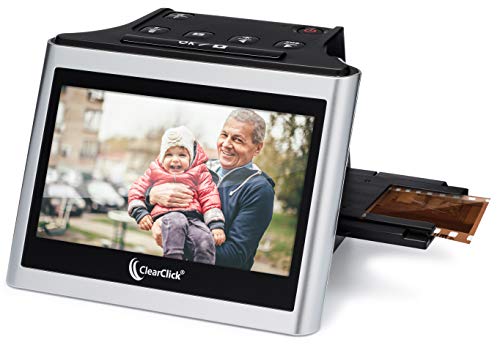
ClearClick Virtuoso 2.0 22MP Film Scanner

OKLILI 35mm Holder for Epson Perfection

Plustek OpticFilm 8100/8200i Film Holder
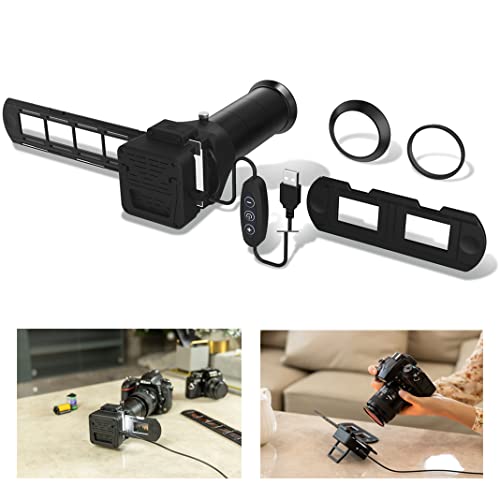
JJC Film Digitizer Scanner with Backlight

JJC Film Digitizer Scanner 35mm and 120

JJC Mobile Film Scanner with LED Backlight
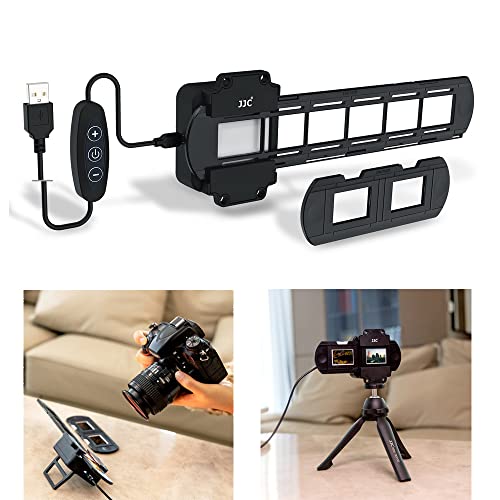
JJC 35mm Slide Digitizing LED Backlight
Meet The Standout Selections
If you already shoot with a Canon, Nikon, or Sony body and own a compatible macro lens, this digitizer turns your camera into a purpose-built film scanner without forcing you to buy a dedicated unit. The kit ships with seven lens adapters, which is the part that catches most people off guard, because that kind of cross-brand flexibility is rare in this niche. Compared to the all-in-one scanners below, this option skips the screen-and-joystand workflow and puts your camera’s sensor in charge of image quality.
The practical upshot is sharper detail and better dynamic range than most standalone units can match, but only when the rest of your rig pulls its weight. You bring the lens, the camera, and the patience to set up a repeatable copy-stand workflow. Anyone who’s been eyeing those old Nikon ES-2 setups on photo forums will recognize exactly what this replaces, and the price tag is friendlier than tracking down the original.
Well-Handled Touches
- Seven adapters cover the major mirrorless and DSLR mounts, saving you from buying separate rigs for each camera body.
- Replaces the Nikon ES-2 adapter at a lower entry point, which matters if you’ve been priced out of the original.
- Uses your camera’s sensor, so final image quality scales with your glass rather than a fixed internal lens.
- Compact form factor travels well to family archives at a relative’s house.
Things To Consider
- No built-in backlight means pairing it with a light source, like the JJC LED backlight reviewed later, for proper exposure.
- Requires a compatible macro lens you may already own, narrowing the appeal for casual users.
Who It Suits Best
Mirrorless and DSLR shooters with a 90mm-or-longer macro lens who want maximum image quality from a single setup.
Consider Something Else When
The Magnasonic all-in-one scanner is a more sensible pick for anyone without a macro lens who wants a no-computer workflow.
Before any scanner can do its job, the film has to be cut into usable strips, and scissors leave ragged edges that jam holders and produce skewed frames. This cutter handles 35mm strips plus the common 120 formats (6×4.5, 6×6, 6×7), which is a wider range than most prep tools cover. The built-in adjustable backlight is the trick that makes it useful, because you can see exactly where each frame begins and ends before the blade drops.
For anyone working through a binder of archival negatives, the consistency of straight cuts matters more than you’d think. Crooked edges mean crooked scans, which means wasted time re-feeding film through the holder. It’s a small accessory, but the workflow benefit adds up over a couple hundred frames.
Positive Points
- Cuts both 35mm and 120 format strips, handling most home darkroom archives in one tool.
- Adjustable backlight makes frame boundaries visible, reducing guesswork and wasted cuts.
- Straight, clean cuts feed into scanners smoothly and reduce skewing issues.
- Compact enough to leave set up on a desk during long digitization sessions.
Worth Noting
- Requires power for the backlight feature, so it ties up a wall outlet or USB port during use.
- Not a scanner itself, so it pairs with one of the actual digitization picks on this list.
Made For
Archivists prepping large volumes of mixed-format film who want consistent, straight cuts before scanning.
Look Elsewhere When
The ClearClick Virtuoso 2.0 is a better single-pick solution when you’d rather skip the prep step entirely and feed whole slides into a tray.
Standalone scanners earn their keep by removing the computer from the workflow entirely, and this Magnasonic model leans hard into that promise. The 5-inch LCD is large enough to check framing and focus without squinting, which speeds up sessions considerably. HDMI output is the quiet bonus, letting you preview scans on a TV during family history nights when everyone wants to crowd around the screen.
Format support is where this unit pulls ahead of most dedicated 35mm scanners. You can feed 35mm, 126, 110, and Super 8 negatives along with mounted slides, which covers just about every film stock a typical household accumulated between the 1960s and 1990s. Built-in memory means you can scan without an SD card for short sessions, though you’ll want one for larger archives.
What Pays Off
- 24MP JPEG output captures enough detail for screen sharing and modest prints without post-processing.
- HDMI output turns the scanner into a living-room preview tool, handy for group viewings.
- Long film tray handles full negative strips, cutting down on reload frequency during long sessions.
- Multi-format support (35mm, 126, 110, Super 8) covers most home film collections in one device.
- No computer required, which keeps the workflow approachable for less technical family members.
Trade Offs
- Fixed internal sensor caps image quality below what a camera-based digitizer setup can produce.
- Built-in memory fills quickly on large archives, so an SD card becomes a near-essential add-on.
Key Specs
Best Suited To
Households with mixed-format family archives who want one self-contained scanner rather than a camera-and-lens setup.
A Better Fit Elsewhere
Enthusiasts chasing maximum sharpness should look at the JJC film digitizer reviewed in pick 7, which leans on a camera sensor.
The Virtuoso 2.0 sits in the sweet spot for people who want a true plug-and-scan experience without wrestling with software. The 5-inch screen is generous for a unit at this level, and the interface keeps buttons to a minimum so first-time users rarely get stuck. You feed a slide or negative strip into the holder, hit scan, and a JPEG lands on your SD card within seconds.
At 22MP interpolated, the resolution is a touch below the Magnasonic above but plenty for social sharing and standard prints. HDMI output returns here too, which is unusual at this tier and turns the unit into a flexible preview deck. The honest read is that this is the friendliest device on the list for someone gifting it to a parent or older relative.
Bright Spots
- No computer or drivers required, which removes the most common setup hurdle.
- Mini HDMI output supports both live preview and post-scan playback on a television.
- 22MP output balances file size with usable detail for everyday sharing.
- Works with 35mm, 110, and 126 negatives plus 50mm mounted slides.
Honest Caveats
- SD card not included, so factor one into your setup budget before the first scan.
- Interpolated resolution doesn’t quite match native sensor capture for large prints.
- Mini HDMI cable is also sold separately, which catches shoppers off guard at first setup.
Who Will Love This
Beginners and gift-givers who want the simplest possible path from shoebox to digital file.
Swap It Out When
The OKLILI holder for Epson flatbeds makes more sense if you already own a Perfection-series scanner and just need to replace a worn part.
Flatbed scanners like the Epson Perfection series produce gorgeous 35mm scans, but the plastic film holders tend to crack or lose tension after a few hundred cycles. This OKLILI replacement fits the V500, V550, V600, 4490, 2450, 3170, 3200, GT-X750, GT-X770, and GT-X820, which covers most Perfection models still in service. If your existing holder is warped, slides keep sliding out of alignment, or the cover doesn’t latch properly, this is the part that fixes it.
It’s not a glamorous product, and it doesn’t add new features; it simply restores a flatbed to working condition. For anyone already invested in an Epson workflow, replacing the holder is far cheaper than buying a new scanner. The part numbers (1423040 and 1403903) match the OEM specs, which is the detail that matters most for fit.
The Case For It
- Compatible with a wide range of Epson Perfection models, covering most flatbed owners.
- Restores proper film alignment on worn scanners, which directly improves scan quality.
- Costs far less than replacing a working flatbed scanner outright.
- Matches OEM part numbers, suggesting consistent fit with original hardware.
Points To Keep In Mind
- Only useful if you already own a compatible Epson Perfection flatbed.
- Doesn’t add scanning capability on its own; it’s a repair component.
The Right Fit
Epson Perfection owners dealing with cracked or warped film holders who want to extend the life of a working flatbed.
Where A Sibling Pick Shines
The Plustek OpticFilm holder is the equivalent replacement for Plustek dedicated-film-scanner owners.
Plustek’s OpticFilm 8100 and 8200i are workhorses for serious film digitization, and the included holder handles both 35mm strips and mounted slides. This replacement unit supports sleeves (6-frame strips) and mounted slides (4 frames), which matches the original accessory’s capacity. If your original holder has gone missing or warped out of spec, this brings a Plustek scanner back to spec.
The 8100 and 8200i remain popular among photo archivists because they pair with SilverFast software for deeper color control. A worn holder undermines that workflow, because misaligned frames won’t sit flat under the sensor. The honest read is that this is a niche accessory for owners of specific Plustek models, but for that audience, it’s essentially mandatory after years of use.
What Works In Its Favor
- Supports both mounted slides and 35mm strip sleeves, covering typical Plustek workflows.
- Restores proper alignment on OpticFilm scanners after original holder wear.
- Compatible with both 8100 and 8200i Ai models, consolidating spare-part inventories.
- Maintains the precise frame positioning needed for SilverFast and IT8 calibration.
Practical Considerations
- Limited to Plustek OpticFilm 8100 and 8200i Ai scanners, so it’s not a universal holder.
- Doesn’t include any scanning capability, which may confuse first-time shoppers.
Whose Shelf It Belongs On
Plustek OpticFilm owners who need to replace a lost, cracked, or warped original film holder.
Skip It When
Anyone using an Epson Perfection should pick up the OKLILI holder from pick 5 instead.
The first JJC digitizer on this list omits the backlight to keep the kit focused on adapters, but this version bundles the lighting into one box. For camera-based digitization, a consistent light source is non-negotiable, so this combined kit saves the step of buying the LED backlight reviewed later as a separate item. The seven-adapter system carries over from the sibling model.
You still need a compatible macro lens and a camera body, so the entry cost runs higher than a standalone scanner. The trade-off is image quality that leans on your camera’s sensor, which often outperforms fixed-lens scanners. For a hybrid shooter who already owns a macro lens, this is a tidy way to add film scanning to an existing setup without buying more accessories later.
Where It Delivers
- Integrated backlight eliminates a separate accessory purchase for camera-based scanning.
- Seven lens adapters span Canon, Nikon, and Sony mounts.
- Replaces the Nikon ES-2 workflow at a friendlier entry cost.
- Compact footprint stores easily in a camera bag between sessions.
Possible Compromises
- Still requires a camera body and macro lens, raising the total system cost.
- Built-in light may not be adjustable, limiting fine-tuning for color-critical work.
Feature Snapshot
Perfect Match For
Camera owners with a macro lens who want a complete digitization kit in a single purchase.
Reach For A Different Pick When
The JJC 35mm and 120 format digitizer is the better match for shooters who also need medium format support.
Medium format film shooters have historically been stuck with expensive dedicated scanners, but this JJC kit brings camera-based digitization to 120 strips alongside 35mm. The slide rail is the standout feature: it adjusts front-to-back so your camera sits at the correct shooting distance, anywhere from about 10.4 to 18.5 inches. That range covers both formats without swapping rigs.
A focusing knob on the rail simplifies fine-tuning, which matters because medium format frames are larger and slightly less forgiving of focus errors. Note that this kit handles negative film strips but not mounted 35mm slides, so slide-mount collectors should look elsewhere. For hybrid shooters who shoot both 35mm and 120, this is the most flexible camera-based option on the list.
Where It Excels
- Supports both 35mm and 120 medium format negatives in one rig.
- Adjustable slide rail covers a wide shooting distance range for both formats.
- Focusing knob on the rail enables precise, repeatable focus adjustments.
- Camera-based capture taps into your existing sensor and lens quality.
Where It Is Less Suited
- Not designed for mounted 35mm slides, limiting it to strip-based workflows.
- Still demands a compatible camera and macro lens, raising total system cost.
Who Should Grab It
Photographers who shoot both 35mm and 120 medium format and want one digitization rig for both.
Not Your Match When
Slide-mount collectors should consider the original JJC film digitizer from pick 1, which focuses on that format.
Not every archive needs a dedicated camera setup; sometimes the smartphone in your pocket is enough. This mobile digitizer holds a phone above an LED backlit stage and uses an adjustable clamp to keep the camera centered over the film. The included wireless remote lets you trigger the shutter without touching the screen, which prevents shake and keeps alignment consistent.
The setup accepts both 35mm and 120 medium format strips, so you aren’t locked into one film size. Phone cameras have come a long way, and a recent flagship paired with this rig produces surprisingly usable scans. The honest caveat is that image quality depends entirely on your phone’s sensor, lens quality, and the free app you choose to invert negatives.
Real Benefits
- Uses a smartphone camera, removing the need for a dedicated DSLR or mirrorless body.
- Wireless remote prevents camera shake and helps maintain frame alignment.
- Adjustable clamp fits a wide range of phone sizes, including most modern flagships.
- LED backlight provides consistent illumination for repeatable exposures.
Where It May Fall Short
- Final image quality is capped by your phone’s camera, which varies widely.
- Requires downloading a third-party app for negative inversion and color correction.
Built With In Mind
Casual archivists who want to digitize small batches without investing in a full camera rig.
Another Choice May Suit
The Magnasonic standalone scanner is the better call for larger archives where phone-based capture would be too slow.
If you’ve already built a camera-based digitization rig, the missing piece is almost always proper lighting. This LED backlight uses 42 LEDs with a CRI of 95+, which is the color rendering index, a measure of how accurately the light reveals true colors compared to natural daylight. A high CRI rating matters because color casts in your light source translate directly into skewed scans. The 6500K color temperature mimics daylight, giving you a neutral baseline.
Ten brightness levels, adjusted via plus and minus buttons, let you fine-tune exposure for dense negatives versus thin positives. It’s not a scanner on its own, but it pairs naturally with any of the camera-based digitizers above. For anyone whose current setup uses a desk lamp or window light, this is the upgrade that brings consistency to a session.
Benefits That Matter
- 42 LEDs with CRI 95+ deliver daylight-accurate color for reliable scans.
- 10 brightness levels handle everything from dense negatives to thin positives.
- 6500K color temperature provides a neutral starting point for color correction.
- Compact panel fits easily into existing copy-stand and tripod setups.
Some Limits To Know
- Only useful alongside a camera or phone rig, since it isn’t a scanner itself.
- Requires USB power, so it ties up a port during longer sessions.
The Right Fit
Existing camera-based digitization setups that need a consistent, color-accurate light source.
Where Another Pick Suits Better
Owners who want lighting bundled with adapters will find the JJC digitizer from pick 7 more convenient.
Choosing The Right 35mm Slide Scanner For Your Archive
The first decision point is whether you want a standalone scanner or a camera-based setup. Standalone units like the Magnasonic and ClearClick Virtuoso handle everything internally and skip the need for a computer, which suits casual users and gift-givers. Camera-based kits, including the JJC digitizers, lean on your existing sensor and macro lens for higher image quality at the cost of more setup.
Format support matters more than most shoppers expect. Pure 35mm users can ignore the medium format question, but anyone with mixed archives should look for scanners that handle both 35mm and 120 strips. The JJC 35mm/120 digitizer covers that ground for camera-based workflows. Mounted slide owners need to confirm their chosen scanner accepts slide mounts; the Pure 35mm/120 digitizer explicitly does not.
Resolution tells only part of the story. Higher megapixel counts produce larger files, but the sensor quality and optics drive actual detail capture. Dedicated film scanners using your camera sensor typically outperform fixed-lens standalone units, but the gap narrows for casual sharing and screen viewing. Think about your end use: social sharing, modest prints, and large archival prints each demand different resolution tiers.
Accessories often decide the workflow’s comfort. Replacement holders extend the life of existing flatbeds like Epson Perfection and Plustek OpticFilm scanners. The film cutter trims strips cleanly before scanning, reducing jams and skew. A high-CRI backlight brings consistent color to camera rigs. None of these are mandatory, but they each save time during long digitization sessions.
Where To Spend Versus Where To Save
Standalone scanners like the ClearClick Virtuoso 2.0 deliver genuine value for casual users without forcing them to buy extra gear. Camera-based digitizers cost more once you factor in a macro lens, but they unlock noticeably better image quality for archivists. The accessories, including cutters, holders, and LED backlights, are worth their modest cost when they fit into an existing workflow.
Key Considerations Across These Picks
Pitfalls Shoppers Hit
The most common mistake is buying a scanner that doesn’t support your film format. A pure 35mm scanner won’t help with 120 medium format strips, and a slide-only unit ignores unmounted negatives. Confirm format compatibility before checking any other feature. The second trap is underestimating accessory needs: standalone scanners sometimes require SD cards and HDMI cables sold separately, and camera-based kits assume you own a compatible macro lens.
Why Top Tier Costs More
Higher-tier picks like the JJC digitizer with the full adapter kit and bundled backlight cost more because they include more components and accept more camera systems. Premium standalone scanners add features like HDMI output and larger displays that speed up review during long sessions. The upgrade is worth it for users with large archives or mixed-format collections, where session time and frustration both compound quickly.
Frequently Asked Questions
What Is The Difference Between A Film Scanner And A Flatbed Scanner?
A dedicated film scanner is built specifically for slides and negatives, with holders and light sources tuned for transparency scanning. A flatbed scanner like the Epson Perfection series handles documents, photos, and film using a transparency adapter in the lid. Dedicated film scanners typically produce sharper scans, while flatbeds offer more general-purpose flexibility.
Do 35mm Slide Scanners Work With Mounted Slides?
Some do, and some don’t. The Magnasonic and ClearClick Virtuoso 2.0 both accept mounted slides, but the JJC 35mm and 120 medium format digitizer explicitly handles strip negatives only. Always confirm slide-mount support if your collection includes cardboard-mounted transparencies.
Can I Use My Phone To Scan 35mm Slides?
Yes, with a mobile digitizer like the JJC phone-based kit reviewed here. You get acceptable results for screen sharing, though image quality depends on your phone’s camera. A free inversion app handles the negative-to-positive color conversion.
How Long Does It Take To Scan A Roll Of 35mm Film?
Standalone scanners like the Magnasonic typically finish a 36-exposure roll in under an hour. Camera-based setups run faster once dialed in, often 20 to 30 minutes per roll. The first few rolls take longer as you refine focus and exposure settings.
Should I Clean Old Film Before Scanning?
Light cleaning with a microfiber cloth or canned air removes surface dust that would otherwise show up as spots in scans. Wet cleaning is possible but adds time and risk, so most home archivists stick to dry methods. Storing cleaned film in archival sleeves keeps it ready for future sessions.
Closing Thoughts
The right 35mm slide scanner depends on how much film you have, what formats you shoot, and whether you already own camera gear. Standalone units work well for casual archives, while camera-based setups reward shooters who want maximum image quality. Accessories like cutters, holders, and LED backlights round out a workflow that should fit comfortably into a weekend project, leaving you with shareable JPEGs instead of a closet full of fading slides.