There’s a particular kind of joy in opening a shoebox of old negatives and realizing you can actually see those moments again. Medium-format shooters, archive keepers, and anyone with a stack of dusty 120 rolls sitting in a closet have all asked the same question: how do I get these into a file without ruining the image or my weekend. This roundup looks at ten scanners, holders, and backlights designed to handle 120 film specifically, from dedicated all-in-one units to modular rigs that pair with a camera you already own. Some make sense for casual cleanups, others make sense for serious archiving, and a few try to bridge both. You’ll find at least one option here that matches how and how often you plan to scan.
An Overview Of The Picks

JJC Film Digitizer (Nikon ES-2 Replacement)

KODAK Mobile Film Scanner, 35mm Negative Scanner & Slide Viewer

KODAK SCANZA Film & Slide Scanner with 3.5″ LCD

OKLILI 120 Film Negative Holder for Epson V600/V550

JJC Mobile Film Scanner Digitizer Set for 35mm/120

KODAK Slide N Scan with 5″ LCD Screen
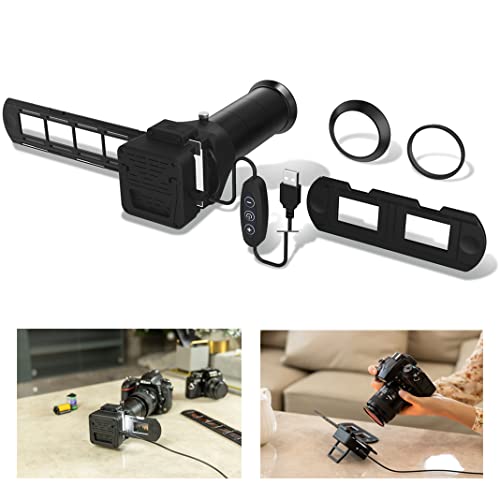
JJC Film Digitizer Scanner with Backlight

JJC Film Digitizer Scanner for 35mm & 120 Format

JJC Mobile Film Scanner for 35mm & 120 Format
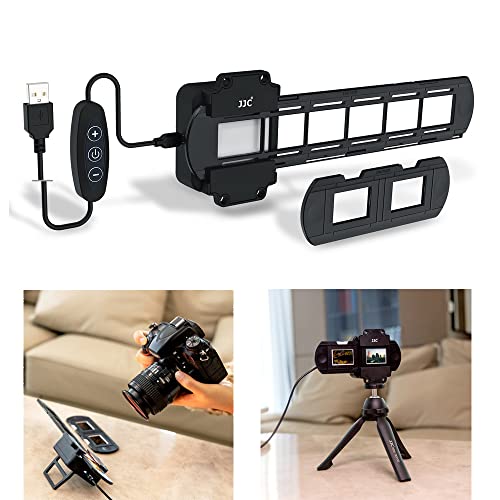
JJC 35mm Slide and Film Digitizing LED Backlight
Taking A Closer Look At The Options
This holder is built for shooters who already own a real macro lens and want to use it. Seven different adapter rings let the same rig mount on Canon, Nikon, and Sony bodies, which solves the most common headache of switching camera systems mid-project.
Picture a weekend where you finally tackle that shoebox of medium format rolls. The JJC rig handles each strip while your camera’s sensor does the heavy lifting on color and sharpness. This approach is closer to camera-scanning than flatbed scanning, and image quality tends to reflect the lens in front.
What It Does Well
- Multi-brand flexibility: seven adapters cover Canon, Nikon, and Sony setups in a single kit
- Direct camera scanning means you skip flatbed resolution limits and lean on your sensor
- Solid build feels reassuring when sliding fragile negatives into place
- Working distance is adjustable, so different macro lenses can dial in framing
- Replaces the Nikon ES-2 and ES-1 at a more approachable price point
Things To Consider
- Requires a compatible macro lens you already own, which adds to the total spend
- Setup time runs longer than a standalone scanner, especially the first few rolls
- Color and exposure correction happen in software afterward, not on capture
Right Fit For
Photographers with a dedicated macro lens who want the best detail their camera sensor can pull from a negative.
Skip It When
The KODAK Mobile Film Scanner makes more sense for you, because you want a phone-based scan without committing to a camera-and-lens setup.
This cardboard-and-LED kit feels almost disposable, which is exactly why first-timers love it. Drop in a negative or slide, fire up the app, and the phone’s camera captures the frame directly. No drivers, no software, no calibration curve.
The whole experience leans casual: a collapsible tray holds the film steady while a battery-powered backlight shines through. Anyone with a shoebox of old 35mm can be capturing shots within five minutes of opening the box.
Notable Upsides
- Lowest learning curve of any product in this roundup
- App handles inverting negatives automatically, so no Photoshop work is needed for casual scans
- Portable design folds flat, ideal for moving between rooms or even taking to a family gathering
- Works with most modern smartphones regardless of brand
- Useful as a viewer for slides you simply want to look at, not archive
Worth Noting
- Limited to 35mm negatives and mounted slides, with no medium format support
- Image quality depends heavily on your phone’s camera sensor and steady hands
- Battery-powered backlight tends to dim over months of use, requiring replacement
Whose Shelf It Belongs On
Casual archivists and families who want to peek at old 35mm rolls without buying dedicated equipment.
Look Elsewhere When
The KODAK SCANZA Film & Slide Scanner fits you better if you want a single standalone unit that handles multiple formats beyond 35mm.
The SCANZA is the Swiss Army knife of consumer film scanners, accepting 35mm, 126, 110, Super 8, and 8mm formats in one box. A small LCD on the back previews each frame before saving to an SD card, which removes the computer from the immediate workflow.
For mixed-format archives, this is the unit that actually gets used. Pull out the right adapter tray, drop in a strip, and the built-in sensor captures the frame. The trade-off is speed and resolution versus a flatbed, but the convenience is hard to beat.
The Helpful Details
- Five format families covered: 35mm, 126, 110, Super 8, and 8mm
- Built-in 3.5-inch LCD lets you preview and edit before saving
- SD card output means no tethered laptop is required
- Includes adapters and trays in the box, no separate purchases needed
Trade Offs
- Sensor resolution falls short of dedicated flatbed scanners for archival work
- Plastic build feels lightweight when handling larger roll formats
- Auto shut-off after ten minutes of inactivity interrupts longer sessions
Feature Snapshot
Made For
Households with mixed-format shoeboxes covering decades of family photo formats.
A Better Fit Elsewhere
The OKLILI 120 Film Negative Holder is a smarter choice if your archive is heavy on medium format and you already own an Epson flatbed.
This is not a scanner, it is a holder, and that distinction matters. The OKLILI bracket slots into compatible Epson Perfection flatbeds and feeds 120, 220, and 620 strips through the scanner’s native film path. Owners of V500, V550, V600, 4490, and similar Epson units already have the scanning hardware; this just unlocks medium format.
For anyone sitting on a V600, the holder turns existing gear into a 120 scanner without buying a new device. Frames up to 6×12cm pass through cleanly when properly aligned.
What Works In Its Favor
- Native compatibility with Epson Perfection V500, V550, V600, and 4490 flatbeds
- Accepts 120, 220, and 620 film widths plus frames up to 6×12cm
- Leverages the flatbed’s existing resolution rather than introducing a new sensor
- Works with automatic film format detection on most modern Epson drivers
Points To Note
- Requires a compatible Epson flatbed; no value for non-Epson owners
- Alignment takes practice, especially with loosely wound 120 rolls
Best Suited To
Epson Perfection flatbed owners who want to extend their existing scanner to medium format without a second purchase.
Reach For A Different Pick When
The JJC Film Digitizer Scanner for 35mm & 120 Format Film suits you better if you do not own a flatbed and prefer a camera-based approach.
This JJC set bundles the pieces you actually need for phone-based 35mm and 120 scanning. An adjustable phone clamp grips most modern handsets, and the magnetic film holders swap between formats in seconds.
The standout feature is the 11-level LED backlight panel, which runs on Type-C power. That range of brightness matters for dense negatives where the default glow washes detail. You can dial the light down until grain and shadow return.
Why It Works Well
- Eleven brightness levels handle everything from dense negatives to thin slide film
- Magnetic holders swap between 35mm and 120 without reloading
- Detachable backlight panel keeps the setup flexible for tabletop or handheld use
- Type-C power input works with most phone chargers and power banks
Honest Caveats
- Phone clamp sizing may not grip very large or unusually shaped cases
- Best results require a third-party app for inversion and color correction
Who It Suits Best
Phone-first shooters who want one kit covering both 35mm and 120 with adjustable lighting.
Consider Something Else When
The KODAK Slide N Scan with 5″ LCD Screen makes more sense if you prefer viewing scans on a dedicated screen rather than a phone.
The Slide N Scan steps up to a 5-inch LCD, which is the largest preview screen in this roundup. That real estate changes the workflow: you actually see your scan clearly before saving, instead of squinting at a smaller display.
At 22 megapixels, the sensor captures enough detail for sharing and reasonable prints. SD card output (card not included) keeps the unit standalone, so you can review slides at the kitchen table without booting a computer.
Everyday Wins
- 5-inch LCD is comfortable for older eyes reviewing slides
- 22MP sensor handles 135, 110, and 126mm negatives plus 50mm slides
- Gallery mode lets you cycle through captures without a connected device
- Direct SD card storage simplifies backup and transfer
Points To Keep In Mind
- SD card is sold separately, which adds a small extra step before first use
- Larger screen footprint makes the unit less travel-friendly than smaller options
Spec Overview
Perfect Match For
Users with mixed 35mm, 110, and 126 archives who want a large preview screen for reviewing scans at the table.
Swap It Out When
The JJC Mobile Film Scanner Digitizer Set is a stronger choice if your archive includes 120 medium format strips.
This is the streamlined sibling of the larger JJC digitizer kit. The integrated backlight lives in the holder itself, so you do not need a separate light panel or a bright window to get even illumination.
The compact footprint makes it travel-friendly: toss it in a camera bag with a body and macro lens, and you have a portable scanning station. For weekend trips or quick archive sessions at a relative’s house, that portability is the selling point.
Everyday Advantages
- Built-in backlight removes the need for a separate light source
- Compact footprint fits in most photography kits without bulk
- Works with the same seven-adapter system as the larger JJC holder
- Pairs naturally with a single macro lens for repeatable framing
Less-Strong Areas
- Still requires a compatible macro lens, which adds to your total investment
- No dedicated brightness control beyond the integrated panel’s output
Who Should Grab It
Travel photographers who want a portable, all-in-one digitizer that pairs with their existing camera kit.
Where Another Pick Suits Better
The JJC 35mm Slide and Film Digitizing LED Backlight with 10-Level Brightness is a smarter add-on if you need finer control over exposure during capture.
Most digitizers lock you into one working distance. This JJC model adds a slide rail that adjusts the camera-to-film gap from roughly 10.4 to 18.5 inches. That range gives room to compose both 35mm and the larger 120 frames without changing lenses.
The rail also has a focusing knob, which makes fine adjustments less fussy. For hybrid shooters who mix formats in the same session, that adjustability saves real time.
A Strong Showing
- Slide rail covers 10.4 to 18.5 inches of working distance for both 35mm and 120
- Focusing knob on the rail allows repeatable framing adjustments
- Hybrid design eliminates swapping rigs between formats
- Sturdy rail keeps the camera stable during long scanning sessions
Where It Is Less Suited
- Larger rail footprint demands more desk space than a fixed-distance holder
- Not designed for slide digitizing, only negative film strips
Technical Sheet
Built With In Mind
Hybrid 35mm and 120 photographers who want one rig that handles both formats cleanly.
Where A Sibling Pick Shines
The OKLILI 120 Film Negative Holder fits better for Epson flatbed owners who already own a Perfection V600 or similar model.
The wireless remote is what separates this kit from a basic phone scanner. Tap the remote and the phone captures the frame without you touching the screen, which kills the blur that plagues handheld scanning.
The adjustable cellphone clamp widens to grip most modern phones, including larger models. LED backlighting is built in, and the format-specific holders cover both 35mm strips and 120 medium format. For phone-based scanning, this is one of the more thoughtful setups.
A Few Strong Suits
- Wireless remote eliminates screen-tap blur during capture
- Adjustable clamp fits a wide range of phone sizes and cases
- Handles both 35mm and 120 formats with dedicated holders
- Built-in LED backlight is even and consistent across formats
Some Limits To Know
- No dedicated app ships with the kit; third-party inversion apps required
- Remote battery replacement becomes a maintenance item over time
Who Will Love This
Phone-first photographers who want a stable, blur-resistant capture setup for both 35mm and 120.
Another Choice May Suit
The JJC Mobile Film Scanner Digitizer Set fits you better if you need adjustable backlight brightness levels for varied film densities.
This is a light, not a scanner, and that is the point. Drop it under any negative or slide holder and you get a clean, even source of 6500K daylight with 10 brightness levels. CRI 95+ means colors stay accurate, which matters when scanning slides for archival purposes.
Owners of mixed rigs often find that the included backlight is the weakest link. Swapping in a dedicated panel like this one sharpens color and reduces banding on dense negatives.
Features That Help
- 42 LEDs deliver even coverage across 35mm and slide frames
- CRI 95+ rating preserves accurate color reproduction during capture
- 6500K daylight color temperature matches typical scanning expectations
- Two-button dimmer with 10 brightness levels for varied film densities
Practical Considerations
- Powers via a dedicated cable that may need a specific outlet adapter
- Useful only as a complement to a holder or scanner, not a standalone device
Feature Card
The Right Fit
Photographers with an existing scanning setup who need a better light source than the one bundled with their holder.
Not Your Match When
The JJC Film Digitizer Scanner for 35mm & 120 Format is the smarter pick if you need a complete digitizing rig rather than a lighting accessory.
Matching A Scanner To Your Film And Workflow
Choosing a 120 negative scanner comes down to three honest questions: what formats you actually own, what gear you already have, and how much time you want to spend per roll.
Film format matters first. Medium format covers 120, 220, and 620 widths, all of which fit the OKLILI holder and the JJC camera-based scanners. The KODAK SCANZA covers 35mm and several small formats but skips medium format entirely. Owners of mixed archives need to confirm a unit handles every format they own, not just the one they plan to scan today.
Existing gear shifts the math significantly. Shooters who already own a macro lens and a mirrorless or DSLR body get the most from camera-based digitizers like the JJC Film Digitizer or the JJC Film Digitizer Scanner with Backlight. Owners of an Epson Perfection V600 or similar flatbed add medium format capability cheaply with the OKLILI holder. Phone-first users skip camera gear entirely and lean on solutions like the JJC Mobile Film Scanner sets.
Time per roll is the underrated factor. A flatbed holder scans a roll in twenty to forty minutes of careful feeding. A phone-based scanner with a wireless remote finishes the same roll in five to ten minutes. A standalone scanner like the KODAK Slide N Scan falls in the middle. The honest read is that convenience costs resolution; quality takes patience. There is no shortcut that gives both speed and archival detail.
A quick term worth defining: “backlight” refers to a light source placed behind the film during capture, so light passes through the negative into the camera or sensor. Even backlighting is what separates a usable scan from one full of banding and shadow noise.
Key Considerations Across These Picks
Wrong Turns To Avoid
The most common misstep is buying a 35mm-only scanner and discovering the medium format strips later. Check supported formats before purchase, not after. Another mistake is assuming phone capture matches flatbed quality; it can be close with steady hands and good lighting, but it rarely beats a sensor designed for the task. Finally, skip generic no-name backlights without a CRI rating. A low-CRI panel shifts color in ways that no amount of post-processing fully corrects.
The Upgrade Payoff
Higher-tier models earn their keep through better light sources, more precise framing, and broader format support. The JJC Film Digitizer Scanner with adjustable slide rail, for example, lets you handle both 35mm and 120 on one rig, which is where the extra cost shows up in workflow. A dedicated CRI 95+ backlight panel produces cleaner colors than bundled lights, and that upgrade often matters more than chasing sensor resolution alone.
Frequently Asked Questions
What is the difference between 120 and 220 film? 120 film is a single roll of medium format film on a paper backing, while 220 is the same width but twice as long, with no backing paper. Both are processed identically and most holders accept either.
Can a phone really scan 120 medium format? Phone-based scanners capture usable previews and social-shareable files, but they rarely match the resolution of a flatbed or dedicated scanner. For archival prints and detailed edits, a flatbed still wins.
Do I need a macro lens to use a camera-based digitizer? Yes. The digitizer holder mounts to a macro lens, which focuses close enough to capture a full 35mm or 120 frame. Without one, the setup will not focus on the negative.
How long does scanning one roll of 120 take? Expect twenty to forty minutes per roll on a flatbed with a holder, depending on alignment patience. Phone-based setups cut that time significantly but at the cost of some resolution.
What is CRI and why does it matter for film scanning? CRI, or Color Rendering Index, measures how accurately a light source reproduces colors compared to natural daylight. A CRI of 95 or higher keeps skin tones and shadow hues faithful, which matters when scanning slides where the original colors are the point.
Wrap Up
The right 120 negative scanner depends less on brand and more on what you already own. A flatbed owner gets the most value from a holder. A mirrorless shooter gets the most detail from a camera-based digitizer. A phone-first archivist gets the most convenience from a mobile scanner kit. Match the tool to your archive, your gear, and your patience, and the shoebox in the closet finally becomes a folder on your computer.