There’s something quietly exciting about opening a shoebox of old negatives and realizing they don’t have to stay trapped on tiny strips of celluloid. Whether you inherited a grandparent’s film archive or just want to rescue your own college-era shots, a dedicated scanner makes the job dramatically easier than photographing each frame with your phone. The trick is matching the right tool to the size of your collection, the formats you actually own, and how much editing you want to do yourself.
The Essentials At A Glance

Plustek Film Holder Kit for OpticFilm Series

KODAK Mobile Film Scanner App-Based Viewer

KODAK SCANZA Digital Film & Slide Scanner
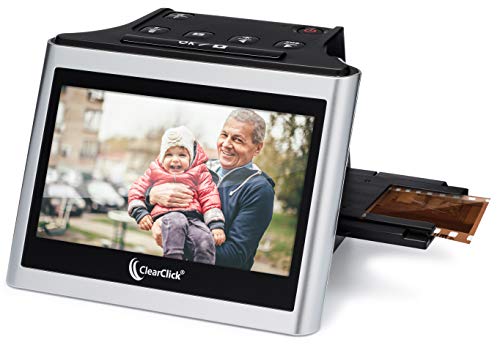
ClearClick Virtuoso 2.0 22MP Film Scanner

OKLILI 35mm Negative Holder for Epson Perfection
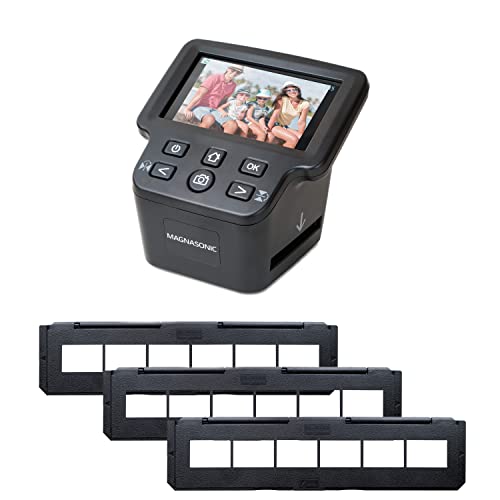
Magnasonic All-In-One 24MP Film Scanner

JJC Mobile Film Scanner Digitizer Set

KODAK Slide N Scan 22MP Film Scanner

Plustek OpticFilm 8100 / 8200i Film Holder
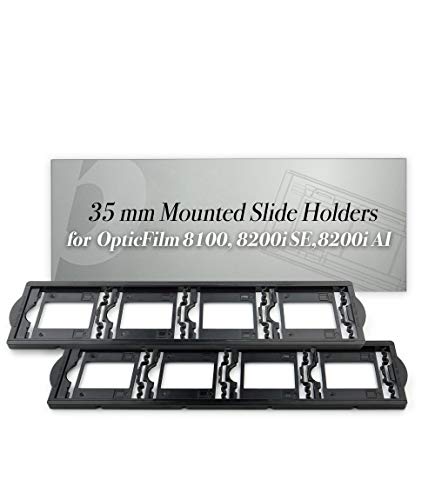
Plustek OpticFilm Mounted Slide Holders x2
Why These Options Stand Out
If you already own a Plustek OpticFilm dedicated scanner, the holders that came in the box tend to wear out faster than the scanner itself. This kit gives you a fresh negative holder plus a fresh positive (slide) holder, so you can keep working without scratching frames against cracked plastic.
It’s compatible with a long list of OpticFilm models, including the 8100, 8200i SE and AI, and 8300i SE and AI, plus the older 7200 through 7600i AI series and the SmartPhoto F50. For most people who already invested in Plustek’s midrange scanner line, swapping in new holders is the cheapest way to bring back consistent scan quality.
Positive Points
- Replaces both negative strip and mounted slide holders in one kit
- Compatible with a wide range of older and current OpticFilm scanners
- Restores flat, warp-free film positioning for sharper frames
- Inexpensive way to extend the life of an existing scanner
Things To Consider
- Only useful if you already own a compatible OpticFilm model
- Plastic frames can loosen after repeated insertions, so handle with care
Feature Snapshot
Made For
Anyone already running an OpticFilm 72–83 series scanner who needs fresh holders after years of regular use.
Where Another Pick Suits Better
The ClearClick Virtuoso 2.0 is a better fit if you don’t already own a Plustek scanner and want an all-in-one solution instead of a replacement part.
This is the lightest possible way to peek at old negatives without committing to a dedicated scanner. You lay a strip on the collapsible cardboard platform, fire up the companion app, and the LED backlight plus your phone camera do the rest.
It handles both negatives and slide positives, runs on batteries, and weighs almost nothing in a drawer. For a handful of strips from your last vacation, that’s plenty. For a shoebox full of family history, you’ll find yourself wanting something with a bit more resolution.
What Makes Sense
- Compact, fold-flat design stores easily in a desk drawer
- Battery-powered backlight means no cables to manage
- Works with both 35mm negatives and mounted slides
- Very approachable price compared to dedicated scanners
Worth Noting
- Final image quality depends heavily on your phone’s camera
- No film advance mechanism, so each frame has to be nudged manually
Who It Suits Best
Casual archivists with a small handful of strips who want a quick, low-commitment way to digitize on the kitchen table.
Look Elsewhere When
The Magnasonic All-In-One 24MP Film Scanner makes more sense for anyone working through hundreds of frames and wanting consistent resolution without babysitting each one.
Few scanners in this price range tackle as many formats as the SCANZA. It’s set up to handle 35mm, 126, 110, Super 8, and standard 8mm, which covers most of the consumer film stocks shot between the 1960s and the early 2000s.
The 3.5-inch built-in LCD means you can preview and capture without booting up a computer, and the included adapters let you swap between film sizes quickly. The trade-off shows up in resolution: this is a snapshot-style scanner with a built-in camera, so it prioritizes speed over fine detail.
Strengths Worth Knowing
- Handles five film formats in one unit
- Comes with adapters and trays for each supported format
- Standalone operation with on-device LCD review
Trade Offs
- Built-in camera approach limits ultimate resolution compared to flatbed scanners
- Owners commonly report that color correction needs tweaking for tricky slides
- Auto shut-off after 10 minutes of inactivity, which can interrupt longer sessions
Quick Facts
Right Fit For
Family archivists pulling together mixed boxes of 35mm strips, 110 cartridges, and Super 8 reels from different generations.
A Better Fit Elsewhere
The ClearClick Virtuoso 2.0 is worth a look if you’d rather skip 8mm film and want a larger 5-inch preview screen instead.
The Virtuoso 2.0 is a second-generation refresh of ClearClick’s popular standalone scanner, and the headline upgrade is the screen: a 5-inch LCD that makes reviewing your captures before saving a much easier experience than the older 3.5-inch panels.
It accepts 35mm, 110, and 126 negatives along with 50mm mounted slides, runs without a computer, and saves to an SD card you bring along. The mini HDMI output is a thoughtful touch for anyone who wants to review a whole batch on a living room TV.
The Value In It
- Larger 5-inch preview screen improves framing confidence
- 22-megapixel interpolated captures give comfortable room for crops
- Mini HDMI output for TV-based reviewing
- No computer or driver installation required
Points To Note
- SD card is sold separately, so plan that into your setup
- MegaPixel rating is interpolated, so the native optical capture is lower
Who Should Grab It
Anyone who values live, on-screen framing and wants to review scans on a TV without touching a computer.
Swap It Out When
The KODAK Slide N Scan is a better match if you mainly work with mounted slides and want gallery-mode previews built in.
If your film scanning workhorse is an Epson Perfection flatbed from the mid-2000s onward, this replacement holder set brings tired equipment back to life. It covers the V500, V550, V600, and a long list of older 2400/3200-series and GT-X models.
The holder assembly includes the 35mm negative frame plus the cover and film guide hardware. For someone whose old Epson still scans beautifully but whose original holder has warped or cracked, this is a far cheaper fix than replacing the whole scanner.
Useful Touches
- Matches OEM part numbers 1423040, 1403903, and 1401444
- Works across many older and current Epson Perfection flatbeds
- Restores consistent film positioning for repeatable scans
Minor Gripes
- Only useful if you already own a compatible Epson scanner
Best Suited To
Anyone with an aging Epson Perfection flatbed whose original 35mm holder has finally given up the ghost.
Another Choice May Suit
The Plustek Film Holder Kit is a better match if your setup runs on OpticFilm dedicated scanners rather than Epson flatbeds.
The Magnasonic earns its “all-in-one” label by covering 35mm, 126, 110, and Super 8 film, plus 135, 126, and 110 slides, all from one unit. The 24-megapixel capture gives you noticeably more room to crop than most entry-level scanners.
Long negative film holders let you load a full strip at once, and the HDMI output plus the large 5-inch display make it friendly for living-room review sessions. Built-in memory means you can start scanning without hunting for a memory card.
The Practical Payoff
- 24MP capture gives more cropping flexibility than typical 22MP units
- Long negative holders accept a full strip in one load
- Built-in memory and HDMI output for TV review
- Handles four film formats plus three slide sizes
A Few Limitations
- Larger footprint than simpler smartphone-based units
- Color and exposure settings often need adjustment for faded slides
Whose Shelf It Belongs On
Households with mixed-format film collections who want one device that handles everything from 110 cartridges to Super 8 reels.
Skip It When
The KODAK SCANZA makes more sense if you mostly scan 35mm and want a more compact footprint at a lower entry cost.
The JJC set is built around a smartphone workflow, but it adds something the basic cardboard viewers don’t: an LED backlight panel with eleven brightness levels. That detail matters when you’re scanning dense negatives where a flat, uniform light prevents banding.
The package includes a magnetic film holder for both 35mm and 120 formats, plus a phone clip and a wireless remote so you can trigger the camera without touching the screen. Backlit panels like this one are powered by Type-C, so a phone charger keeps it running.
What Stands Out
- Eleven-step brightness adjustment handles dense negatives without blowout
- Magnetic film holder supports both 35mm and medium format 120 strips
- Wireless remote reduces shake when triggering the phone camera
- Detachable backlight panel can run off a standard Type-C cable
Possible Compromises
- Quality still depends on your phone’s camera lens and sensor
- Manual alignment of each frame takes patience on larger archives
Who Will Love This
Mobile-first photographers who already shoot on their phone and want more control over lighting than a basic viewer offers.
Consider Something Else When
The Magnasonic All-In-One is worth considering if you’d rather not babysit a phone and want a standalone unit instead.
The Slide N Scan leans into the social side of film scanning with a built-in gallery mode on its 5-inch LCD. You can flip through captured shots on the device itself, which is genuinely useful for gathering family reactions before saving anything.
It accepts 135, 110, and 126 negatives plus 50mm slides, and captures at 22 megapixels. Outputs go straight to an SD card, which you bring along yourself. For many grandparents and casual archivists, the gallery preview is what turns scanning from a chore into a small event.
Everyday Perks
- Gallery mode on the 5-inch display invites shared reviewing
- Wide viewing angle helps groups see the screen at once
- Accepts three negative formats and standard mounted slides
Small Caveats
- SD card sold separately
- Color and exposure tweaks still expected for older, faded film
Perfect Match For
Family gatherings where multiple people want to see and comment on each frame as it comes off the roll.
Reach For A Different Pick When
The KODAK SCANZA is a stronger choice if your collection includes Super 8 or 8mm cine film alongside still photography formats.
This Plustek holder bundle addresses two workflows at once. You get a 35mm sleeve film holder for uncut strips and a separate mounted-slide holder for cardboard-framed slides, so you don’t have to swap gear mid-session.
It’s specifically rated for the OpticFilm 8100 and 8200i Ai, which are two of Plustek’s most popular dedicated scanners. Sleeves handle up to six frames at a time, while the mount holder takes four, so even at moderate batch sizes the workflow feels manageable.
Key Advantages
- Combined sleeve and mount holders in one package
- Sleeve holder accepts up to six frames per load
- Mounted-slide holder accepts up to four slides per load
Areas To Watch
- Limited to specific Plustek OpticFilm 8100 and 8200i Ai scanners
- Plastic frames can wear with heavy daily use
Built With In Mind
Plustek OpticFilm 8100 and 8200i Ai owners who scan both strips and slides and want a single replacement bundle.
Where A Sibling Pick Shines
The Plustek Film Holder Kit covers a broader model range if you own an OpticFilm outside the 8100 or 8200i Ai line.
Some OpticFilm owners burn through one slide holder and decide they want a backup. This two-pack delivers exactly that: a pair of mounted-slide holders sized for the OpticFilm 7200 through 9000 series scanners, including the 8100, 8200i, and 8300i.
Two holders at once means one stays in rotation while the other dries from cleaning, or you can keep one as a spare for the inevitable day the original cracks. It’s a small, specific part, but for active slide scanners it’s the kind of consumable that quietly disappears from the market.
Useful Highlights
- Two-piece pack keeps a working spare on hand
- Compatible with OpticFilm 7200 through 9000 series
- Mounted-slide format fits standard cardboard-framed 35mm slides
Honest Caveats
- Only useful if your scanner is one of the listed OpticFilm models
- Doesn’t include a negative strip holder, so it’s a slide-only bundle
The Right Fit
OpticFilm owners who scan mostly mounted slides and want a clean backup holder ready when the primary wears out.
Not Your Match When
The OKLILI Epson holder is a smarter pick if your scanning setup runs on a Perfection flatbed rather than a dedicated OpticFilm unit.
Picking A Scanner That Actually Fits Your Archive
Buying a film scanner is really about matching the tool to your film collection, not chasing the highest resolution number on the box. Three attributes tend to drive day-to-day satisfaction more than any spec sheet: the formats the device actually accepts, the resolution of the captures, and how much post-processing you want to do yourself.
A “format” in this category means the physical size and shape of the film. Standard 35mm strips, 110 cartridges, 126 Instamatic, mounted 50mm slides, and cine formats like Super 8 all count as different formats. Multi-format units like the KODAK SCANZA and the Magnasonic cover more of these out of the box, while dedicated 35mm scanners tend to produce sharper results per frame.
Resolution, measured in megapixels, determines how much you can crop or print later. Anything in the 20–24MP range gives comfortable room for sharing online and modest prints. Flatbed scanners paired with a quality holder, like the Epson Perfection line mentioned earlier, push that ceiling much higher.
Finally, the workflow choice matters. Standalone units with built-in screens and SD card slots let you scan anywhere without a computer. Mobile-scanner sets like the KODAK Mobile Film Scanner and the JJC Digitizer rely on your phone, which is portable and cheap but trades off final image quality. Decide which trade-off fits your tolerance before you fall in love with a spec list.
Key Considerations Across These Picks
Pitfalls Shoppers Hit
The most common slip is assuming any “film scanner” handles every format ever shot. Plenty of consumer units quietly omit 110 or Super 8, so confirming the exact format list before you buy saves a frustrating return trip. Another trap is trusting the headline megapixel count without checking whether the figure is interpolated (a software upscaling) versus native optical capture. Interpolated megapixels produce larger files, but they don’t actually capture more detail than the lens and sensor can resolve.
Storage slips up a lot of first-timers too. Many standalone scanners require you to bring your own SD card, and the mobile-scanner workflows assume you’ll save straight to your phone’s camera roll. Confirming the storage story up front prevents you from unboxing a scanner and realizing you can’t actually use it yet.
What The Higher Tier Buys
Stepping up to a premium dedicated scanner like the Plustek OpticFilm line generally buys three things: optical resolution well above what snapshot-style scanners can deliver, infrared-assisted dust and scratch removal that cleans up old film automatically, and tighter color accuracy thanks to higher-quality internal sensors. The trade-off is price and a workflow tethered to a computer, since these scanners lean on software like SilverFast for the best results.
For a one-time family archive project, mid-range standalone units often deliver plenty of value. For photographers who care about pixel-level detail or plan to make large prints, the premium tier pays for itself in time saved on retouching later.
Frequently Asked Questions
Do film scanners really make digital copies as good as the original negatives? Dedicated 35mm negative scanners with proper holders can approach the quality of a high-resolution scan from a photo lab, especially for slides. Snapshot-style scanners capture less detail per frame, so prints from those scans tend to be limited to standard sizes.
Can one scanner handle both negatives and mounted slides? Most of the units in this roundup accept both formats, either through separate holders or interchangeable trays. Confirm the specific formats you own before settling on a model.
Is a smartphone-based film scanner worth using? For casual viewing and quick social sharing, yes. For archival preservation or large prints, a dedicated scanner produces noticeably sharper and more color-accurate results.
How long does it take to scan a roll of 35mm film? Standalone scanners with automatic or semi-automatic advance typically finish a 36-exposure roll in 30–60 minutes. Flatbed scanners are slower because each frame has to be repositioned by hand.
What’s the difference between an interpolated and native megapixel rating? Native megapixels reflect what the sensor actually captures. Interpolated megapixels are produced by software that enlarges the image, adding pixels without adding real detail. Native resolution is the number that matters for image quality.
Wrap Up
The right scanner depends less on the spec sheet and more on the formats sitting in your closet and how you want to spend a Saturday afternoon. Match the tool to the collection, pick a workflow you won’t dread repeating, and the rest tends to take care of itself.