That shoebox of family negatives deserves more than a closet shelf. The right 35mm photo scanners can turn faded 1980s birthday parties and sun-soaked vacation rolls into files you can actually share, print, and back up. Plenty of options crowd the category, from app-based viewers to dedicated film scanners with proper mounting trays. The ten below cover the spread, including accessories that rescue aging Plustek and Epson setups, so a stack of old strips can finally leave the attic.
The Leading Options At A Glance

Plustek Film Holder Kit for OpticFilm 72~83 Series
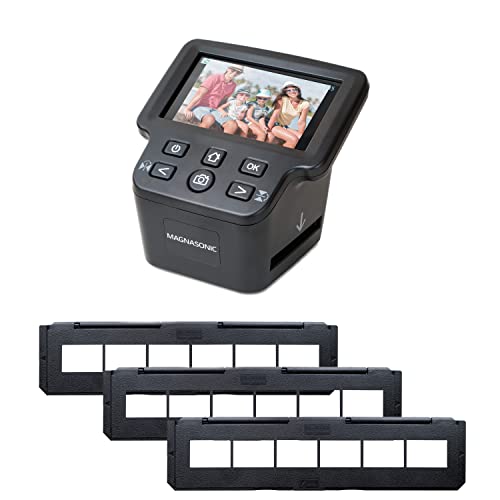
Magnasonic All-In-One 24MP Film Scanner with 5″ Display

KODAK Mobile Film Scanner, App-Based Slide Viewer

KODAK SCANZA Film & Slide Scanner with 3.5″ LCD
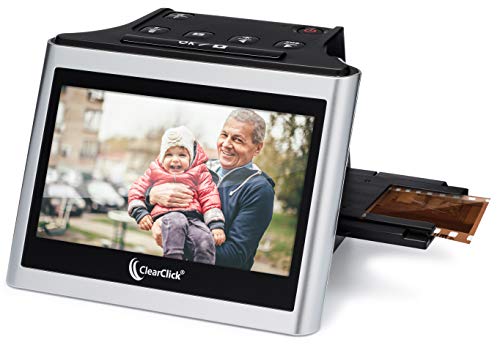
ClearClick Virtuoso 2.0 22MP Film & Slide Scanner

OKLILI 35mm Negative Holder for Epson Perfection Series

DigitPro 22MP Film & Slide Scanner with 5″ LCD

KODAK Slide N Scan 22MP Film & Slide Scanner

Plustek OpticFilm 8100 / 8200i Ai Film Holder
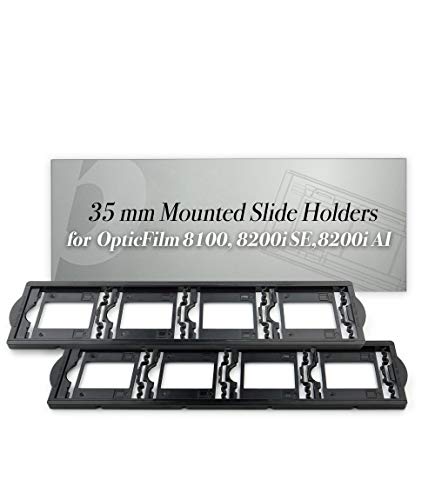
Plustek 35mm Mounted Slide Holders (x2) for OpticFilm
Taking A Closer Look At The Options
A two-piece replacement kit that breathes new life into aging Plustek OpticFilm scanners when the original negative and positive holders crack or warp. The set covers the negative strip tray plus the positive slide holder, so a single purchase usually solves both wear points.
Owners of the OpticFilm 7200, 7200i, 7200i SE, 7300, 7400, 7500i SE, 7500i AI, 7600i SE, 7600i AI, 8100, 8200i SE, 8200i AI, 8300i SE, and 8300i AI get a known-good fit. The SmartPhoto F50 also works here, which is handy for anyone juggling multiple Plustek units in the same workspace.
The Good Stuff
- Covers both negative strips and positive slides in a single kit, removing the need to order two separate accessories.
- Wide model coverage from the older 7200 series through the modern 8300i AI scanners.
- Restores proper tension on warped originals, which helps cut down on crooked scans during batch jobs.
- Drop-in replacement that requires no calibration step beyond what the scanner already does.
Things To Consider
- Works only with the Plustek OpticFilm and SmartPhoto F50 lines, so anyone on a different brand of dedicated scanner should look elsewhere.
- Plastic wear is a common long-term issue across Plustek holders, so handle the new pieces gently when loading and unloading film.
Who It Suits Best
Anyone whose Plustek OpticFilm 8100 or 8200i has finally given up on its original holder and needs a direct-fit replacement.
Look Elsewhere When
The OKLILI 35mm Negative Holder for Epson Perfection Series fits better for shooters running an Epson V500, V550, V600, or older GT-X-series flatbed.
A standalone scanner aimed at people with a mixed-format haul: 35mm and 126 negatives, 110 strips, 135/126/110 mounted slides, plus Super 8 reels. The 5-inch LCD gives a larger preview window than the 3.5-inch screens found on earlier generations, which matters when checking fine detail before saving.
The HDMI output is the underrated feature, sending the preview straight to a TV for group viewing. Built-in memory means a quick test scan can happen without hunting for an SD card, though most people will still add one for serious jobs.
Real-World Strengths
- 24MP JPEG output captures more detail than the 22MP units in this category.
- Covers 35mm, 126, 110, Super 8 negatives and the matching slide formats, so most family archives fit without swapping hardware.
- Large 5-inch display speeds up framing and color checks during long sessions.
- HDMI output streams previews to a TV, useful for shared reminiscing sessions.
Worth Noting
- An SD card is still required for serious storage; built-in memory fills up fast on multi-roll projects.
- Super 8 reels demand extra patience compared to flat 35mm strips.
Feature Snapshot
Made For
Households with a mixed pile of 35mm, 110, and Super 8 reels who want a single unit rather than separate scanners per format.
A Better Fit Elsewhere
The ClearClick Virtuoso 2.0 22MP Film & Slide Scanner suits better for shoppers who want a simpler standalone experience without the Super 8 reel requirement.
A collapsible cardboard platform that pairs with a smartphone app, turning any recent phone into a basic slide and negative viewer. The battery-powered LED backlight sits behind the film while the phone camera does the actual capture, which keeps the cost and the learning curve very low.
The trade-off is real: image quality depends entirely on the phone’s camera and how steady the user holds the device. For casual digitization of a handful of family slides, the result is often good enough to share online. For archive-grade work, the dedicated scanners later in this list are the better tool.
Reasons It Performs
- Lowest-cost way to start digitizing negatives and slides at home.
- Folds flat for storage in a desk drawer between sessions.
- App-based workflow means files go straight to the phone’s photo library for easy sharing.
Trade Offs
- Image quality is limited by the smartphone camera, so detail and color accuracy vary widely.
- No computer needed, but a steady hand and good ambient lighting become essential.
- Less suited for large archive projects where consistency matters more than convenience.
Right Fit For
Casual users who want to peek at a few old negatives and slides without committing to a full scanner setup.
Swap It Out When
The DigitPro 22MP Film & Slide Scanner with 5″ LCD suits better for anyone needing a dedicated standalone unit with a proper preview screen.
The longest-running name in this category, the SCANZA handles 35mm, 126, 110, Super 8, and 8mm reels alongside mounted slides. The 3.5-inch LCD is smaller than the 5-inch screens on newer models, but the unit itself has earned its reputation by surviving years of regular home use.
Power management is worth noting: a long press of the power button wakes the unit, and it auto-shuts-off after about ten idle minutes. That second detail is a small but appreciated feature for anyone who tends to walk away mid-batch.
Where It Delivers
- Covers Super 8 and 8mm reels, formats many competing units skip entirely.
- Compact footprint fits on a bookshelf or small desk.
- Auto shut-off after ten idle minutes saves batteries during long archive projects.
Points To Note
- Snapshot-style capture rather than true high-resolution scanning, so detail is limited for print enlargements.
- 3.5-inch screen is smaller and harder to read than the 5-inch displays on newer competitors.
Best Suited To
Anyone with old home-movie reels plus slide trays who wants one unit that handles both instead of separate purchases.
Skip It When
The Magnasonic All-In-One 24MP Film Scanner suits better for shoppers who want a larger preview screen and slightly higher resolution for still formats.
A second-generation standalone scanner that ditches the computer entirely. No drivers, no software installs: drop in a negative strip or a mounted slide, press a button, and watch the 22-megapixel JPEG land on an SD card (sold separately).
The extra-large 5-inch screen makes a noticeable difference over the older 3.5-inch units, since framing and color checks happen right on the device. A mini HDMI output streams the preview to a TV, which doubles as a fun group-viewing feature on family nights.
Everyday Perks
- Plug-and-play design with no driver installs or computer connection needed.
- 5-inch LCD gives a comfortable preview window for color and crop adjustments.
- Mini HDMI output streams previews to a TV.
Room For Improvement
- 22MP is interpolated, so true native detail is lower than the headline number suggests.
- SD card and mini HDMI cable are not included, adding to the total cost.
Who Should Grab It
First-time scanner owners who want a simple standalone device without software headaches.
Reach For A Different Pick When
The KODAK Slide N Scan 22MP Film & Slide Scanner fits better for shoppers wanting gallery mode for shared viewing sessions.
A replacement film holder assembly designed for a long list of Epson Perfection flatbed scanners, covering the V500, V550, V600, 4490, 2450, 3170, 3200, GT-X750, GT-X770, and GT-X820. When the original plastic cracks or the cover hinge loosens, this drop-in part gets the scanner back to work without buying a whole new unit.
Like the Plustek kit earlier in this list, this is an accessory rather than a scanner, but it earns its spot because so many households still rely on these Epson flatbeds for high-quality film work.
Practical Advantages
- Replaces the OEM holder assembly at a fraction of the cost of a new scanner.
- Compatible with a wide range of Epson Perfection models from older 2450 units to the GT-X820.
- Neutral packaging keeps the contents safe during shipping.
Honest Caveats
- Limited to Epson Perfection flatbeds, so anyone on a Plustek or Canon scanner should skip this one.
- Some users report the cover hinge feels slightly less snug than the original part, so handle with care during loading.
Built With In Mind
Anyone still using an Epson Perfection V500, V550, V600, or GT-X-series flatbed whose original film holder has finally cracked.
Consider Something Else When
The Plustek Film Holder Kit for OpticFilm 72~83 Series fits better for shooters with Plustek OpticFilm scanners rather than Epson flatbeds.
A straightforward standalone scanner that handles color and black-and-white 35mm, 135, and 126 negatives, 110 strips, 50mm mounted slides, and Super 8 reels. The 5-inch screen sits right on the front, which keeps the workflow visible without leaning over a small window.
Built-in 128MB memory handles a quick test scan without an SD card. External SD cards up to 64GB in FAT32 or exFAT format work for larger projects, so the storage ceiling is comfortable for multi-roll archives.
What It Does Well
- Built-in memory means a quick test scan happens without hunting for an SD card first.
- Supports 64GB SD cards for projects involving multiple rolls of film.
- 5-inch screen offers comfortable framing and color checks during batch sessions.
- Handles B&W and color negatives across 35mm, 126, and 110 formats.
Small Caveats
- SD card is sold separately, so first-time setup requires a small extra purchase.
- Super 8 conversion is functional but slower than flat-strip scanning.
Feature Rundown
Perfect Match For
First-time scanner owners who want a no-fuss standalone unit that works out of the box with no computer setup.
Not Your Match When
The Magnasonic All-In-One 24MP Film Scanner fits better for shoppers wanting a slightly higher 24MP output for archival projects.
A modern take on the classic Kodak scanner, built around a generous 5-inch LCD with wide-angle viewing. The Gallery Mode turns the screen into a slideshow, which is the kind of feature that makes a coffee-table session with grandparents actually fun.
Color and black-and-white negatives in 135, 110, and 126mm formats convert to digital files saved on an SD card. The unit works without a computer, so the whole setup lives on a side table rather than a desk.
Standout Benefits
- Gallery Mode turns the LCD into a slideshow for shared living-room viewing.
- Wide viewing angle on the 5-inch display keeps colors consistent from different seats.
- Handles color and B&W negatives plus slides in a single unit.
Points To Keep In Mind
- SD card is not included, so budget for a separate purchase before the first scan.
- 22MP output is solid but not the highest in this roundup.
Technical Sheet
Whose Shelf It Belongs On
Families who want to scan old slides and negatives, then sit around the TV scrolling through them together.
Another Choice May Suit
The ClearClick Virtuoso 2.0 fits better for shoppers who prefer a mini HDMI output for direct TV playback without gallery mode.
A two-piece holder kit aimed at the OpticFilm 8100 and 8200i Ai specifically. The package includes one 35mm sleeve film holder plus one film holder for mounted slides, supporting up to six frames in sleeves or four mounted slides at a time.
This is a more targeted replacement than the broader Plustek kit earlier in the list, which matters for owners who only need to refresh one tray type rather than both.
Everyday Wins
- Supports both sleeve-stored strips and mounted slides in a single kit.
- Direct-fit design for the OpticFilm 8100 and 8200i Ai.
- Useful for shooters who only need to replace one tray rather than both.
A Few Limitations
- Limited to two specific Plustek models, so the broader Plustek kit is the better choice for mixed-model workspaces.
- Plastic pieces need gentle handling over years of regular use.
Best Suited To
Plustek OpticFilm 8100 and 8200i Ai owners who only need to replace a single sleeve or mount holder.
Where Another Pick Suits Better
The Plustek Film Holder Kit for OpticFilm 72~83 Series fits better for shooters who need to refresh both negative and positive trays at once.
A two-pack of mounted slide holders built for the OpticFilm 7200 through 9000 series, including the 8100, 8200i, and 8300i. The pair lets one tray stay loaded while the other rotates through the workflow, which speeds up batch scanning sessions significantly.
Anyone who has fought a single jammed tray during a long archive project will appreciate the spare. The swap also gives a worn tray a rest, which can extend the life of the original plastic over time.
Useful Strengths
- Two-pack format keeps a spare tray ready for continuous batch scanning.
- Covers the OpticFilm 7200 through 9000 series, a wide Plustek range.
- Reduces downtime when one tray needs cleaning or has jammed film.
Factors To Consider
- Only handles mounted slides, so a separate negative holder is needed for strip work.
- Plastic flex over years of use is a common long-term concern.
Feature Card
Who Will Love This
Plustek OpticFilm owners running multi-hour slide scanning sessions who want a backup tray ready.
Skip It When
The Plustek Film Holder Kit for OpticFilm 72~83 Series fits better for anyone needing both negative strips and slides in a single purchase.
What Matters Most Before Choosing 35mm Photo Scanners
Resolution vs. Real-World Use
Megapixel counts grab attention, but the resolution only matters if it suits the destination. JPEGs around 22 to 24 megapixels handle social sharing and standard prints well. For larger archive work, a true dedicated film scanner with higher native resolution outshines snapshot-style units that interpolate up to a higher number.
Film Format Coverage
Before picking a scanner, sort the film pile by format. A standalone unit handling 35mm, 126, 110, and Super 8 covers most family archives. Specialty scanners that skip Super 8 or 8mm reels leave home-movie collectors looking for a second device. Dedicated Plustek and Epson flatbed owners should focus on replacement holders instead of buying a whole new scanner.
Standalone vs. Computer-Based Workflow
Standalone scanners with built-in screens and SD card slots work well for casual sessions, group viewing, and tight spaces. Computer-tethered flatbeds deliver higher resolution and finer color control but require a dedicated spot on a desk. The right pick depends on how often the scanner comes out and who else needs to use it.
Build Quality and Long-Term Use
Plastic holders and trays wear out, especially the hinges and clamps that hold film flat. Anyone planning years of regular use should weigh the availability of replacement holders, since cracked parts tend to end a scanner’s working life. Look for bundles that include spare trays or confirm the accessories are sold separately.
Key Considerations Across These Picks
Traps First Timers Fall Into
Newcomers often chase the highest megapixel count and end up with an interpolated number that does not reflect real detail. Resolution interpolation stretches a lower native capture to a bigger file size, which looks impressive on paper but does not add sharpness. A 22MP scanner with true native capture usually outperforms a “24MP” unit that leans on interpolation.
What The Higher Tier Buys
Stepping up to a premium-tier film scanner typically delivers higher native optical resolution, better infrared dust removal, and tighter color accuracy across multiple film stocks. For most casual users, mid-tier standalone units are plenty. For archive-grade projects, photographers editing or printing at large sizes benefit from the extra detail and color depth a higher-tier scanner provides.
Frequently Asked Questions
What is the easiest 35mm photo scanner for beginners?
Standalone units like the ClearClick Virtuoso 2.0 or the DigitPro 22MP scanner skip the computer entirely. Load the film, press a button, and the file lands on an SD card. The KODAK Mobile Film Scanner is even simpler but depends on a smartphone for capture.
Can these scanners handle old black-and-white negatives?
Most dedicated scanners in this roundup handle color and B&W negatives across 35mm, 126, and 110 formats. Black-and-white strips need slightly different exposure handling than color, but the scanners listed above process them without extra steps. Check each product’s listed formats before assuming a match.
Do I need a computer to use a 35mm photo scanner?
Not always. Standalone models with built-in LCD screens and SD card slots work without a computer. Flatbed scanners from Epson and Plustek rely on a USB connection to a computer for both power and software control. The right choice depends on workspace and workflow preferences.
How long does it take to scan a roll of 35mm film?
Most standalone scanners capture a frame every few seconds, so a 36-exposure roll takes roughly five to ten minutes. Flatbed scanners with batch holders finish a full roll faster but require setup time. Super 8 reels run longer because the format is denser and requires careful frame advancement.
What is the difference between dedicated scanners and app-based mobile viewers?
Dedicated scanners include their own light source, optics, and image sensor, which produces consistent results. App-based mobile viewers rely on the smartphone’s camera and a backlight, so quality varies with the phone model and lighting conditions. Mobile viewers cost less and travel easily, but dedicated scanners deliver better consistency.
The Takeaway
A 35mm photo scanner turns forgotten film rolls into files you can actually use, and the right pick depends on whether you need a simple standalone, a versatile multi-format unit, or a replacement part for an existing Plustek or Epson setup. Sort the film pile by format first, then match the scanner to the workflow. The ten picks above cover the spread, so a stack of old negatives can finally leave the shoebox and join the family photo library.