Those cardboard boxes of 35mm negatives and yellowed slide trays gathering dust in your closet are not lost. The right scanner turns them into shareable JPEGs without sending anything off to a lab. Whether you want a simple standalone unit for an afternoon project or a dedicated film scanner that respects color and grain, this shortlist has the right match for your situation.
How The Shortlist Stacks Up

ClearClick Virtuoso 3.0 22MP Film & Slide Scanner with 7″ LCD

Plustek Film Holder Kit (Negative + Positive) for OpticFilm 72~83 Series
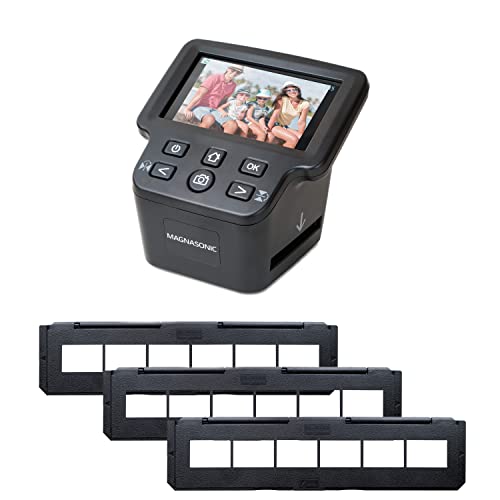
Magnasonic All-In-One 24MP Film Scanner with 5″ Display and HDMI
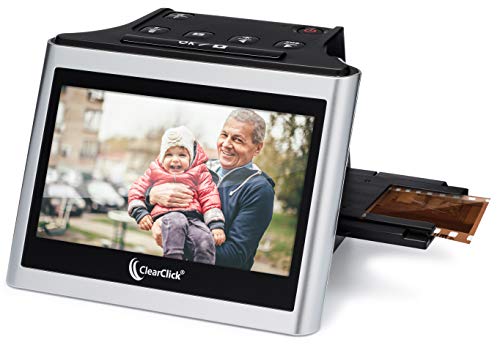
ClearClick Virtuoso 2.0 22MP Film & Slide Scanner with 5″ LCD

OKLILI Photo Holder Assy for Epson Perfection V500 V550 V600 Series

DigitPro 22MP Film & Slide Scanner with 5″ LCD

Magnasonic All-in-One 24MP Film Scanner with HDMI Cable

JJC Mobile Film Scanner Digitizer Set with 11-Level LED Backlight

Plustek OpticFilm 8100 / 8200i Ai Film Holder
A Deeper Look At The Lineup
The Virtuoso 3.0 is the kind of scanner you hand to a relative and walk away from. Its 7-inch LCD is large enough that older eyes can actually see what is being framed, and the standalone design means you never have to install drivers or fight with a laptop. In a real kitchen-table scenario, you slot in a strip of 35mm negatives, watch the preview update, and save the result straight to an SD card.
It reads 35mm, 110, and 126 negatives, plus 50mm mounted slides, which covers the formats most family shoeboxes contain. Native capture sits at 14MP with 22MP achieved through interpolation, a software upscaling process that boosts resolution without adding real detail. For casual archiving where JPEG sharing is the goal, the result is more than usable.
Practical Pluses
- Large 7-inch preview screen makes framing and reviewing comfortable
- Standalone workflow removes the need for any computer or software
- Covers three negative formats plus 50mm slides in one unit
- Mini HDMI output lets you scan straight to a television for group viewing
- Saves to an SD card for quick transfer to phones and cloud storage
Trade-Offs
- 22MP figure is interpolated, not native, so fine grain detail is limited
- SD card is not included and the unit tops out at 32GB cards
- Cleaning the backlight panel between sessions is part of routine ownership
Who It Suits Best
Anyone converting a family photo collection without wanting to learn photo software will find the Virtuoso 3.0 friendly.
A Better Fit Elsewhere
Photographers who care about resolving fine grain should look at the Magnasonic All-in-One 24MP Film Scanner with HDMI Cable for its higher native capture and bundled cable.
This kit is the accessory, not the scanner. It is a pair of replacement film holders, one for negative strips and one for mounted slides, designed exclusively for Plustek’s OpticFilm 72 through 83 series scanners. Anyone who has worn out a holder, lost one in a move, or inherited a scanner with no accessories at all will know exactly why this exists.
Compatibility is broad across the OpticFilm line, including the 7200, 7300, 7500i, 7600i, 8100, 8200i, and 8300i, plus the SmartPhoto F50. Owners of older or specialized Plustek hardware may find the holders harder to source elsewhere, and this kit solves that gap directly.
Useful Touches
- Includes both negative and positive holders in a single purchase
- Designed and sold by Plustek for a guaranteed fit on supported models
- Revives a scanner whose original holders are missing or cracked
Honest Caveats
- Will not work with any scanner outside the OpticFilm 72~83 and SmartPhoto F50 list
- Does nothing on its own without a compatible Plustek scanner already in hand
Made For
Plustek OpticFilm owners who need a fresh set of holders to keep their workflow running.
Consider Something Else When
Anyone without a Plustek scanner should skip this entirely and look at the ClearClick Virtuoso 3.0 22MP Film & Slide Scanner for a complete standalone setup.
The Magnasonic all-in-one earns its name by accepting a wider range of formats than most rivals, including 35mm, 110, 126, Super 8 movie film, and the matching slide sizes. In a real archiving session, that flexibility means you can move from a strip of negatives to a reel of Super 8 without swapping hardware. The long tray design helps the scanner accept longer negative strips without cropping or jamming.
At 24MP, the JPEG output is higher resolution than many entry-level units, and the built-in memory lets you start scanning without hunting for a card. The HDMI output mirrors the on-screen view to a TV, which makes a weekend scanning project a group activity rather than a solo chore.
Positive Points
- Accepts Super 8 film in addition to standard still formats
- 24MP output produces larger, more detailed JPEGs
- Long tray supports extended film strips with less manual repositioning
- Built-in memory means you can start scanning right out of the box
Worth Noting
- Super 8 frames are stills only, not playable movies
- HDMI cable is not included with this particular listing
- Built-in memory is small, so most owners add an SD card for serious use
Who Will Love This
Hobbyists with mixed-format collections, including Super 8 reels, who want one box to handle everything.
Skip It When
Anyone strictly focused on 35mm stills and tight budgets should grab the ClearClick Virtuoso 2.0 22MP Film & Slide Scanner with 5″ LCD for a simpler, lower-cost path.
The Virtuoso 2.0 is the predecessor to the 3.0, and it remains a solid choice for anyone who does not need the larger 7-inch screen. The 5-inch display is still generous compared with most standalone scanners, and the unit handles 35mm, 110, and 126 negatives plus 50mm mounted slides without extra equipment.
Setup is the same as its newer sibling: insert an SD card, slot in a film strip, and start scanning. The Mini HDMI output lets you preview on a television, though the cable is sold separately. For first-time converters dipping a toe into film archiving, this generation tends to come in at a more approachable price.
Real-World Strengths
- Standalone design with no computer or driver installation
- 22MP output is adequate for sharing and moderate printing
- Covers three negative formats plus 50mm slides
Small Caveats
- SD card and HDMI cable are not included in the box
- 22MP figure is interpolated, not native sensor resolution
- Owners should expect to wipe the backlight and film rails between sessions to avoid dust spots
Best Suited To
First-time film converters who want a simple standalone unit without paying for the largest display.
Reach For A Different Pick When
Anyone who wants the bigger preview experience should move up to the ClearClick Virtuoso 3.0 22MP Film & Slide Scanner with 7″ LCD instead.
This is another accessory rather than a standalone scanner, and it solves a very specific problem. The OKLILI photo holder assembly is a replacement film-and-slide carrier for the Epson Perfection V500, V550, V600, plus older models like the 4490, 2450, 3170, 3200, and the GT-X750, GT-X770, and GT-X820. If your Epson flatbed’s original holder has cracked or vanished, this is the part that brings film scanning back to life.
Cross-referencing the OEM part numbers 1423040, 1403903, and 1401444 makes it easier to confirm fit before ordering. In a workshop setting, the holder’s job is to keep negatives perfectly flat and aligned with the scanner’s light source, which directly affects how sharp your scans turn out.
Reasons It Performs
- Restores film-scanning ability to a wide range of Epson Perfection flatbeds
- Direct replacement for OEM part numbers 1423040 and 1403903
- Listed compatibility spans multiple generations of Epson hardware
Things To Weigh
- Third-party part, so fit and finish may not match original Epson components exactly
- Useless without a compatible Epson Perfection scanner already in your setup
Whose Shelf It Belongs On
Anyone with an Epson Perfection flatbed whose film holder has worn out or gone missing.
Look Elsewhere When
If you do not already own a compatible Epson Perfection scanner, the JJC Mobile Film Scanner Digitizer Set is a more accessible entry point for phone-based capture.
The DigitPro is a compact, no-frills unit aimed at people dipping into film conversion for the first time. It accepts 35mm, 110, and 126 negatives plus 50mm slides, with a 5-inch LCD that shows previews in real time. The all-in-one design mirrors the ClearClick and Magnasonic units in approach, so anyone comfortable with those should adapt to this one quickly.
It also handles Super 8 film stills and supports both color and black-and-white negatives. Built-in 128MB of memory covers a handful of test scans, and an SD card slot accepts cards up to 64GB for serious sessions. The simple button layout keeps the learning curve short.
The Practical Payoff
- 5-inch LCD with real-time preview simplifies positioning
- Built-in memory plus SD card support for flexible storage
- Color and black-and-white negatives both supported
Where It May Fall Short
- 22MP output is interpolated rather than native
- Brand recognition is lower, so long-term support is harder to gauge
Perfect Match For
First-timers converting a small box of family negatives who want a low-commitment starting point.
Swap It Out When
Anyone needing a true multi-format unit with Super 8 movie film support should pick the Magnasonic All-In-One 24MP Film Scanner instead.
This is the same Magnasonic all-in-one scanner as the earlier listing, but bundled with an HDMI cable in the box. That small change matters for anyone planning to run scans on a television, since the cable otherwise has to be sourced separately. The 5-inch display, 24MP JPEG output, and multi-format support all carry over.
In a living-room scanning session, the cable lets you preview and review on a big screen without crowding around a 5-inch panel. Built-in memory and SD card support handle storage, and Super 8 film strips can be captured as stills for those old home-movie reels gathering dust.
What Helps Most
- HDMI cable included for immediate TV-side scanning
- 24MP capture produces larger and more detailed JPEG files
- Built-in memory lets you start scanning out of the box
Points To Keep In Mind
- Super 8 output is still frames, not playable video
- Slightly bulkier than single-format units when set up
Built With In Mind
Anyone planning TV-side family scanning sessions where the cable matters as much as the scanner itself.
Where Another Pick Suits Better
People working on a laptop or computer-free at a kitchen table will do fine with the ClearClick Virtuoso 2.0 22MP Film & Slide Scanner and save on the bundled cable.
The JJC set takes a completely different approach: instead of a dedicated scanner, you use your phone’s camera. The kit includes an LED backlight panel with 11 brightness levels, a phone clip, and magnetic holders for 35mm and 120 film. For someone who already takes most of their photos on a phone, the workflow feels natural rather than bolted-on.
A wireless remote shutter helps avoid camera shake during capture, and the adjustable backlight lets you tune exposure to match the density of your negatives. The end result depends heavily on your phone’s camera, but for casual sharing and social media, the output is often more than enough.
Strengths Worth Knowing
- Uses hardware you already own, so cost stays low
- 11-level LED backlight adapts to negative density
- Wireless remote reduces shake during capture
- Works with both 35mm and 120 medium-format film
What To Weigh
- Final image quality depends on your phone’s camera and lens condition
- Setup and alignment take practice to nail consistently
- Backlight panel needs Type-C power, which means a cable or battery pack nearby
Right Fit For
Phone-first creators who want to digitize a handful of negatives without buying a dedicated scanner.
Not Your Match When
Anyone who wants one-touch automated scanning should go with the ClearClick Virtuoso 3.0 22MP Film & Slide Scanner with 7″ LCD for a fully standalone experience.
Another dedicated Plustek accessory, this holder is built for the OpticFilm 8100 and 8200i Ai scanners specifically. It supports both film sleeves, with capacity for six links, and mounted slides for four links, which covers a small batch of scans between reloads. The narrow compatibility list means there is no ambiguity about fit.
For owners of those specific OpticFilm models, this is a straight replacement or spare. In a dedicated darkroom-style workflow where the scanner stays set up, a second holder lets you prep the next batch while the previous one is still scanning.
Positive Takeaways
- Supports both sleeve-mounted film and mounted slides
- Confirmed fit for OpticFilm 8100 and 8200i Ai
- Useful as a spare to keep workflow moving during long sessions
Where It Is Less Suited
- Only fits two Plustek scanner models, nothing else in the line
- No value without owning the matching scanner already
Who Should Grab It
Plustek OpticFilm 8100 or 8200i Ai owners looking for a replacement or backup holder.
A Better Fit Elsewhere
People wanting both negative and positive holders for the broader OpticFilm range should consider the Plustek Film Holder Kit (Negative + Positive) for OpticFilm 72~83 Series instead.
What Matters Most Before Choosing 35mm Scanners
Resolution That Earns Its Number
The “MP” on a film scanner box can mean two different things. A native resolution reflects the sensor’s actual pixel count, while an interpolated resolution is a software upscaling trick that stretches a smaller image to a bigger file. For most archiving work, anything around 14MP native or 22MP interpolated will look fine on a phone or a moderate print. Higher numbers help if you plan to crop heavily or make large prints, but they do not conjure detail that the original negative never captured.
Format Coverage Across Your Shoebox
Before picking a unit, sort your collection by format. A pile of 35mm strips and a few trays of 50mm slides are handled by nearly every scanner on this list. Add 110 or 126 negatives, and most still cope. Pull out a reel of Super 8 movie film, and your choices narrow to the Magnasonic units. Pull out 120 medium-format film, and the JJC mobile kit suddenly looks attractive.
Standalone Vs Computer-Tethered
Standalone units with built-in screens are friendlier for one-off weekend projects. Computer-tethered flatbeds with film holders, like the Epson Perfection line, reward patience with better dynamic range and RAW capture, but they ask more of you in setup time. Your tolerance for software and your time budget usually settle this question faster than the spec sheet does.
Storage And Connection Habits
A scanner that saves to an SD card is convenient, but a 32GB or 64GB ceiling matters if you have thousands of negatives. HDMI output turns scanning into a group activity, while USB or computer tethering suits someone who wants every file automatically backed up. The small extras, like an included HDMI cable or built-in memory, tend to matter more in daily use than the marketing copy suggests.
Key Considerations Across These Picks
Pitfalls Shoppers Hit
A common slip is chasing the highest megapixel count and assuming it equals detail. Interpolation inflates the number, but a 14MP native capture from a quality sensor will out-resolve a 22MP interpolated file from a cheap one. Another trap is forgetting that an SD card or HDMI cable often ships separately, leaving you with a scanner you cannot use on day one. Always check what is in the box.
Where The Extra Money Goes
Paying more for a film scanner usually buys better dynamic range, the ability to capture usable shadow and highlight detail in a single pass, plus more careful color science. Higher-tier models also tend to support RAW output, which preserves more information for later editing. For casual sharing, the gap is small. For archival-grade scans intended to last decades, the upgrade tends to pay off.
Frequently Asked Questions
What is the difference between native and interpolated resolution?
Native resolution is the real pixel count a sensor captures. Interpolated resolution is software stretching a smaller image to a larger file, adding pixels without adding real detail. For archival work, native resolution matters more.
Can these scanners handle Super 8 movie film?
Only the Magnasonic all-in-one units and the DigitPro capture Super 8, and only as individual still frames, not as playable video. Dedicated film scanners are needed for full movie conversion.
Do I need a computer to use a standalone film scanner?
No. Standalone units like the ClearClick Virtuoso and Magnasonic models scan directly to an SD card or built-in memory. Computer tethering is only required for flatbed models like the Epson Perfection line.
Why would I buy a film holder instead of a scanner?
Replacement film holders, like the Plustek kits or the OKLILI Epson part, restore scanning ability to a scanner you already own. They make sense if your original holder is cracked, lost, or worn out.
Is phone-based film scanning worth it?
Phone-based digitizing, like the JJC mobile kit, works well for casual sharing and social media. Final quality depends on your phone’s camera, alignment, and lighting, so it is not a substitute for a dedicated scanner when you need archival-grade output.
The Takeaway
Pick the scanner that matches your formats and your patience level. Standalone units cover most family archives with minimal fuss, while flatbed holders and phone-based kits fill very specific gaps. Whichever route you choose, the important step is starting before those old negatives and slides deteriorate further.