A walk-through on a busy build site rarely tells the full story. Handheld photos miss corners, fixed security cameras miss context, and a single-lens action camera can’t capture a whole room in one pass. That’s where a dedicated 360 camera earns its keep, recording everything around it so you can pull the framing you actually need in post. The ten picks below cover the main ways construction pros use these tools, from full jobsite walk-throughs to tight inspections behind drywall.
The Choices Worth Comparing

Insta360 X5 Waterproof 8K 360° Action Camera

AKASO 360 Action Camera Creator Combo

Insta360 X5 Essentials Bundle

Insta360 X4 Air Starter Bundle

Insta360 X4 Air Travel Bundle

AKASO 64GB microSDXC U3 MicroSD Card
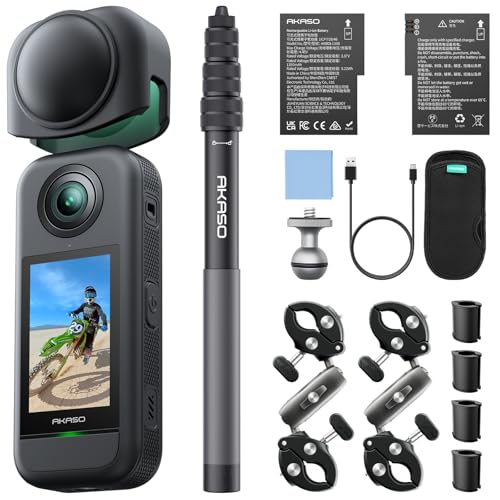
AKASO 360 Action Camera Motorcycle Combo

Ralcam 360° Articulating Borescope Dual Lens
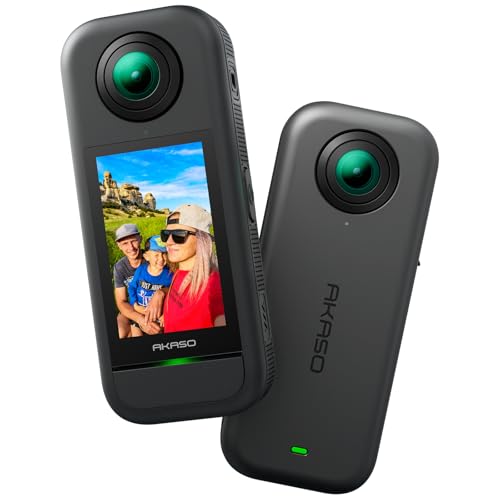
AKASO 360 Action Camera Standard Combo

AKASO 118in Invisible Selfie Stick
A Closer Look At Each Pick
Few 360 cameras aimed at the consumer market shoot 8K30fps, so the Insta360 X5 stands out for crews who want maximum resolution to crop into specific walls or details later. Dual 1/1.28-inch sensors handle low-light scenes better than smaller sensors, which matters inside partially built structures with mixed lighting. The replaceable lens design is a quiet but real advantage on a construction site, since scratched domes won’t end the camera’s life.
For daily walk-through documentation, the three-hour battery covers a full site loop without a swap. Built-in wind guard helps in exposed exteriors, and the invisible selfie stick effect removes the operator from framing entirely. Stabilization is strong enough to smooth out handheld bobbing on uneven surfaces.
Where It Helps
- 8K30fps capture gives generous room to crop and reframe in post
- Triple AI chip design helps in mixed-lighting interiors like framed rooms
- Rugged build with replaceable lenses extends field life after drops
- Three-hour battery suits a full walk-through without a charger
Things To Consider
- 8K files eat storage quickly, so budgeting for high-capacity cards is wise
- The full feature set rewards time spent in the companion app, which can slow first-day adoption
Right Fit For
Project managers and site supervisors documenting weekly progress who want a single 360 capture they can reframe in post.
Consider Something Else When
You need a featherweight helmet mount, in which case the Insta360 X4 Air Starter Bundle is the lighter sibling.
The Creator Combo packages the AKASO 360 with the accessories a content-producing crew typically buys anyway, including an invisible selfie stick and extra battery. The 5.7K sensor reads as a slight step down from the Insta360 X5’s 8K, but it’s still sharp enough for client-facing site updates. Touchscreen operation simplifies handheld framing on ladders or scaffolding.
For contractors running a marketing channel alongside the build, the bundle’s accessory spread is the real story. AI tracking helps keep the camera locked to a person walking through the space, while 360° horizon lock keeps footage level regardless of how the camera is held. You’re buying a turnkey kit rather than a bare camera.
Where It Excels
- Creator-ready accessory bundle skips the slow add-to-cart phase
- AI tracking follows a subject across the site without manual panning
- 5.7K resolution balances file size with detailed captures
- Touchscreen control is a real asset on a dusty, gloved worksite
Worth Noting
- Low-light performance may not match higher-tier options like the Insta360 X5
- Bundles tend to weigh more in a kit bag than a bare camera alone
Made For
Construction marketing teams and project leads who need ready-to-shoot client videos straight out of the box.
Look Elsewhere When
Maximum resolution matters most for reframing, in which case the Insta360 X5 outresolves this AKASO bundle.
The Essentials Bundle keeps the same X5 sensor stack as the standalone version reviewed earlier, but pairs it with just the must-have accessories. For crews stepping into 360 for the first time, that’s an easier entry point than sorting through dozens of add-ons. The 8K30fps capture ceiling remains identical, which is what most buyers care about.
Where this bundle separates itself from the bare X5 is in the unboxing experience: extra battery, basic mount, and the invisible selfie stick are usually in the box. For solo site documentation, the included extras shave a learning curve off the first day. Beyond that, the camera behaves the same as its sibling.
Practical Pluses
- Same flagship 8K30fps sensor as the standalone X5
- Bundle format reduces guesswork on first purchase
- Invisible selfie stick included for clean third-person framing
Trade Offs
- Bundles sometimes lack specialized mounts you’d buy separately for helmets or vehicles
- Heavier than the X4 Air reviewed later, which matters for extended wear
Best Suited To
First-time 360 owners at small firms who want a complete starter kit without juggling individual add-ons.
Swap It Out When
Long wear sessions on a hard hat call for the lighter Insta360 X4 Air Starter Bundle instead.
Weight is the headline feature of the X4 Air: 165 grams feels closer to a beefy smartwatch than an action camera. On a hard hat or a chest harness, that translates to noticeably less fatigue over a full shift. The dual-lens 8K30fps spec matches cameras that weigh far more, which is where the appeal sits.
FlowState stabilization smooths out helmet bobbing, and the built-in wind guard helps on rooftops. Shoot-first, frame-later workflow means you can capture a whole corridor in one pass and pick the angle in post. Compared with the bulkier X5 above, the X4 Air trades some battery capacity for portability.
A Few Highlights
- 165g body reduces strain on helmets, drones, and chest rigs
- 8K30fps 360 capture keeps high-resolution options open
- Replaceable lenses protect against scratches from site debris
- AI-powered app simplifies reframing for less tech-savvy crew
Points To Note
- Battery life runs shorter than the larger X5 in extended sessions
- Lower-light performance may dip compared to the larger-sensor X5
Whose Shelf It Belongs On
Site engineers, drone operators, and safety officers who wear the camera on their head or chest for hours at a stretch.
A Better Fit Elsewhere
Handheld, room-scale walk-throughs favor the Insta360 X5 with its longer battery life.
The Travel Bundle takes the same featherweight X4 Air body and adds accessories chosen for movement: a longer stick, carrying case, and travel-ready mounts. Project teams bouncing between multiple sites, or inspectors covering a region, benefit most from the ready-to-pack format. The core camera spec matches the Starter Bundle covered above.
Build-wise, the 165g weight and dual-lens 8K capture match its sibling exactly. What changes is everything around it: the included carry case, spare mounts, and accessories aimed at people on the move. For a solo consultant, the Travel Bundle tends to fit a working day better than piecing together a kit later.
What Stands Out
- Travel-focused accessory kit reduces packing time
- Light 165g body stays comfortable across long days
- Same 8K30fps dual-lens capture as the Starter Bundle
Small Caveats
- Travel accessories may duplicate gear crews already own
- Some specialized construction mounts still require separate purchases
Who Should Grab It
Mobile inspectors and regional project leads who jump between job sites weekly and want a single grab-and-go case.
Reach For A Different Pick When
Your work stays at one site, where the Insta360 X5 Essentials Bundle gives you more camera for less.
A 360 camera is only as useful as the storage inside it. The U3 speed class is the minimum these cameras recommend, and this card clears that bar comfortably with read speeds up to 100MB/s. For crews shooting 5.7K or 8K daily, the right card prevents dropped frames and corrupted files that lose critical site footage.
Compatibility spans most modern AKASO and GoPro bodies, plus a wide list of older action cams, which makes it a sensible spare for any kit. The 64GB capacity fills up fast at 8K, so serious shooters carry several. Owning one or two extras is standard practice on long shoots.
Key Advantages
- U3 rating supports high-bitrate 360 capture without frame drops
- Broad device compatibility covers most action cams on site
- Compact size slips easily into a tool belt pocket
Honest Caveats
- 64GB runs short for a full day of 8K capture
- Owners commonly rotate multiple cards for heavy shoots
Perfect Match For
Crews who want a confirmed-spec card as a backup alongside the Insta360 X4 Air or AKASO 360 cameras in this list.
Skip It When
You need behind-wall inspection capability, where the Ralcam Borescope takes over entirely.
The Motorcycle Combo retunes the AKASO 360 for vehicles, and the same idea applies on construction equipment cabs, ATVs, and trucks bouncing around sites. Vibration-absorbing mounts, weather-ready housings, and the invisible selfie stick all ship together. The 5.7K sensor stack is identical to the Creator Combo covered earlier.
For documenting haul roads, equipment operation, or exterior site access, the kit’s specialized mounts matter more than the resolution difference. Owners commonly use the AI tracking feature to lock onto a vehicle ahead, producing a stabilized exterior shot without a second operator. Compared with handheld walk-throughs, this setup covers ground faster.
A Favorable Mix
- Vibration-rated mounts handle heavy equipment cabs
- AI tracking keeps a target vehicle centered automatically
- 5.7K sensor captures enough detail to crop for site-wide views
- 360° horizon lock keeps footage level over uneven ground
Where It May Fall Short
- Vehicle-oriented mounts may not suit handheld walk-throughs
- 5.7K is a step below 8K options like the Insta360 X5 for detail crops
Who Will Love This
Logistics crews, site security, and equipment operators who want full-context video from inside or around vehicles.
Where A Sibling Pick Shines
Stationary interior documentation fits the AKASO 360 Action Camera Standard Combo more naturally.
The Ralcam isn’t a typical 360 camera for room-scale documentation, but it fills a gap the other picks ignore. The 0.25-inch slim probe bends and rotates in four directions, so it slips behind drywall, inside conduit, or into ceiling cavities where a regular camera physically can’t go. For inspection work, that reach often matters more than resolution.
The dual-lens head provides a wider field of view than single-lens scopes, and the adjustable screen lets you flip between front and side views. Documentation of plumbing runs, hidden wiring, or post-pour checks becomes shareable instead of guesswork. Compared with the Insta360 X5 above, the Ralcam trades imagery scale for access.
Points In Its Favor
- Articulating probe reaches cavities no standard camera can enter
- 0.25-inch slim diameter fits narrow conduit and wall openings
- Dual-lens head delivers wider inspection views
- Useful for documenting hidden defects before close-up
Practical Considerations
- Probe care matters: rough handling inside pipes can scuff the lens
- Not a substitute for room-scale site walk-through documentation
Built With In Mind
Building inspectors, plumbers, and electricians who need visual confirmation behind finished surfaces.
Not Your Match When
You want walk-through site documentation, where the Insta360 X5 is the right tool instead.
The Standard Combo strips the AKASO 360 down to its essentials, making it the lowest-friction entry point in this roundup. The 1/2-inch 48MP sensor pulls decent detail in 5.7K, and the package includes the invisible selfie stick plus basic mounts. For a small contractor buying their first 360, this is the path of least resistance.
The 360-SuperSmooth stabilization helps handheld walk-throughs, and horizon lock keeps level footage on sloped terrain. Light handling is straightforward enough that field staff don’t need extensive training. Owners commonly report that low-light performance drops indoors, so exterior or daylight work is where it shines brightest.
Features That Help
- Standardized combo simplifies the buying decision
- 5.7K resolution delivers usable 360 capture for most jobs
- Invisible selfie stick removes operator from the frame
A Few Limitations
- Low-light footage may show visible grain inside framed structures
- Fewer accessories than the Creator Combo covered earlier
Who It Suits Best
Small crews and solo operators stepping into 360 documentation without a heavy accessory budget.
Another Choice May Suit
Heavier marketing or vehicle work benefits from the AKASO 360 Creator Combo covered earlier.
A 360 camera alone can’t reach a ceiling or roofline without a long pole, and the AKASO 118-inch (3m) stick fills that gap. Because 360 software erases the stick from the final footage, the result looks like a floating drone shot. Construction crews use this trick to inspect high details without ladders or aerial rental.
For ceiling inspections, parapet checks, or overhead MEP (mechanical, electrical, and plumbing) routing, the extra reach matters more than another camera body. Collapsed length is short enough to fit in a vehicle. The main caveat is that the stick is invisible only when paired with a 360 camera, not a standard action cam.
Standout Benefits
- 3-meter reach enables drone-style perspectives without a drone
- Disappears from 360 footage for clean third-person framing
- Useful for ceiling and roofline inspections
Points To Keep In Mind
- Long sticks are unwieldy in tight interior spaces
- Only erases in compatible 360 camera software, not standard video
The Right Fit
Field engineers and inspectors documenting overhead work without renting lift equipment.
Where Another Pick Suits Better
Behind-wall conduit checks need the Ralcam Borescope instead.
Picking A 360 Camera That Fits Your Site Workflow
Choosing a 360 camera for construction work means balancing reach, durability, and the kind of documentation you actually keep. Resolution gets the headlines, but field reliability decides whether a camera earns a permanent spot in the kit. The right pick depends on whether you’re walking a site, mounting to equipment, or inspecting hidden cavities.
Resolution And Sensor Size
Higher resolution buys you the freedom to reframe in post, which matters when a single 360 pass replaces several handheld shots. Larger sensors handle low light better, which is a real benefit inside framed interiors. For most crews, 5.7K is workable, while 8K gives more room to zoom into details like outlet placements.
Durability And Lens Protection
Construction sites punish cameras with dust, drops, and abrasion. Replaceable lenses are a quiet advantage, since scratched domes won’t end the camera’s life. Weather sealing matters for exterior work in unpredictable conditions, and rugged bodies survive being knocked off ladders more often than slim consumer models.
Stabilization And Mounts
Handheld footage on uneven subfloors gets shaky fast. FlowState and 360-SuperSmooth are two names for in-camera stabilization systems that keep footage level during walk-throughs. Vibration-rated mounts, helmet mounts, and vehicle mounts each suit different workflows, so matching your mount list to your daily routine matters more than chasing every accessory.
Workflow Fit And Real Use Cases
The right tool depends on your documentation style. Project managers want walk-throughs. Site engineers want helmet footage. Inspectors want behind-wall visibility. Equipment operators want vehicle-mounted capture. Identifying your dominant use case first narrows the shortlist fast, and a single specialty tool, like the borescope reviewed earlier, fills niches other options ignore.
Things Worth Weighing Before You Commit
Where Shoppers Go Wrong
A common slip is choosing on resolution alone, then discovering the camera’s app workflow is clumsy or the battery dies mid-walk-through. Another is forgetting storage: 8K footage fills cards faster than expected, and a single 64GB card may not survive a busy day. Match the camera to your actual routine, not the spec sheet’s highlight reel.
What The Higher Tier Buys
Top-tier models cost more because they pack larger sensors, longer batteries, and better low-light processing. For a crew documenting weekly client walk-throughs in varied lighting, that upgrade pays back in salvageable footage. For a quick exterior site check in good light, a standard combo captures more than enough, and the savings stay in your equipment budget.
Frequently Asked Questions
Do 360 cameras actually help on construction sites?
Yes, mainly because a single 360 pass captures every wall, ceiling, and corner in one go. That replaces juggling handheld shots and stitching them later, and it lets you reframe any angle in post.
What resolution makes sense for site walk-throughs?
5.7K is workable for most documentation, but 8K gives more room to crop in post. If you regularly zoom into specific walls or details, the higher resolution earns its keep.
Can I use these cameras on a hard hat or vehicle?
Most of the picks above include compatible mounts for helmets, vehicles, or extension poles. The Insta360 X4 Air is the lightest option for long wear, while the Motorcycle Combo suits cabs and equipment.
How do I store all the footage?
8K and 5.7K files fill cards quickly, so carrying multiple high-capacity microSD cards is standard. Offloading to a laptop or external drive at the end of each day prevents lost clips and keeps cards ready for the next site visit.
Is a borescope worth including with a 360 camera?
For inspectors, yes. The Ralcam Borescope reaches behind walls and inside conduit where no standard 360 camera can fit, making it a complement rather than a competitor to walk-through cameras.
Final Take
The right 360 camera depends on what you actually document day to day. Walk-through crews need resolution and battery life, helmet wearers need lightweight bodies, and inspectors need tools like the borescope that reach where cameras can’t. Match the pick to your dominant use case, plan for storage, and the rest of the kit falls into place.