A good 360 virtual tour camera should disappear into the background, letting you focus on the space, the moment, or the meeting happening in front of it. Whether you’re walking a real estate client through a listing, recording a downhill run without fumbling with a frame, or running a hybrid meeting where remote teammates need to feel present, the right tool removes friction. These ten picks span action-ready rigs for outdoor adventurers, polished options for real estate walkthroughs, and conference-room systems that turn video calls into something closer to a face-to-face conversation. Each one brings a different balance of resolution, portability, audio capture, and software polish, so the right fit depends entirely on what you’re trying to capture.
The Shortlist At A Glance

Insta360 X3 360 Action Camera 5.7K HDR

Insta360 X5 Waterproof 8K 360° Action Camera

Insta360 X5 Essentials Bundle 8K 360° Camera

Insta360 X4 Air Starter Bundle 8K 360 Camera

Insta360 X4 Air Travel Bundle 8K 360 Camera
Insta360 X3 Waterproof 360 Action Camera
Insta360 ONE X2 360 Waterproof Action Camera

KanDao Meeting Pro 360° Conference Camera

KanDao Meeting PRO 2 4K HDR Conference Camera
KanDao Meeting Ultra 5-in-One 360° System
Inside Each Recommended Option
The Insta360 X3 sits in that comfortable middle ground where a camera does both jobs without forcing you to pick sides. You get full 360 capture at 5.7K resolution, which is plenty of headroom for reframing later, but the single-lens 4K mode (using just one of the two lenses to record a standard flat video) lets you grab a normal wide-angle shot when reframing feels like overkill. The 2.29-inch touchscreen is large enough to navigate menus without squinting, and FlowState Stabilization, the brand’s name for its in-camera electronic stabilization system, smooths out the kind of handheld shake that ruins otherwise good footage.
For everyday creators, this camera handles the kind of mixed workflow that tends to trip up more specialized rigs. Mount it on a helmet for a mountain bike ride, pull it off for a static vlog, drop it in a pool during a beach trip, and the footage still comes out usable. Compared to the newer X5 reviewed below, the X3 trades some resolution and low-light clarity for a more approachable price, making it a sensible starting point if you’re still figuring out what kind of 360 work you actually enjoy.
Features That Help
- Dual-purpose shooting with both 360 capture and single-lens 4K modes means one camera covers two distinct styles of content.
- Waterproof construction removes the need for a separate housing during pool days, rainy hikes, or beach shoots.
- AI-assisted editing through the companion app reframes raw 360 footage into shareable flat clips in minutes rather than hours.
- The large 2.29-inch touchscreen speeds up menu navigation and live previews when you’re shooting without a phone attached.
Things To Consider
- Low-light performance falls behind the newer X5 and X4 Air, so indoor or dusk scenes will show more noise.
- Battery life is shorter than the X5’s extended runtime, which matters for longer shooting days without spare cells.
Who It Suits Best
Versatile hobbyists and vloggers who want one camera that handles both action sequences and standard video without swapping gear.
Where Another Pick Suits Better
The Insta360 X5 is a better match for shooters who regularly film in dim environments or need longer battery life per charge.
The Insta360 X5 is the camera you reach for when image quality is the deciding factor. Dual 1/1.28-inch sensors, meaning each lens has a relatively large image sensor that gathers more light, push full 360 video all the way to 8K at 30 frames per second, giving you enough resolution to reframe aggressively and still end up with a crisp 4K output. The triple AI chip design handles noise reduction on the fly, so dusk trails, candle-lit dinners, and indoor tours come out cleaner than what older Insta360 models manage.
Ruggedness is where the X5 earns its keep for adventure shooters. The replaceable lenses are a quiet but meaningful upgrade; instead of sending the whole camera in for repair after a rock scratch, you swap the damaged lens and keep filming. Combined with the built-in wind guard and roughly three hours of battery life per charge, the X5 is built for long days outside where conditions don’t cooperate. It costs more than the X3 above, but for creators whose work depends on detail and durability, that gap is reasonable.
The Helpful Details
- 8K 360 capture paired with large sensors preserves detail when reframing and dramatically improves low-light footage.
- Replaceable lenses cut downtime after minor impacts, since a scratched lens no longer ends a shoot.
- Three-hour battery life per charge covers most full-day outings without constant swaps.
- The built-in wind guard reduces the muffled whoosh that ruins outdoor audio in lighter cameras.
Honest Caveats
- Heavier than the X4 Air, so extended helmet or drone mounts may feel noticeable after a few hours.
- Premium pricing puts it out of reach for casual users who don’t need the resolution gains.
Made For
Adventure creators and professional tour builders who prioritize image quality, low-light performance, and long shooting days over compactness.
Consider Something Else When
The Insta360 X4 Air Travel Bundle suits travelers who want similar 8K quality in a noticeably lighter package for handheld or mounted use.
Buying a 360 camera without the right accessories is a common frustration; you get the body home and realize you still need batteries, mounts, and a carrying case. The Insta360 X5 Essentials Bundle addresses that exact problem by pairing the same 8K camera body covered above with the most-requested extras in one box. Everything shares the X5’s design language, so there’s no compatibility guesswork, and the bundle arrives ready for immediate use.
This isn’t a different camera from the standalone X5 reviewed earlier; it’s the same hardware with a different accessory mix. For someone stepping into 8K 360 capture for the first time, the bundle saves the trial-and-error phase where you figure out which batteries actually fit and which mounts hold up. Compared to the standalone version, you trade a slightly higher upfront cost for fewer trips back to the cart later.
Standout Benefits
- Matched accessories remove the trial-and-error of piecing together a kit from individual listings.
- Same rugged body, replaceable lenses, and three-hour battery as the standalone X5.
- Wind guard and waterproof construction carry over from the base camera.
Points To Note
- The bundle costs more than the camera alone, so experienced shooters with existing gear may not need the extras.
- Bundle contents vary by region, so it’s worth confirming the specific accessory list before checkout.
Right Fit For
First-time 8K 360 buyers who want a complete starter kit without spending weeks researching which accessories are worth adding.
Look Elsewhere When
The standalone Insta360 X5 makes more sense for shooters who already own Insta360 batteries and mounts from a previous camera.
Weight is the quiet killer of wearable and mount-based shoots. The Insta360 X4 Air brings 8K resolution down to 165 grams, which is light enough to forget it’s clipped to a helmet or balanced on a selfie stick. That kind of mass reduction shows up in real use: less neck fatigue during long handheld vlogs, steadier drone shots because the gimbal isn’t fighting a heavy payload, and fewer pressure points when the camera sits against a chest mount for hours.
Underneath the lighter body, the X4 Air still records 8K 360 video with replaceable lenses, the invisible selfie stick effect (a software trick that removes the stick from the final frame, creating the look of a floating camera), and the same shoot-first-frame-later workflow that makes 360 so forgiving for non-professionals. Compared to the X5 above, you give up some low-light capability and battery life for a noticeably easier carry. For travel vlogs, city walk-throughs, and lightweight mounting setups, that trade feels right.
What Earns Its Place
- 165-gram body reduces fatigue on handheld, helmet, and drone mounts during extended shoots.
- Replaceable lenses protect the camera investment against minor scratches and impacts.
- Invisible selfie stick effect removes the stick from final footage, creating drone-like framing without a drone.
Trade Offs
- Low-light performance trails the heavier X5, since smaller bodies usually mean smaller sensors or tighter thermal limits.
- Battery life is shorter than the X5’s three-hour rating.
Who Should Grab It
Travel vloggers and urban tour creators who carry their camera all day and need 8K quality without the bulk.
Skip It When
The Insta360 X5 is the better pick for shooters who prioritize low-light clarity and battery endurance over portability.
The X4 Air Travel Bundle takes the same lightweight 165-gram body covered above and pairs it with accessories aimed at people who actually leave home with their camera. The kit is built around the realities of trip-based shooting: extended batteries, compact mounts, and a carrying case small enough to fit in a daypack. For someone filming a multi-day tour or a hiking vacation, those extras move from convenient to essential.
The hardware story is identical to the X4 Air Starter Bundle reviewed just above, so the choice between bundles comes down to which accessories match your workflow. Travelers and content creators who already own spare batteries may not need the extras, but for anyone buying into the X4 Air system from scratch, the travel bundle removes the planning phase entirely. The flow-state stabilization keeps walking footage usable, and the AI-powered app handles reframing in the background while you keep moving.
Notable Upsides
- Travel-focused accessories remove the need to source batteries, mounts, and cases separately.
- Featherweight 165-gram body keeps the camera comfortable for full-day carry.
- FlowState stabilization smooths walking and handheld footage without requiring a separate gimbal.
A Few Limitations
- Bundle pricing sits above the standalone camera, which matters for budget-focused shoppers.
- Accessory contents may shift between retailers, so confirming the included list before ordering is wise.
Best Suited To
Active travelers and tour content creators who want a single purchase that covers the camera plus the gear needed for multi-day shoots.
A Better Fit Elsewhere
The Insta360 X5 is a stronger match for creators who mainly shoot stationary or studio-style scenes where the lighter body isn’t a priority.
The Insta360 X3 reviewed here pairs the same familiar X3 platform with upgraded dual 1/2-inch 48MP sensors, meaning each lens captures higher-resolution stills and noticeably cleaner video than the original X3. For creators who treat photography and video as equal priorities, this version pushes 360 stills all the way to 72MP, which is enough resolution for large prints or aggressive crops. Active HDR (high dynamic range) video retains detail in both bright skies and shaded foregrounds, which is the kind of thing that separates amateur-looking footage from something more polished.
The single-lens 4K mode and 60fps Me Mode (a setting that keeps the subject framed and centered while recording) handle the vlog-style content that drives most social platforms. Live streaming adds another workflow angle for creators who broadcast to audiences in real time. Waterproofing and stabilization carry over from the original X3, so the action camera heritage stays intact. Compared to the newer X5 line, you give up 8K resolution and the replaceable lens system, but the photo-first focus and live streaming support justify the price gap.
The Case For It
- Dual 48MP sensors push 360 photo resolution to 72MP for high-detail stills and large prints.
- Active HDR video preserves highlight and shadow detail in mixed lighting.
- Live streaming support opens up real-time broadcast workflows for creators with established audiences.
Where It May Fall Short
- Resolution tops out at 5.7K 360, below the 8K ceiling on the X5 and X4 Air lines.
- Lenses are not user-replaceable, so damage means a service event rather than a quick swap.
Who Will Love This
Photo-leaning content creators and live streamers who want high-resolution 360 stills alongside versatile video modes in one body.
Another Choice May Suit
The Insta360 X5 is a better fit for videographers who prioritize 8K footage and replaceable lens protection over still image resolution.
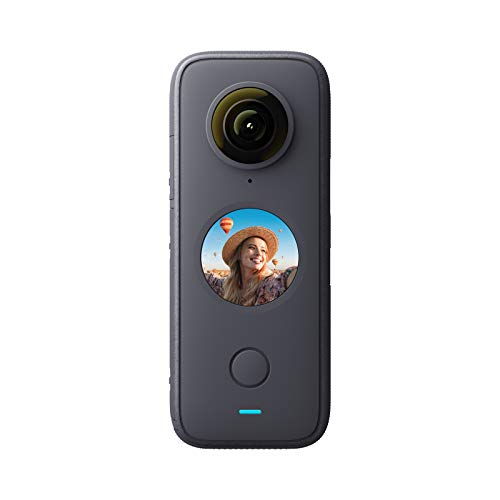
The Insta360 ONE X2 is the camera that introduced a lot of people to 360 capture in the first place, and it remains a sensible entry point for newcomers who don’t need the latest specs. You get 5.7K 360 recording, IPX8 waterproofing (meaning it can survive continuous submersion at depths beyond a meter, though specific depth ratings should be checked), and FlowState stabilization that smooths handheld footage well enough for casual sharing. The pocketable form factor slips into a jacket pocket, which matters more than spec sheets suggest when you’re deciding whether to bring the camera along.
This is a generation behind the X3 and X5 reviewed above, so resolution, sensor size, and battery life all trail the newer models. What it offers instead is a lower price and a more mature app ecosystem; Insta360 has had years to refine the editing tools for this line. Voice control, live streaming, and webcam mode add utility for creators who want flexibility without paying for flagship features. For beginners dipping a toe into 360, the ONE X2 covers the essential workflow without the financial stretch.
Notable Gains
- Lower price point makes 360 capture accessible to beginners and casual users.
- IPX8 waterproofing handles rain, splashes, and shallow submersion without a separate housing.
- Webcam and live streaming modes expand the camera’s usefulness beyond traditional video.
Less-Strong Areas
- Sensor technology and resolution fall behind the X3 and X5 generations, which matters for low-light and high-detail work.
- Battery life is shorter than newer Insta360 models, so carrying spares is wise on longer outings.
Built With In Mind
First-time 360 buyers and casual creators who want a capable camera without committing to flagship pricing.
Swap It Out When
The Insta360 X3 reviewed above is a better fit for shoppers willing to spend slightly more for newer sensors and improved image quality.
The KanDao Meeting Pro shifts the 360 conversation from outdoor adventure to the conference room, and it’s the first pick on this list designed for video calls rather than action footage. Dual 195-degree lenses combine to capture an entire meeting space, and the AI face and voice tracking automatically frames whoever is currently speaking, so remote participants feel like they’re sitting at the table rather than watching a wide shot from across the room. Smart zooming (an automatic digital crop that follows the active speaker) replaces the manual camera adjustments that interrupt meetings.
Audio is where this system earns its place over a standard webcam. Eight omnidirectional microphones (mics that pick up sound equally from every direction) capture voices from anywhere in the room, and the built-in 5W speaker handles playback clearly without needing external speakers for a small to medium group. Connectivity covers Wi-Fi, HDMI, and USB, so the camera slots into most existing meeting setups without requiring extra adapters. For hybrid teams where some members are in the room and others are remote, the 360 framing closes the gap that traditional webcams leave open.
Practical Advantages
- 360 capture with AI speaker tracking keeps remote participants engaged without a camera operator.
- Eight-mic array picks up voices from across the room, eliminating the need for separate conference microphones.
- Wi-Fi, HDMI, and USB connectivity support a wide range of meeting room configurations.
Potential Drawbacks
- Setup requires initial software configuration and account pairing, which takes longer than a plug-and-play webcam.
- The AI tracking works best in meetings with clear speaking turns, so free-form discussions may confuse the framing logic.
Whose Shelf It Belongs On
Hybrid teams and small businesses running regular video meetings where remote participants need a more inclusive view of the room.
Reach For A Different Pick When
The KanDao Meeting Ultra is a stronger fit for larger conference rooms that benefit from the built-in touchscreen and 5-in-1 system design.
The KanDao Meeting PRO 2 layers intelligence on top of the 360 foundation. Where the original Meeting Pro handled the camera side well, this version adds SmartNote, an AI meeting assistant that generates real-time translations, meeting summaries, and searchable content recaps. For teams running multilingual discussions or anyone who has ever scribbled frantic notes during a fast-moving call, that feature alone can shift how meetings feel. Noise-canceling mics keep cross-talk from drowning out the active speaker.
The 4K HDR (high dynamic range) video output preserves detail in rooms with mixed lighting, such as window-lit conference tables where standard dynamic range cameras struggle with blown-out backgrounds. Compatibility with Zoom, Microsoft Teams, and other major platforms means the camera integrates into existing workflows without forcing a switch. Compared to the Meeting Pro above, you trade some of the simpler plug-and-play appeal for a richer software feature set that justifies the upgrade for teams that actually use those capabilities.
Benefits That Matter
- SmartNote AI assistant generates summaries, translations, and searchable recaps during and after meetings.
- Noise-canceling microphones reduce cross-talk in busy conference room environments.
- 4K HDR output preserves detail across mixed lighting conditions in windowed rooms.
Some Limits To Know
- SmartNote features depend on subscription terms that may change over time, so confirming access before purchase is wise.
- Higher cost than the original Meeting Pro makes it harder to justify for very small teams or infrequent meetings.
Perfect Match For
Multilingual business teams and knowledge workers who want AI-assisted meeting documentation alongside quality 360 video capture.
Not Your Match When
The KanDao Meeting Pro is a better fit for teams that don’t need AI summaries and want a lower-priced entry into 360 conferencing.
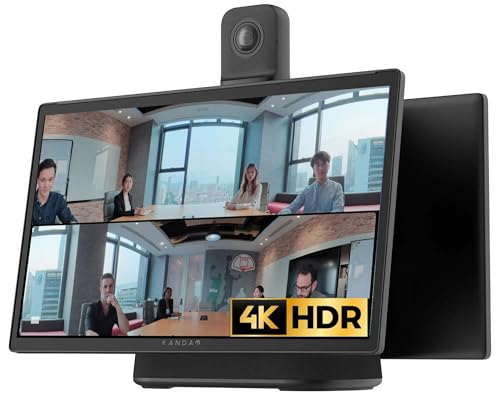
The KanDao Meeting Ultra is the most complete conferencing system on this list, designed for rooms where a simple camera isn’t enough. It combines dual 4K HDR 360 cameras, a built-in 15.6-inch touchscreen, microphones, and speakers into a single unit that sits at the center of the room. The touchscreen handles meeting controls locally, so participants can start a call without passing a laptop around, and the all-in-one design removes the cable clutter that comes with separate components.
Smart zooming follows whoever is speaking, and the system works with the major conferencing platforms used by most businesses. For medium and large meeting rooms, the camera’s 360 coverage means no one in the room gets left out of frame, and the integrated audio simplifies the room setup compared to running separate speaker and microphone hardware. Compared to the Meeting Pro 2 reviewed just above, the Ultra is less about AI meeting notes and more about physical room coverage, so the choice depends on whether your team needs better documentation or better in-room experience.
What Makes Sense
- All-in-one design combines cameras, microphones, speakers, and a 15.6-inch touchscreen in a single unit.
- Dual 4K HDR 360 cameras cover medium and large meeting rooms without manual adjustment.
- Local touchscreen controls reduce the need for a connected laptop to start or manage calls.
Things To Weigh
- Higher price point reflects the all-in-one design, so it’s overkill for small huddle rooms.
- Built-in system means less flexibility to mix and match audio or display components for specialized setups.
Who Should Grab It
Medium and large organizations outfitting dedicated conference rooms that host regular hybrid meetings with remote participants.
Skip It When
The KanDao Meeting PRO 2 is a smarter pick for teams that prioritize AI meeting documentation over physical room hardware.
What Matters Most Before Choosing 360 Virtual Tour Cameras
Start by identifying your primary capture environment, since the right 360 camera for a mountain bike is very different from the right one for a boardroom. Action-focused models from Insta360 emphasize ruggedness, waterproofing, and stabilization, while conferencing systems from KanDao prioritize audio pickup, AI speaker tracking, and platform compatibility. Mixing those priorities usually means compromises that don’t pay off, so picking a lane early keeps the choice focused.
For outdoor and travel use, sensor size and resolution matter more than most spec sheets suggest. Larger sensors gather more light, which directly improves footage shot in shaded forests, indoor venues, or post-sunset scenes. The jump from 5.7K to 8K capture also gives you more room to reframe aggressively in post-production without ending up with a soft, low-detail flat export. Replaceable lenses are worth prioritizing if you shoot in rocky or crowded environments where lens scratches are inevitable.
For real estate and virtual tour creation, software matters as much as the camera body. Reframing tools, AI-assisted editing, and stabilization all live in the companion app, and a clunky editor turns a fun camera into a chore. Look for a system whose app you find approachable, since you’ll spend more time in it than you expect. Battery life and storage handling also show up quickly on long walkthrough days.
For conferencing, audio quality deserves equal billing with video. An 8K camera with weak microphones produces calls where remote participants still struggle to hear clearly. Look for systems with multiple microphones, noise cancellation, and a built-in speaker robust enough for your room size. Platform compatibility with Zoom, Teams, and similar services saves a lot of configuration headaches.
Key Considerations Across These Picks
Common Buying Mistakes
Buying the highest resolution model without considering the workflow behind it is the most common trap. An 8K camera that produces files too large for your editing setup or storage plan creates more frustration than the extra resolution solves. Match the camera to your actual editing environment, not the spec sheet you wish you had.
Another slip is assuming all 360 cameras work well in low light. Sensor size and image processing vary significantly between models, and the difference shows up immediately in dim venues, indoor shoots, and golden-hour outdoor scenes. If your shooting schedule includes those conditions, prioritize models known for low-light performance rather than chasing peak resolution numbers.
Where The Extra Money Goes
Higher-tier models in this category typically invest in three areas: sensor quality, replaceable lens systems, and battery life. Those upgrades are tangible in daily use, since they reduce the chance of a damaged lens ending your shoot and extend the time between battery swaps. For professionals and frequent creators, those gains justify the price gap.
For casual users, the mid-tier options deliver most of the practical benefit at a more approachable price. The jump from a 5.7K to an 8K camera is meaningful for reframe-heavy workflows, but less so for users who mostly export flat clips at standard resolutions. Spending up makes sense when your output demands the extra detail; otherwise, the savings fund better accessories or longer shooting runs.
Frequently Asked Questions
What is a 360 virtual tour camera?
A 360 virtual tour camera uses two lenses placed back-to-back to capture a full sphere of footage at once, so you can reframe to any angle after recording instead of locking in a single direction during the shoot.
Can 360 cameras be used for real estate walkthroughs?
Yes, and they work especially well for listings where prospective tenants want to explore the space at their own pace. Mount the camera, walk the property once, and let viewers choose their own viewing angles later.
Do 360 cameras work in low light?
It depends on the sensor size and the camera’s image processing. Models with larger sensors and dedicated low-light modes handle dim rooms better, while older or smaller-sensor cameras produce more noise in the same conditions.
How do conferencing 360 cameras differ from action models?
Conferencing cameras focus on AI speaker tracking, multi-microphone arrays, and platform compatibility, while action models emphasize ruggedness, waterproofing, and stabilization. The internal hardware overlaps, but the optimization priorities are very different.
Is 8K resolution worth it over 5.7K?
8K gives you more room to reframe aggressively while still exporting a sharp 4K flat video. For users who reframe heavily or want to crop into specific portions of the 360 sphere, 8K pays off; for users exporting wider angles or working with smaller delivery formats, 5.7K is often sufficient.
The Takeaway
The right 360 virtual tour camera is the one that fits the way you actually capture, whether that’s a helmet-mounted adventure rig, a real estate walkthrough tool, or a conference room centerpiece. Match the camera’s strengths to your environment, and the rest of the decision tends to fall into place. Pick the model whose priorities align with yours, and the investment pays off in footage you’ll actually use.