Live production has quietly become a weekend hobby for a lot of people. Pastors streaming Sunday services, school boards broadcasting graduations, small studios chasing broadcast polish, parents documenting recitals from the back row. The right pan-tilt-zoom camera turns shaky handheld footage into smooth, professional coverage, and 4K resolution keeps everything sharp enough for cropping and replay.
The ten cameras below cover most of the realistic scenarios you’ll hit in 2026. Some lean toward church and worship setups, others toward broadcast studios or security. A few are bundles with controllers or speakerphones included, so you can stop piecing a system together from five different boxes. Skim the picks, then dig into the reviews to see which one fits your room, your workflow, and your tolerance for cable clutter.
A Quick View Of The Lineup

FoMaKo 4K 60fps NDI PTZ Camera Bundle, Supports NDI HX3 4K 60fps Output, 20x Optical Zoom, Gen 3 AI Auto-Tracking, 3G-SDI/HDMI/NDI/USB/PoE, for Church Worship & Live Studio,K600N x3+KC608,BK203

NDI PTZ Camera 4K – 30X Auto Tracking Live Streaming Cam with SDI/HDMI/IP Outputs for Church Worship School Sport Hospital Wedding(NDI HX2 and NDI HX3)

FoMaKo K600NW 4K 60fps NDI PTZ Camera, NDI|HX3 4K 60fps Output,20X Optical Zoom,Gen 3 AI Auto-Tracking, 3G-SDI HDMI NDI USB PoE, for Church Worship & Live Streaming, White

FoMaKo 60fps 4K NDI PTZ Camera 30x, Supports NDI HX3 4K 60fps Output, 30x Optical Zoom, Gen 3 AI Auto-Tracking, 3G-SDI/HDMI/USB/LAN PoE, Ideal for Church Worship & Live Studio, K630N
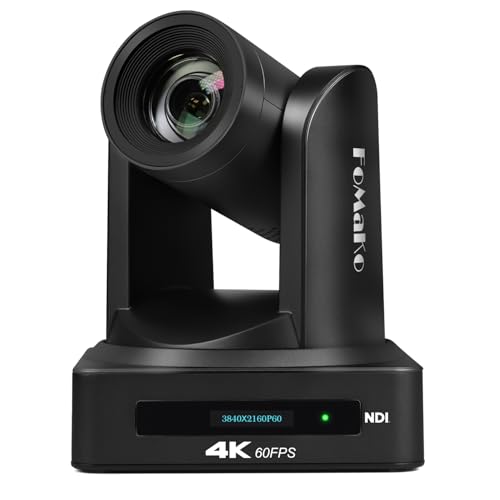
FoMaKo K800N 4K NDI PTZ Camera, Support NDI HX3 4K 60fps Video Output, 20x Optical Zoom, AI Auto-Tracking Gen 3, 3G-SDI LAN USB PoE, for Church Worship Live Services Live Studio(NDI 6 and NDI | HX3)

FoMaKo 4K 60fps NDI PTZ Camera 20X Optical, AI Auto-Tracking/Auto-Frame, 1/1.8″ CMOS 8.42MP, NDI 6 & HX3, HDMI 3G-SDI USB3.0 PoE for Live Streaming Broadcast, Large Venue Conference Room Church K820N

FoMaKo 4K 60fps 12G-SDI & Freed Broadcast PTZ Camera | 20X Optical | NDI 6 & HX3 | AI Auto-Tracking with Auto Frame | HDMI USB3.0 PoE+ for Live Production, OB Van & Virtual Studios

4K Conference Room Camera System AI Auto-Tracking 4K PTZ Camera 3X Optical Zoom 93° Wide Angle USB3.0 HDMI Output and Wireless Bluetooth Speakerphone with Mics for Conferencing Worship Church Medical
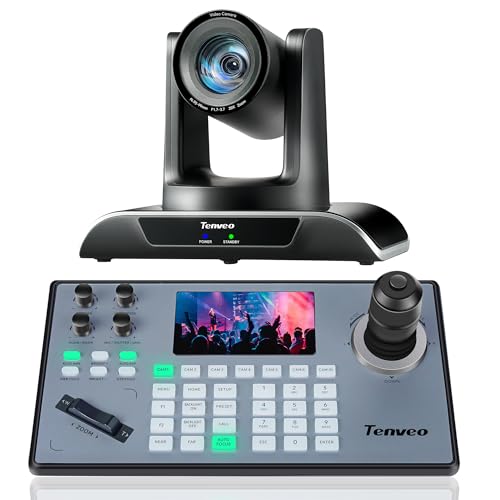
Tenveo PTZ Camera and Controller – 20X AI Humanoid & Face Auto-Tracking PTZ Camera with HDMI/USB3.0/LAN(PoE) and NDI PTZ Controller Joystick Keyboard Bundle for Church Worship Service Live Streaming

Defender AI 4K Guard Ultra-Charge AOV Wireless Battery Security Camera, 24/7 Recording, 360° PTZ, AI Tracking, Setup in 5 Minutes, 10,000mAH Battery, 5W Solar Panel, Guard App (1-Pack, 64GB SD Card)
The Picks, Examined More Closely
Three cameras in one box changes the math for a mid-size sanctuary or a small studio that’s been limping along with one camcorder on a tripod. The FoMaKo BK203 bundle ships three K600N PTZ heads paired with a KC608 controller, so a single volunteer can run a wide, a tight, and a roamer without juggling three remotes. Each head outputs 4K at 60fps over HDMI, NDI HX3, or USB 3.0, and a 20X optical zoom keeps the pastor readable from the back row.
Gen 3 AI auto-tracking follows a presenter without needing a dedicated operator, which is the kind of feature that pays off the moment your only camera person calls in sick. PoE (Power over Ethernet) support means a single Ethernet run handles video, control, and power, so cable clutter drops sharply compared to a typical SDI rig.
Strengths Worth Knowing
- Three-camera coverage out of the box, including a controller, removes the usual piecemeal buying experience.
- Triple 4K60 output paths (HDMI, NDI HX3, USB 3.0) let the same camera feed a recorder, a stream, and a confidence monitor simultaneously.
- 20X optical zoom reaches a balcony seat without forcing you into digital zoom artifacts mid-service.
- Gen 3 AI tracking holds a moving speaker reliably, so a one-person volunteer team can still produce a polished service.
Things To Consider
- Three network-capable PTZ heads on the same switch demand real bandwidth planning, so older unmanaged switches tend to choke.
- Installation usually wants ceiling or wall mounts that are sold separately, and a basic ladder setup rarely survives a windy outdoor event.
Who Should Grab It
A worship tech, school AV lead, or small studio owner who wants a turnkey three-cam rig without sourcing each piece separately.
Look Elsewhere When
A single fixed room with no operator needs the simpler AVKANS NDI PTZ Camera 4K (pick 2) instead, since the extra heads just sit unused.
When the room is large enough that a 20X zoom starts to feel tight, the AVKANS steps in with a longer 30X reach and flexible output options. A 1/2.7-inch Panasonic CMOS sensor drives 1080p over SDI alongside 4K-capable HDMI and IP streams, and the camera speaks both NDI HX2 and NDI HX3, which keeps it friendly with older NewTek gear that still lives in many volunteer-run facilities.
Auto-tracking follows a person across the frame without manual joystick nudging, and PoE support means one cable does the heavy lifting. RTSP and RTMP streaming are baked in, so it pushes directly to YouTube, Facebook, or a private CDN without a middleman encoder.
Reasons It Performs
- 30X optical zoom pulls a speaker in from the far end of an auditorium without obvious digital grain.
- Quad output (SDI, HDMI, IP, NDI) covers a legacy switcher and a modern NDI workflow at once, useful for hybrid rooms.
- Built-in RTSP and RTMP cut the encoder out of small streaming setups.
- Ceiling or desktop mounting flexibility helps in tight control rooms or temporary event setups.
Honest Caveats
- Some users report that the auto-tracking occasionally loses fast-moving subjects across stage lighting changes.
- Documentation leans on the minimal side, so first-time PTZ installers may need to budget extra time for IP configuration.
Best Suited To
A venue producer, school broadcaster, or hospital AV team covering wide rooms where reach matters more than absolute pixel count.
Skip It When
A multi-camera sanctuary that wants matched looks should grab the FoMaKo BK203 bundle (pick 1) for visual consistency across heads.
The K600NW is essentially the same imaging engine as the BK203 bundle, dressed in a white housing that disappears into a sanctuary ceiling better than the typical matte black. If your room has pale walls, a black PTZ head tends to read as a visual distraction in wide shots, and the white finish solves that quietly.
Output options mirror the larger K600N, including uncompressed 4K60 over HDMI and NDI HX3 plus 1080p60 over 3G-SDI. The 20X optical zoom and Gen 3 AI auto-tracking keep this camera firmly in “set it and forget it” territory for weekly services.
Where It Excels
- White housing blends into ceiling tile and trim in modern sanctuaries, reducing on-camera clutter.
- Triple simultaneous output (HDMI, NDI HX3, USB 3.0) at full 4K60 keeps recorders, streams, and monitors fed.
- Gen 3 AI tracking handles slow walks across a stage without manual nudging, which suits volunteer operators.
- PoE simplifies installation to a single Ethernet cable run.
Points To Note
- White finish shows dust and ceiling stains more readily than black, so routine cleaning belongs on the maintenance schedule.
- The single-head package means you still need to bring your own controller, which the BK203 bundle already includes.
Who It Suits Best
A worship leader or venue manager who needs one broadcast-quality camera and prefers equipment that fades into the background visually.
Consider Something Else When
A growing church planning multiple matched heads should pick the FoMaKo BK203 bundle (pick 1) for a uniform look and a controller in the box.
The K630N is the FoMaKo answer to long-throw rooms where 20X just isn’t enough. The 30X optical zoom is paired with a small LCD status screen on the back of the unit, which is a thoughtful touch when the camera lives in a hard-to-reach ceiling mount, since you can confirm IP, resolution, and tracking mode at a glance without dragging out a laptop.
Like its siblings, the K630N supports simultaneous 3G-SDI, HDMI, USB, and NDI HX3 output, plus PoE for one-cable installs. Gen 3 AI tracking means an operator isn’t strictly required to keep a moving subject framed.
Practical Pluses
- 30X optical reach from a back-of-room mount keeps a speaker tight without digital zoom artifacts.
- Onboard LCD saves service-day troubleshooting when the camera is mounted 20 feet up.
- Triple output paths plus PoE cover modern and legacy workflows in one box.
- Tracking behavior is consistent with other Gen 3 FoMaKo cameras, so multi-cam installs share a familiar feel.
Where It Is Less Suited
- At 30X, even small vibrations show up in the image, so a rigid mount is more important than usual.
- The price step over 20X models only pays back in venues that use that extra reach.
Whose Shelf It Belongs On
An auditorium, conference hall, or large classroom where the camera lives 50+ feet from the subject.
Swap It Out When
A smaller sanctuary with a short throw should grab the FoMaKo K600NW (pick 3) and save some budget for lighting instead.
The K800N is the camera to pick when the production workflow is already built around NDI tools and the budget doesn’t have room for a surprise software license later. Unlike earlier models, the K800N ships with NDI 6 included, which means it drops straight into a vMix, OBS, or TriCaster rig without an extra purchase step.
Image-wise, you’re looking at 4K60 over HDMI or LAN, 4K30 over USB, and 1080p60 over SDI or NDI, so the same camera can drive a recorder and a stream at their respective best resolutions. PoE keeps the install tidy.
The Helpful Details
- Bundled NDI 6 license removes a hidden cost that often surprises first-time NDI buyers.
- Multi-resolution output (HDMI/LAN at 4K60, USB at 4K30, SDI/NDI at 1080p60) covers the typical production stack.
- 20X optical zoom suits small and mid-size rooms without overspending on reach.
- PoE support keeps cabling to one run per camera, easing ceiling and truss installs.
A Few Limitations
- USB tops out at 4K30, which matters if a streaming PC expects a 60fps feed over USB.
- The Gen 3 AI tracking works best with one subject; group shots can confuse the algorithm.
The Right Fit
A studio operator or IT volunteer building a wired NDI workflow on a tight, all-in budget.
A Better Fit Elsewhere
A USB-only streaming setup that doesn’t need NDI at all should grab the TONGVEO conference room kit (pick 8) for a simpler plug-and-play experience.
Feature Snapshot
The K820N pulls ahead of the standard K-series FoMaKo cameras with a noticeably larger 1/1.8-inch CMOS sensor at 8.42 megapixels. That extra surface area shows up as cleaner low-light performance and more usable detail at the long end of the 20X optical plus 16x digital zoom range, which matters in dim sanctuaries or evening conferences.
A broadcast-grade white balance control helps color match across multiple cameras on the same stage, and both NDI 6 and NDI HX3 are supported. Auto-frame joins auto-tracking, so the camera doesn’t just follow a person but also tightens or widens to fit the scene.
The Case For It
- Larger sensor gathers more light, improving image quality in moody sanctuary or stage setups.
- Combined optical and digital zoom reaches across a large conference room while preserving usable detail.
- Auto-frame complements auto-tracking, which removes more of the operator’s day-to-day work.
- White balance control simplifies multi-cam color matching for mixed-camera live shows.
Trade-Offs To Consider
- The price climbs noticeably over the K600N line, so smaller budgets may feel the step.
- Sensor heat and power draw are slightly higher than smaller-chip models, which can shorten ceiling-mount service intervals.
Best Suited To
A production company, university AV team, or large conference room that values low-light image quality.
Reach For A Different Pick When
A tight-budget church should grab the FoMaKo K600NW (pick 3) and put the savings toward lighting upgrades.
Virtual production studios and outside broadcast vans live or die by clean camera tracking data, and the FreeD protocol built into this camera sends PTZ position, rotation, and lens data directly to Unreal Engine or another AR/VR pipeline over IP. No external encoder box is required, which is unusual at this price tier.
12G-SDI is the headline upgrade over the rest of the FoMaKo family. It carries uncompressed 4K60 over a single BNC cable, which is the format most professional broadcast switchers expect, and HDMI plus USB 3.0 plus NDI 6 cover the rest of the workflow.
What It Does Well
- Built-in FreeD protocol feeds virtual-set engines like Unreal without extra hardware.
- 12G-SDI carries 4K60 over one BNC cable, simplifying OB van and switcher workflows.
- Auto-frame plus auto-tracking reduces operator load on scripted shows.
- PoE+ support handles the slightly higher power draw that virtual-set use demands.
Some Limits To Know
- FreeD benefits only pay back if your pipeline actually uses AR/VR tracking data.
- The broadcast-oriented I/O assumes you already own a 12G-SDI switcher, which most small studios don’t.
Made For
A broadcast engineer, OB van crew, or virtual production studio building AR-driven sets on a single-camera PTZ budget.
Not Your Match When
A church or school that just needs a clean stream should grab the AVKANS NDI PTZ Camera 4K (pick 2) and skip the broadcast extras.
Key Specs
The TONGVEO bundle breaks from the worship-studio pattern with a setup aimed at hybrid meetings, telehealth, and small worship spaces. The camera itself pairs a 3X optical zoom with a generous 93-degree wide angle, which is unusual for PTZ cameras and a smart choice for huddle rooms where everyone needs to fit in frame.
The Bluetooth speakerphone ships in the same box, so a small room gets matched video and audio without sourcing two separate systems. USB 3.0 and HDMI outputs both come standard, and the camera’s AI auto-tracking keeps a presenter framed without dedicated camera work.
Useful Highlights
- Wide 93-degree field of view captures an entire conference table without panning.
- Matched Bluetooth speakerphone removes the guesswork of mixing mics and cameras from different brands.
- USB 3.0 and HDMI outputs cover laptop-based video calls and room displays at the same time.
- AI auto-tracking keeps a moving presenter framed during hybrid meetings.
What To Weigh
- 3X optical zoom is short compared to worship-grade cameras, so large sanctuaries will need the FoMaKo K630N (pick 4) instead.
- Speakerphone audio quality is acceptable for meetings but modest for music-heavy worship use.
Perfect Match For
A remote or hybrid office, small clinic, or congregation running video calls alongside weekly services.
Where Another Pick Suits Better
A larger worship venue should swap to the FoMaKo K600NW (pick 3) for higher zoom reach and NDI workflow support.
Feature Card
The Tenveo bundle is built for the solo operator who wants real tactile control without learning a software switcher. The included KB200PRO joystick keyboard has a 5-inch LCD preview screen and a 4D joystick, so you can see what each camera is framing and nudge it precisely between segments.
The VHD20H camera itself carries 20X optical zoom, AI humanoid and face auto-tracking, and HDMI, USB 3.0, and LAN outputs with PoE support. The tracking behaves well on faces specifically, which helps when presenters turn sideways and lose their shoulders.
Everyday Wins
- Joystick controller included, so you can run multi-cam productions without extra software.
- AI humanoid and face tracking stays locked on a presenter who pivots during a talk.
- Three output paths plus PoE cover most streaming and recording setups.
- Real-time preview screen on the controller speeds up framing decisions.
Points To Keep In Mind
- Single-camera package means additional cameras require separate purchases, unlike the FoMaKo BK203 (pick 1).
- Tracking may drift in crowded scenes with multiple moving faces, so for choirs a manual operator still helps.
Who Will Love This
A small church, content creator, or live streamer who runs the whole production solo and prefers hardware controls.
Another Choice May Suit
A multi-camera sanctuary that wants three matched heads should grab the FoMaKo BK203 (pick 1) for a uniform multi-cam setup.
The Defender AI 4K Guard belongs on this list because not every PTZ camera is destined for a sanctuary ceiling. This one is built to live outdoors on a fence post or a tree, recording 24/7 with a 10,000mAh battery and a 5W solar panel that keeps it topped up without running a single cable.
A 360-degree pan-tilt range covers an entire yard or driveway from a single mount point, and AI tracking follows people or vehicles as they move. Setup takes a few minutes, and a 64GB SD card ships in the box, so local recording is ready on day one.
What Pays Off
- Solar plus battery removes the need for any power or network cabling outdoors.
- 360-degree PTZ coverage from a single mount reduces blind spots in large yards.
- AI tracking flags people or vehicles moving through the frame.
- Included 64GB SD card covers local recording without a separate purchase.
Factors To Consider
- Wi-Fi range becomes the limiting factor in remote installations, so a mesh access point may be required.
- Heavy overcast weeks can drain the battery faster than solar recharges, so a south-facing mount placement matters.
Right Fit For
A homeowner, small business, or remote site that wants 4K PTZ coverage where running cables isn’t realistic.
Consider Something Else When
An indoor live production needs the FoMaKo K820N (pick 6) instead, since this Defender model is tuned for outdoor security rather than broadcast output.
Quick Facts
What To Weigh Before Buying a 4k PTZ Camera
Resolution, Frame Rate, and Bandwidth
4K at 60fps gives you sharp motion, which matters during fast church segments, school plays, or sports broadcasts. 4K at 30fps is usually fine for talking-head content, but the gap becomes obvious in motion-heavy scenes. Plan for serious network bandwidth when several 4K PTZ cameras run simultaneously, and prioritize a managed gigabit switch for any multi-camera install.
Optical Zoom vs. Digital Zoom
Optical zoom uses lens movement to bring subjects closer without losing detail, while digital zoom just crops pixels and looks soft fast. A 20X optical zoom covers most sanctuaries and conference rooms, while 30X starts to matter for large auditoriums and gymnasiums. The FoMaKo K820N (pick 6) adds a 16X digital zoom on top, useful in a pinch but not something to rely on for critical shots.
Output and Workflow Compatibility
SDI is the broadcast standard and runs long cable distances cleanly. HDMI works for short runs to displays and recorders. NDI HX3 (Network Device Interface) carries video, audio, and control over a single Ethernet cable, which is why so many worship and studio cameras ship with it. USB output is the easiest path to a laptop for streaming, but the cables are short. Match the camera’s outputs to the gear you already own, and your install day stays calm.
Auto-Tracking and Operator Load
AI auto-tracking has gotten genuinely useful in recent generations. It tracks presenters, follows faces, and reframes automatically, which lets a volunteer team run a polished production. The trade-off is that group scenes, fast movement, or heavy backlight can confuse the algorithm. For choirs, dance recitals, or sports with multiple subjects, having a manual operator on a joystick like the Tenveo KB200PRO (pick 9) keeps things reliable.
Power, Mounting, and Environment
PoE (Power over Ethernet) lets one cable carry power and data, which simplifies ceiling and outdoor installs. Confirm the camera supports the PoE standard your switch delivers. Outdoor models like the Defender AI 4K Guard (pick 10) sidestep wiring entirely with solar and battery, but indoor broadcast cameras assume a controlled climate and a sturdy mount. Always confirm the mount weight rating matches the camera body, especially for truss installs.
Key Considerations Across These Picks
Where Shoppers Go Wrong
A common trap is buying a 4K PTZ camera without checking the workflow it actually needs. Cameras that push 4K60 over HDMI but only 1080p over USB can disappoint laptop streamers, while a USB-first camera like the TONGVEO (pick 8) frustrates broadcast switcher operators. Cable runs longer than 15 feet also tend to fail over HDMI without active extenders, so plan your SDI, NDI, or fiber path before unboxing. Mounting location matters too: a back-of-room 30X zoom on a vibrating truss can look handheld, even on paper.
What The Higher Tier Buys
Spending more in this category usually buys larger sensors, longer optical zoom, more simultaneous outputs, and bundled licenses like the NDI 6 included with the FoMaKo K800N (pick 5). Premium cameras like the K820N (pick 6) and the FreeD-equipped 12G-SDI model (pick 7) add broadcast-grade color control and virtual-set data that pays off only in specific production environments. For most sanctuaries, schools, and small studios, mid-tier cameras deliver the meaningful upgrades, and the top tier earns its keep in studios with matching switchers and pipelines.
Frequently Asked Questions
What does PTZ mean on a camera?
PTZ stands for pan, tilt, and zoom. The camera head can rotate horizontally, tilt vertically, and change focal length, all usually controlled remotely by joystick, software, or AI auto-tracking.
Do I really need 4K for live streaming?
Not always. 1080p60 still looks clean at typical streaming bitrates. 4K earns its keep when you plan to crop, zoom in post, or future-proof recordings for larger displays. For pure streaming to social platforms, 1080p60 can be the smarter choice.
What is NDI and do I need it?
NDI is a network protocol that sends video, audio, and control over standard Ethernet. It’s a huge convenience in multi-camera setups because one cable replaces several. You only need it if your switcher, recorder, or streaming PC supports NDI, otherwise HDMI or SDI works fine.
Can a PTZ camera work outdoors?
Standard indoor PTZ cameras should stay indoors, since humidity, temperature swings, and dust shorten their life quickly. Outdoor-rated models like the Defender AI 4K Guard (pick 10) are built for sun, rain, and cold with sealed housings and weatherproof connectors.
How hard is it to install a PTZ camera?
Ceiling and truss mounts require basic rigging knowledge and a solid surface. PoE cameras simplify things to one Ethernet run per camera. Wall or shelf mounts in small rooms take only a few minutes. For anything beyond a desktop setup, a professional AV installer saves headaches.
Closing Remarks
The right 4K PTZ camera depends less on spec sheets and more on the room, the team, and the existing gear. Match the outputs to your switcher or streaming PC, pick zoom range for your room size, and let auto-tracking carry the load when volunteers are thin. Run through the picks, weigh your real workflow, and the choice usually makes itself.