You don’t need a four-figure cinema camera to start publishing. Plenty of sub-$500 models now ship with flip screens, 4K recording, dual lenses, and the kind of autofocus that keeps your face sharp when you’re moving around the frame. The trick is matching the tool to the work you actually plan to shoot, whether that’s a daily vlog, a webcam upgrade for live streams, or weekend photography for your Etsy shop. This roundup walks through nine capable, approachable options so you can pick the camera that fits the channel you’re building.
A Snapshot Of The Selections
Sony ZV-1F Compact Digital Camera 4K Video Black

Camcorder Video Camera 4K Ultra 80MP Vlogging

Yatao 6K WiFi Flip Screen Digital Camera

Razer Kiyo V2 Webcam 4K 30Fps (White)
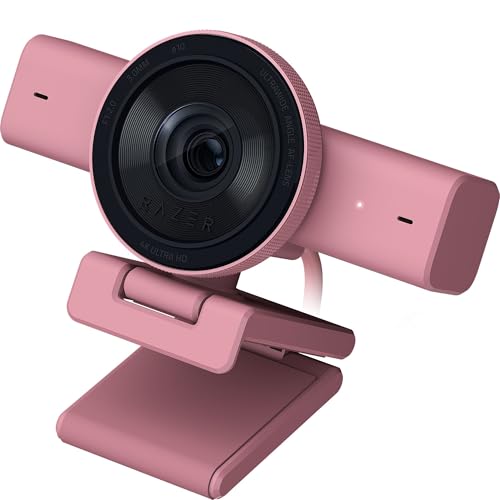
Razer Kiyo V2 Webcam 4K 30Fps (Quartz)
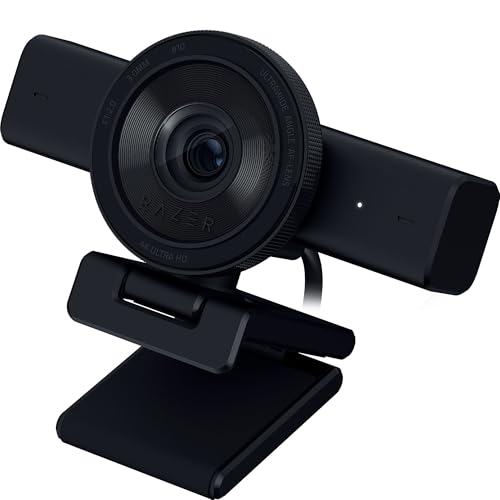
Razer Kiyo V2 Webcam 4K 30Fps (Black)

Gavonde 8K 64MP WiFi Camera with 4″ Touchscreen

Saneen 8K WiFi Digital Camera for Vlogging

Xoieod Full HD 1080P 36MP Digital Video Camera
A Closer Look At Each Pick
The Sony ZV-1F earns the top slot for a reason, and once you’ve held one, the appeal is obvious. The body slips into a jacket pocket, yet inside sits a 1-inch sensor paired with a fixed ultra-wide lens, the kind of combo that lets you talk to the camera from arm’s length without your forehead stretching across the frame.
Compared with the bulkier camcorder picks later in this list, the ZV-1F leans into a “point and create” philosophy that suits solo shooters. Eye-detection autofocus locks onto your face, the touchscreen flips out for self-recording, and the physical record button is right where your thumb lands naturally.
The Practical Payoff
- The 1-inch sensor pulls in noticeably more light than the smaller sensors inside most budget camcorders, so indoor shots don’t look grainy.
- The fixed ultra-wide lens removes the guesswork of framing: you can hold the camera out and still capture your full scene.
- Eye-AF tracking keeps a moving subject sharp without you touching the screen, which matters for walk-and-talk vlogs.
- The pocketable body means you actually carry it, and gear that travels with you tends to get used.
Things To Consider
- The fixed lens means there’s no optical zoom, so distant subjects stay distant unless you crop in post.
- Some owners report the battery draining quickly during long 4K shoots, so a spare battery is a smart add-on.
Key Specs
Who It Suits Best
Solo creators filming talking-head content, daily vlogs, or product reviews who want image quality that outclasses a phone without hauling a rig.
A Better Fit Elsewhere
Streamers tied to a desk setup will find the Razer Kiyo V2 (Black) a more natural fit, since webcams mount directly above a monitor.
This camcorder leans traditional, the kind of shape you’d recognize from a decade of family-recording devices. Peryoua builds it for users who want long zoom reach and a comfortable handheld grip rather than pocket-friendly portability. The zoom range is where it differentiates from the Sony ZV-1F we just covered, since fixed-lens compacts can’t compete here.
It’s worth knowing that “80MP” in budget camcorder listings refers to interpolated still images (a software upscaling process that guesses extra pixel detail), not a true high-resolution native sensor. For video, the 4K frame rate of 30fps is the more useful number.
Positive Points
- The 18x digital zoom lets you tighten the frame on a subject across the room without physically moving closer, useful for events.
- Handheld form factor with a side-flipping display works well for longer recording sessions where a touchscreen-only camera would tire your arm.
- Setup menus tend toward the approachable side, so first-time creators can hand it to a family member without a tutorial.
Worth Noting
- Digital zoom (magnification done in-software) degrades image quality at the high end, unlike optical zoom (true lens magnification) on more expensive cameras.
- The plastic body feels light in hand, which helps during long shoots but can read as less premium on screen.
- Low-light performance will likely disappoint compared to the Sony ZV-1F’s larger sensor.
Right Fit For
New YouTubers who film school events, family gatherings, or travel vlogs and prefer the comfort of a traditional camcorder grip.
Consider Something Else When
If you’re walking-and-talking in tight indoor spaces, the Sony ZV-1F will deliver cleaner footage and slip into a pocket when you’re done.
The Yatao lands in that sweet spot between phone shooting and a “real” camera. You get a flip-out screen, an external-style microphone and fill light included, plus WiFi for moving clips to your phone without a cable. For someone just starting a TikTok or Instagram channel, that bundle removes several gear purchases at once.
Where the previous Peryoa leaned on zoom, this one leans on connectivity and creator accessories. The dual-lens setup means you can shoot yourself with the front-facing camera and the wider scene with the rear one without swapping gear.
Well-Handled Touches
- The included fill light is genuinely useful in dim rooms where a phone flash would blow out your face.
- WiFi transfer means you can upload a clip to your channel within minutes, which matters when you want to ride a trending topic.
- The flip screen rotates for self-recording, eliminating the awkward “am I framed?” guesswork.
- 16x digital zoom adds framing flexibility for travel content where you can’t always get closer.
- The included external microphone improves vocal clarity compared to built-in camera mics at this price tier.
Trade Offs
- The 6K label typically refers to interpolated output rather than a true 6K native sensor, so don’t expect cinema-grade sharpness.
- Plastic construction is light in the bag but may not survive heavy daily travel without a case.
Key Specs
Who Should Grab It
Short-form video creators who want a single box that covers shooting, lighting, and audio without buying three separate items.
Skip It When
You already own a good external mic and prefer better low-light performance; the Sony ZV-1F handles dim rooms more gracefully.
The Kiyo V2 in White is the same hardware as the Black and Quartz versions we’ll see shortly, just wrapped in a finish that suits a brighter desk setup. For creators who stream from a light-toned home office or a shared workspace, the color choice isn’t vanity: it stops the webcam from becoming the loudest object in the frame.
Razer targets this squarely at the streaming crowd, and you can feel that intent in the feature set. The AI auto-framing keeps you centered when you lean back or stand up, and the Sony STARVIS sensor is the same image sensor technology often praised for low-light sensitivity in security cameras.
Features That Help
- AI auto-framing follows your movement so you don’t have to sit frozen in the center of the shot.
- The STARVIS sensor captures more detail in dim rooms than typical laptop webcams.
- Plug-and-play USB connection means no driver hunting before your first stream.
Room For Improvement
- Webcams are bound to your desk, so this won’t replace a handheld camera for B-roll or outdoor work.
- The 30fps ceiling at 4K resolution may feel limited for creators who want smoother motion.
Built With In Mind
Live streamers and remote professionals who want a clean, bright aesthetic for video calls and Twitch sessions.
Look Elsewhere When
You shoot handheld lifestyle content or need to leave the house; the Sony ZV-1F or Yatao 6K serve that work better.
The Quartz finish is the soft-pink sibling in Razer’s three-color Kiyo V2 lineup, and it earns its slot by serving a real aesthetic: creators who curate their on-camera backdrop down to the keyboard now have a webcam that doesn’t clash. The imaging hardware is identical to the White and Black variants covered above, so the choice here is purely about how it looks on your monitor.
Setup is the same simple USB experience: clip it onto a monitor, run the cable to your computer, and the OS recognizes it without extra software. For most streamers, that’s the whole installation story.
What Helps Most
- The pastel finish blends into feminine or minimalist desk setups rather than fighting them.
- AI auto-framing keeps you centered when you gesture during a stream.
- STARVIS sensor tech improves low-light clarity, which matters for evening streams.
Honest Caveats
- Color choice adds no imaging benefit, so this only makes sense if the aesthetic matches your setup.
- The 30fps at 4K may leave motion-heavy gameplay looking slightly soft.
Whose Shelf It Belongs On
Creators who design their workspace with intention and want every visible accessory to feel intentional.
Reach For A Different Pick When
You’re filming anything outside a desk environment; the Xoieod Full HD camcorder handles handheld and event work.
The Black version is the default pick for most gamers, and it’s the version you’ll most often see in Twitch setup photos. Razer built the Kiyo V2 line for late-night sessions where the only light in the room is the glow of a monitor, and the Black finish disappears against a dark backdrop while the sensor does the heavy lifting.
Compared with the White and Quartz variants just covered, this is the version with the broadest appeal: it pairs with any RGB setup, doesn’t draw attention away from the stream layout, and matches most existing Razer peripherals if you’re already in that ecosystem.
Useful Touches
- The 4K resolution at 30fps gives chat-side viewers a noticeably sharper image than 1080p webcams.
- AI auto-framing tracks movement during energetic gameplay segments so you stay in frame.
- STARVIS sensor pulls in usable footage under monitor-only lighting conditions.
Points To Keep In Mind
- Confined to desktop use, so this won’t substitute for a dedicated handheld camera.
- The 30fps limit at 4K is fine for most streams, but competitive FPS players may prefer higher frame rates at lower resolution.
- You’ll likely want to tweak lighting or background to match the dark finish.
Key Specs
Made For
Twitch and YouTube gamers who want their facecam to look clean without buying a DSLR setup.
Swap It Out When
You’re primarily shooting outdoor or handheld content; the Sony ZV-1F gives you that freedom without losing image quality.
Gavonde packs a generous feature list into one box: a 4-inch touchscreen (large for the category), dual-lens switching, 16x zoom, and a 3000mAh battery that comfortably outlasts a typical shoot day. The 32GB card in the package means you can start shooting the moment the box opens.
The 8K and 64MP labels, like most budget cameras at this tier, almost certainly refer to interpolated output rather than a native 8K sensor. Real-world stills and video will look detailed at typical viewing sizes, but don’t expect the resolution headroom to matter for social posts where compression eats the extra pixels anyway.
Why It Works Well
- The 4-inch touchscreen is large enough to review clips comfortably, which smaller 2.7-inch screens can’t match.
- Dual-lens design lets you toggle between wide and close-up framing without swapping cameras.
- The 3000mAh battery supports extended shooting sessions away from a charger.
- Included 32GB storage means zero extra purchases to start filming.
Some Limits To Know
- Higher resolution modes often require well-lit conditions, and indoor performance may disappoint.
- Touchscreens collect fingerprints quickly, so a microfiber cloth is worth keeping in the bag.
- Plastic construction feels light but isn’t built for rough handling.
Key Specs
Best Suited To
Hobbyist photographers and vloggers who want a touchscreen-first workflow and don’t want to buy a memory card on day one.
Not Your Match When
You need reliable autofocus for fast-moving subjects; the Sony ZV-1F’s Eye-AF is the more dependable system for that.
Saneen positions this as an entry-level camera for creators who want WiFi file transfer without paying for premium build quality. The headline numbers echo the previous Gavonde (8K video, 88MP stills), though the implementation lands firmly in the budget tier. For students or first-time creators, that’s often the right trade-off.
WiFi is the real differentiator at this price point, since older budget cameras still expect a USB cable to move files. Saving two minutes per clip adds up over a month of regular uploads.
Noteworthy Benefits
- WiFi transfer speeds up the path from camera to phone, which matters when you’re posting same-day content.
- The webcam function lets you use it as a basic streaming camera, adding flexibility.
- The compact body fits in a small bag, useful for commuters who don’t want a dedicated camera pouch.
Less Ideal Details
- Image quality drops noticeably in low light, so dim indoor shoots will look grainy.
- Autofocus is slower than what you get from the Sony ZV-1F or even the Yatao 6K.
- Build materials are light enough that you’ll want to handle it gently.
Perfect Match For
Students and casual creators building a first channel who need wireless transfer more than premium imaging.
Another Choice May Suit
Creators who shoot indoors often should look at the Sony ZV-1F, which handles dim rooms far more gracefully for a modest step up.
The Xoieod rounds out the list with a feature you don’t often see in this category: infrared night vision (a mode that uses invisible IR light to capture footage in total darkness). For event videographers, parents filming sleeping babies, or travelers documenting dim venues, that’s a genuinely useful inclusion rather than a marketing extra.
It records at Full HD 1080p rather than 4K, which is a deliberate trade: lower resolution typically means better low-light performance and smaller files. The 270-degree rotating screen is another practical touch for overhead or low-angle framing.
Positive Takeaways
- Night vision expands what you can capture into conditions other budget cameras can’t handle at all.
- The 3-inch screen rotates 270 degrees for overhead shots, selfies, and vlog-style framing.
- Full HD recording keeps file sizes manageable for editors working on modest hardware.
Practical Considerations
- 1080p resolution limits cropping flexibility in post compared to 4K alternatives.
- You’ll want to budget for an SD card since one isn’t typically included in the box.
The Right Fit
Event videographers, parents, and travelers who shoot in varied lighting and value night vision over maximum resolution.
Where Another Pick Suits Better
For daytime vlogging where 4K cropping matters, the Gavonde 8K camera offers more resolution headroom for similar money.
What Matters Most Before Choosing Affordable Cameras For Content Creators
Sensor Size And Low-Light Performance
The single biggest spec to understand is sensor size. A 1-inch sensor (the kind inside the Sony ZV-1F) gathers dramatically more light than the small sensors found in budget camcorders and entry-level point-and-shoots. That translates directly to cleaner indoor footage, less grain when the lights dim, and better background blur for that “professional separation” look. If your shooting happens mostly indoors or at night, prioritize sensor size over megapixel counts.
Resolution And Frame Rate Tradeoffs
Higher resolution numbers grab attention in listings, but real-world use depends on the platform. YouTube and Instagram compress everything anyway, so 4K matters mostly when you want to crop or stabilize footage in post. Frame rate (measured in fps, or frames per second) matters more for motion: 30fps is standard, 60fps gives smoother playback, and anything higher helps slow-motion shots. Match the specs to where your footage actually lives.
Form Factor And Daily Use
A camera you’ll carry is better than one that stays in a drawer. Compact bodies like the Sony ZV-1F slip into a pocket, so they tend to get used. Camcorders like the Peryoa are comfortable for long sessions but live in a bag. Webcams like the Razer Kiyo V2 are perfect for desk work but useless outdoors. Pick the shape that matches your shooting style, and you’ll shoot more often.
Audio And Accessories
Built-in mics on budget cameras are usually passable at best. If you record talking-head content, an external mic (or a bundle that includes one, like the Yatao 6K) makes a bigger difference than upgrading the camera itself. Also check whether batteries, memory cards, and lights come in the box; a camera that ships ready-to-shoot saves both money and shopping trips.
Key Considerations Across These Picks
Common Shopping Slip Ups
The most frequent mistake is chasing megapixel and resolution numbers while ignoring sensor size and lens quality. A 64MP camera with a tiny sensor will produce noisier, less-detailed images than a 20MP camera with a larger one. Another trap is forgetting to budget for an SD card, spare battery, or basic tripod, since many cameras ship without essentials. Finally, buying a webcam when you actually need handheld mobility (or vice versa) leaves you with gear that gathers dust. Match the form factor to how you plan to shoot.
What The Higher Tier Buys
Stepping up to premium cameras typically delivers three concrete benefits: a larger sensor for cleaner low-light footage, faster and more accurate autofocus (especially for moving subjects), and better build quality that survives daily handling. For creators making money from their channel, those upgrades pay off through faster editing (less time fixing footage), higher viewer retention (cleaner video keeps people watching), and longer gear lifespan. For hobbyists shooting casual content, the budget tier covered here often produces footage that’s more than good enough to start.
Frequently Asked Questions
Do I need 4K resolution as a beginner creator?
Not strictly. Full HD 1080p looks great on phones and most laptops, and many successful channels built their audience on 1080p footage. Choose 4K only if you plan to crop or reframe shots in post-production.
Can a budget camera work for live streaming?
Yes, though the setup matters. Webcams like the Razer Kiyo V2 plug directly into a computer and work with streaming software immediately. Standalone cameras often need a capture card (an adapter that converts a camera’s HDMI output into a USB signal your computer can use) to feed video into a stream.
How important is a flip-out screen for vlogging?
Very important if you film yourself. A flip screen lets you confirm framing, focus, and exposure while you record. Cameras without one force you to guess or use a separate monitor, which slows your workflow.
What accessories should I buy first with a new camera?
A spare battery, an SD card (if not included), and a small tripod cover the basics. For talking-head content, an external microphone improves audio quality more visibly than any camera upgrade at the same price.
Are webcam cameras good enough for YouTube?
For sit-down commentary, tutorials, and live streams, a quality webcam produces clean, professional footage. For travel vlog, fitness content, or anything shot outside a desk, a handheld camera gives you the flexibility a webcam physically cannot.
Closing Thoughts
The right camera is the one that gets used. Start with the form factor that matches your shooting style, pick the best sensor you can afford in that shape, and don’t overspend on resolution your platform will compress anyway. As your channel grows, you can always upgrade, and you’ll upgrade with a clearer sense of what you actually need.