Thermal imaging used to cost more than a used car. These days, a useful handheld unit slides comfortably into a tool budget, and a few clever USB-C models turn a phone into a heat-detecting workhorse. The picks below cover the spread: standalone handhelds for serious diagnostics, lightweight units for quick scans, and plug-in modules for the homeowner who just wants to find the drafty window or the missing cat. Every item below sits firmly in the affordable category, with clear trade-offs spelled out so you can match the right tool to the right job.
The Main Contenders

HSFTOOLS F2W Thermal Camera

MILESEEY TR10 Thermal Imaging Camera 192×192

MiLESEEY TR20 Thermal Imaging Camera 320×240

MiLESEEY TR20 Pro Handheld Infrared Imager

TOPDON TC001 Thermal Imaging Camera for Android

GT14S Thermal Imaging Camera 240g
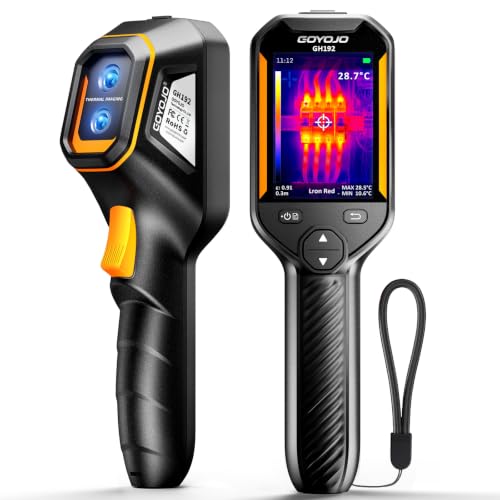
GH192 Handheld Thermal Imager with Fusion

NOYAFA NF-524 120×90 Thermal Imager

GOYOJO GW192A USB-C Thermal Camera

GW340 USB-C Thermal Camera 512×384
Inside Each Recommended Option
The F2W opens the list because it pulls a clever trick: a 256×192 detector runs through an internal enhancement algorithm (a software routine that sharpens raw sensor output) and outputs a 640×480 image on a 3.2-inch LCD, which is unusually large for the price. Thermal sensitivity, expressed as NETD (Noise Equivalent Temperature Difference) and measured in millikelvins, sits below 40 mK, meaning tiny temperature gradients stay readable.
For HVAC diagnostics, electrical inspections, and quick home energy audits, that combination is hard to beat in this tier. The 25 Hz refresh keeps moving targets from smearing, so you can scan a running breaker panel without lag. Field techs who would otherwise rent a pro-grade unit should look here first.
Strong Points
- Super-resolution output effectively quadruples usable detail over native resolution
- Low NETD rating picks up subtle temperature differences behind walls
- 25 Hz frame rate stays smooth during live scans of moving machinery
- Compact handheld form fits a tool bag without dedicated storage
Worth Noting
- Enhancement is software-driven, not optical, so real-world images stay a step behind dedicated 640×480 sensors
- Battery life varies by mode; expect to top up during long inspection days
Quick Facts
Made For
Trade professionals who want near-pro imaging without crossing into the four-figure price range.
Consider Something Else When
The MiLESEEY TR10 is a lighter fit if you only need entry-level scans and want a smaller upfront outlay.
The TR10 takes a friendly entry point: a 192×192 sensor paired with the same 25 Hz refresh rate seen on pricier siblings. NETD lands under 50 mK, which is still sensitive enough to spot the heat bloom around an overloaded outlet or a slow leak in a hot water line.
For first-timers, that spec list is reassuringly familiar: the unit runs as a straightforward point-and-shoot with on-screen temperature cursors. You trade outright sensor detail for accessibility, and the savings are worth it if you mostly want to confirm a suspicion, not chase hairline gradients.
What It Does Well
- Approachable learning curve with intuitive on-screen controls
- 25 Hz refresh avoids the choppy lag common to budget cameras
- Lightweight shell fits comfortably in one hand for extended scans
Honest Caveats
- Lower native resolution means fine detail at distance gets fuzzy
- NETD is a touch higher than the HSFTOOLS F2W, so subtle gradients may not pop on screen
- Owners commonly report the included manual reads thin compared to the unit’s actual feature set
Whose Shelf It Belongs On
Curious newcomers and homeowners chasing a first thermal camera without committing to a pro budget.
Look Elsewhere When
Jump to the TOPDON TC001 if you already own a recent Android phone and want sharper imaging without carrying a separate unit.
The TR20 climbs a clear step over the TR10 with a 320×240 sensor and a sub-40 mK NETD rating. A 50-degree wide-angle lens (the field of view, measured in degrees, that the optics capture) sweeps more wall, ceiling, or mechanical bay in a single frame, so you spend less time stitching scans together.
The 2.8-inch LCD at 480×640 keeps the image honest. For home inspectors walking a property or HVAC techs chasing airflow across ductwork, the upgrade in raw detail pays off the first time you spot a hidden hot spot across the room.
Useful Strengths
- 320×240 native resolution reads clear thermal detail at typical inspection distances
- NETD under 40 mK pulls in faint gradients for early problem detection
- 50-degree lens covers broad surfaces quickly
- Solid handheld size for daily field use
Trade-Offs
- Heavier price tag than the TR10 may stretch a casual budget
- Wide lens can distort edge readings on long, narrow targets
Feature Snapshot
Best Suited To
Home inspectors and HVAC technicians who need genuine diagnostic clarity on every visit.
Reach For A Different Pick When
The MiLESEEY TR20 Pro makes more sense if you also want visible-light fusion to pair thermal patterns with real-world visuals.
The TR20 Pro layers a visible-light camera onto the TR20’s sensor, opening five imaging modes including infrared-only, visible-only, blend, fusion, and outline enhancement. Fusion overlays (a mode that merges thermal and standard photos into one image) are genuinely useful when you need to point at a specific breaker or pipe and explain the heat pattern to a colleague.
Same 320×240 sensor and 25 Hz refresh, so frame-rate smoothness carries over. For pros who shoot client reports, the ability to capture a side-by-side frame in a single image simplifies documentation considerably.
Standout Benefits
- Five imaging modes adapt to reporting and diagnostic workflows
- Visible-light capture removes guesswork when documenting findings
- Same proven sensor as the TR20 with added versatility
Points To Note
- Higher cost than the standard TR20, which may not matter for casual users
- Fusion modes can flatten subtle thermal detail if overused
Right Fit For
Contractors and inspectors who produce written reports and need clear visual evidence alongside thermal data.
Swap It Out When
The MiLESEEY TR20 is the more practical choice for users who never need visible-light overlays and want to keep the spend down.
The TC001 takes a different path: plug the module into an Android phone or tablet and the device screen becomes your viewfinder. The 256×192 native sensor enhances to 512×384 through TISR (TOPDON Image Super Resolution), which is sharper than nearly every standalone in this roundup.
Power comes from the phone, so there is no battery to track or charger to pack. For Android-first technicians who already carry a capable handset, this consolidates two tools into one pocket.
Points In Its Favor
- Phone-powered design drops battery management from the routine
- 512×384 enhanced output reads impressively detailed
- Compact module slips into a laptop sleeve for travel
Softer Spots
- Compatibility depends on your specific Android device, so verifying support before purchase matters
- Phone screen drains faster during long scan sessions
Core Details
Who Should Grab It
Android users who want near-pro imaging without carrying a second device into the field.
Where Another Pick Suits Better
iPhone owners should look at the GOYOJO GW192A or GW340 for native iOS support.
The GT14S keeps things light, at roughly 240 grams, the body practically disappears in a jacket pocket. It runs both standard thermal imaging, with Center/Hot/Cold spot tracking, and a thermometer mode for point-and-read temperature numbers.
That dual-mode approach makes the GT14S useful for a wider audience than a pure thermal unit. Cooking enthusiasts checking pan heat, mechanics watching a bearing warm up, or homeowners chasing a draft all have a reason to pick it up.
Why It Works Well
- Lightweight shell stays comfortable during overhead or extended scans
- Thermometer mode gives exact readings when imaging is overkill
- Hot/Cold spot tracking speeds up quick diagnostics
Things To Consider
- Lower native resolution than the MiLESEEY TR20 means finer details may blur
- Compact size can feel fiddly in gloved hands during cold-weather work
Perfect Match For
Mobile users who want a grab-and-go camera for fieldwork, automotive checks, or kitchen experimentation.
A Better Fit Elsewhere
The HSFTOOLS F2W makes more sense for pros who prioritize image clarity over portability.
The GH192 leans into a workshop mindset. Its 240×240 super-IR sensor pairs with a 2MP visible-light camera, then overlays the two through fusion imaging on a 2.8-inch IPS display running at 25 Hz. A high-temperature alarm adds a layer of safety when scanning electrical panels or hot machinery.
Auto temperature tracking reads the scene’s hottest and coldest points without manual adjustments, which speeds up mechanical inspections where overheating bearings or failing components are the targets. For garage and shop use, that hands-off scanning mode earns its place.
A Few Strong Suits
- Fusion imaging ties heat patterns to identifiable real-world objects
- High-temperature alarm flags hazards during electrical work
- Auto tracking eliminates constant manual cursor adjustments
Minor Gripes
- Image export requires toggling a setting before transferring files, an easy step to miss
- Slightly bulkier than the GT14S, so pocket carry is less practical
Who It Suits Best
Mechanics, electricians, and serious DIYers who run diagnostics in a fixed workshop or garage.
Skip It When
The MiLESEEY TR20 Pro delivers comparable fusion features with slightly sharper native resolution if that detail matters.
The NF-524 lives at the most affordable end of this roundup. A 120×90 sensor with under-60 mK NETD, plus center-point, max, and min temperature cursors, covers the basics without frills. Multilingual menus and a 25 Hz refresh keep the experience modern.
For occasional homeowners, this is the kind of unit you pull out twice a year to find a missing pet, check for missing insulation, or confirm a radiator is actually heating. Resolution is modest, but so is the price.
A Strong Showing
- Lowest-cost entry into handheld thermal imaging in this list
- Three measurement modes cover everyday troubleshooting
- Multilingual interface helps non-English-first households
Room For Improvement
- 120×90 sensor reads coarse at distance, fine details get lost
- NETD above 50 mK means faint thermal differences may not register
- Plastic shell feels less rugged than metal-bodied rivals during daily transport
Made For
Casual users and budget-conscious shoppers who only need occasional thermal snapshots.
Not Your Match When
The MILESEEY TR10 is the better value step up if you can stretch the budget slightly for noticeably sharper results.
The GW192A plugs into a USB-C port and turns a phone into a thermal camera through a dedicated app. No batteries, no Bluetooth pairing; the unit draws power from the handset. iPhone 15, 16, and 17 series phones work alongside modern Android devices.
The 192×192 sensor lands in the middle of the road for this category, but the convenience factor is hard to match. Water leak detection, basic electrical checks, and quick HVAC reviews all become phone-screen tasks.
Good Reasons To Consider
- Plug-and-play design removes charging and pairing from the workflow
- Cross-platform support covers most recent iPhone and Android models
- Tiny module drops into a pocket or phone case
Where It May Fall Short
- Resolution is mid-pack, so detail at distance is limited
- Requires a free companion app, which adds a setup step some users forget
- USB-C only, so older Lightning-equipped iPhones are out of luck
Quick Technical Notes
Who Will Love This
Phone-first users who want thermal imaging available whenever they pull out their handset, no extra bag space required.
Another Choice May Suit
The GW340 is worth the stretch if you want sharper output and a wider temperature range from the same plug-in form.
The GW340 upgrades the GW192A platform with sharper imaging and a wider temperature range, covering −4°F to 752°F with a stated accuracy within roughly ±2°C or 2% of reading. The native 256×192 sensor enhances to 512×384 super-resolution, matching the output of more expensive dedicated handhelds.
For home inspectors, automotive techs, and HVAC pros who already live inside their phone, the GW340 removes the need to juggle a second device while delivering scan depth that survives a client meeting. USB-C connection keeps the workflow clean.
Where It Delivers
- Broad temperature range handles cold-snap pipe checks and hot mechanical scans alike
- Enhanced 512×384 output competes with standalone pro units
- Stated accuracy tolerance supports credible reporting
Things To Weigh
- Pricing sits above simpler phone modules, which may deter casual users
- Best results depend on a recent USB-C tablet or phone with adequate processing power
Right Fit For
Pros who want pro-tier imaging without buying and charging a second device.
Where A Sibling Pick Shines
The TOPDON TC001 is the alternative to consider if your workflow runs on Android rather than iPhone and you prefer its app ecosystem.
What Matters Most Before Choosing Affordable Infrared Cameras
Sensor resolution sets the ceiling on what you can see. A 120×90 sensor handles broad thermal questions like “is the radiator working?” A 320×240 or higher sensor starts answering finer questions like “which breaker is overheating?” For whole-home energy audits or electrical work, aim for 256×192 or higher.
Refresh rate affects how moving subjects appear. A 25 Hz rate keeps moving machinery from smearing, which matters in automotive or HVAC inspections. Anything below 9 Hz feels like a slideshow and makes handheld scanning frustrating.
NETD defines the smallest temperature difference a sensor can detect. Lower numbers are better. Anything under 50 mK works for everyday use; under 40 mK reads as a noticeable upgrade when chasing subtle heat loss behind walls.
Form factor matters more than people expect. Standalone handhelds run on their own batteries and feel familiar, but phone modules cut weight and skip charging routines. Pick the shape that matches how you already carry your tools.
Key Considerations Across These Picks
Pitfalls Shoppers Hit
The most common error is buying on native resolution alone and overlooking NETD. A 320×240 sensor with poor sensitivity still misses the small gradients that justify the upgrade. The flip side also happens: shoppers chase a high NETD number without confirming the lens field of view suits their typical target size. For tight mechanical bays, a narrower lens often reads more clearly than a wide-angle counterpart.
Compatibility slips under the radar on phone-module cameras. USB-C phones from the last few years generally work, but older handsets or tablets with restricted power delivery can refuse the connection. Verifying your specific model is supported before checkout saves a return trip.
Where The Extra Money Goes
Stepping up from a 120×90 entry-level unit to a 320×240 handheld buys sharper imaging and noticeably better thermal sensitivity. The image is easier to interpret, scan times drop, and the gap between “this looks warm” and “that circuit is faulting” becomes clear.
The larger jump from a standard handheld to a phone-based module with super-resolution, like the TC001 or GW340, adds screen real estate and removes battery anxiety. Whether the upgrade is worth it depends on how often you reach for the camera; occasional users may not feel the difference, while daily users will not want to go back.
Frequently Asked Questions
What resolution do I actually need in an affordable infrared camera? A 256×192 sensor covers most home and light commercial work comfortably. Anything lower works for spot checks, anything higher helps when scanning at a distance or chasing fine gradients.
Can a phone-based thermal camera replace a standalone unit? For many homeowners and even some pros, yes. Phone modules deliver similar sensor performance and a larger screen, but they drain phone battery during long sessions and depend on app updates.
What does NETD actually mean? NETD stands for Noise Equivalent Temperature Difference, the smallest temperature gap the sensor can distinguish from background noise. Lower mK values mean more sensitive imaging.
Are these cameras useful for finding water leaks? Yes. Cold-water supply lines and the wet areas around leaks both register as temperature anomalies on a thermal scan, which makes leak tracing far faster than guesswork in finished walls.
How important is refresh rate for casual use? At 25 Hz, the image feels natural during handheld panning. Anything below 9 Hz looks choppy and makes it harder to track a moving target like a running appliance.
The Takeaway
The right pick depends on how you already work. Standalone handhelds like the HSFTOOLS F2W and MiLESEEY TR20 reward users who want a dedicated tool with strong battery life. Phone modules like the TOPDON TC001 and GOYOJO GW340 suit people who would rather skip a second device. Start with the resolution and NETD that match your most common task, then choose the form factor that fits your daily carry. Whichever way you lean, the affordable category now delivers imaging that would have looked pro-grade a few years ago.