Learning to fly a drone used to mean accepting a steep learning curve, a few inevitable crashes, and the nagging worry of clipping a tree or a roof. Modern collision avoidance (sensors that detect nearby objects and steer the drone away automatically) has changed that math. The picks below are designed for first-time pilots who want guardrails baked in, from tiny indoor toys to sub-249-gram flyers that sidestep registration in many countries, all the way up to enthusiast gear that still feels friendly in the hand.
The Choices Worth Comparing
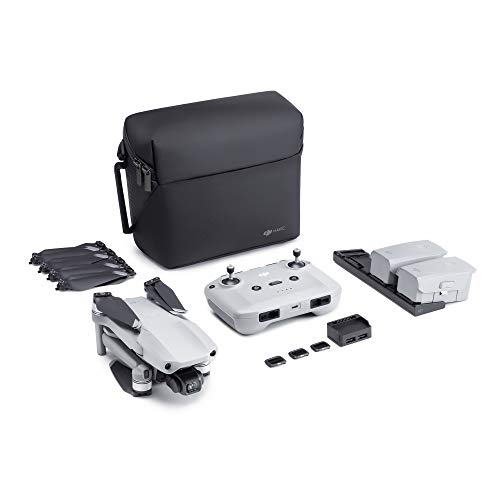
DJI Mavic Air 2 Fly More Combo Drone Quadcopter

DJI Neo 2 Fly More Combo with RC-N3 Controller

Ruko U11MINI 4K Camera Drone with Touchscreen Remote
Ruko F11PRO 2 Drone with 6K Camera

Ruko F11PRO 2 Plus Drone with 48MP Camera

GPS Drone with 1080P Camera and LCD Remote

Mini Drone for Kids with 4K Dual Cameras

SKYROVER X1 Drone Combo with Screen Controller

Flying Toy Drone for Kids with Motion Sensors
More Details On Our Top Picks
The Mavic Air 2 sits in a sweet spot for first-time pilots who want gear that grows with them. Its folding frame tucks into a small bag, and the Fly More Combo adds extra batteries and accessories that remove the usual anxiety about running out of power mid-flight. ActiveTrack 3.0 (software that follows a subject automatically) and forward, backward, and downward obstacle sensors give beginners a real safety net without dumbing down the creative side.
Newcomers typically appreciate the long advertised flight time, since landing every fifteen minutes kills the fun. Hobbyists coming from smaller toys will notice the jump to a 1/2-inch sensor for sharper stills and smoother 4K video. For most backyards and parks, this is a confident pick.
Key Advantages
- Forward, backward, and downward obstacle sensing helps prevent the most common beginner mistakes.
- Three batteries in the Fly More Combo extend total flying time across a single outing.
- 1/2-inch CMOS sensor (a light-gathering chip roughly twice the area of typical smartphone sensors) supports 48MP photos and stable 4K video.
- ActiveTrack 3.0 keeps a subject framed, useful for hiking videos and family moments.
- OcuSync 2.0 transmission delivers a stable long-range video feed for confident framing.
Things To Consider
- It is larger and heavier than a sub-250-gram drone, which may affect local registration rules.
- Learning the full app takes patience; novices usually need a few charging cycles before menus feel intuitive.
- The carrying case fits the drone but tight against extra accessories, so careful packing helps on travel days.
Who It Suits Best
First-time flyers with room in their budget who want a long-serving platform that handles both learning sessions and travel footage.
Consider Something Else When
The DJI Neo 2 Fly More Combo with RC-N3 Controller is a better match for shoppers who prioritize ultra-light portability over sensor size.
The Neo 2 leans into the lightest end of the category, weighing around 151 grams and slipping easily into a jacket pocket. C0 certification (the lightest drone class under many regional aviation rules) means many beginners can skip registration entirely, which removes a paperwork step that often stalls new owners. Full-coverage propeller guards add a layer of physical protection for indoor hallways and tight outdoor spaces.
Palm takeoff and gesture control make the first flight feel less intimidating than a traditional stick-based remote. ActiveTrack keeps a person or pet framed during walks, useful for content creators just starting out. Compared to the Mavic Air 2, this one trades sensor size and flight time for portability, which matters more than raw specs for many entry-level pilots.
The Helpful Details
- Lightweight build at roughly 151 grams keeps it comfortable for travel days.
- Propeller guards reduce scrapes when flying near furniture or tree branches.
- Palm takeoff removes the stress of runway-style launches.
- Gesture controls add a hands-free option for solo creators.
Worth Noting
- Wind performance is more limited than larger drones, so calm days are best.
- Camera quality is solid but not in the same league as bigger sensor models.
- The accessory bundle is generous, so storing the full kit takes a bit of planning.
Quick Facts
Made For
Travelers, casual hobbyists, and anyone wanting a pocket-friendly drone that still ships with modern safety features.
Skip It When
The Ruko U11MINI 4K Camera Drone with Touchscreen Remote fits shoppers who want a dedicated viewing screen on the controller itself.
The U11MINI solves a real beginner pain point: skipping the phone entirely. Its 5.5-inch 1080p touchscreen remote handles framing, settings, and live preview without a tangle of cables, which simplifies the very first flight. Ruko also pairs that convenience with a 1/2-inch CMOS sensor, a notable upgrade from the small sensors that dominate the budget end of the category.
Beginners moving up from toys tend to appreciate the standalone remote, since app pairing can be a stumbling block on day one. Casual family flyers get sharp stills and steady 4K/30fps video for backyard memories. Compared to the SKYROVER X1, this drone is positioned as a friendlier entry, not a creator-first tool.
Where It Helps
- Touchscreen remote removes the need for a smartphone during flights.
- 1/2-inch sensor captures richer photos than typical entry-level drones.
- Simple menus shorten the learning curve for first-time owners.
Points To Keep In Mind
- Build and finish feel closer to mid-range than premium flagship gear.
- App control is optional, but the best experience still requires reading the manual.
Right Fit For
Tech-minimalist beginners who want a single device in their hands, not a phone clipped beside a controller.
Look Elsewhere When
The SKYROVER X1 Drone Combo with Screen Controller is the smarter choice for shoppers wanting full 360° obstacle avoidance and longer flight windows.
The F11PRO 2 markets itself as a gift-ready drone, and the package leans into that angle. A 3-axis mechanical gimbal (a motorized stabilizer that counteracts vibration and movement) sits at the heart of the design, turning what would otherwise be wobbly 4K video into smooth clips you actually want to share. Parents and casual hobbyists tend to land here because the controls stay approachable while the footage looks a step above toy-grade output.
For weekend travelers, the body folds down into a backpack-friendly size. New owners gain GPS-assisted hovering and one-tap return features that reduce the panic of a lost orientation. Against the DJI Mavic Air 2, this pick trades some flight time and ecosystem polish for a friendlier price.
Noteworthy Benefits
- 3-axis gimbal steadies video noticeably more than electronic stabilization alone.
- 4K/30fps recording suits casual travel vlogs and family events.
- GPS-assisted features make hovering and return-to-home reliable for novices.
Trade Offs
- Obstacle avoidance coverage is lighter than flagship models, so care is still required near trees.
- The 6K photo spec refers to interpolated stills (software-upscaled images), so expectations matter here.
Feature Snapshot
Best Suited To
Family flyers and gift shoppers who want a forgiving drone with noticeably smoother video than entry-level toys.
Another Choice May Suit
The Ruko F11PRO 2 Plus Drone with 48MP Camera is the better choice when low-light footage matters more than gimbal-friendly daytime video.
The F11PRO 2 Plus positions itself as the dusk-friendly sibling of the standard F11PRO 2, with a 48MP 1/2-inch sensor tuned for low-light scenes. Golden hour and evening landscapes are the headline use case, which gives this drone a clear identity beyond generic travel footage. Beginners who already know they will fly outside daytime hours tend to gravitate here.
One thing worth considering is that more pixels and a larger sensor can mean slightly more weight and wind sensitivity. Daytime flyers who never shoot past late afternoon may not notice the difference. Stack this against the SKYROVER X1 and the choice becomes sensor character versus full 360° obstacle coverage.
What Works In Its Favor
- 48MP 1/2-inch sensor captures detail in dim conditions.
- Solid choice for sunset and evening creative work.
- Gift-ready framing and packaging for adult hobbyists.
Small Limitations
- Heavier sensor setup is more affected by wind than ultra-light rivals.
- Low-light gains matter less for pilots flying only in bright daylight.
Key Product Details
Who Will Love This
Travelers and creators who regularly shoot around sunrise or sunset and want detail-rich stills.
Reach For A Different Pick When
The DJI Mavic Air 2 Fly More Combo Drone Quadcopter is a smarter match for flyers who prioritize flight time and a mature ecosystem over sensor resolution.
Sewsunny’s take on the beginner drone leans into simplicity. The 4.5-inch LCD remote streams a live feed without demanding a phone, which mirrors the U11MINI’s approach at a more accessible price band. GPS anchoring gives the drone a steady hover, useful for first flights when pilots instinctively overcorrect.
For budget-focused adults, the combination of 1080P video and a dedicated screen is the real story. Expect shorter transmission range than premium picks, and plan flights accordingly. Compared to the SKYROVER X1, this is a more modest camera sensor with fewer obstacle sensors.
Good Reasons To Consider
- LCD remote removes the phone tether from basic flights.
- GPS-assisted hover keeps the drone stable for nervous first flights.
- 1080P video meets everyday social-sharing needs.
A Few Limitations
- Obstacle avoidance is minimal, so open spaces are safer for early sessions.
- Image quality is adequate rather than cinematic.
Perfect Match For
Adults new to drones who want a dedicated screen remote without paying flagship prices.
Where A Sibling Pick Shines
The Ruko U11MINI 4K Camera Drone with Touchscreen Remote is the upgrade path when sharper video and a larger sensor become priorities.
This Mgfdget model is built for the household where the youngest pilot is still learning what the sticks do. Altitude hold (the drone automatically maintains a set height) and headless orientation (controls respond relative to the pilot, not the drone’s facing direction) remove the two biggest early frustrations, while one-key takeoff and landing keep the experience on rails. The foldable frame and two included batteries mean less waiting between flights.
Dual cameras and 3D flips add the playful side that turns practice into play. Compared to the SKYROVER X1 or the DJI Mavic Air 2, this is firmly in toy territory, so expecting pro-level footage sets the wrong benchmark. For indoor living rooms and small backyards, it does the job.
Notable Gains
- One-key start and landing simplify the trickiest moments for new pilots.
- Altitude hold keeps the drone steady while kids find their coordination.
- Two batteries extend play sessions without long charging gaps.
- 3D flips add the fun factor that keeps practice engaging.
Points To Weigh
- Wind tolerance is low, so outdoor play needs calm conditions.
- Camera quality is playful rather than share-worthy for content creators.
Feature Card
Whose Shelf It Belongs On
Families introducing kids or pre-teens to drone flying in indoor and backyard settings.
A Better Fit Elsewhere
The DJI Neo 2 Fly More Combo with RC-N3 Controller suits older teens ready for subject tracking and outdoor adventures.
The SKYROVER X1 pushes beginner drones toward enthusiast territory while still keeping a friendly footprint at under 249 grams. The standout detail is 360° obstacle avoidance, meaning sensors cover forward, backward, left, right, and overhead directions, a real upgrade from basic front-and-down sensing. That alone shifts the safety math for new pilots flying in cluttered environments.
A 1/1.32-inch CMOS sensor with f/1.7 aperture (a wide lens opening that gathers more light) supports 4K/60fps HDR video and AI-assisted night shots. Three batteries extend total advertised flight time to about 96 minutes. Compared to the Ruko F11PRO 2 Plus, this drone leans into creator-grade specs while keeping a beginner’s frame weight.
Positive Takeaways
- 360° obstacle avoidance covers more angles than typical beginner models.
- Under 249 grams keeps it free from registration in many regions.
- Three batteries push total flight time toward a generous window.
- AI night shot expands shooting conditions beyond daylight hours.
- Built-in screen controller removes phone dependency.
A Few Considerations
- Feature depth means more menu time during the first week of ownership.
- Higher-end spec sheet comes with a higher-end price than entry picks.
Feature Rundown
Built With In Mind
New pilots who want flagship-style safety coverage and creators eyeing more demanding footage from day one.
Swap It Out When
The Mini Drone for Kids with 4K Dual Cameras is the better choice for households prioritizing low-cost indoor play over imaging specs.
Semai’s UFO-style toy drone strips the controller from the equation entirely. 360° motion sensors detect nearby hands and obstacles, letting kids guide the drone by gesture alone. That makes it one of the most accessible entry points on this list, especially for ages six through early teens who want instant fun without a learning curve.
The trade-off is clear: no remote, no serious camera, no outdoor performance. For living rooms and bedrooms, it shines. Compared to the Mgfdget Mini Drone, this one trades stick-based controls for pure hand-guided play. Expect LED light shows more than usable aerial footage.
Useful Strengths
- Motion-sensor guidance removes the remote control learning curve entirely.
- Compact size suits indoor play and travel bags.
- LED lights add visual appeal for younger pilots.
- Accessible price point for gifts and stocking stuffers.
Honest Caveats
- Not designed for outdoor flight, so wind and sun are real limitations.
- No camera, so this is pure play rather than content creation.
The Right Fit
Younger kids and gift shoppers looking for a hand-controlled indoor drone with an approachable price.
Not Your Match When
The Mini Drone for Kids with 4K Dual Cameras is a better pick when kids want stick-based controls and a real camera.
What To Weigh Before Picking A Beginner Drone With Collision Avoidance
Sensor Coverage Shapes Real-World Safety
Obstacle avoidance is not a single feature. Some drones sense only forward and downward, leaving the sides and rear exposed. Others add 360° sensing, which reduces mid-air surprises when the drone rotates. Beginners flying near trees, indoors, or in tight outdoor spaces benefit most from wider coverage.
Sensor placement also affects how confidently the drone handles sudden pilot inputs. A drone with rear sensing will resist flying backward into a wall, which is one of the most common beginner mistakes. Wider coverage costs more, but it pays off when the pilot is still building reflexes.
Weight And Registration Matter Early
Sub-250-gram drones often fall under lighter regulatory categories in many regions, which can mean skipping registration entirely. That detail saves paperwork and lets you fly sooner. Heavier drones tend to offer longer flight times and bigger sensors, but they bring registration steps into the workflow.
Pick the weight class that matches your willingness to handle registration. A sub-249-gram drone is the easiest entry. A heavier drone makes sense for pilots who already know they want bigger imaging capabilities.
Battery Counts Shape How Much You Actually Fly
Most beginner drones advertise roughly 20 to 40 minutes per battery. Bundles that include two or three batteries are common and meaningfully change how long an outing lasts. A single-battery starter kit often ends a session at 25 minutes, while a three-battery kit stretches a park trip into real exploration time.
Consider where you will charge. Owners often rotate through batteries at home rather than in the field, so storage for spares and a charging hub helps over the long run.
Controller Style Decides Daily Friction
Stick controllers, touchscreen remotes, and phone-tethered apps each create a different feel. Screen-equipped controllers remove the need to mount a phone, which simplifies setup. Phone-based apps offer deeper settings but introduce pairing steps and battery drain. Match the controller style to how casually you plan to fly.
Key Considerations Across These Picks
Pitfalls Shoppers Hit
The most common beginner mistake is buying on sensor size alone and ignoring obstacle coverage. A drone with a 48MP camera but only forward sensing still crashes into trees from behind. Balancing sensor quality with sensor coverage is the better shopping lens.
Another trap is assuming all “GPS drones” behave the same way. Some use GPS only for return-to-home, while others use it for stable hovering, follow-me modes, and wind resistance. Read the feature list carefully to understand what GPS actually does on the model you choose.
Where The Extra Money Goes
Higher-tier beginner drones tend to spend the budget on 360° obstacle avoidance, larger image sensors, and more batteries. These upgrades show up as fewer crashes, better footage in tough light, and longer sessions. For most new pilots, the upgrade is worth it once flights become a weekly habit rather than a one-off experiment.
Frequently Asked Questions
Do beginner drones with collision avoidance really prevent crashes?
They reduce crashes significantly, especially with rear and side sensing, but they do not replace careful flying in tight indoor spaces. Sensors help with sudden obstacles, not with every reckless input.
How long does it take to learn basic drone flying?
Most first-time pilots feel comfortable within a few charging cycles, roughly a weekend of casual practice. GPS hover and altitude hold shorten that timeline considerably compared to older toy drones.
Can kids fly drones with collision avoidance?
Yes, especially models with one-key takeoff, altitude hold, and headless mode. The hand-controlled toy option is the simplest entry, while older kids can handle stick-based remotes with parental guidance.
Do I need a phone to fly these drones?
Not always. Several picks include screen-equipped remotes that handle the live feed without a smartphone. Phone apps add advanced settings for pilots who want more creative control.
What is the safest place to practice as a beginner?
An open grassy park or a large indoor space with soft floors works well. Avoid crowded public events and areas near airports until you understand local rules and your comfort level.
Closing Remarks
Beginner drones with collision avoidance have removed most of the early frustration that used to come with learning to fly. The right pick depends on where you plan to fly, how often, and what kind of footage matters. Match the weight class, sensor coverage, and controller style to your routine, and the rest tends to fall into place.