Shooting crisp, true-to-life footage used to mean hauling bulky cinema rigs and editing on a workstation. Today, even a compact webcam on a laptop can deliver sharp 4K output, and creators have more formats, frame rates, and lighting options within reach than ever. The trade-off is choice: nine very different picks in this guide range from pocket-friendly streaming webcams to a Super35 professional camcorder built for narrative work. The aim here is to help you match the right tool to the right project, whether you’re hosting a remote meeting, building a YouTube channel, or stepping into indie filmmaking.
The Essentials At A Glance
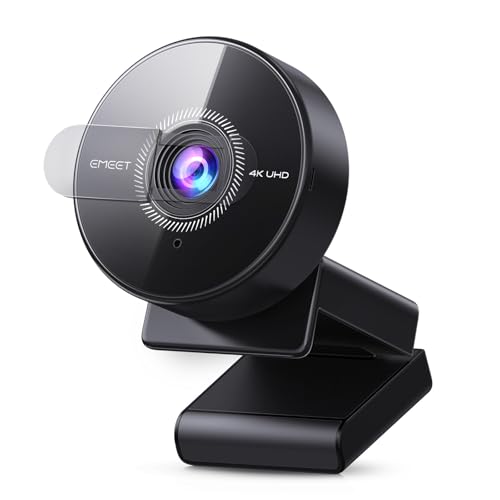
EMEET C950 4K Webcam (PDAF Autofocus)

EMEET NOVA 4K Webcam (Dual Omni Mics)

EMEET C960 4K Webcam (73° FOV)

EMEET S600L 4K Webcam with Ring Light

EMEET C100 2K Webcam (Privacy Cover)

EMEET C60E Dual-Camera 4K Streaming Webcam

EMEET S600 4K Streaming Webcam (Sony Sensor)

EMEET Piko Dual-Camera 4K Streaming Webcam

Blackmagic URSA Mini Pro 4.6K G2 Camcorder
What Each Pick Brings To The Table
The EMEET C950 sits at the entry point of the 4K webcam range, and it earns that spot by handling the basics without fuss. PDAF (phase-detection autofocus) keeps your face sharp when you lean in toward the mic, and the CMOS sensor is built to hold detail in dim home offices where overhead fluorescents play havoc with cheaper sensors. Plug it into a USB port and you’re streaming 4K at 30 frames per second, or stepping down to 1080p at 60 for smoother motion on platforms that don’t push full 4K.
This is the practical choice for daily video calls, online classes, and the occasional live stream where image fidelity matters more than lighting tricks. Remote workers who move between rooms or natural-light setups get a forgiving camera that adapts without manual tweaking.
Positive Points
- Real 4K output at 30 FPS gives you a clear upgrade over older 1080p office webcams.
- PDAF autofocus tracks your face so you stay sharp when gesturing or holding products up to the lens.
- USB plug-and-play keeps setup short, which matters on packed work-from-home mornings.
- CMOS sensor handles low-light home offices better than typical laptop cameras.
Things To Consider
- Lens coating attracts smudges from frequent adjusters, so a microfiber cloth becomes part of the routine.
- Wide default framing can capture more background than some professional meeting settings prefer.
Who It Suits Best
Frequent remote workers and online learners who want a noticeable jump in image quality without stepping into dual-camera or specialty lighting territory.
Where Another Pick Suits Better
Streamers who broadcast in dim rooms should consider the EMEET S600L with its built-in ring light, which solves the lighting problem this model leaves to the room.
The NOVA adds a layer of polish over entry-level 4K webcams, and the standout upgrade is the dual omnidirectional microphone array. Those mics are tuned to pick up your voice evenly from multiple angles, which translates to cleaner audio when you swivel in your chair or share the frame with a co-host. The 4K@30FPS sensor handles the same resolution tier as the C950, but the better audio capture means fewer post-production fixes on the sound side.
For a remote team that runs standing meetings where people take turns speaking, the NOVA keeps voice pickup consistent without forcing everyone to lean toward the screen. Content creators running casual interviews from a desk get a similar benefit.
Advantages To Know
- Dual omni microphones capture voice cleanly across a wider range of seating positions.
- 4K sensor output keeps visual parity with other premium webcams in the line.
- USB connectivity avoids driver headaches on standard conferencing platforms.
Trade Offs
- The microphone array picks up room echo in hard-walled home offices, so acoustic treatment still helps.
- USB cable length limits placement flexibility for users with monitors mounted away from the desk.
Key Specs
Right Fit For
Remote teams, podcast-style video calls, and dual-host livestreams where audio clarity ranks alongside image quality.
Swap It Out When
Solo creators running tight tutorials should pick the EMEET Piko instead, since its telephoto lens handles close-up product shots more gracefully.
The C960 leans into a deliberate design choice with its 73° field of view, narrower than typical webcams in this price band. FOV (field of view) describes how wide a scene the lens captures, and 73° is a sweet spot for head-and-shoulders framing without the barrel distortion you get from ultrawide lenses. PDAF autofocus keeps you sharp, and the dual omnidirectional mics handle the audio the same way the NOVA does.
Solo presenters and remote professionals who want a clean, interview-style framing without cropping in software will appreciate the natural proportions. It also works well in tighter home offices where showing too much background feels unprofessional.
Points In Its Favor
- 73° FOV gives flattering headshot framing without digital cropping.
- True 4K resolution avoids the softness that comes from upscaled 1080p sensors.
- Dual mics provide solid voice pickup for one-on-one and small-group calls.
Room For Improvement
- Narrower FOV makes group scenes harder, so multi-person panels need a different camera.
- The fixed clip limits positioning on thicker monitors or curved displays.
Whose Shelf It Belongs On
Coaches, consultants, and solo streamers who prioritize clean framing over capturing a full room.
Consider Something Else When
Hosts running panel-style interviews with three or more guests should reach for the EMEET C60E, whose wide-angle lens captures the whole group.
The S600L solves a specific problem most webcams ignore: bad room lighting. Its built-in ring light wraps the lens and synchronizes with the sensor’s exposure settings, so toggling it on brightens your face without blowing out highlights. The 1/2-inch sensor pulls in more light than smaller webcam chips, and the 0.2-second PDAF autofocus reacts fast enough to track hand gestures and head tilts during energetic streams.
Game broadcasters and Twitch creators in basements or windowless rooms get a camera that handles lighting and framing in one device, without separate key lights cluttering the desk. Reviewers and makeup creators who need even facial illumination will find the ring light effect familiar.
Why It Works Well
- Integrated ring light handles the most common streaming complaint: uneven facial lighting.
- 1/2-inch sensor captures noticeably more light than standard webcam chips.
- Fast 0.2-second PDAF keeps motion sharp during animated gameplay reactions.
- 4K resolution future-proofs streams as platforms expand higher-resolution tiers.
Some Limits To Know
- The ring light draws extra power and may require a dedicated USB port or powered hub.
- Long streaming sessions can heat the housing, which may shorten component life in poorly ventilated setups.
Feature Snapshot
Made For
Gaming streamers, beauty creators, and remote presenters who film in spaces without proper studio lighting.
Another Choice May Suit
Filmmakers shooting narrative scenes will find the Blackmagic URSA Mini Pro 4.6K G2 far better suited, since cinema-grade dynamic range outweighs convenience lighting for that work.
The C100 steps down to 2K resolution, but it earns a spot on this list by addressing concerns the others leave open. The rotating privacy cover slides physically over the lens when you finish a call, which matters in shared living spaces and for anyone wary of accidental broadcasts. The metal clip grips laptop lids and monitors firmly, and the built-in microphone handles straightforward audio without fuss.
Students attending remote classes and casual callers who want a low-maintenance upgrade over a laptop camera will find this fits the bill. It’s also a thoughtful fit for households where multiple people share a computer.
The Upside
- Physical privacy cover gives peace of mind when the camera isn’t in use.
- Metal clip holds steady on thin laptop lids where plastic clips tend to slip.
- 2K resolution still beats most built-in laptop cameras by a clear margin.
Honest Caveats
- 2K tops out below the 4K ceiling the rest of the list offers.
- Fixed-focus lens keeps you sharp only within a typical desk distance.
Best Suited To
Students, casual remote workers, and households that prioritize a physical privacy shutter over maximum resolution.
Not Your Match When
Creators producing content for 4K platforms should look at the EMEET S600, which delivers true UHD resolution without the privacy cover tradeoff.
The C60E stands out by carrying two cameras in one housing, sharing a 1/2.8-inch CMOS 4K sensor. A wide-angle lens grabs panoramic scenes, while a telephoto lens zooms in on close-ups at a recommended distance of about 13.8 inches. The 11x hybrid zoom combines optical and digital magnification, and PDAF autofocus keeps both lenses responsive. RGB lighting, dual microphones, and a remote control round out a streamer-focused feature set.
For creators who switch between showing their full desk and zooming into products, hands, or facial expressions, the dual-camera design replaces what would normally require two separate webcams and a capture switcher. Interview-style podcasts and unboxing channels benefit most from the instant lens swap.
The Practical Payoff
- Dual lenses eliminate the need for a second camera in single-presenter setups.
- 11x hybrid zoom lets you reframe without moving the camera physically.
- Remote control simplifies switching lenses mid-stream without touching the desk.
- RGB lighting adds atmospheric effects for gaming and entertainment channels.
Where It Is Less Suited
- The dual-camera design adds bulk, making it harder to mount on thin laptops.
- Hybrid zoom beyond optical range loses detail, so wide zooms look soft at full magnification.
Perfect Match For
Dynamic streamers and product reviewers who switch between wide and tight shots during the same broadcast.
Reach For A Different Pick When
Solo remote workers running simple video calls should save budget with the EMEET C950, which covers the basics without the dual-lens complexity.
The S600 shares the same resolution options as the rest of the EMEET lineup, but it leans on a Sony 1/2.55-inch sensor that pulls cleaner detail out of the same lighting conditions. Sony sensors have a reputation in the camera world for color accuracy and low-noise output, and that shows up here in skin tones that look natural under mixed office lighting. PDAF autofocus keeps transitions snappy, and 4K@30FPS or 1080p@60FPS give streamers flexibility for different platforms.
Aspiring streamers and content creators who care about color grading or simply want more lifelike skin tones will find this a step up. It suits creators who already use good lighting and want the sensor to capture the full range.
Useful Highlights
- Sony sensor delivers richer color depth than generic webcam chips in this price band.
- 4K@30FPS and 1080p@60FPS options cover both quality and motion-priority use cases.
- PDAF autofocus tracks movement reliably for handheld product walkthroughs.
Soft Spots
- Premium sensor performance depends on good lighting, so dim rooms still need supplemental light.
- Setup software may require updates to unlock full resolution on certain platforms.
Core Details
Who Should Grab It
Content creators and live broadcasters who want better-than-average color accuracy without leaving the webcam form factor.
A Better Fit Elsewhere
Cinematic projects that require interchangeable lenses and high dynamic range belong to the Blackmagic URSA Mini Pro 4.6K G2, which is built for narrative work.
The Piko refines the dual-camera concept with a clear split between wide-angle and telephoto lenses, each optimized for its own framing style. The wide-angle lens captures full-room scenes with you and your workspace naturally composed, while the telephoto lens delivers close-up detail for product demos, tutorials, and expression-driven content. Together they cover most single-presenter streaming scenarios without swapping hardware.
Tutorial channels, craft creators, and product reviewers who constantly switch between showing their hands and their face will get the most out of this design. It also fits podcasters filming themselves alongside props or instruments.
Good Reasons To Consider
- Wide-angle lens keeps full desk scenes composed without fisheye distortion.
- Telephoto lens pulls in sharp close-ups for product and hand demonstrations.
- Dual-camera setup replaces two separate webcams in single-presenter workflows.
- 4K resolution across both lenses preserves detail when reframing.
Practical Considerations
- Lens switching may require learning the companion software, which adds setup time.
- Larger housing footprint takes up more desk space than single-lens models.
Built With In Mind
Tutorial creators, unboxing channels, and craft streamers who alternate between wide and tight framing.
Look Elsewhere When
Plain video calls don’t justify the dual-lens design; the EMEET C960 handles those with a simpler, narrower 73° field of view.
The Blackmagic URSA Mini Pro 4.6K G2 sits in a completely different category from the webcams above. It uses a Super35 sensor, the same large format found in many cinema cameras, with an effective sensor size of 25.34 by 14.25 millimeters and an interchangeable EF lens mount. The 4.6K resolution beats 4K by a margin that matters for cropping and reframing in post, and dynamic range of 15 stops gives you room to recover shadows and highlights that webcams simply clip.
For indie filmmakers, commercial producers, and advanced videographers shooting narrative or documentary work, this is the kind of camera you build a project on. It records to CFast 2.0 and SD cards, includes a 4-inch LCD for monitoring, and accepts optional PL, B4, and F lens mounts for specialized work.
Well-Handled Touches
- Super35 sensor captures true cinema-grade footage with strong low-light performance.
- 15 stops of dynamic range preserve detail in shadows and highlights for color grading.
- EF lens mount opens access to a vast ecosystem of still and cinema glass.
- CFast 2.0 and SD recording options balance speed and storage flexibility.
Trade-Offs To Consider
- Manual controls assume operator experience, which steepens the learning curve.
- File sizes from 4.6K footage demand fast storage and a capable editing workstation.
- Form factor requires dedicated bags, rigs, or tripods rather than a monitor clip.
Quick Technical Notes
Who Will Love This
Indie filmmakers, commercial producers, and serious videographers working on narrative or documentary projects who need cinema-grade image quality.
Skip It When
Streamers and remote workers should pick the EMEET S600L with its ring light, since this camcorder is built for productions, not plug-and-play broadcasts.
Choosing A Camera That Matches Your Work
Picking a 4K camera starts with honest answers about what you actually shoot. Most everyday needs, including meetings, classes, and casual streaming, are served well by a 4K webcam with PDAF autofocus and decent low-light handling. Step up to dual-camera models when your work involves switching between full scenes and close-ups, like tutorials or product reviews. Reserve cinema-grade camcorders for projects that demand interchangeable lenses, manual control, and the dynamic range to grade footage in post.
Resolution matters, but context matters more. 4K at 30 frames per second suits talking-head content where motion stays modest, while 1080p at 60 frames per second serves gameplay and sports where smoothness counts. Sensor size plays a quiet role in image quality: larger sensors gather more light and produce cleaner footage in dim rooms. A 1/2-inch or 1/2.55-inch sensor offers a noticeable upgrade over the smaller chips in entry-level webcams.
Microphone quality often decides whether your content feels professional. Dual omnidirectional mics improve voice pickup in shared spaces, and built-in ring lights solve the most common complaint from new streamers: uneven facial illumination. For cinema work, these conveniences give way to manual audio inputs, lens choice, and recording media speed.
Key Considerations Across These Picks
Pitfalls Shoppers Hit
Treating “4K” as the only spec worth comparing leads to mismatched purchases. Many inexpensive 4K webcams rely on upscaling from lower-resolution sensors, which produces softer footage than true 4K capture. Spec sheets don’t always make that distinction clear, so reading reviews and confirming sensor size helps avoid the trap. Another common slip is ignoring lighting: a great sensor in a dim room still delivers flat, noisy footage. Build the lighting first, then upgrade the camera.
Where The Extra Money Goes
Higher-tier picks in this category typically spend the premium on sensor quality, dual-lens flexibility, or cinema-grade hardware. The Blackmagic URSA Mini Pro 4.6K G2, for instance, buys dynamic range and lens interchangeability that webcams simply cannot match. Dual-camera webcams like the C60E and Piko add hardware complexity that justifies their cost for creators who genuinely switch between framings. Spending more pays off when your work demands those specific capabilities; for everyday calls, mid-tier picks cover the gap without strain.
Frequently Asked Questions
What does PDAF autofocus do on a webcam?
PDAF (phase-detection autofocus) measures the convergence of light rays to focus faster and more accurately than older contrast-based systems, keeping your face sharp during movement.
Do I need 4K resolution for video calls?
Standard video calls rarely use full 4K, but 4K sensors produce cleaner 1080p output and give you flexibility for streaming or recording at higher resolutions later.
How important is sensor size in a webcam?
Larger sensors gather more light, which improves low-light performance and produces less noisy footage in dim rooms compared to smaller webcam chips.
Can a webcam replace a dedicated camcorder for YouTube?
For talking-head and tutorial content, yes. For cinematic projects with shallow depth of field or interchangeable lenses, a dedicated cinema camera like the URSA Mini Pro is the better fit.
What storage do 4K cinema cameras require?
High-resolution cinema cameras typically use fast media like CFast 2.0 or SD cards, and the large file sizes demand ample storage and a capable editing workstation.
The Takeaway
Your best pick depends on the gap between your current setup and the work you actually want to produce. For daily calls and classes, a reliable 4K webcam with PDAF autofocus covers the basics without overkill. For creators switching between wide and tight shots, dual-camera models unlock new framing possibilities. For narrative projects, cinema-grade hardware earns its keep through dynamic range and lens flexibility. Match the tool to the project, and the rest tends to fall into place.