Setting up a big-screen experience at home used to mean wrestling with cables, dongles, and apps that refused to behave. The newest wave of smart projectors changes that equation: built-in streaming, voice control, brighter lasers, and smarter autofocus make the category friendlier than it was even a year ago. Whether you want a backyard movie night, a conference room centerpiece, or a living room TV alternative, the right pick depends on where you plan to use it and how bright that room gets. Below is a curated roundup of nine solid options across price ranges and use cases, so you can match the strengths of each model to your own space.
A Snapshot Of The Selections

WiMiUS K14 Outdoor 4K Projector with VIDAA Smart OS

Epson Pro EX9270 Wireless 1080p Business Projector
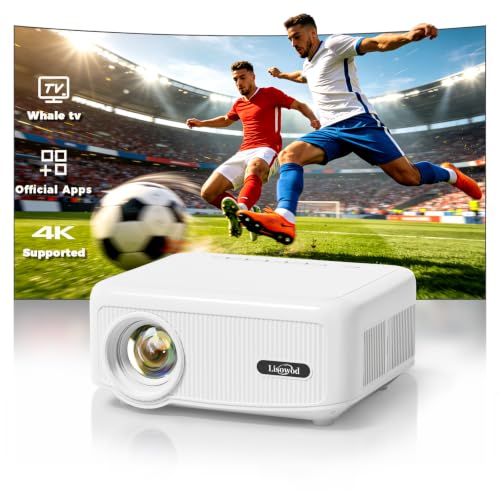
Lisowod L02 Outdoor Projector with WiFi and Bluetooth

Epson EX3290 WXGA 3-Chip 3LCD Projector
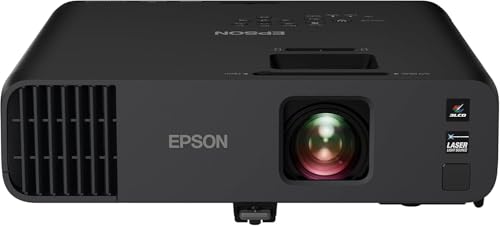
Epson Pro EX11000 Wireless Laser Projector

LYNCAST Google TV 4K Projector with Dolby Audio
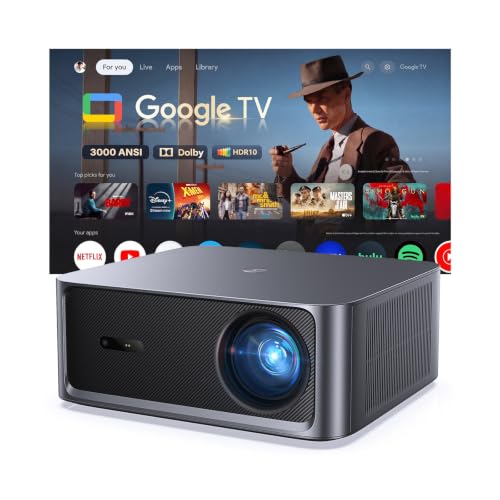
HAPPRUN 3000 ANSI Google TV 4K HDR Projector

TOPTRO TP1 Smart Projector with Built-in Apps

TOPTRO Google TV 14.0 Short Throw Projector
The Strengths Of Each Pick
The WiMiUS K14 leans hard into the streaming-first crowd. VIDAA is its built-in smart operating system, meaning the interface itself handles Netflix, Prime Video, and similar apps without needing a separate stick. Pair that with WiFi 6 (the newest, fastest home WiFi standard) and Bluetooth, and you get a projector that behaves more like a smart TV than a traditional media box.
Its 1450 ISO lumen rating, a measurement of light output that tends to run more conservative than some competitors’ claims, gives it enough punch for a dim living room or a shaded patio. Auto focus and HDR10 support (a high-dynamic-range format that expands contrast between bright and dark areas) round out a package that feels aimed at people who want plug-and-play simplicity rather than calibration tinkering.
What Stands Out
- VIDAA Smart OS built in removes the need for an external streaming stick, which cuts clutter and remote confusion.
- WiFi 6 support helps buffer-free playback on busy home networks, useful for households streaming in 4K while others game online.
- 60W Dolby audio output delivers louder, fuller sound than typical projector speakers, so small rooms may not need an external soundbar.
- AI voice control adds hands-free navigation, which is handy when the projector lives on a high shelf or ceiling mount.
Things To Consider
- 1450 ISO lumens can wash out in rooms with strong direct sunlight, so darker environments suit it best.
- VIDAA’s app catalog may not match Roku or Google TV for niche regional services.
- Firmware updates over WiFi are occasional, and some owners report a learning curve with the remote layout.
Who It Suits Best
Homeowners setting up a backyard theater or renters who want one projector that handles movies, sports, and streaming without extra hardware.
Where Another Pick Suits Better
Offices needing high ambient-light performance may prefer the Epson Pro EX9270’s stronger lumen output.
The Epson Pro EX9270 trades streaming frills for reliable, office-ready performance. Its 3-chip 3LCD engine (a projection system that splits light into red, green, and blue channels for richer color than single-chip designs) is built for spreadsheets, slides, and video calls in rooms you can’t fully darken. Wireless connectivity adds flexibility, so conference attendees can mirror screens without hunting for adapters.
For a hybrid workplace, the EX9270 acts as a bridge between an old-school ceiling-mounted projector and a modern smart display. Image sizes up to 300 inches mean a small meeting room can feel like a presentation hall, and the lamp-based light source keeps replacement part costs predictable over time.
Practical Pluses
- 3LCD color accuracy holds up well for charts, product photos, and brand-sensitive content.
- Wireless mirroring reduces cable clutter during client visits and team handoffs.
- Large image ceiling suits training rooms where participants sit far from the screen.
Worth Noting
- 1080p resolution (full HD) is modest compared to true 4K competitors, though fine for most slide decks.
- No built-in smart apps means you’ll likely pair it with a laptop or streaming stick for non-work content.
- Lamp replacements are an ongoing ownership cost that laser-based projectors avoid.
Best Suited To
IT managers and small-business owners outfitting a hybrid meeting space where visibility matters more than resolution.
Skip It When
Home theater enthusiasts focused on cinematic 4K content will find better choices in the WiMiUS K14 or HAPPRUN.
The Lisowod L02 stands out with a custom LX2 chip and a Whale OS 3.0 interface that mimics a smartphone app grid. Navigation feels familiar to anyone used to Android, which helps less technical shoppers find their apps without scrolling through nested menus. Native 4K input support keeps the door open for higher-resolution content when available.
Compared to the WiMiUS K14’s VIDAA setup, this one trades a more conservative interface for a wider app selection. Bluetooth audio output is a quiet perk for pairing portable speakers at outdoor gatherings, where built-in projector audio tends to get lost in open air.
What It Does Well
- Familiar smartphone-style interface reduces the learning curve for first-time projector owners.
- Bluetooth pairing expands audio options beyond the built-in speakers, helpful for noisy outdoor settings.
- Lightweight form factor makes transport between rooms or to a friend’s house less of a chore.
Points To Keep In Mind
- App performance depends on the LX2 chip’s real-world responsiveness, which may feel uneven with heavy multitasking.
- Outdoor use still calls for a dark environment or a projection screen, since brightness is limited.
- Carrying case is rarely included, so storing the lens safely takes some planning.
The Right Fit For
Casual streamers and renters who want a portable projector with a phone-like menu they can hand to grandparents without a tutorial.
A Better Fit Elsewhere
Shoppers prioritizing ambient-light performance should look at the HAPPRUN 3000 ANSI, which is built for brighter rooms.
The Epson EX3290 is built around one job: staying visible when you can’t dim the lights. With 4,000 lumens of color and white brightness, it’s a workhorse for classrooms and training spaces where fluorescent overheads stay on all day. WXGA resolution (a widescreen format slightly sharper than standard 720p HD) lands between HD and full HD, which suits text-heavy material.
Unlike the Pro EX9270, this model skips wireless connectivity in favor of a wired HDMI and VGA-friendly approach. The trade-off shows up in cleaner setup for permanent installations, where reliability outweighs convenience features.
What Makes Sense
- 4,000 lumens keep presentations readable under bright fluorescent lighting without forcing blackout curtains.
- 3-chip 3LCD color holds up for diagrams and product color matching in classroom settings.
- 300-inch image ceiling suits lecture halls where the back row sits far from the screen.
Trade Offs
- WXGA resolution falls below full HD, so detailed spreadsheets may look softer than on sharper projectors.
- Wired-only design means presenters carry adapters or rely on room-installed cables.
- Lamp-based light source adds long-term maintenance compared to laser alternatives.
Whose Shelf It Belongs On
Educators and corporate trainers running sessions in well-lit rooms where clarity of slides matters more than cinematic detail.
Consider Something Else When
Home theater shoppers will find the LYNCAST or WiMiUS picks better suited to movie-night priorities.
The Epson Pro EX11000 is the step-up sibling to the EX9270, swapping the lamp for a laser light source. That single change reshapes ownership: laser projectors typically last far longer between part replacements and maintain brightness longer than lamps. For a busy office, that translates to fewer maintenance windows and lower long-term hassle.
At 4,600 lumens, this model outshines most home-focused projectors in the roundup. Wireless connectivity, full HD 1080p resolution, and 3LCD color round out a package aimed at conference rooms that double as event spaces.
A Favorable Mix
- Laser light source avoids the lamp replacement cycle, a real saving over five-plus years of heavy use.
- 4,600 lumens handle large, sunlit rooms without forcing blackout shades.
- Wireless mirroring speeds up meeting turnover, especially in shared spaces.
Possible Compromises
- 1080p falls short of true 4K for detailed graphics, even if it’s enough for most presentations.
- Premium pricing reflects the laser engine, which may exceed budgets for smaller teams.
- Size and weight lean toward permanent installation rather than travel between rooms.
Built With In Mind
Mid-to-large companies outfitting a flagship boardroom that runs all day, every week.
Look Elsewhere When
Home users can save money and gain streaming apps by choosing the WiMiUS K14 or LYNCAST instead.
The LYNCAST earns its spot with a fully licensed Google TV interface, which is meaningfully different from “supports Android apps.” Licensed Google TV means a familiar, regularly updated app store with all the major streaming services and ongoing security patches. For families already living in the Google ecosystem, that consistency matters.
At 2,000 ANSI lumens (a brightness standard similar to ISO but tested slightly differently), the LYNCAST handles moderately lit living rooms better than dim-only models. Dual 36W Dolby speakers suggest the projector is designed to stand alone without an immediate soundbar upgrade, which suits first-time projector owners.
Features That Help
- Licensed Google TV keeps the interface, app catalog, and search consistent with a Google TV streaming stick.
- AI voice remote simplifies searches across services, sparing you from typing titles letter by letter.
- 4K and 8K input support future-proofs the projector for higher-resolution source material.
Room For Improvement
- 2,000 ANSI lumens still struggles in direct sunlight, so blackout curtains help on bright afternoons.
- Fan noise can be noticeable during quiet scenes, depending on the chosen picture mode.
- Google TV licensing means account sign-in is required to unlock the full app experience.
Made For
Families wanting a primary living room display that streams Netflix, Prime, and Disney+ without juggling extra devices.
Reach For A Different Pick When
Outdoor-only use is your main scenario, since the WiMiUS K14 and HAPPRUN are positioned more for that environment.
The HAPPRUN brings serious lumen output to the home category. At 3,000 ANSI lumens, it has enough headroom for living rooms with daytime window light, game rooms with overhead fixtures, and other spaces where total darkness is unrealistic. HDR support adds punch to colorful games and nature documentaries.
Auto focus and keystone correction are the quiet stars here. Keystone correction adjusts the image so it stays rectangular even when the projector sits at an angle, which removes one of the biggest setup headaches in the category.
The Practical Payoff
- 3,000 ANSI lumens maintain visibility with curtains open, unlike most home projectors.
- Auto focus saves setup time when the projector moves between rooms or surfaces.
- Built-in Google TV means consistent app support and parental controls across the household.
- 4K HDR input support handles modern consoles and UHD Blu-ray players without compromise.
Small Caveats
- Higher brightness typically means more fan noise, especially in eco modes turned off.
- Physical size increases over smaller portables, so it’s less of a grab-and-go option.
- Google TV account setup adds an extra step for households new to the ecosystem.
Key Specs
Perfect Match For
Living room owners who can’t fully darken the space and want a single projector for movies, gaming, and streaming.
Where A Sibling Pick Shines
Office and classroom installations will get more mileage from the Epson Pro EX11000’s laser durability.
The TOPTRO TP1 prioritizes portability without dropping the smart features that make modern projectors appealing. Its 360-degree adjustable stand sets it apart from competitors that expect you to balance the unit on books or buy a separate tripod. Built-in YouTube and Prime Video mean two of the most-watched services work without any setup beyond sign-in.
Native 1080p output (full HD resolution that the projector can actually display, rather than just accepting as input) keeps the picture sharp at typical screen sizes, and Dolby audio support delivers fuller sound than basic stereo. For apartment dwellers and dorm rooms, it’s a thoughtfully designed small-space option.
Real-World Strengths
- 360-degree adjustable stand removes the need for extra mounting gear in tight rooms.
- Pre-loaded streaming apps get you watching within minutes of unboxing.
- Compact body slips into a backpack for trips or visits to family.
Honest Caveats
- Lower lumen output limits daytime use to shaded rooms or evening hours.
- Built-in app selection may require manual updates for newer streaming platforms.
- Small speakers benefit from a portable Bluetooth speaker for outdoor use.
Feature Snapshot
Right Fit For
Apartment dwellers, college students, and frequent travelers who need a compact unit that travels well.
Not Your Match When
You want a permanent living room replacement with daylight visibility, which points to the HAPPRUN.
The TOPTRO short throw model solves the distance problem. Short throw projectors (units that can produce a large image from just a few feet away) let you place the unit on a nightstand or low table and still get a 100-inch-plus image on the opposite wall. For bedrooms, dorms, and small rentals, that’s a quiet game-changer.
Google TV 14.0 is the latest Android-based smart TV platform, and it brings a polished interface plus a wide app catalog. Compared to the older TOPTRO TP1, this model adds ceiling mounting flexibility and HDR10 support for better contrast in mixed lighting.
Standout Benefits
- Short throw design fits small bedrooms where traditional units need 10+ feet of throw distance.
- Google TV 14.0 keeps the interface modern with the newest streaming apps and security updates.
- Auto focus and keystone correction handle imperfect placement in awkward room layouts.
- Ceiling projection mode expands placement beyond a coffee table or shelf.
Worth Bearing In Mind
- Short throw designs are sensitive to wall texture; uneven paint or wallpaper can distort the image.
- Lumen output is modest, so darker rooms remain the ideal environment.
- Google TV 14.0 account setup may slow first-time configuration compared to plug-and-play projectors.
Feature Rundown
Who Should Grab It
Bedroom and dorm dwellers with limited space who still want a big-screen streaming experience.
Swap It Out When
You need a projector for a conference room, where the Epson Pro EX11000’s brightness and laser engine make more sense.
What Matters Before Choosing Your Next 4K Projector
Brightness sets the foundation. Lumen ratings tell you how much light a projector throws, and how that translates depends entirely on the room. A dark basement theater can run on 1,000 ANSI lumens or less. A living room with windows needs 2,500 or higher to stay visible during the day. ISO and ANSI are the two common measurement standards, and they don’t always compare directly, so look at the room first and the number second.
Resolution deserves attention too. Native 1080p projectors display full HD without upscaling. Native 4K projectors cost more but show every pixel of UHD content. Many projectors in this roundup accept 4K input but render at 1080p, which is fine for casual viewing but noticeable on a 120-inch screen.
Light source changes ownership. Lamp-based projectors cost less up front but need bulb replacements every few thousand hours. Laser projectors cost more initially but typically last the life of the unit. For heavy daily use, laser often wins on total cost of ownership.
Throw distance matches the room. Standard throw units need 8 to 12 feet for a 100-inch image. Short throw projectors, like the TOPTRO model above, can sit just a couple of feet from the wall. Ultra-short throw models go even closer and behave more like a TV on a credenza.
Smart features save setup time. Built-in Google TV or VIDAA means fewer cables and remote controls. Voice control adds convenience, especially when the projector lives on a ceiling mount.
Audio matters more than people expect. Built-in speakers range from tinny to surprisingly capable. Dolby support and higher wattage, like the LYNCAST’s dual 36W setup, can fill a small room without an external soundbar.
Things Worth Weighing Before You Buy
Common Mistakes Worth Dodging
The biggest trap in this category is chasing the highest lumen number without checking the room. A 4,000-lumen projector is wasted in a blacked-out basement and underwhelming if it can’t actually beat the sun in a bright living room. Match the spec to the space, not the other way around.
Another common slip is ignoring throw distance. Shoppers often buy a projector, set it up, and then realize the image is too small or the unit blocks the walkway. Measure the room and check the throw ratio (the relationship between projector distance and image width) before committing.
Where The Extra Money Goes
Spending up usually buys three things: laser light sources, native 4K panels, and better-built smart platforms. Each of those adds real value over time, especially for daily users. For occasional movie nights, a mid-tier smart projector covers the experience without the premium.
Key Considerations Across These Picks
Mistakes Worth Dodging
Chasing the highest lumen count is tempting, but a 4,000-lumen lamp projector in a dark basement is overkill, while a 1,500-lumen unit in a sunny living room underdelivers. The honest read is to match brightness to the room you actually have, not the room you wish you had.
Ignoring fan noise is another common slip. Quieter eco modes typically reduce brightness too, so plan for a real-world fan level that fits your viewing style. Action-heavy movies mask noise better than dialogue scenes do.
The Case For Spending Up
Premium models like the Epson Pro EX11000 buy laser durability, which means years of use without lamp replacements. Higher-tier smart platforms like licensed Google TV also tend to receive longer software support, keeping the interface current as streaming services evolve. For frequent users, those upgrades earn their keep.
Frequently Asked Questions
What is the difference between ANSI lumens and ISO lumens?
ANSI lumens and ISO lumens are both brightness standards, but they’re measured using slightly different methods and equipment. ANSI lumens tend to run higher on paper for the same perceived brightness, so direct comparison needs care. A 2,000 ANSI lumen projector and a 2,000 ISO lumen projector can look different in the same room.
Do I need a 4K projector or is 1080p enough?
For a 100-inch screen at typical seating distance, 1080p looks sharp. On screens larger than 120 inches, or for viewers sitting very close, 4K becomes more noticeable. Streaming and gaming both benefit from higher resolution, but the gap narrows at smaller screen sizes.
Can I use a projector in a room with windows?
Yes, but you’ll want at least 2,500 to 3,000 lumens for daytime viewing. Blackout curtains help significantly, and ambient-light-rejecting screens can boost contrast in bright rooms. For casual evening use, lower-lumen projectors work fine with normal lighting.
How long do projector light sources last?
Lamp-based projectors typically need a new bulb every 2,000 to 5,000 hours of use, depending on the mode. Laser projectors often last 20,000 hours or more, which translates to years of ownership without part replacements.
Is a short throw projector better for small rooms?
Short throw projectors are designed for small rooms where space behind the unit is limited. They produce large images from just a few feet away, which suits bedrooms, dorms, and apartments. The trade-off is sensitivity to wall texture and slight placement adjustments.
Bottom Line
The right 4K projector comes down to where you watch and how often. Living room dwellers with daylight challenges lean toward the HAPPRUN or LYNCAST. Backyard movie hosts gravitate to the WiMiUS K14. Offices with daily use get the most from the Epson Pro EX11000’s laser durability. Match the strengths to your space, and the choice usually makes itself.