Working from home used to mean grainy laptop footage and apologetic “sorry, can you hear me now?” moments. These days, 4K webcams make you look like you actually planned the call. Whether you’re teaching a class, pitching a client, or streaming to a small but loyal audience, the right camera changes how people experience your presence online. This guide rounds up ten solid options across budget, streaming, conferencing, and pro setups so you can pick what fits without overpaying for features you won’t touch.
The Shortlist At A Glance
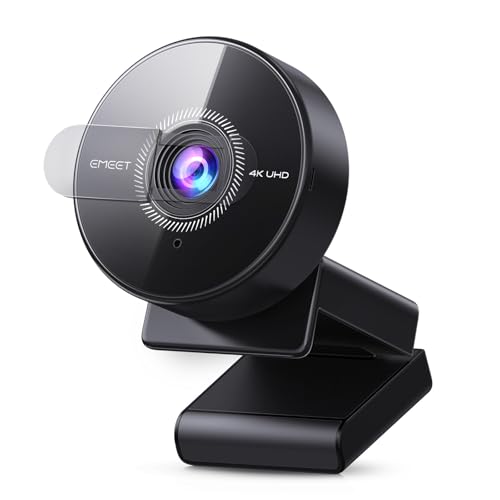
EMEET C950 4K Webcam with PDAF Autofocus

EMEET NOVA 4K Webcam with Dual Omni Mics

EMEET C960 4K Webcam with 73° FOV

EMEET S600L 4K Streaming Webcam with Ring Light

Logitech Brio Video Conferencing Webcam

EMEET C100 2K Webcam with Privacy Cover

EMEET C60E Dual-Camera 4K Streaming Webcam

TONGVEO 4K PTZ Conference Camera System

EMEET S600 4K Webcam with Sony Sensor

EMEET Piko Dual-Camera 4K Streaming Webcam
Taking A Closer Look At The Options
The C950 is the kind of webcam you forget is there, which is exactly the point. Built around a CMOS sensor with PDAF (Phase Detection Autofocus), it locks onto your face quickly and stays sharp whether you’re leaning in to read a note or pulling back in your chair. It captures at 4K resolution with frame rates up to 1080p at 60fps, so the higher resolution helps on platforms that actually use it while the lower resolution keeps motion smooth for everyday chats.
Compared to the NOVA in the next slot, the C950 keeps things simpler with fewer onboard microphones but adds that same 4K clarity. It’s USB-based, plugs into most laptops and desktops without extra drivers, and includes a built-in mic so you can get going without extra gear. For most home offices, this is the kind of set-and-forget webcam that quietly outclasses any laptop camera from the past few years.
Features That Help
- PDAF autofocus that tracks faces quickly during a long meeting.
- 4K resolution at 30fps, with smoother 1080p at 60fps when frame rate matters more.
- CMOS sensor that handles dim home offices reasonably well, reducing the muddy look of typical webcam footage.
- USB plug-and-play setup, no software hunt required.
- Built-in microphone so a quick call works without hunting for a headset.
Things To Consider
- Lower-light performance depends a lot on your room, and dim setups can still show noise.
- The built-in mic is fine for calls but won’t match a dedicated USB or headset microphone.
Who It Suits Best
Daily remote workers and online educators who want sharp 4K without fiddling with software settings.
Where Another Pick Suits Better
Streamers who need ring lighting baked in will get more out of the EMEET S600L 4K Streaming Webcam with Ring Light.
The NOVA leans into clean 4K video with a stronger audio setup than most webcam-only options. It runs a CMOS sensor at 4K resolution with 30fps capture, paired with dual omnidirectional microphones (mics that pick up sound from all directions) for fuller pickup across a small desk. Where the C950 keeps things minimal, the NOVA adds that second mic for more natural voice capture without a separate headset.
The hardware is geared toward business meetings, online classes, and personal streaming where both sides of the audio and video equation matter. PDAF autofocus helps the camera stay locked on during gestures or whiteboarding moments. In our view, this is the kind of webcam that quietly replaces a mid-tier headset mic for everyday calls, while keeping video quality firmly in 4K territory.
A Few Highlights
- Dual omnidirectional mics pick up voices clearly across a small workspace.
- 4K resolution at 30fps for crisp, detailed visuals.
- PDAF autofocus keeps faces sharp during movement and gesturing.
- USB plug-and-play with broad platform compatibility.
Points To Note
- The omnidirectional pattern can pick up background noise in loud rooms.
- You’ll want to check that your video conferencing platform supports 4K, or you’ll default to 1080p.
Made For
Remote professionals and teachers who need both strong video and pickup without a separate headset.
Consider Something Else When
Creators who want lighting built into the camera should look at the EMEET S600L 4K Streaming Webcam with Ring Light.
The C960 is built around a true 4K CMOS sensor, meaning the resolution is captured natively rather than digitally stretched (upscaled) from a lower-res source. That distinction matters more than spec sheets suggest, because upscaled 4K looks softer than the real thing. The 73° field of view (FOV) frames a single speaker or small group without distorting edges, which keeps faces natural during back-to-back meetings.
PDAF autofocus and dual omnidirectional mics round out a setup aimed at office calls and teaching. Compared to the NOVA, the C960 trades a slightly wider mic pickup pattern for a more conservative FOV, which suits a one-person desk perfectly. The honest read is that this camera fits people who value image honesty over features they won’t use.
Reasons It Performs
- Genuine 4K capture from a CMOS sensor, with no upscaling tricks.
- 73° FOV frames a single person without wide-angle distortion.
- Dual omni mics handle everyday calls without a separate headset.
- PDAF autofocus stays locked during gestures and whiteboard moments.
Honest Caveats
- The narrower FOV won’t capture a conference table as well as a wide-angle option.
- You’ll need proper room lighting to make the most of that true 4K detail.
Best Suited To
One-on-one professionals, teachers, and presenters who care more about image accuracy than room coverage.
Look Elsewhere When
Small-group calls where you need a wider frame point to the EMEET Piko Dual-Camera 4K Streaming Webcam.
The S600L is the first pick in this list aimed squarely at streamers and content creators. It combines a 1/2-inch sensor (a relatively large sensor for a webcam, which helps with light gathering) with a built-in ring light that synchronizes with the camera’s exposure settings. When you flip the light on, the camera adjusts automatically to avoid the washed-out look you get from bolting a clip-on light to a basic webcam.
That 0.2-second PDAF autofocus is fast enough to keep up with a hand moving toward the lens for product shots. For creators shooting tutorials, makeup videos, or hobby streams, the integrated lighting removes a layer of gear you might otherwise need to buy and position. Compared to the C960, the S600L trades office polish for creator-ready lighting and a faster focus response.
Where It Excels
- Built-in ring light balanced with the camera’s exposure, no extra gear needed.
- Larger 1/2-inch sensor captures more light than typical webcams.
- 0.2-second PDAF autofocus handles hand gestures and product close-ups.
- 4K resolution keeps streamed footage sharp on modern platforms.
Small Caveats
- The ring light eats power and can run warm during long sessions.
- Creators filming across multiple setups may prefer separate lighting for finer control.
Who Will Love This
Solo streamers, tutorial creators, and hobby content makers who want light and lens in one package.
Skip It When
Professional conference rooms needing subject tracking will get more from the TONGVEO 4K PTZ Conference Camera System.
The Logitech Brio is the seasoned veteran on this list, having held its ground through several generations of newer 4K competitors. It records at a 4096 x 2160 resolution through USB 3.0 (a faster USB standard that handles 4K data without bottlenecking), captures up to 90fps at lower resolutions for fluid motion, and includes 5x digital zoom for tightening the frame. The Brio uses auto-focus and ships with onboard microphones for quick calls.
Compared to the EMEET C950, the Brio trades a slightly more dated control ecosystem for a wider install base and proven long-term reliability. Many offices and remote workers already know the Logitech software stack, which lowers the learning curve. One thing worth considering: that 90fps mode requires actual USB 3.0 bandwidth, so older laptops may be limited to standard frame rates.
A Strong Showing
- 4096 x 2160 capture resolution for true 4K detail.
- Up to 90fps at lower resolutions for smooth motion during presentations.
- 5x digital zoom for tightening the frame on slides or products.
- USB 3.0 throughput keeps video data moving without compression artifacts.
- Established Logitech software support across operating systems.
Worth Noting
- Maximum frame rates require a USB 3.0 port, which older laptops may lack.
- Digital zoom lowers effective resolution at the tight end of the range.
- Newer webcams now offer features like ring lights the Brio doesn’t include.
Right Fit For
Hybrid office workers and traveling professionals who value a proven platform and broad software support.
A Better Fit Elsewhere
Solo streamers wanting lighting baked in should consider the EMEET S600L 4K Streaming Webcam with Ring Light.
Key Specs
The C100 is the odd one out here, and it earns its place for a reason: it’s a 2K camera, not 4K. That matters because 2K still beats most laptop cameras by a wide margin while keeping the price approachable for casual users. The fixed focus (set permanently to a sharp range rather than adjusting on the fly) is tuned for the 12 to 40 inch sweet spot of a desk, which means no autofocus hunting during a meeting.
The rotating privacy cover is a small touch that pays off in shared spaces or anyone tired of tape over their laptop camera. A metal clip keeps it seated on a monitor, and a built-in mic covers quick calls. In our view, this is a sensible pick for anyone whose video needs stop at looking clear on Zoom without crossing into true 4K territory.
The Practical Payoff
- 2K resolution at 30fps is a noticeable step up from typical laptop cameras.
- Fixed focus avoids the autofocus pulsing some cheaper cameras suffer from.
- Rotating privacy cover blocks the lens physically when not in use.
- Metal clip holds steady on monitors and laptop lids.
Trade Offs
- It’s 2K rather than 4K, so detail won’t match the C950 or NOVA on supported platforms.
- Fixed focus means anyone closer than 12 inches or farther than 40 inches may look soft.
Who Should Grab It
Casual home office users and remote workers who want better-than-laptop clarity without paying for 4K.
Swap It Out When
Creators wanting 4K detail and a built-in ring light will find the EMEET S600L 4K Streaming Webcam with Ring Light a better fit.
The C60E is built around a pair of cameras sharing a 1/2.8-inch CMOS sensor, which sounds unusual until you see what it does in practice. A wide-angle lens captures the room and the subject, while a telephoto lens (a longer-focal-length lens that frames closer subjects tightly) handles tight close-ups at a recommended 13.8-inch distance. Switching between them on the fly gives streamers and presenters a level of framing flexibility that single-lens webcams can’t match.
Add up to 11x hybrid zoom (a combination of optical zoom and digital zoom working together), PDAF autofocus, RGB lighting for accent effects, two onboard mics, and a remote control for hands-free framing, and you’ve got a webcam aimed at serious content workflows. Compared to the S600L, the C60E trades the built-in ring light for a dual-lens system that handles product demos and live reactions far better.
The Value In It
- Dual-camera design covers wide scenes and tight close-ups from one unit.
- Up to 11x hybrid zoom tightens on details without swapping gear.
- Remote control adjusts framing without reaching for the camera.
- RGB lighting adds atmosphere for live broadcasts.
- Two microphones handle voice pickup alongside video.
Factors To Consider
- More complex setup than a single-lens webcam, with software to learn.
- The dual-lens design and RGB lighting make it bulkier on a monitor.
Built With In Mind
Advanced streamers and presenters running product demos, reaction content, or hybrid meeting formats.
Reach For A Different Pick When
Meeting rooms needing automated subject tracking across larger spaces suit the TONGVEO 4K PTZ Conference Camera System better.
The TONGVEO system jumps categories entirely. Rather than a webcam that clips to your monitor, this is a 4K PTZ (pan-tilt-zoom) conference camera with 3x optical zoom (a true lens-based zoom that preserves full image quality at every step) and a 93° wide-angle lens, paired with a wireless Bluetooth speakerphone. AI auto-tracking follows the active speaker so the camera doesn’t need a human operator during meetings.
Output options include USB 3.0 and HDMI, which lets the system drop into traditional conference room setups or modern software-based meetings. The bundled speakerphone handles far-end audio with multiple mics for better pickup around a table. The honest read: this is overkill for a single desk but exactly right for a small meeting room, worship space, or telehealth setup where one person shouldn’t have to run the camera.
What Pays Off
- 3x optical zoom preserves full resolution through the zoom range.
- 93° wide-angle captures an entire meeting table.
- AI auto-tracking follows the active speaker without manual control.
- USB 3.0 and HDMI outputs support both software and hardware setups.
- Bundled wireless Bluetooth speakerphone handles full-room audio.
Worth Bearing In Mind
- Installation and mounting take more effort than a clip-on webcam.
- It’s larger and heavier than a desk webcam, so travel use isn’t practical.
- Auto-tracking can occasionally switch subjects during rapid cross-talk.
The Right Fit
Small to mid-size meeting rooms, worship spaces, and telehealth setups needing automated camera operation.
Where A Sibling Pick Shines
Solo remote workers will find the EMEET C950 4K Webcam a simpler and more desk-appropriate option.
Feature Snapshot
The S600 drops the ring light of its sibling and goes all-in on sensor quality. The Sony 1/2.55-inch sensor is among the larger sensors you’ll find in a webcam that still clips to a monitor, which translates to better low-light behavior and cleaner detail than smaller-sensor alternatives. Resolution options include 4K at 30fps and 1080p at 60fps, so you can favor smoothness or sharpness depending on the platform.
PDAF autofocus keeps subjects sharp during streams and presentations. Compared to the S600L, the S600 skips lighting integration in favor of stronger pure image quality for creators who already own lights. For aspiring streamers and game broadcasters who want the cleanest possible image from a single webcam, this is the more focused tool.
The Good Stuff
- Sony 1/2.55-inch sensor delivers stronger low-light performance.
- 4K at 30fps and 1080p at 60fps cover both detail and motion needs.
- PDAF autofocus keeps streams sharp during movement.
- Larger sensor gathers more light for cleaner color reproduction.
Soft Spots
- No built-in lighting, so darker rooms need separate lights.
- Larger sensor design makes it slightly bulkier than entry-level webcams.
Whose Shelf It Belongs On
Serious streamers, game broadcasters, and creators who already own lighting and want the best pure image.
Not Your Match When
YouTubers and creators wanting a one-piece lighting solution fit better with the EMEET S600L 4K Streaming Webcam with Ring Light.
The Piko brings the dual-lens concept from the C60E to a slightly different audience: tutorial creators, product demonstrators, and educators who need both context and close-ups in the same recording. The wide-angle lens captures the room and the presenter’s environment, while the telephoto lens locks onto details like hands holding a product, small props, or written notes on a board.
Built for content workflows rather than gaming streams, the Piko gives you framing flexibility without swapping cameras mid-recording. It’s a thoughtful design that solves a real pain point for solo creators filming tutorials or live demonstrations. In our view, anyone tired of cutting between two cameras for a single video will appreciate the simplicity of having both lenses work together.
Useful Highlights
- Dual-lens design covers wide scenes and detail shots in one device.
- Telephoto lens locks onto product details at close range.
- Streamlines tutorial and demo workflows without a multi-camera rig.
- 4K resolution keeps both lenses sharp for streaming platforms.
Practical Considerations
- Software learning curve is steeper than a single-lens webcam.
- Wider feature set means higher cost than basic 4K options.
Perfect Match For
Tutorial creators, product demonstrators, and educators who need both wide and tight framing in one session.
Another Choice May Suit
Game streamers who care more about lighting than dual framing should consider the EMEET S600L 4K Streaming Webcam with Ring Light.
What To Weigh Before Choosing Your Next Webcam
Picking the right 4K webcam starts with honesty about how you’ll use it. Daily meeting folks need sharp detail and reliable autofocus, while streamers need lighting and zoom flexibility. The good news is that 4K sensors have matured enough that even budget options now beat most built-in laptop cameras by a wide margin.
Sensor Size and Low Light
Sensor size (the physical light-gathering area inside the camera) matters more than raw megapixels in dim rooms. Larger sensors like the Sony 1/2.55-inch in the EMEET S600 gather more light, producing cleaner footage when your home office isn’t perfectly lit. Smaller sensors can still work but tend to show noise in evening sessions.
Autofocus Technology
PDAF (Phase Detection Autofocus) reacts faster than contrast-based systems, which matters for streamers who move around or presenters who gesture with products. Fixed focus systems like the one in the EMEET C100 work great at a set distance but soften if you shift position.
Field of View and Framing
A 73° field of view (FOV) frames a single speaker naturally, while wider angles around 93° capture groups or meeting tables. Wide angles can distort faces at the edges, which is worth considering for one-on-one calls. Dual-lens cameras solve this by giving you both options in one unit.
Audio Capture
Built-in microphones handle casual calls but rarely match a dedicated USB mic or headset. Dual omnidirectional setups pick up voices across a small desk, but in noisy rooms you may still want to reach for a separate microphone.
Key Considerations Across These Picks
Where Shoppers Go Wrong
The most common slip-up is paying for 4K resolution when your video platform actually streams at 1080p. Many conferencing tools compress or downscale before sending, so a true 4K image only matters if your software supports it. Another trap is ignoring lighting, since a 4K sensor can’t fix a dim room any better than a 1080p one. Before upgrading the camera, see whether a basic key light or window-side positioning improves your current setup more than a hardware swap.
The Case For Spending Up
Higher-tier models earn their keep through larger sensors, faster autofocus, and extra features like ring lights or dual lenses. The jump matters most for creators working in variable lighting or presenters who need flexible framing on the fly. For a once-a-week video call, the budget end holds up fine, but daily professional use or streaming quickly exposes the gaps.