Pulling old negatives out of a shoebox and watching them glow under the right light never gets old. The trouble starts when you want to share those frames online, color-correct them on a laptop, or back them up before the film fades further. A purpose-built film scanner setup turns that dusty archive into files you can edit, post, and preserve without sending anything to a lab.
This roundup covers nine accessories that cover the workflow from edge to edge: macro-based digitizers for mirrorless shooters, mobile rigs for phone-only setups, dedicated medium-format holders for flatbed scanners, and a few support tools that make prep and color accuracy less of a headache. Each pick fits a specific kind of user, so the right match depends on the camera gear you already own and how much hands-on fiddling you enjoy.
A Quick View Of The Lineup

JJC Film Digitizer for 35mm Slide Negative to Digital

JJC Negative Slide Film Cutter for 35mm & 120
JJC 35mm Film Retriever Tool with Lanyard

120 61.5mm Negative Holder for Epson V600/V550

JJC Mobile Film Scanner Set with 11-Level Backlight
JJC Film Digitizer Scanner with Built-In Backlight

JJC Film Digitizer for 35mm & 120 Format

JJC Mobile Film Scanner for 35mm & 120
JJC 35mm Slide and Film Digitizing LED Backlight
Taking A Closer Look At The Options
Macro shooters chasing the cleanest possible result will feel at home with this rig. It is purpose-built to slot a 35mm slide or negative strip in front of a dedicated macro and pull a single, sharp frame at a time. Compared to the phone-based picks later in the list, this setup leans on the sensor quality of your existing mirrorless or DSLR, so the final file quality tracks closely with the camera you pair it with.
The kit bundles a set of step-down rings that let you match Canon, Nikon, and Sony macro lenses without hunting for separate adapters. It does not include a light panel, so most owners add a dedicated backlight (such as the JJC LED panel covered later) to nail consistent exposure across a roll. For someone who already shoots macro and wants to repurpose that glass for archival work, this is a focused, well-mapped route.
Everyday Perks
- Reuses a macro lens you already own, keeping the gear list tight.
- Multiple step rings cover Canon, Nikon, and Sony bodies in one box.
- Shoots one frame at a time, which makes color correction across a roll easier.
- Mounts directly to a tripod, leaving both hands free to load and advance.
Points To Note
- No built-in light means a separate backlight adds to the total cost.
- Limited to 35mm strips and mounted slides, with no medium-format support.
- Requires steady hands and consistent focus habits to keep results uniform.
Key Specs
Right Fit For
Mirrorless and DSLR owners who already own a sharp macro lens and want maximum control over each frame.
Look Elsewhere When
The JJC Film Digitizer Scanner for 35mm & 120 Format suits people whose archive mixes both formats and need them on a single rig.
Trimming film cleanly sounds like a small job, until crooked edges start jamming scanner holders and skewing frames. This dedicated cutter handles 35mm strips plus the common 120 medium-format widths (6×4.5, 6×6, 6×7), so one tool covers a mixed archive. The built-in adjustable backlight helps you frame the cut and inspect sprocket holes at the same time.
Power comes from a 59-inch USB cable, so it runs off any USB port or battery pack on your desk. Cuts land clean and square, which is exactly what film holders on flatbed scanners and phone rigs need to seat properly. It pairs naturally with the holders and digitizers elsewhere in this list, acting as a prep station before the actual scanning begins.
Everyday Advantages
- Cuts straight edges on both 35mm strips and 120 medium-format rolls.
- Built-in backlight lets you check framing and sprockets while you work.
- USB power keeps the tool mobile between a desk, couch, or darkroom.
- Sized for standard negative pages, so trimmed output stores neatly.
Worth Noting
- Does not scan anything on its own, so it is part of a larger setup.
- Requires a flat, stable surface for the cleanest cuts.
Whose Shelf It Belongs On
Hobbyists trimming mixed-format archives before loading holders, and anyone tired of fighting crooked strips.
Swap It Out When
If you scan only 35mm and want a single combined prep-and-scan tool, the JJC Mobile Film Scanner for 35mm & 120 folds trimming, lighting, and capture into one phone rig.
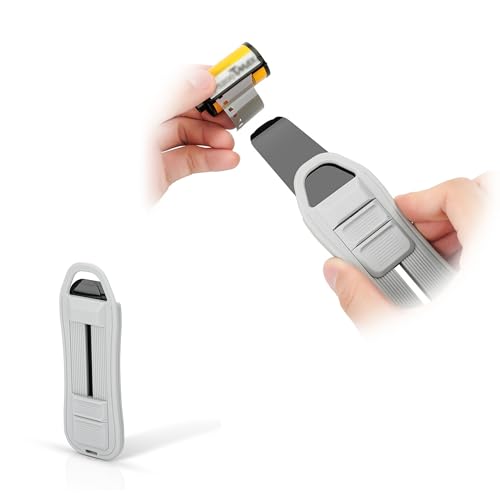
Self-developing 35mm at home runs into one annoying moment: a fully rewound cassette that hides its film leader deep inside the spool. This little retriever solves that exact problem. It slides three smooth plastic blades into the cassette and pulls the tongue back out without scoring the film base.
The body uses ABS and PET, so it holds up to repeated trips into the changing bag. A retractable design keeps the blades protected when not in use, and the included lanyard keeps it from vanishing into the couch cushions between sessions. For someone building out a home darkroom, this small tool is the difference between finishing a roll and fishing blindly for an hour.
Useful Touches
- Three polished blades retrieve film without scratching the emulsion.
- Retractable body protects blades during storage and travel.
- Lanyard prevents loss in busy darkrooms or shared workspaces.
- Compact enough to live in a camera bag pocket.
Soft Spots
- Only handles 35mm cassettes, with no medium-format support.
- Requires some practice to angle the blades correctly on tight cassettes.
Built With In Mind
Home developers finishing their own 35mm rolls and tired of rewound cassettes that trap the leader inside.
A Better Fit Elsewhere
If your workflow starts with already-developed strips, the JJC Negative Slide Film Cutter trims and preps them in one step without reaching into any cassettes.
Epson Perfection flatbeds ship with 35mm holders but rarely include the medium-format tray people discover they want a month in. This third-party holder fills that gap for V500, V550, V600, 4490, and related models, accepting 120, 220, and 620 film up to 61.5mm wide. Frames up to 6x12cm fit, which covers most standard medium-format shooting.
Most scanners in that Epson family support automatic film format detection, so the holder slots into the existing scan workflow without extra configuration. It functions as a swap-in replacement for lost or damaged factory trays. People handling a meaningful medium-format archive find this is the missing link between owning the flatbed and actually using it for 120 work.
Strengths Worth Knowing
- Fits a long list of Epson Perfection models, including older units.
- Handles 120, 220, and 620 roll film in one tray.
- Scans frames up to 6x12cm, covering most medium-format shooting.
- Plugs into existing Epson scan software without configuration headaches.
Small Caveats
- Does not work with non-Epson flatbeds, so cross-brand shoppers should look elsewhere.
- Plastic construction requires gentle handling to avoid misaligned frames.
Feature Snapshot
Made For
Epson Perfection owners with medium-format rolls who want their flatbed to do the actual scanning instead of outsourcing it.
Reach For A Different Pick When
JJC’s Mobile Film Scanner Set with 11-Level Backlight is a better match for people without a flatbed and who prefer phone-based capture.
For people whose main camera is the one in their pocket, this all-in-one kit covers the basics. It includes the magnetic holders, a phone clamp, a backlit panel, and a wireless remote so you can trigger the camera without touching the screen. Compared to the cheaper mobile kit lower in the list, the backlight offers finer brightness steps, which helps when scanning dense negative stocks.
Setup runs off a single Type-C cable to the backlight, and the detachable remote fires the camera through your phone’s Bluetooth. Most people pair it with a third-party app such as Lightroom Mobile or Snapseed for color inversion, since the kit ships without software. For first-time archivists who want to start scanning in an afternoon, the bundle structure takes most of the guesswork out.
A Few Highlights
- Eleven brightness levels dial in exposure for different negative densities.
- Magnetic holders speed up switching between 35mm strips and 120 frames.
- Wireless remote eliminates the screen-tap shake that softens phone captures.
- Type-C power keeps the light panel compatible with modern battery packs.
Things To Consider
- No software included, so a third-party inversion app is a required add-on.
- Final quality depends heavily on phone sensor and lens cleanliness.
Best Suited To
Beginners with mostly smartphone-based photography who want a tidy kit that covers prep, light, and capture in one box.
Not Your Match When
The JJC Film Digitizer for 35mm & 120 Format gives experienced shooters a camera-based rig with finer focusing control.
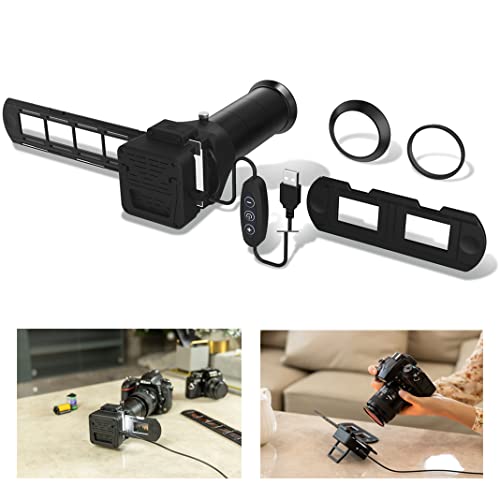
This rig bundles the digitizer body and the backlight into a single unit, which simplifies camera-based setups compared to the earlier Nikon-ES-2-style digitizer. Where that earlier pick assumes a separate light panel, this version integrates the source, so exposure stays consistent from frame one through the end of the roll.
It still mounts to a macro lens on Canon, Nikon, or Sony bodies via the included step rings. Photographers using this on a tripod end up with one less cable and one less accessory to align. Compared to phone-based picks, you get better dynamic range from a real camera sensor, though you trade portability for that quality bump.
Where It Delivers
- Integrated backlight removes one piece from the setup checklist.
- Seven step rings cover the three main camera mounts.
- Stable platform produces repeatable exposure across long scanning sessions.
- Captures both negatives and mounted slides in 35mm.
Honest Caveats
- No medium-format support, so 120 owners need a different rig.
- Bulkier than phone-based options, which matters for travel scanners.
Who Should Grab It
DSLR and mirrorless shooters with a macro lens who want a tidy, repeatable scanning setup for 35mm archives.
Where Another Pick Suits Better
The JJC Film Digitizer for 35mm & 120 Format handles both 35mm and medium-format film on a single rail-mounted rig.
Mixed-format archives are the rule rather than the exception, and this rig handles both 35mm and 120 medium-format negatives on a single camera-mounted platform. A sliding rail adjusts the shooting distance from roughly 10.4 to 18.5 inches, which lets you match the working distance to whichever format is loaded.
The included knob gives you precise front-to-back movement, which matters when chasing focus on a flatbed-style setup. A note worth flagging: this model handles negatives but does not digitize 35mm mounted slides, so pure slide archivists should pair it with a different holder. For someone whose shoebox holds both formats, though, this rig collapses two workflows into one.
Points In Its Favor
- One rig covers both common film formats without swapping hardware.
- Adjustable rail matches working distance to the format you load.
- Camera-based capture delivers better color depth than phone scanning.
- Knob-driven focus helps keep results consistent across a roll.
Room For Improvement
- Does not handle mounted 35mm slides, only film strips.
- Requires a tripod and a stable surface for best results.
Technical Highlights
Who It Suits Best
Photographers with both 35mm and 120 negatives in the same archive who want a single camera-based scanning setup.
Skip It When
Flatbed owners with an Epson Perfection V-series can scan 120 directly using the 61.5mm medium-format holder.
First-time archivists and family-history projects often start here. This mobile rig covers both 35mm and 120 negatives using your phone as the capture device, with an adjustable clamp to fit a wide range of phone sizes. The included LED backlight is simpler than the 11-level panel on the more expensive mobile kit, but it still produces even illumination for color inversion.
A detachable wireless remote fires the shutter through Bluetooth, which keeps the capture sharp. The kit ships without any bundled app, so you will need a free inversion tool such as Snapseed or a dedicated negative scanner app to flip the colors after capture. For most casual archives, this trade-off keeps the entry cost low without sacrificing everyday usability.
The Practical Payoff
- Two-format support in a single phone rig keeps the setup simple.
- Adjustable clamp fits a wide range of phone widths.
- Wireless remote removes the screen-tap shake during capture.
- Lower entry cost for casual archivists.
Trade-Offs To Consider
- No app included, so color inversion requires an extra download.
- Final image quality tracks closely with the phone sensor used.
Perfect Match For
Family-history archivists who want a low-cost way to digitize mixed 35mm and 120 rolls without buying a camera.
Consider Something Else When
Color-critical photographers should choose the JJC 35mm Slide and Film Digitizing LED Backlight with finer brightness control.
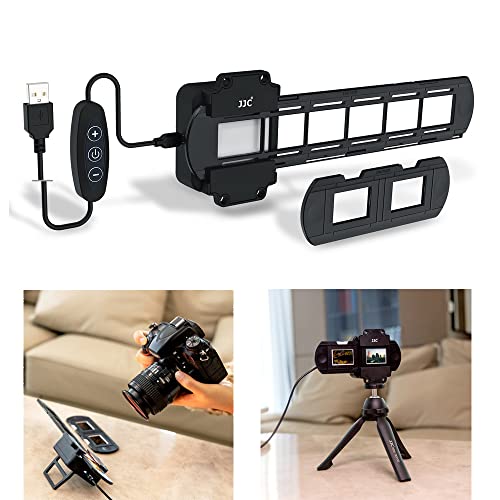
Color-critical shooters know that a sloppy backlight shows up as muddy shadows and uneven color across a roll. This dedicated panel uses 42 LEDs rated at a CRI (Color Rendering Index, a measure of how faithfully a light source reveals true colors compared to daylight) above 95 with a 6500K color temperature (a daylight-balanced white point), which translates into clean, accurate negatives for color inversion.
Two dimming buttons on the controller let you adjust output across ten levels, so you can match brightness to dense or thin negative stocks. It pairs naturally with any of the camera-mounted digitizers covered earlier in the list, including the bare ES-2-style JJC Film Digitizer that does not include a light. For shooters already invested in macro glass, this panel is the missing piece that makes the rig sing.
Where It Helps
- CRI above 95 keeps color inversion honest and predictable.
- Ten brightness levels handle a variety of negative densities.
A Few Limitations
- Limited to 35mm format coverage.
- Does not digitize on its own; needs a camera or scanner to capture.
Who Will Love This
Color-focused shooters with an existing macro rig who want a clean, even light source to anchor the whole scanning workflow.
A Different Pick May Work Better
For complete phone-based workflows, the JJC Mobile Film Scanner Set with 11-Level Backlight bundles a light panel into a full scanning kit.
What To Weigh Before Choosing A 120 Film Scanner Setup
Capture Method: Camera, Phone, Or Flatbed
The first fork in the road is how you plan to digitize. Camera-mounted rigs lean on a mirrorless or DSLR sensor plus a macro lens and produce the cleanest color and detail, but require gear you may already own. Phone-based rigs are the most portable and the easiest entry point, though results scale with phone sensor quality. Flatbed scanners like the Epson Perfection series with the right holder provide reliable scans for medium-format work without extra accessories.
Film Formats In The Archive
Before picking a digitizer, count how many 120 rolls sit in your archive versus 35mm strips and mounted slides. Some rigs handle both formats on one rail, while others are single-format specialists. If your collection mixes heavily, choose a rig that swaps formats without rebuilding the whole setup.
Light Quality And Color Accuracy
The light source determines how accurate the inversion will be. A high CRI panel above 95 (an index that measures how closely a light matches natural daylight across the visible color spectrum) at a 6500K color temperature produces truer color across shadow and highlight areas. Cheaper backlights look acceptable at first but introduce cast that takes hours to correct in software.
Workflow Extras That Save Time
Trim cutters, film retrievers, and remote shutters are easy to overlook until you need them. A clean-cut edge prevents scanner jams, and a wireless remote removes the screen-tap shake that softens phone captures. These extras are small individually but together they cut a full day of scanning down by hours.
Key Considerations Across These Picks
Common Buying Slip Ups
A frequent stumble is buying a digitizer before checking macro lens compatibility, since some rigs need very specific focal lengths to fill the frame. Another is assuming any phone scanner works for medium-format film, when most phone kits need the right holder to seat a 120 strip correctly. Always match the rig to the format and the camera before anything else.
Where The Extra Money Goes
Higher-end panels add more LEDs, finer dimming steps, and CRI ratings that translate directly into cleaner color after inversion. Camera-mounted rigs cost more because they integrate a sliding rail, multiple step rings, and better build tolerances. The upgrade pays off when scanning hundreds of frames a session, where consistency and color accuracy save significant post-processing time.
Frequently Asked Questions
What Is The Easiest Way To Scan 120 Film At Home?
A flatbed scanner with a 120 medium-format tray, such as an Epson Perfection V-series plus a 61.5mm holder, is the simplest path. It produces reliable scans without extra camera gear, and most software handles the color inversion automatically.
Do Phone Scanners Produce Good Enough Results?
For casual sharing and social posts, yes. For archival prints or large prints, a camera-mounted digitizer using a macro lens produces noticeably better color depth and detail, and is worth the extra setup.
Can One Rig Handle Both 35mm And 120 Film?
A few do, including the JJC Film Digitizer for 35mm & 120 Format and the mobile phone kits with magnetic holders. Single-format rigs typically deliver more consistent focus across that one format, so choose based on which you shoot more often.
How Important Is CRI For A Film Digitizing Light?
CRI, or Color Rendering Index, measures how faithfully a light source matches natural daylight across the visible spectrum. A rating above 95 helps inversion software produce accurate colors with less manual correction. Lower CRI panels can introduce color cast that takes significant time to undo.
What Accessories Make Scanning Faster?
A trim cutter for clean strip edges, a wireless remote to trigger the camera without touching it, and a film retriever for rewound cassettes all speed the workflow noticeably. None of them are required, but each one removes a small bottleneck from the process.
Wrap Up
The right scanner setup depends on what you already own and how you plan to use the files. Camera shooters chasing gallery-quality results should anchor on a macro lens and a high-CRI light panel. Phone-first archivists get the best mileage from a kit that bundles holders, backlight, and remote. Flatbed owners with an Epson Perfection can extend what they already have with a medium-format holder. Start with the format mix in your archive, then pick the rig that meets you there.