Hunting for sharp video without dropping a grand on a camera setup is a real grind. Most laptop cameras still look fuzzy in anything less than perfect lighting, and full studio rigs feel like overkill for a Tuesday morning team call. This list gathers ten solid webcams that handle 4K resolution without the high-end markup, covering home offices, classrooms, casual streaming setups, and everything in between.
The picks span entry-level compact models, dual-lens powerhouses, and built-in lighting options. Each one balances resolution, microphone quality, autofocus behavior, and mounting style in a slightly different way, so the right match depends on how you actually plan to use it. Read on to find the one that fits your daily setup, and skip the ones that overdeliver on features you won’t touch.
The Leading Options At A Glance
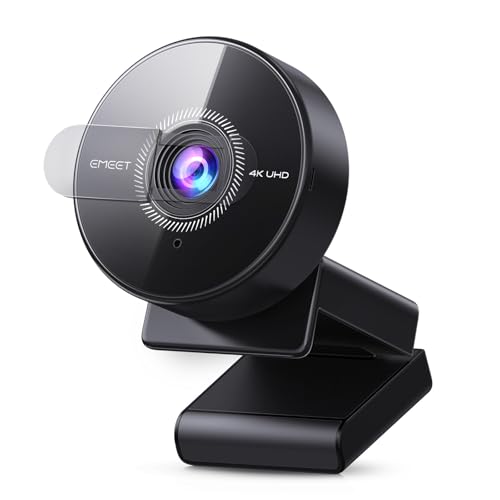
EMEET C950 4K Webcam PDAF Autofocus

EMEET NOVA 4K Webcam PDAF Dual Mics

EMEET C960 4K Webcam Dual Omni Mics

EMEET S600L 4K Streaming Webcam Ring Light

Logitech Brio Video Conferencing Webcam

Logitech Brio Ultra HD 4K Webcam

EMEET C100 2K Webcam Privacy Cover

EMEET C60E Dual-Camera 4K Streaming Webcam

EMEET S600 4K Streaming Webcam Sony Sensor

EMEET Piko Dual-Camera 4K Streaming Webcam
A Closer Look At Each Pick
The C950 sits in that sweet spot where resolution, autofocus behavior, and price all line up without anyone feeling shortchanged. It captures 4K at 30 frames per second (a smooth, standard frame rate for video) and steps down to 1080p at 60 fps for smoother motion, which matters when you wave your hands around during a presentation or chase a toddler across the frame on a family call. The CMOS sensor (the chip that converts light into a digital image) helps in low-light rooms where cheaper cams tend to crush detail into shadows.
You’ll mostly leave it clipped to your monitor and forget it exists, which is exactly what most home offices want. Compared to the pricier NOVA up next, this one skips the dual microphones, but the built-in single mic still handles everyday voice calls without complaint.
The Value In It
- Real 4K output at 30 fps for sharp, readable slides and faces
- PDAF autofocus (phase-detection autofocus, the same fast-focus tech phones use) keeps you crisp when you lean in or shift position
- CMOS sensor holds detail in dim home-office lighting
- USB plug-and-play means no driver headaches on most platforms
Worth Noting
- Single built-in microphone picks up background noise in open-plan spaces
- You’ll want decent lighting to see the full benefit of that sensor
Best Suited To
Remote workers, students, and casual streamers who want clean 4K video without fiddling with settings or buying extras.
Look Elsewhere When
The EMEET NOVA 4K Webcam serves content creators who need dual omnidirectional microphones and stronger low-light capture.
NOVA leans harder into the streaming and meeting side of webcam life. The dual omnidirectional microphones (mics that pick up sound evenly from all directions) capture voice from a wider arc, which helps when you pace during presentations or share a desk with a co-host. The CMOS sensor pulls detail out of dim rooms where most webcams start smudging faces into shadow.
Compared to the C950’s single-mic setup, this one trades a slightly higher cost for noticeably better audio pickup. The 4K at 30 fps ceiling stays the same, but the smarter sensor tuning tends to hold up better against window glare in late-afternoon calls.
Advantages To Know
- Dual omnidirectional mics catch voices from across a small room
- CMOS sensor tuned for low-light clarity during evening calls
- 4K resolution preserves fine detail for product close-ups and whiteboard sessions
- PDAF autofocus reacts quickly when you move toward the camera
Trade Offs
- Slightly bulkier housing than the C950, so it sits taller on thin monitor bezels
- Dual mics don’t replace a dedicated USB mic for podcasting
Feature Snapshot
Whose Shelf It Belongs On
Content creators, online educators, and small-team hosts who want richer audio pickup without buying a separate microphone yet.
Reach For A Different Pick When
The EMEET S600 4K Streaming Webcam suits gamers who prioritize a higher 1080p frame rate over microphone coverage.
C960 keeps things simple and a little tighter. The 73-degree field of view (the angle of the scene the lens captures) frames one person naturally without that wide-angle distortion you sometimes see on cheaper cams, so your face looks proportionate on screen instead of stretched at the edges. The dual omnidirectional mics keep audio steady for solo calls.
Where the NOVA pushes for bigger rooms, the C960 settles into the small home-office corner. The clip fits cleanly onto thin laptop lids and external monitors, which matters if you travel between desks or hot-desk at a coworking space.
Where It Helps
- 73-degree field of view frames a single speaker without background clutter
- True 4K sensor avoids the soft, upscaled look of fake 4K claims
- Dual omnidirectional mics handle voice clearly at desk distance
- Compact body stays out of the way on slim monitor bezels
A Few Limitations
- Narrower field of view cramps group calls with multiple people on screen
- Limited mounting angle adjustment compared to larger streaming cams
Made For
Solo professionals, tutors, and presenters who need a clean, natural-looking headshot on every call.
A Better Fit Elsewhere
The EMEET C950 4K Webcam PDAF Autofocus works better for shared desks where multiple people might appear in frame.
The S600L solves a problem most webcams ignore: bad room lighting. The integrated ring light wraps around the lens and brightens your face evenly, which means late-night creators don’t need to rig a separate key light behind their monitor. The camera also adjusts exposure when the ring kicks in, so you don’t end up washed out or shadowed under the chin.
Compared to the NOVA’s dual-mic focus, this one leans toward visual polish. The 1/2-inch sensor (a physically larger image sensor that gathers more light) gathers more light than smaller webcam sensors, which helps in dim setups before the ring light even turns on.
Well-Handled Touches
- Built-in ring light evens out facial lighting without extra gear
- Larger 1/2-inch sensor pulls in more light for cleaner low-light video
- Auto-exposure balancing avoids the harsh glare typical of ring lights
- 0.2-second PDAF autofocus keeps up with hand gestures and posture shifts
Honest Caveats
- Ring light adds bulk, so it doesn’t tuck neatly behind a laptop screen
- Light color temperature can’t always match warmer room tones, depending on your setup
Quick Facts
Right Fit For
Streamers, tutors, and remote workers filming in basement offices, bedrooms, or any room with uneven lighting.
Swap It Out When
The EMEET Piko Dual-Camera 4K Streaming Webcam works better for creators who switch between wide scenes and close-ups during the same stream.
The original Logitech Brio leans on glass optics rather than plastic, and that choice shows up in sharper edges and more accurate color. It supports 4K resolution and a higher 90 fps mode at lower resolutions, which keeps motion smooth during product walkthroughs and gesture-heavy demos. The auto-focus tracks reliably without the constant hunting you see on budget cams.
Where the EMEET S600L tackles dim rooms with a ring light, the Brio depends more on tuning exposure in software. You’ll want some ambient light in the room, but in well-lit offices and meeting spaces, the color rendering tends to look more lifelike than most plastic-lens alternatives.
Benefits That Matter
- Glass lens holds sharper detail at the edges of the frame
- 5x digital zoom pulls in for closer product or document shots
- 90 fps at lower resolutions smooths out hand gestures and presentations
- Auto-focus stays steady without pulsing in and out
Things To Consider
- USB 3.0 requirement for full 4K performance, so older ports may limit output
- No ring light, so dim rooms can leave faces looking flat without external lighting
Who It Suits Best
Enterprise teams, consultants, and remote professionals running polished client-facing calls from well-lit offices.
Consider Something Else When
The Logitech Brio Ultra HD 4K Webcam suits shoppers who want HDR (high dynamic range, which balances bright and dark areas) tuning for tricky mixed lighting conditions.
The newer Brio Ultra HD adds RightLight 3, Logitech’s exposure tuning that balances glare and backlight automatically. If you sit near a window, that feature alone changes the game, because it stops the camera from blowing out the bright sky while leaving your face in shadow. HDR support preserves detail in both bright and dim parts of the frame.
Compared to the original Brio, this one leans harder into mixed-light environments where natural and artificial light fight each other. The glass lens, 4K sensor, and USB-C-friendly connection stay consistent with the older model.
Useful Strengths
- RightLight 3 auto-balances window glare and indoor lighting
- HDR support keeps both bright skies and shadowed faces readable
- Glass lens preserves color accuracy across the frame
- Multiple connection types including USB-C make laptop docking easier
Points To Note
- Premium positioning pushes it above most budget webcam tiers
- Setup software offers lots of dials, which can overwhelm first-time users
Feature Card
Perfect Match For
Home-office workers with bright windows, mixed-light rooms, or variable daytime conditions who want video that just looks right without manual tweaks.
Not Your Match When
The EMEET S600L 4K Streaming Webcam Ring Light better serves creators working in dim rooms who want built-in lighting instead of HDR tuning.
The C100 sits a notch below 4K at 2K resolution, but the practical trade is a lower price and a rotating privacy cover that physically blocks the lens when you’re off-camera. That’s the kind of small detail that matters when the webcam lives in a bedroom or shared apartment and you want a hard guarantee no one is watching. Fixed focus keeps images sharp between roughly 12 and 40 inches, which covers typical desk distances without hunting.
Where the C950 pushes for full 4K resolution, the C100 trades resolution for privacy and simplicity. The metal clip grips thin laptop lids securely, so it doesn’t slide around during travel.
Positive Takeaways
- Physical rotating privacy cover gives a hard barrier when not in use
- Metal clip holds firm on slim laptop screens and external monitors
- Fixed focus avoids the focus-hunting jitter common on cheaper cams
- Lower price point makes it approachable for first-time webcam shoppers
Possible Compromises
- 2K resolution falls short of full 4K for sharp, detailed close-ups
- Distortion-control field of view excludes wider room shots from the frame
Who Should Grab It
Students, casual remote workers, and anyone prioritizing privacy and low cost over maximum resolution.
Skip It When
The EMEET C950 4K Webcam PDAF Autofocus fits shoppers who want true 4K resolution and don’t need a built-in privacy cover.
The C60E pulls off something unusual: two cameras sharing a single sensor housing. The wide-angle lens captures your full setup, while the telephoto lens (a lens designed for distant, magnified subjects) pulls in for close-up product shots or detailed expressions during tutorials. Switching between them mid-stream adds a layer of production value most single-lens webcams can’t match.
Compared to the single-lens S600L, this one trades ring-light simplicity for shooting flexibility. RGB lighting around the body adds flair for content creators, and the included remote lets you trigger camera switches without touching the unit.
Notable Gains
- Dual cameras let you cut between wide and close-up views during streams
- Up to 11x hybrid zoom (a blend of optical and digital zoom that magnifies distant subjects) reaches across larger desks
- RGB lighting ring adds personality for content creator branding
- Remote control keeps camera switching hands-free during recordings
Things To Weigh
- More complex setup than a single-lens webcam, depending on your streaming software
- Hybrid zoom loses some sharpness at the higher magnification range
Built With In Mind
Product reviewers, online teachers, and creators who switch between showing themselves and showcasing items on a desk.
Where A Sibling Pick Shines
The EMEET NOVA 4K Webcam PDAF Dual Mics works better for shoppers who care more about clear audio than camera-switching tricks.
The S600 swaps the ring light for a Sony 1/2.55-inch sensor, which captures noticeably cleaner video with less noise in dim rooms. For streamers running colorful overlays and reactive scenes, the higher 1080p frame rate (60 fps) keeps fast motion smooth without the soap-opera effect you sometimes get on cheaper cams.
Compared to the ring-lit S600L, this one is a better fit for setups that already have proper lighting. Gamers with LED panels behind their monitor and content creators with controlled studio lighting get more out of the sensor than they would from a built-in ring.
Strengths Worth Knowing
- Sony 1/2.55-inch sensor delivers cleaner low-light video than typical webcams
- 4K at 30 fps and 1080p at 60 fps cover both quality and motion needs
- PDAF autofocus holds focus during gaming gestures and quick movements
- Streamer-friendly frame rates pair well with OBS and similar tools
Small Caveats
- No built-in lighting means dim rooms still need external illumination
- Higher frame rate modes rely on platform and software support
Feature Rundown
The Right Fit
Twitch streamers, gaming creators, and anyone with a controlled lighting setup chasing smoother high-frame-rate footage.
Where Another Pick Suits Better
The EMEET S600L 4K Streaming Webcam Ring Light fits creators in dim rooms who need built-in lighting more than a larger sensor.
Piko rounds out the dual-camera category with a slightly simpler take than the C60E. The wide-angle camera keeps you and your room naturally framed, while the telephoto camera steps in for tight product close-ups, which works well for tutorial creators who bounce between talking to camera and showing small details on the desk.
Compared to the C60E’s RGB lighting and remote control, the Piko sticks closer to a clean, neutral design. You get the same dual-lens flexibility without extra visual flair, which suits users who prefer a low-key look on screen.
Everyday Advantages
- Dual cameras support flexible framing from wide room shots to tight close-ups
- Telephoto lens delivers sharp detail for product demos and tutorials
- Clean, neutral design fits home offices without drawing attention
- Useful for hybrid creators who run both meetings and content sessions
Where It Is Less Suited
- Less specialized for gamers who want high frame rates above resolution
- No built-in lighting, so it depends on room setup for low-light performance
Who Will Love This
Hybrid creators, online tutors, and small-business streamers who switch between personal framing and product close-ups in the same session.
A Better Fit Elsewhere
The EMEET S600 4K Streaming Webcam Sony Sensor fits dedicated gamers who want higher 1080p frame rates over dual-lens flexibility.
What To Weigh Before Choosing Your Next Webcam
Pick the resolution that matches your platform first. Most video conferencing apps still downscale to 1080p on the receiving end, so true 4K matters most for recorded content, product demos, and high-stakes client calls where every detail shows. If your daily routine is mostly team meetings on standard platforms, a 2K or 1080p webcam may handle the job without the extra cost.
Sensor size and autofocus behavior shape how the camera handles real rooms. Larger sensors (the 1/2-inch and Sony 1/2.55-inch types in this list) gather more light and stay cleaner in dim conditions. PDAF autofocus locks onto your face faster than older contrast-detection systems, which matters during presentations when you move around the frame.
Microphone quality sits higher on the priority list than most shoppers expect. Dual omnidirectional mics handle small rooms and shared desks well, but they won’t replace a dedicated USB mic for podcasting or music recording. If audio quality matters for your work, plan to budget for an external mic alongside the webcam.
Mounting and physical design affect daily use more than spec sheets suggest. Slim monitors and laptops need a low-profile clip, while streaming setups often call for a tripod mount. A privacy cover gives peace of mind in shared spaces, and integrated ring lights remove the need for extra desk gear.
Key Considerations Across These Picks
Mistakes Worth Dodging
The most common slip is chasing the highest resolution on paper without checking the sensor and lens quality behind it. A cheap 4K sensor can look worse than a quality 2K sensor in average room lighting. Another trap is ignoring microphone quality and assuming onboard audio will hold up for important calls. Pick a webcam that matches your actual lighting and room setup first, then layer on extras like ring lights or dual lenses.
Where The Extra Money Goes
Higher-tier models earn their price through better sensors, glass lenses, and smarter exposure tuning. The Logitech Brio Ultra HD, for example, handles mixed lighting through HDR and RightLight 3, which cheaper cams can’t replicate. Dual-lens options like the C60E and Piko add production flexibility that single-lens cams cannot match. The honest read is that the upgrade pays off when your work depends on consistent video quality across changing room conditions.
Frequently Asked Questions
Do I really need 4K resolution on a webcam? You benefit most from 4K when recording content, streaming, or hosting high-stakes client calls where fine detail matters. For standard team meetings, 1080p often looks identical on the receiving end and saves money.
How important is autofocus speed for video calls? Autofocus matters more than most people realize. PDAF systems track your face quickly when you lean in or move around, while cheaper cams can pulse in and out of focus during longer conversations.
Can a webcam replace a dedicated microphone? For casual calls and meetings, dual omnidirectional mics work fine. For podcasting, music, or content where audio quality carries the production, a dedicated USB microphone still delivers noticeably cleaner sound.
What is HDR and do I need it? HDR (high dynamic range) balances bright and dark areas in the same frame, which helps when you sit near a window. You benefit from HDR mostly in mixed-light rooms where standard exposure leaves either the window or your face looking off.
Will any of these work with my laptop? All ten webcams here use USB connections compatible with Windows, macOS, and most Linux distributions. Check your laptop’s USB port version if you plan to use 4K at full frame rates, since some older ports may limit bandwidth.
Bottom Line
The right webcam depends on where you work, how you light your space, and what kind of calls you run most days. Streamers and content creators should weigh the S600, S600L, or one of the dual-lens picks. Office workers in mixed-light rooms will get the most from the Logitech Brio Ultra HD. Budget shoppers and privacy-minded users will find the C100 checks the boxes that matter most without overcomplicating the setup. Pick the one that fits your daily scenario, and the video quality will follow.