Setting up a home theater used to mean committing to a wall-mounted TV and a tangle of cables. Modern projectors flip that script, letting you throw a 100-inch picture onto a blank wall or a pull-down screen with a single device. The category has matured fast: laser light sources last years instead of months, smart TV platforms are baked in, and short-throw designs let you park the unit inches from your wall. Sorting through the noise takes time, though, so the picks below cut straight to what fits specific rooms, budgets, and viewing habits.
Your Options, Compared

Soundcore Nebula P1 Portable Projector
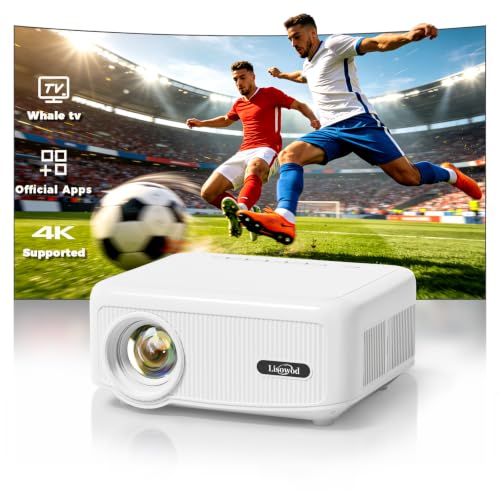
Lisowod Outdoor Projector with WiFi and Bluetooth
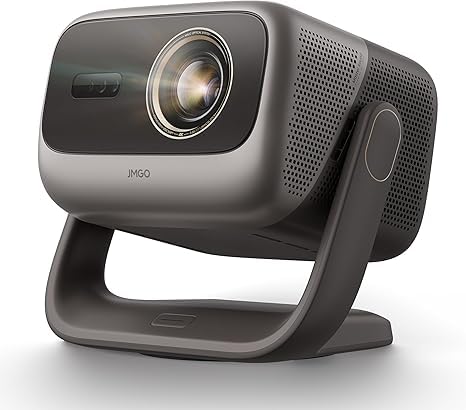
JMGO N3 Ultimate 4K Triple Laser Projector

JMGO N1S Ultra 4K Triple Laser Projector

JMGO PicoPlay 1080P Smart Mini Projector

TOPTRO Portable Smart Projector with Google TV 14.0

JMGO N1S Ultimate Triple Laser 4K Projector

JMGO O2S Ultra 4K Ultra Short Throw Triple Laser Projector
What Each Pick Brings To The Table
The Nebula P1 stands out the moment you unbox it, because the speakers physically detach from the main unit. That single design choice changes how you set up a movie night: you can drop the projector on a coffee table, then place the speakers at either end of the couch for real stereo separation, without running wires across the room.
Inside the speakers sit 20W drivers with Dolby Audio processing, so dialogue stays clear and effects have some weight behind them. You also get roughly 20 hours of detached playback if you just want background music. For projector duties, the light engine pushes 650 ANSI lumens, which is plenty for a dim room or a backyard once the sun drops. Compared to the Lisowod model further down the list, the Nebula P1 trades native app libraries for a more portable, modular form factor.
Why It Works Well
- Detachable speakers unlock true wireless stereo placement
- 650 ANSI lumens handles dim rooms and evening outdoor use
- Built-in battery lets you skip the power cable for short sessions
- Dolby Audio adds depth without forcing an external soundbar
- Compact chassis fits a backpack for travel or sleepovers
Worth Bearing In Mind
- 650 lumens falls short in sunlit living rooms during the day
- Battery life drops fast at peak brightness, so plan for the brick on longer movies
- Detachable speakers mean more pieces to keep charged and stored
Whose Shelf It Belongs On
Anyone who wants a grabbable projector for dorm rooms, sleepovers, or back patio evenings without dragging out cables.
Swap It Out When
Pick the JMGO N1S Ultimate instead if you mostly watch in a bright living room and need raw light output over portability.
Lisowod’s outdoor projector leans hard into the smart TV side of things rather than chasing the highest brightness. It ships with Whale OS 3.0 powered by an LX2 chip, and the interface feels closer to a phone than the clunky menu grids you find on older projectors. In practice, that means less time hunting for the Netflix tile and more time actually watching.
The native app library runs past 1,000 entries, so streaming subscriptions rarely require an external stick. Wireless streaming over WiFi or Bluetooth handles the rest, and the chassis stays light enough to pack out to a patio or park field. The trade-off versus the Soundcore Nebula P1 is straightforward: this one is built to stay plugged in and tethered to apps, not to roam untethered for hours.
Good Reasons To Consider
- Whale OS 3.0 navigates more like a smartphone than a traditional projector menu
- 1,000+ native apps remove the need for a separate streaming stick
- WiFi and Bluetooth dual-band streaming keeps cables off the lawn
- LX2 chip keeps menus responsive when you bounce between apps
Things To Weigh
- Best used under near-dark conditions; outdoor ambient light washes out the image
- No detachable speakers, so audio positioning stays fixed to the unit
- Streaming-focused software can feel overkill for users who just want HDMI input
Feature Snapshot
Best Suited To
Backyard hosts and casual streamers who want a smart-TV-like interface without buying an extra streaming stick.
Where Another Pick Suits Better
Choose the Soundcore Nebula P1 instead if you care more about wireless audio and battery-powered portability than app depth.
The N3 Ultimate is the heavyweight of this list, packing 5,800 ISO lumens and a motorized gimbal that physically moves the image around the room. Triple laser light sources split red, green, and blue across dedicated modules, which keeps colors vivid without the rainbow effect older single-laser units sometimes show. Daytime viewing stops being a fight.
You also get true optical lens shift covering a wide horizontal and vertical range, plus a zoom range wide enough to fill a 120-inch screen from a coffee table. The motorized gimbal adds 360-degree panning and 150 degrees of tilt, so a weird room layout no longer means a crooked picture. Compare that to the N1S Ultra below, and you trade some compactness for far more installation flexibility and sheer brightness.
What It Does Well
- 5,800 ISO lumens punch through daylight and patio string lights
- Motorized 360-degree gimbal places the image anywhere in the room
- Optical lens shift keeps 4K sharp without digital cropping
- Triple laser light engine produces richer, more accurate colors
- Wide zoom range simplifies placement near coffee tables or shelves
Trade Offs To Consider
- Larger chassis eats shelf space compared to the N1S Ultra
- Higher brightness ceiling drives louder cooling under load
- Specs and gimbal add complexity if you just want a simple plug-and-play setup
Perfect Match For
Homeowners with bright, open living spaces who want a daylight-readable projector and don’t mind a larger unit on the credenza.
Look Elsewhere When
The JMGO O2S Ultra fits better if you want a TV-replacement image from inches off the wall rather than across the room.
The N1S Ultra hits a comfortable middle ground for shoppers who want triple laser color without paying for flagship-tier lumens. Its 2,800 ISO lumens hold up well in moderately lit rooms with curtains drawn, and the Google TV integration means the Netflix login screen sits one click away rather than behind a stick.
Where it really earns its keep is in mixed-use rooms. You can leave it on the shelf for daily streaming, then dim the lights for a movie without the picture washing out. Compared to the JMGO PicoPlay, this is a stationary unit that demands a power outlet and some breathing room, but it gives you a real 4K picture instead of a portable 1080p compromise.
Benefits That Matter
- Triple laser light source delivers wide color gamut for movies and games
- 2,800 ISO lumens handle evening viewing with lights on
- Google TV built in, so streaming apps run natively
- Long laser lifespan reduces lamp-replacement concerns
Points To Keep In Mind
- Not bright enough to overcome direct sunlight through unshaded windows
- Stationary form factor rules out easy room-to-room moves
- Google TV interface occasionally needs manual app refreshes after updates
Spec Overview
Right Fit For
Living room viewers who want a daily-driver projector that doubles as a smart TV replacement for evening movie sessions.
A Better Fit Elsewhere
Step up to the JMGO N3 Ultimate if your room floods with afternoon light and you want daylight-grade brightness.
PicoPlay leans into the “pocket cinema” idea without giving up streaming apps. Google TV comes preinstalled with a licensed Netflix app, so you avoid the messy sideloading that plagues some travel projectors. The 400 ISO lumen output keeps things readable at smaller screen sizes, though you won’t want to fight a sunny room with it.
The 8W Dolby Digital speaker pushes out more volume than the chassis size suggests, which matters when you’re projecting onto a hotel wall or tent fabric. You can also pair it with a power bank for cable-free setups, making it a strong fit for road trips. Against the Soundcore Nebula P1, you trade the detachable speakers for a slightly smaller body and full Google TV app support.
Features That Help
- Licensed Netflix through Google TV avoids workarounds
- Power bank support lets you skip wall outlets on trips
- 8W Dolby Digital speaker handles small groups without extra gear
- Optical filter accessory shifts the mood for ambient lighting
Less-Strong Areas
- 400 ISO lumens means dark-room viewing only
- 1080p resolution loses detail on screens larger than 80 inches
- Built-in battery life often needs topping up during long movies
Who Should Grab It
Travelers, college students, and renters who want a true grab-and-go projector with mainstream streaming apps ready to go.
Reach For A Different Pick When
Pick the TOPTRO Portable Smart Projector instead if you need short-throw flexibility for tight bedroom walls.
TOPTRO’s portable projector is built for tight rooms where a long-throw unit simply won’t fit. The short-throw lens can fill a bedroom wall from just a foot or two away, and the auto focus and keystone correction handle the rest without fiddling. Google TV 14.0 runs the show, with 10,000+ apps and HDR10 support baked in.
The 1GB RAM and 32GB storage combo keeps navigation snappy enough for casual browsing. Dolby audio decoding pairs with the built-in speaker, and you can stream over WiFi or Bluetooth without adapters. Compared to the JMGO PicoPlay, this unit trades true battery portability for ceiling-friendly mounting and a brighter HDR-friendly picture.
Strengths Worth Knowing
- Short throw lens fits cramped bedrooms and dorm walls
- Google TV 14.0 offers the newest app ecosystem out of the box
- Auto focus and keystone remove manual setup steps
- HDR10 support adds punch to compatible streaming content
A Few Limitations
- No built-in battery, so you’ll always need a wall outlet nearby
- 1GB RAM can stutter when juggling multiple background apps
- Audio quality lags behind the JMGO PicoPlay’s dedicated 8W driver
Feature Card
Built With In Mind
Bedroom, dorm, and small apartment dwellers who want a ceiling-mountable projector with smart apps in a tight footprint.
Not Your Match When
Choose the JMGO PicoPlay if you want battery-powered portability over short-throw wall placement.
The N1S Ultimate sits between the N1S Ultra and the flagship N3, blending a 3,300 ISO lumen output with the same Google TV smart platform. Triple laser technology keeps colors saturated, and a 1,600:1 native contrast ratio preserves shadow detail without crushing blacks. It’s the sweet spot for shoppers who want a brighter picture than the N1S Ultra but don’t need the N3’s full 5,800-lumen setup.
For mixed-use rooms with large windows, the extra lumens buy you the ability to watch daytime sports without blackout curtains. The unit still runs cool and quiet enough for a bedroom or den, and the integrated gimbal helps with placement. Against the N3 Ultimate, you give up motorized pan range and peak brightness in exchange for a friendlier size.
A Strong Showing
- 3,300 ISO lumens handle sunlit rooms and afternoon games
- Triple laser color holds saturation even at high brightness
- 1,600:1 contrast ratio preserves shadow detail in dark scenes
- Google TV streamlines app logins across services
- Integrated gimbal simplifies placement on side tables or shelves
Honest Caveats
- Doesn’t match the N3’s motorized flexibility for ceiling mounts
- Larger footprint than portable options like the Soundcore Nebula P1
- Lasers can show faint speckle on certain screen materials
Made For
Shoppers who want flagship-tier color and brightness in a stationary home unit without paying for the top-of-line gimbal system.
Where A Sibling Pick Shines
Move up to the JMGO N3 Ultimate for full 360-degree motorized placement if your room layout demands unusual angles.
The O2S Ultra belongs to the ultra short throw family, projecting a 150-inch image from just inches off the wall. That throw ratio of 0.16:1 means the unit sits on a media console like a soundbar, throwing the picture upward instead of across the room. It behaves like a TV replacement, which is exactly the pitch for shoppers tired of mounting traditional projectors.
3,600 ISO lumens and RGB triple laser light give you enough punch for daytime sports and bright HDR scenes. The compact chassis keeps it from dominating the credenza, and the laser light source should outlast any lamp-based alternative by years. Compared to the N3 Ultimate, you lose the room-filling flexibility of long-throw optics but gain a furniture-friendly footprint.
A Favorable Mix
- 0.16:1 throw ratio projects 150 inches from inches off the wall
- 3,600 ISO lumens keep the image visible in lit rooms
- RGB triple laser covers wide color gamut for HDR content
- Compact chassis fits on standard media consoles
- Laser longevity removes lamp-replacement worries
Some Limits To Know
- Requires a flat, dedicated wall or an ambient-light-rejecting screen for best results
- Surface dust shows up more at extreme close range, so wiping the wall area matters
- More expensive than long-throw units with similar brightness
Product Snapshot
Who Will Love This
Living room shoppers ready to retire a wall-mounted TV and replace it with a console-friendly projector and screen combo.
Consider Something Else When
Pick the JMGO N1S Ultimate if your room layout calls for traditional across-the-room placement instead of close-wall throw.
Matching The Right Projector To Your Room
Picking a projector starts with honest answers about where it will live. A short-throw unit in a tiny bedroom behaves completely differently from a 5,800-lumen laser tower in an open loft, and the gap shows up the first time you press play.
Brightness and ANSI/ISO lumens. Lumens measure how much light the projector pushes at the screen. Anything under 1,000 ISO lumens needs a dark room; 2,500 to 4,000 handles typical daytime glare; 5,000+ fights direct sun. The number matters most when you can’t fully control the ambient light in your viewing space.
Throw distance and room layout. Throw ratio tells you how wide the image gets at a given distance. Long-throw units need 8 to 12 feet for a 100-inch picture; ultra short throw models need only inches. Measure your room before falling in love with a spec sheet, especially if ceiling mounting isn’t an option.
Light source type. Laser projectors last far longer than lamp-based units and hold brightness longer. Triple laser designs split red, green, and blue into dedicated modules, which gives you better color volume but can show faint speckle on certain screen materials.
Smart platform and apps. Built-in Google TV, Whale OS, or licensed Netflix means fewer streaming sticks cluttering your inputs. Check that the apps you actually use are native; sideloading workarounds get old fast.
Getting The Most From Your Pick
Pitfalls Shoppers Hit
The biggest trap is buying on lumens alone. A 4,000-lumen lamp-based projector in a screen-incompatible room can look worse than a 2,000-lumen laser on the right surface. Wall color matters too: projecting onto a beige wall eats contrast that a neutral gray or a proper screen would preserve.
Another common slip is ignoring fan noise. Higher-lumen units push more air, and that hum becomes obvious during quiet dialogue scenes. Reading owner feedback about noise under load helps separate the quiet performers from the loud ones before you commit.
Where The Extra Money Goes
Premium laser projectors cost more for three real reasons: longer light-source life, better color accuracy, and stronger brightness headroom. Spending up makes sense when you watch daily, want HDR content to look right, and plan to keep the unit for five or more years.
Budget units still deliver a great picture for occasional movie nights, but they tend to fade faster and run louder. If you treat the projector as a main display rather than a weekend toy, the upgrade usually pays off in quieter operation and longer service life.
Frequently Asked Questions
Do 3d 4k projectors need a special screen? A dedicated screen helps, but a smooth, neutral-colored wall works for casual viewing. Ambient-light-rejecting screens make the biggest difference in rooms you can’t fully darken.
How close can a short throw projector sit to the wall? Ultra short throw units like the O2S Ultra can sit inches away, while regular short throw models need a foot or two. Check the throw ratio in the specs to confirm fit for your space.
Are laser projectors worth the higher cost? Lasers last years longer than lamps, hold brightness better, and reach full power almost instantly. For daily use, the longer lifespan and lower maintenance usually justify the upfront premium.
Can I use a projector in a lit room? Yes, but you need at least 2,500 ISO lumens for shaded daytime viewing and 4,000+ for direct sun. Pair the brightness with an ambient-light-rejecting screen for the cleanest daytime picture.
How long do projector light sources actually last? Modern laser units typically run 20,000 to 30,000 hours before meaningful brightness loss, which covers a decade or more of regular evening use. Lamp-based projectors usually need a new lamp around 3,000 to 5,000 hours.
The Takeaway
A good fit comes from matching brightness, throw distance, and smart features to the room you actually have, not the room you wish you had. The picks above cover everything from backyard streaming to TV-replacement setups, and each one earns its place for a specific use case. Whichever path you choose, focus on the room first and the specs second, and the right projector usually reveals itself.