Remote work and creator workflows have pushed webcams past their old, grainy reputation. A modern 4k webcam delivers crisp detail, natural color, and far better low-light handling than the laptop shooter you have been tolerating. This roundup walks through nine options worth your attention, covering home offices, streaming setups, hybrid conference rooms, and budget builds, so you can match a camera to the way you actually work.
A Closer Look At The Lineup

Acer A640 4K Webcam with AI Noise Canceling Mic

Logitech Brio Video Conferencing Webcam (Black)

Insta360 Link 2 PTZ 4K Webcam with AI Tracking

Logitech Brio Ultra HD 4K Webcam

Logitech Brio 4K Webcam for Business
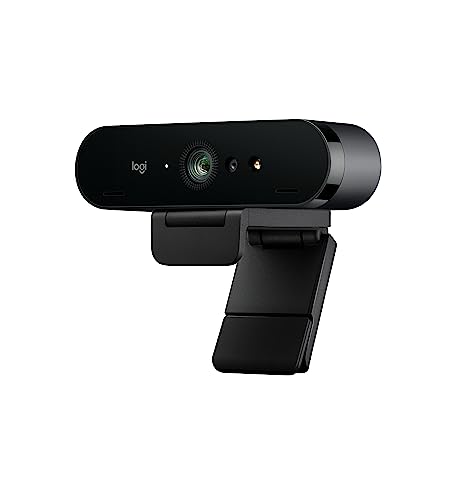
Logitech 4k Webcam
Insta360 Link 2 PTZ Webcam (HDR, Gesture)

TONGVEO 4K PTZ Conference Room Camera System

UGREEN 4K@30fps Webcam with Noise-Canceling Mics
Taking A Closer Look At The Options
The Acer A640 is the kind of webcam that fades into your desk and stays out of your way. It pairs a Sony 1/2.8-inch sensor with Phase Detection Auto Focus (PDAF), the same focus method many mirrorless cameras use to lock onto a subject without the small pulsing you see on cheaper cams. In a real home office, that means walking around your room during a stand-up does not turn you into a soft blur.
AI noise canceling rounds out the mic, which is helpful when a partner or roommate is on a call in the next room. For everyday Zoom, Teams, and Google Meet sessions, the A640 covers the bases without feeling overbuilt. It is a sensible first 4K upgrade over a stock laptop camera.
The Upside
- PDAF autofocus keeps your face crisp when you shift position mid-meeting.
- The Sony sensor delivers natural color and decent low-light behavior.
- Built-in AI mic suppresses common household noise without a separate accessory.
- Plug-and-play setup works across most meeting apps right out of the box.
Things To Consider
- Lacks motorized pan or tilt, so it stays fixed on one framed view.
- Best image quality depends on a well-lit room; dim setups look softer than on Logitech’s Brio tier.
Who It Suits Best
Remote professionals running daily video calls who want a noticeable jump from a laptop camera without a steep learning curve.
Look Elsewhere When
You need gesture tracking and motorized framing, in which case the Insta360 Link 2 is a smarter fit.
The original Logitech Brio still earns attention for one reason: it pushes a true 4096 x 2160 signal through USB 3.0. Compared to the Acer A640 in this lineup, you get a more established optical stack, smoother motion at 90 fps in lower resolutions, and a digital zoom for those times you want a tighter headshot. For executive desks and small home studios, that polish is hard to fake.
The bundled microphone handles casual calls fine, though most owners using a Brio already own a dedicated USB mic. The value here is the imaging pipeline, the durable aluminum-feel housing, and Logitech’s mature software. It is the kind of webcam you set up once and forget about for years.
Good Reasons To Consider
- USB 3.0 throughput keeps 4K video uncompressed for cleaner motion.
- 5x digital zoom helps when the only mounting spot is wide and far back.
- Strong third-party software support for OBS, Teams, and Zoom settings.
- Auto-exposure holds up across shifting room light throughout the day.
Honest Caveats
- Requires a USB 3.0 port for full 4K; older laptops may bottleneck the signal.
- Onboard mic is functional but not memorable, so plan for a separate mic if audio matters.
Right Fit For
Power users and executives who want a premium desktop look and already invest in their broader desk setup.
Consider Something Else When
Your team wants certified compatibility with Windows Hello and enterprise device management, where the Logitech Brio 4K for Business is the better tool.
The Insta360 Link 2 is the only camera in this lineup that physically moves. PTZ stands for pan, tilt, and zoom: a small motor rotates the lens to follow you across the frame. Paired with a 1/2-inch sensor and HDR, you get a picture that holds up in moody lighting, plus tracking that keeps you centered when you stand up to write on a whiteboard or demo a product.
Gesture control sets it apart from the Brio and Acer options. Raise a hand and the camera follows you; hold up a palm and it zooms out. For solo creators running cooking demos, fitness sessions, or sales pitches, that hands-free framing is genuinely useful rather than a gimmick.
Useful Touches
- AI tracking keeps a moving subject framed without manual camera work.
- Larger 1/2-inch sensor improves low-light clarity compared to most webcams.
- Gesture shortcuts remove fiddling with software mid-recording.
- Dual native compatibility with Zoom and Teams out of the box.
Points To Note
- The moving gimbal adds weight and bulk compared to fixed-lens rivals.
- Best tracking behavior assumes a clear line of sight; cluttered backgrounds can confuse the AI.
Who Should Grab It
Presenters and creators who move around during calls and want the camera to keep up without a second person behind the lens.
Skip It When
You just need a simple plug-and-call upgrade, where the Acer A640 covers the basics at a friendlier cost.
This is the Brio most shoppers picture when they hear the name. RightLight 3 (Logitech’s auto-exposure engine) and HDR work together to keep faces readable when sunlight blasts through a window or a lamp flickers behind you. The glass lens and 4K sensor handle the rest, producing a natural look that does not require fiddling in software.
It pairs well with everything from a MacBook Air to a desktop streaming rig, and field-of-view adjustments let you switch between a tight headshot and a wider group frame. For most hybrid workers who split time between calls and recorded video, this Brio hits the sweet spot of polish and everyday usability.
Useful Highlights
- HDR combined with RightLight 3 manages tough mixed lighting gracefully.
- Glass lens produces cleaner edges than the plastic optics on cheaper cams.
- Adjustable field of view suits both solo calls and small group framing.
- Works with USB 2.0 and 3.0 setups, which matters for older laptops.
Worth Noting
- Higher resolution modes rely on USB 3.0 bandwidth, so older cables can bottleneck.
- No motorized tracking, unlike the Insta360 Link 2 PTZ option.
Who Will Love This
Hybrid workers and streamers who want a no-fuss premium look in any lighting and rely on one webcam for both meetings and recorded content.
A Better Fit Elsewhere
If your priority is gesture-controlled tracking for a more dynamic presentation style, the Insta360 Link 2 PTZ Webcam brings features this Brio does not.
The “for Business” version of the Brio exists for IT departments, not casual shoppers. It adds Windows Hello biometric login, certified compatibility with Microsoft Teams, Zoom, and Google Meet, and tighter integration with Logitech Sync device management. If your shop rolls out fleets of laptops and wants a single trusted webcam model, this is the one procurement teams will point to.
Under the hood, you still get the 4K sensor, RightLight 3 auto-correction, and noise-canceling microphones. The practical difference shows up in deployment: fewer driver complaints, smoother firmware updates, and a single support path across an organization.
Everyday Perks
- Windows Hello lets you skip typed passwords on supported machines.
- Certified for Teams, Zoom, and Meet, reducing app compatibility guesswork.
- RightLight 3 keeps faces exposed correctly under office fluorescents.
- Compatible with Logitech Sync for centralized fleet updates.
Trade Offs
- Costs more than the standard Brio for features an individual may not touch.
- Some IT-only features add little value to a solo home office setup.
Best Suited To
Organizations deploying video gear across teams and IT managers who need a managed, certified webcam.
Where Another Pick Suits Better
For a solo professional who just wants sharp video without enterprise tooling, the Logitech Brio Ultra HD 4K Webcam covers the same imaging at a lower commitment.
This entry exists on the market as a discontinued Logitech 4K model, often sold at clearance pricing through third-party listings. On a tight budget, you can still pick up a respectable Logitech image pipeline at a fraction of newer prices. It is a viable fallback for anyone who wants 4K resolution without paying flagship money.
Two honest cautions belong here. The camera is no longer supported with firmware updates, and the listing specifically marks it as discontinued, so you are buying an older design rather than a current one. For light daily use that is workable; for mission-critical business fleets, the risk is real.
Notable Upsides
- Often shows up at noticeably lower prices than current Logitech 4K models.
- Carries Logitech’s recognizable color science and exposure behavior.
- Simple USB setup that mirrors the rest of the Logitech family.
A Few Limitations
- No manufacturer support or firmware updates going forward.
- Older sensor generation compared to the current Brio and Insta360 releases.
- Availability varies by seller, so the warranty path is not always clear.
Made For
Cost-conscious shoppers who want a 4K Logitech image and do not need the latest firmware or smart features.
Another Choice May Suit
Anyone who can stretch a little further should consider the UGREEN 4K webcam for a current-generation sensor and active warranty.
This second Insta360 Link 2 variant leans further into creator workflows, with HDR capture, AI tracking, and gesture control aimed at streamers on Twitch, YouTube, and similar platforms. The 1/2-inch sensor is the same physical hardware as the previous Insta360 entry, so the imaging foundation is solid; what changes is the software posture.
If you spend more hours broadcasting than sitting on conference calls, the gesture-driven framing and AI noise suppression let you run a stream almost entirely hands-free. Twitch compatibility adds polish for live chat overlays and scene transitions managed from the camera itself.
Points In Its Favor
- Gesture controls reduce on-screen clicking during live streams.
- AI tracking keeps gameplay or product demos centered automatically.
- HDR helps under uneven stage or desk lamp setups.
- Native compatibility across Zoom, Teams, and Twitch broadens use cases.
Practical Considerations
- Many of the headline features assume the Insta360 Link software is installed and running.
- The motorized gimbal adds desk clutter compared to fixed-lens webcams.
Perfect Match For
Solo streamers who want a single camera to handle calls by day and broadcasts by night without re-mounting gear.
Reach For A Different Pick When
You only need a fixed-angle webcam for back-to-back meetings, where the Acer A640 keeps things simpler.
The TONGVEO bundle is not a personal webcam; it is a full conference room kit. The 4K PTZ camera adds 3x optical zoom (a real lens zoom that preserves detail, unlike digital zoom) and a 93-degree wide-angle field of view, paired with a wireless Bluetooth speakerphone that picks up voices around a table. Together, they replace the all-in-one bar approach with separate, more flexible pieces.
AI auto-tracking follows whoever is speaking, and USB 3.0 plus HDMI outputs make it friendly to both PC-based conference software and room-installed AV gear. For medium meeting rooms, house-of-worship setups, and telehealth clinics, that flexibility is exactly what is needed.
Where It Helps
- 3x optical zoom retains detail at the long end of the lens.
- Wireless speakerphone keeps the table tidy without running mic cables.
- AI tracking reduces the need for a dedicated camera operator.
- Dual USB 3.0 and HDMI outputs fit mixed AV environments.
Where It Is Less Suited
- Overkill for a single desk; the form factor expects a room, not a monitor clip.
- Setup complexity is higher than a simple plug-in webcam.
Built With In Mind
IT teams and AV installers outfitting conference rooms, sanctuaries, or clinical consultation spaces that need a polished multi-participant experience.
Swap It Out When
You are shopping for a personal desk webcam, where any of the Logitech or Insta360 picks here are a better size match.
UGREEN has built a reputation for solid PC accessories at fair prices, and this webcam follows the pattern. The 8MP CMOS sensor captures 4K at 30 fps with improved low-light sensitivity, and the dual noise-canceling mics handle everyday call audio without forcing you to buy a separate USB mic. For students, first-time remote workers, and anyone upgrading from a laptop camera on a budget, the calculus is simple.
There is a useful footnote in the fine print: you only get the full 4K@30fps stream when both your hardware and software path support it. Older USB 2.0 ports and outdated meeting clients may drop you back to 1080p automatically. That is normal for the category, but worth knowing before you set expectations.
Practical Pluses
- 8MP sensor delivers true 4K without leaning on a high price tag.
- Dual built-in mics reduce the need for an immediate separate audio purchase.
- Low-light sensitivity helps in dorm rooms and home offices with mixed lighting.
- Plug-and-play behavior matches more expensive rivals in basic apps.
Things To Weigh
- Full 4K output depends on a current USB 3.0 port and up-to-date meeting software.
- No advanced features like AI tracking or motorized framing.
Whose Shelf It Belongs On
Students, new remote workers, and casual streamers who want a current-generation 4K image without paying flagship pricing.
Not Your Match When
You need certified enterprise compatibility for a managed fleet, where the Logitech Brio 4K for Business delivers what IT departments ask for.
Choosing A Webcam That Actually Fits Your Setup
Picking a 4K webcam is less about chasing resolution and more about matching the camera to your room, your apps, and your habits. Start with the environment you actually have, not the one in your head.
Sensor Size And Low-Light Behavior
A larger sensor gathers more light, which matters more than pixel count when your office relies on a single lamp. The Insta360 Link 2 models use a 1/2-inch sensor, while most competitors sit closer to 1/2.7 or 1/2.8 inches. In practice, a slightly larger sensor will hold skin tones together during evening calls without your face looking like a watercolor wash.
Autofocus, Tracking, And Field Of View
Phase Detection Auto Focus (PDAF), found on the Acer A640, snaps onto your face faster than the contrast-based systems older webcams use. If you move around during calls, prioritize PDAF or AI tracking. If you sit still, a fixed-focus lens removes any focus drift at the cost of flexibility.
Field of view (the width of what the camera sees) shapes how you frame yourself. A 65-degree lens suits a head-and-shoulders shot, while a 90-degree lens captures a whiteboard or two people side by side. Logitech’s Brio models let you switch between these on the fly.
Microphone Quality And Noise Handling
Webcam microphones have improved a lot, but they still trail a dedicated USB mic. AI noise canceling, present on the Acer, UGREEN, and Insta360 picks, removes keyboard taps and background voices better than older single-mic designs. For occasional calls, that is plenty; for daily client-facing meetings, plan to add a real mic later.
Compatibility And Connection Standards
USB 3.0 is the practical floor for uncompressed 4K video on Windows and macOS. USB-C is a port shape, not a speed standard, so check that the underlying USB version supports the resolution you want. Older laptops with only USB 2.0 will often fall back to 1080p automatically, which is fine for some users and a deal-breaker for others.
Where Shoppers Slip Up And What Premium Buys You
Common Shopping Slip Ups
The most common mistake is treating “4K” as a single uniform spec. Two 4K webcams can look completely different because of sensor size, lens quality, and bitrate handling. Skim past megapixel counts and read what reviewers say about color, low-light, and motion. Another pitfall is ignoring the connection path: a great camera bottlenecked by a USB 2.0 hub will look worse than a modest 1080p webcam plugged into USB 3.0.
What The Higher Tier Buys
Stepping up to a premium webcam usually pays for better optics, smarter auto-exposure, and longer software support. The Logitech Brio line and Insta360 Link 2 tiers add RightLight 3 or AI tracking that genuinely improves the picture, not just spec sheet padding. For a single remote worker, a mid-tier 4K cam often makes sense. For someone on camera daily, the premium tier earns its keep through fewer adjustments and a more consistent look over months of use.
Frequently Asked Questions
Do I Really Need 4K Resolution For Video Calls?
Most meeting software still streams between 720p and 1080p to other participants, so 4K helps most for recording, cropping, and future-proofing. A 4K sensor also tends to deliver better 1080p output than a native 1080p webcam because of oversampling (where extra pixels are combined to produce a cleaner, less noisy image).
What Is The Difference Between Optical And Digital Zoom?
Optical zoom uses the lens itself to magnify, preserving detail. Digital zoom simply crops the image and enlarges the pixels, which softens the picture. The TONGVEO conference camera’s 3x optical zoom is genuinely useful; a webcam’s 5x digital zoom is mainly a framing convenience.
Can A 4K Webcam Work With My Older Laptop?
Yes, but check the USB port version. USB 3.0 (often blue inside) is required for smooth 4K. USB 2.0 will still work, usually dropping to 1080p automatically. USB-C ports support both speeds depending on the underlying standard.
Are Built-In Microphones Good Enough For Daily Meetings?
For most remote calls, AI-enhanced dual mics on webcams like the UGREEN and Acer models are workable. They fall short for podcasting, music, or any situation where vocal warmth matters, where a dedicated USB microphone remains the right tool.
What Is HDR In A Webcam?
HDR, or High Dynamic Range, balances bright and dark areas in the same frame so a window behind you does not turn your face into a silhouette. It is a real quality-of-life improvement in mixed lighting and worth prioritizing for daytime calls.
Bottom Line
Your best 4K webcam is the one that matches the room you actually sit in and the calls you actually take. Solo professionals in quiet home offices will be happy with the Acer A640 or a Logitech Brio. Creators who move around will find the Insta360 Link 2 earns its keep. Larger rooms belong to a dedicated PTZ system like the TONGVEO bundle. Match the tool to your real workflow, and the upgrade pays for itself the first time a call goes smoothly without you fiddling with the camera.