Bird photography from a kitchen window or a backyard feeder asks more from your gear than casual shooting. You need reach, fast focus on quick wingbeats, and image quality that survives cropping. The picks below span dedicated feeder cameras and traditional superzoom bridge bodies, so you can match a setup to the way you actually watch birds.
The Main Contenders

Kiwibit Solar Bird Feeder with Camera 2 Mini

Sony Cyber-Shot RX10 IV Bridge Camera

Kiwibit Bird Feeder 2 Pro Solar Camera

Kiwibit Smart Bird Feeder 4K AI Camera
Kiwibit Bird Feeder 4K AI No Subscription

Kiwibit Solar Bird Feeder 4K HDR Camera
Aqara Camera Hub G5 Pro PoE Outdoor

KODAK PIXPRO AZ528 Bridge Camera
What Each Pick Brings To The Table
If you’re new to backyard birding and don’t want a complicated setup, the Camera 2 Mini takes the friction out of getting started. The solar panel keeps it topped up on its own, so you’re not climbing a ladder every few weeks to swap batteries.
You get a 132-degree wide-angle view (that’s a broad sweep across the feeder) plus 4K video with HDR, which simply means the camera handles bright and shadowy spots at the same time without losing detail. For folks who just want to peek at their phone when something lands, the app alerts do exactly that.
Standout Benefits
- 4K HDR video plus 8MP stills give you enough detail to crop in on a bird’s face without a muddy result.
- 132-degree wide lens captures the whole feeder zone, so birds entering from either side stay in frame.
- Infrared night vision means owls and late visitors show up clearly in black-and-white after dark.
- Solar power keeps things running through most seasons, with the panel recharging the internal battery on sunny days.
Things To Consider
- The AI bird ID features require a Kiwibit Premium subscription after a 30-day trial, which adds to the long-term cost.
- Like most feeder cameras, it leans on a strong Wi-Fi signal outdoors, so placement near the router matters.
Feature Snapshot
Who It Suits Best
Casual backyard watchers who want a hands-off feeder camera that runs on solar and streams clearly to a phone.
Consider Something Else When
Skip this one and look at the Kiwibit Bird Feeder 2 Pro if slow-motion hummingbird close-ups matter to you.
For birders who treat photography as the main event, the Sony RX10 IV is the bridge camera many enthusiasts quietly call a benchmark. Its 25x optical zoom reaches 600mm (a serious telephoto length for filling the frame with a songbird), and the autofocus locks on faster than most cameras in this class.
You can shoot handheld at the long end and still come home with sharp frames, which matters when a warbler pops up for ten seconds and vanishes. Compared with the feeder-camera picks above, this is a different tool: you carry it, you point it, you choose your shot.
Real-World Strengths
- 0.03-second autofocus acquisition keeps moving subjects, like a hovering kestrel, locked in.
- 24-600mm Zeiss zoom covers wide habitat shots and tight portraits with one lens swap.
- Built-in optical stabilization helps you shoot at full zoom without a tripod on most days.
- Constant f/2.4-4 aperture gathers light in shade or at dawn when birds are most active.
Worth Noting
- This body costs notably more than the feeder-camera options, so it suits committed photographers more than casual watchers.
- At over a kilogram, it earns its weight on a hike but feels heavy on long handheld sessions.
Key Specs
Made For
Bird photographers who want a single do-it-all body for backyard feeders, wetlands, and travel without swapping lenses.
Skip It When
The KODAK PIXPRO AZ528 makes more sense if you mostly want raw reach on a tighter budget and don’t need flagship autofocus.
Hummingbirds don’t sit still, and that’s exactly why the Bird Feeder 2 Pro earns its spot. The auto-focus lens actively tracks rapid motion, so when a hummingbird darts in for nectar, the camera adjusts mid-flight rather than locking on empty air.
The 8x slow-motion playback is the real headline feature for anyone fascinated by wingbeats. Pair that with a 5W solar panel, an IP65 weatherproof rating (meaning it’s sealed against dust and rain jets), and a detachable 5200mAh battery for cloudy stretches, and you get a feeder camera built for daily use rather than occasional peeks.
A Few Strong Suits
- 1080p at 120fps playback slows down hummingbird wings into smooth, cinematic frames.
- Dual-band Wi-Fi (2.4GHz and 5GHz) helps you pick the band with the strongest outdoor signal.
- Up to 20 shared users mean grandparents, cousins, and friends can all watch the same feeder.
- Built-in dual mics pick up actual bird songs, not just silence between visits.
Trade Offs
- Slow-motion playback requires a microSD card, which is sold separately.
- More features can mean more app settings to learn before everything feels intuitive.
Best Suited To
Households with hummingbird feeders who want video that does justice to those quick wingbeats and shared family viewing.
Look Elsewhere When
The Kiwibit Camera 2 Mini is the lighter pick if you don’t need slow-motion and prefer the simpler interface.
Birding tends to be more fun when you can share the moment in real time, and this Kiwibit model leans into that. Up to three people can watch the 4K livestream simultaneously, and recorded clips can be shared with up to 20 family members.
The HDR-enhanced feed, 132-degree wide lens, and infrared night vision cover the same broad viewing window as the Camera 2 Mini. Where it differs is in the social layer. For grandparents in another state or cousins across town, this is the kind of feeder that turns into a small shared hobby.
Notable Upsides
- Multi-user livestream support makes it easy to share the backyard with extended family.
- 8MP stills paired with 4K HDR video deliver solid detail for both print and screen.
- Night vision extends viewing well past sunset, so early-morning and dusk visitors stay visible.
- Solar power keeps the camera running without frequent manual recharging.
Points To Note
- Advanced AI features sit behind a subscription, so factor that into the long-term cost.
- Wider social sharing works best on stable home Wi-Fi rather than spotty mobile signals.
Feature Card
Whose Shelf It Belongs On
Families and multi-generational households who want to share the backyard feeder experience without everyone crowding one phone.
A Better Fit Elsewhere
Pick the Kiwibit Bird Feeder 4K AI No Subscription if monthly fees would frustrate you more than the shared-viewing extras.
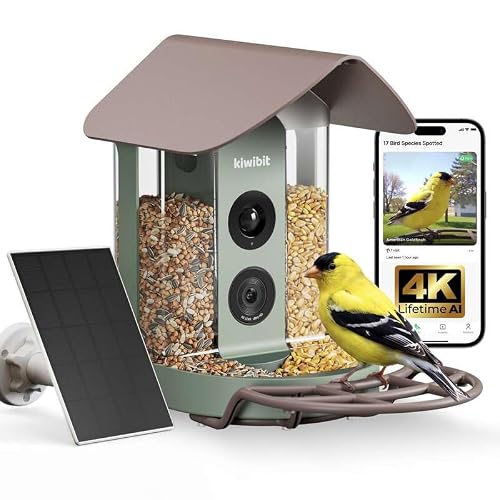
The recurring subscription is often the part that catches shoppers off guard with smart feeders, and this Kiwibit skips it entirely. Lifetime AI recognition is built in, meaning you can identify over 10,000 species without paying a monthly fee after the initial setup.
It’s a small but meaningful shift. Instead of budgeting for a subscription that quietly renews each year, you pay once and let the camera do its work. For backyard birders keeping an eye on long-term cost, that change of math often tips the decision.
A Few Highlights
- Lifetime AI included means no monthly fee surprises down the road.
- Bird Keyshots automatically organizes daily visits into shareable moments.
- 4K Ultra HD video holds up well when you crop in on a perched bird.
- False-alarm filtering helps the alerts feel relevant rather than noisy.
Room For Improvement
- Some advanced AI insights may still be gated behind feature tiers, depending on rollout.
- Like other solar-powered feeders, cloudy weeks can drain the backup battery faster than sunnier stretches.
Quick Facts
Right Fit For
Subscription-averse shoppers who want long-term AI identification without the recurring cost piling up year after year.
Swap It Out When
Reach for the Bird Feeder 2 Pro instead if 8x slow-motion playback matters more to you than skipping the subscription.
Some backyards are sun-drenched and others sit under tree cover, and this HDR-equipped model handles both reasonably well. The 132-degree wide lens captures a generous sweep of the feeding area, while the 8MP sensor and HDR keep colors and contrast natural even on bright, contrast-heavy days.
The Perch Extender is a thoughtful touch for anyone watching larger birds like jays or doves, since it gives them somewhere to land before stepping onto the feeder itself. Combined with infrared night vision, this is a camera that quietly covers the full arc of a day.
The Good Stuff
- HDR sensor balances bright skies against shaded feeder shadows for richer color.
- 8MP photos and 4K video give you solid material for both stills and clips.
- Perch Extender supports bigger birds that wouldn’t otherwise feel comfortable.
- Infrared night vision captures black-and-white footage after dark without disturbing wildlife.
Honest Caveats
- AI bird ID may require a subscription, depending on the tier you choose at setup.
- Solar charging drops off in deep shade or during stormy stretches, so placement matters.
Spec Overview
Who Should Grab It
Birders with mixed flocks, from chickadees to jays, who want balanced color and a perch big enough for larger visitors.
Reach For A Different Pick When
Choose the Sony RX10 IV if you want to photograph birds well beyond the feeder, like hawks in open fields or herons across a pond.
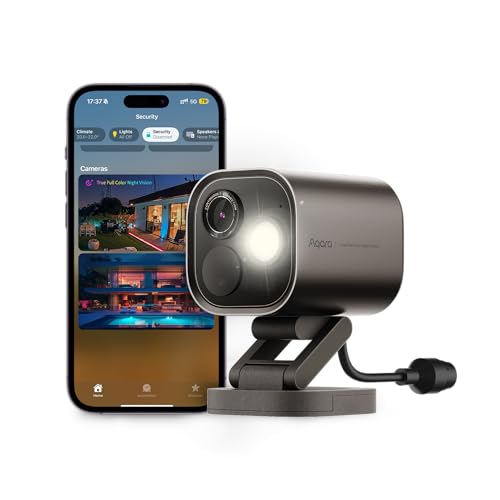
The Aqara G5 Pro isn’t a feeder camera, and that’s worth saying up front. It’s a PoE (Power over Ethernet) outdoor security camera, which means a single cable handles both power and data. For smart-home tinkerers who already run an Aqara or HomeKit setup, that’s a feature, not a quirk.
Where it gets interesting for birders is the true-color night vision, made possible by a 1/1.8-inch sensor and f/1.0 aperture (a very wide lens opening that gathers more light). Most night-vision bird cameras fall back to grainy black-and-white. This one keeps color information after dark.
The Case For It
- True color night vision keeps plumage colors readable after sunset, a notable edge over infrared-only feeders.
- 133-degree field of view covers a generous slice of yard or feeder scene.
- PoE setup means one cable for power and video, which simplifies outdoor installation.
- Built-in dimmable spotlight can deter larger critters without flooding the scene with light.
Some Limits To Know
- This is a security camera, not a feeder-specific product, so it lacks a built-in seed tray or perch design.
- PoE installation requires running an Ethernet cable outdoors, which is doable but not always trivial.
Perfect Match For
Smart-home enthusiasts who want their bird cam to double as an outdoor security camera and integrate with their existing setup.
Where A Sibling Pick Shines
The Kiwibit Bird Feeder 4K HDR Camera is the better choice if you want a feeder with a built-in tray and don’t need PoE.
Sometimes you don’t need flagship autofocus, you just need to get closer. The PIXPRO AZ528 stretches to 52x optical zoom, which puts distant subjects, like a hawk in a far tree or shorebirds across a marsh, into reasonable frame size without digital cropping.
The 16MP BSI CMOS sensor (a back-illuminated sensor design that handles low light more efficiently) keeps detail reasonable for a camera at this tier, and the optical image stabilization helps tame handshake at the long end. Compared with the Sony RX10 IV above, this trades autofocus speed and lens brightness for a friendlier price.
Positive Points
- 52x optical zoom reaches subjects that cheaper cameras can’t fill the frame with.
- Optical image stabilization keeps handheld shots at long focal lengths workable.
- Built-in Wi-Fi lets you transfer images to your phone for quick sharing.
- Lightweight body is easier to carry on long walks than heavier enthusiast zooms.
Potential Drawbacks
- Autofocus is slower than premium bridge cameras, so fast-moving birds test the limits.
- The maximum aperture narrows at full zoom, which means dim conditions are tougher.
Built With In Mind
Casual wildlife watchers who want extreme reach on a budget and don’t mind working within the autofocus limits.
Not Your Match When
Pick the Sony RX10 IV instead if you regularly photograph fast, erratic birds and need the faster focusing system.
Choosing The Right Bridge Camera For Your Backyard
Reach Matters More Than Megapixels
A bridge camera earns its name from the built-in superzoom lens that bridges the gap between a compact body and a telephoto setup. For bird photography, that reach is the whole reason to pick one. A bird three trees over looks like a leaf at 24mm and a portrait at 600mm.
Autofocus Speed And Stabilization
Birds rarely pose. Look for fast autofocus acquisition and optical image stabilization, since both decide whether a moving subject ends up sharp or blurred. The Sony RX10 IV is a clear reference point here, but even modest stabilizers help at long focal lengths.
Fixed Feeder Cameras Versus Handheld Bridges
Smart feeders with cameras are essentially always-on wildlife monitors, perfect for casual viewing and shared livestreams. Traditional bridge cameras, like the RX10 IV or PIXPRO AZ528, give you creative control but require you to be present and pointing. Many birders end up using both styles for different moments.
Connectivity And Power Considerations
Outdoor cameras depend on stable Wi-Fi and reliable power. Solar panels extend runtime on sunny days, while PoE setups deliver a wired connection that doesn’t drop out. Match the power solution to your yard, since shaded feeders and distant gardens behave very differently.
Key Considerations Across These Picks
Pitfalls Shoppers Hit
Chasing megapixels is the most common trap, since more pixels on a small sensor don’t automatically mean sharper bird photos. Lens reach and stabilization do more for your keeper rate than raw resolution. Another mistake is buying a feeder camera expecting it to replace a real telephoto, when the two tools serve different goals.
Where The Extra Money Goes
Paying more for a bridge camera typically gets you faster autofocus, a brighter lens across the zoom range, and better build quality. For feeder cameras, the upgrade usually buys night-vision performance, weatherproofing, and smoother app experience. The honest read is that the upgrade pays off most when you actually use those extras, so think about how often you’ll shoot in low light or rough weather before stepping up.
Frequently Asked Questions
What Is A Bridge Camera For Bird Photography?
A bridge camera is a single-lens camera with a long built-in zoom, sitting between a point-and-shoot and a DSLR. For birds, that fixed telephoto reach lets you fill the frame without swapping lenses.
How Much Optical Zoom Do You Need For Birds?
For backyard feeders, 25x to 50x covers most situations. For distant wildlife like raptors or shorebirds, look toward the 600mm-and-up end, since more reach means tighter framing on small subjects.
Are Smart Bird Feeder Cameras Worth It?
They’re worth it for hands-off monitoring and shared viewing, especially for casual birders. They’re less useful if you want creative control or shoot moving birds beyond the feeder itself.
Can Bridge Cameras Shoot In Low Light?
Some can, particularly models with bright constant apertures like the Sony RX10 IV. Smaller-sensor bridge cameras struggle more at dawn and dusk, which is often when birds are most active.
Do Bridge Cameras Need Tripods?
Not strictly, since optical stabilization helps handheld shooting at moderate zoom. Tripods still help at full telephoto or during long observation sessions, so consider one for stationary setups.
Bottom Line
The right pick depends on whether you want a window into a feeder or a camera in your hands. Feeder cameras like the Kiwibit lineup make birding effortless and shareable, while traditional bridge bodies give you creative control over the shot. Match the tool to the kind of birding you actually do, and the rest falls into place.