Starting a podcast shouldn’t mean dropping thousands on gear. Today’s webcams deliver genuinely clean video at prices that keep your launch budget intact, and most include a built-in mic that handles the basics until you upgrade your audio chain.
The Choices Worth Comparing

Acer A640 4K Webcam with AI Noise Canceling Mic

Logitech C920S HD Pro Webcam with Privacy Shutter

Acer 4K Webcam with Sony 1/2″ Sensor

NexiGo N660P 1080P 60FPS Webcam

EMEET NOVA 4K Webcam with PDAF Autofocus

1080P HD Webcam with Tripod & Mic

Logitech C920x HD Pro Webcam

4K Webcam with Ring Light & Microphone
EMEET C60E 4K Webcam with Tripod
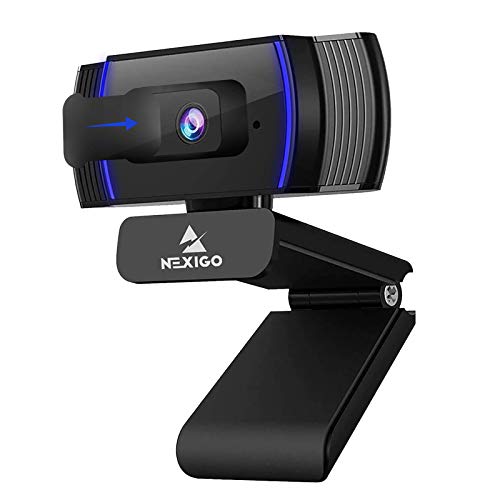
NexiGo N930AF Autofocus Webcam
The Details Behind The Selections
The Acer A640 leans hard into sharpness, pairing a Sony sensor with phase-detection autofocus (PDAF, the same focus tech phones use to lock onto faces fast). You point it at yourself and it tracks in roughly a beat, so podcast hosts who gesture a lot don’t have to worry about focus hunting mid-sentence.
For a single-host setup where one person sits and talks, this is the cleanest entry in the lineup. The AI noise canceling mic is genuinely useful if you haven’t yet invested in a separate XLR or USB microphone, since it trims room hum and keyboard noise. Compared to the older Logitech C920S you’ll see further down the list, you get a real jump in resolution, though the price does climb to match.
Bright Spots
- PDAF autofocus locks onto your face quickly, which matters when you lean in or shift around.
- The 1/2.8-inch Sony sensor captures detailed skin tones in mixed lighting, helping you look natural on screen.
- AI noise reduction trims background hum, so your voice stays cleaner without a second mic.
- 4K resolution means you can crop in during editing without losing sharpness.
- USB plug-and-play means no extra drivers for most setups.
Things To Consider
- 4K video demands more bandwidth and storage, so older laptops may struggle.
- The built-in mic is solid for starting out, but you’ll likely swap it for a dedicated USB mic once your show grows.
Who It Suits Best
Solo creators who want polished 4K video with minimal fuss and a mic that handles the basics until audio gear arrives.
Consider Something Else When
If a metal body and a Sony 1/2-inch sensor matter more than AI mic tricks, the Acer 4K Webcam with Sony 1/2″ Sensor is the better fit.
The Logitech C920S is the camera most podcasters bump into first, and there’s a reason: it’s been refined through years of firmware updates. You get 1080p at 30fps (frames per second, meaning how many still images stack into each second of video) through a glass lens, plus HD autofocus that quietly does its job without much fuss. Light correction handles dim home studios better than the older plastic-lens competition.
Where it really earns its place is the privacy shutter, a small physical cover that slides over the lens when you’re off air. If you record from a bedroom or shared apartment, that simple cover removes a lot of anxiety. Compared to the Acer A640 above, the resolution drops to 1080p, but for most interview-style podcasts that’s perfectly watchable.
What Pays Off
- Glass lens and reliable autofocus mean consistent image quality session after session.
- Built-in light correction rescues footage shot in dim rooms without extra gear.
- Physical privacy shutter gives you one-click peace of mind between recordings.
- Plug-and-play with virtually every recording app, no setup headaches.
Worth Noting
- The dual-mic setup is decent for calls, but not a substitute for a real podcast microphone.
- Cable length is around 5 feet, so back-of-room placements may need an extension.
- 1080p caps your resolution if you plan to crop or zoom in post-production.
Made For
Beginners recording their first season who want a camera that’s already trusted across thousands of podcast setups.
Look Elsewhere When
Step up to the Logitech C920x HD Pro if you want similar image quality without the privacy shutter, since both share the core optical design.
Where most webcams feel like plastic toys, this Acer unibody (machined from a single block of metal, so there are no seams to creak or loosen) webcam feels like a piece of gear you’ll keep around. The Sony 1/2-inch sensor is much larger than the typical webcam chip, and that extra real estate shows up in low-light situations where most cameras fall apart. Pair that with HDR (High Dynamic Range, which balances bright and dark areas in the same frame) and you get skin tones that don’t blow out when your window light changes.
It’s also notably cross-platform, working across Switch 2, Zoom, Teams, FaceTime, YouTube, and Google Meet without drivers. If you record from different devices across a week, that flexibility is worth more than it sounds. The main trade-off is weight: all-metal bodies add heft, so you’ll want a solid mount.
A Few Highlights
- The metal body dissipates heat during long recording sessions, so the sensor stays cool.
- HDR (High Dynamic Range) keeps window-lit faces from blowing out, which matters in home studios with big windows.
- Two noise-reduction mics handle echoey rooms better than single-mic designs.
- Broad app compatibility means you can swap devices without re-pairing or reinstalling drivers.
Trade Offs
- Heavier than plastic webcams, so clip-on mounts can sag over time.
- PDAF autofocus is fast but may hunt briefly when you first sit down.
Best Suited To
Creators who record long sessions in mixed lighting and want a camera that survives daily use without creaking apart.
Skip It When
Reach for the Acer A640 4K Webcam with AI Noise Canceling Mic if you want lighter weight and a microphone with smarter noise filtering.
Most budget webcams top out at 30fps, which means motion gets a little choppy when you gesture or turn your head. The NexiGo N660P doubles that to 60fps at 1080p, and the difference is visible. For hosts who move around during a recording or run a podcast that involves holding up products, the smoother motion helps everything feel more natural on screen.
It also ships with software that lets you tweak exposure, white balance, and resolution without digging through menus. Compared to the Logitech C920S above, you trade the privacy shutter and trusted name for higher frame rates, which is a real upgrade if your podcast style involves movement.
Strong Points
- 60fps at 1080p delivers noticeably smoother motion than 30fps competitors.
- Dual noise-cancelling microphones help when you record near appliances or street noise.
- Included software gives you manual control without leaving your recording app.
- Privacy cover ships in the box, so you’re not hunting for a third-party add-on.
Points To Note
- Autofocus is good but not as fast as PDAF systems in higher-priced picks.
- Low-light performance trails the larger Sony sensors found on premium picks.
Right Fit For
Streamers and dynamic podcasters whose recordings involve a lot of hand movement or prop handling.
A Better Fit Elsewhere
Choose the EMEET NOVA 4K Webcam if smoother motion matters but you also want 4K resolution for cropping flexibility.
The EMEET NOVA is built around one promise: fast, confident focus. Its PDAF system locks onto your face in roughly the time it takes you to settle into your chair, and the dual omnidirectional mics pick up your voice even if you lean to one side of the desk. For talk-show-style podcasts where two hosts sit angled at each other, that’s a meaningful upgrade over cameras that hunt for focus.
You also get 4K at 30fps through a CMOS sensor (the standard image chip used in modern cameras and phones), which is sharp enough to crop a wide two-shot into a tighter single frame in post. The trade-off, as with most 4K cameras, is that older USB ports may not deliver enough bandwidth for full-resolution capture.
Key Advantages
- PDAF autofocus keeps two-host setups sharp without manual tweaks.
- Dual omnidirectional mics capture voice from either side of a desk evenly.
- 4K resolution leaves room to reframe shots during editing.
- USB plug-and-play across major podcast recording apps.
Honest Caveats
- 30fps at 4K limits motion smoothness compared to the NexiGo N660P’s 60fps at 1080p.
- Needs a USB 3.0 port to fully leverage 4K, which older computers may lack.
Who Should Grab It
Hosts recording two-person conversations where both speakers need consistent focus and clear audio capture.
Reach For A Different Pick When
Step down to the NexiGo N660P 1080P 60FPS Webcam if you prioritize smoother motion at 1080p over 4K sharpness.
This Shcngqio webcam arrives as a complete starter bundle, camera plus a rotatable tripod plus a built-in mic, which removes the guesswork for first-time podcasters. The 1080p output is genuinely fine for a static talking-head show, and the wide-angle lens helps if you want to show a whiteboard or product alongside your face.
Auto light correction does a respectable job rescuing footage shot near a single window, though very dim rooms still look grainy. Compared to the Logitech C920S above, you’re trading brand recognition and a glass lens for a lower entry price and a tripod in the box, a fair trade for many newcomers.
Standout Benefits
- The bundled tripod means no extra purchase to get proper eye-level framing.
- Wide-angle lens captures more of your desk, useful for product reviews or demo podcasts.
- Plug-and-play USB works with virtually any recording software.
- Privacy cover ships in the box for off-air peace of mind.
Practical Considerations
- The included mic handles the basics but won’t match a dedicated USB podcast microphone.
- The wide-angle lens slightly distorts faces at close range, so you’ll want to sit back a step.
Perfect Match For
First-time podcasters who want a camera, mic, and tripod in one box without hunting for separate parts.
Swap It Out When
Step up to the Logitech C920S HD Pro Webcam if a glass lens and trusted brand reliability matter more than a bundled tripod.
The C920x shares the same five-element glass lens and HD autofocus as its sibling, but skips the privacy shutter to land at a friendlier price point. For podcasters who don’t worry about leaving the lens uncovered between sessions, that tradeoff is easy to accept. Image quality is the dependable Logitech look: warm tones, smooth light correction, and clean detail at 1080p/30fps.
Dual mics flank the lens for balanced audio pickup, which works well for a single host seated centered in front of the camera. Compared to the C920S above, you’re essentially choosing between a privacy shutter and a few dollars saved.
Points In Its Favor
- Glass lens and Logitech’s mature firmware keep colors consistent across recordings.
- HD autofocus is quiet enough not to buzz in your audio.
- Dual mics capture voice cleanly for a single seated host.
- Light correction handles uneven window lighting without manual tweaks.
Small Caveats
- No privacy shutter, so you’ll want to position it out of casual sight lines.
- Capped at 1080p/30fps, with no 4K option for future-proofing.
Built With In Mind
Weekly interview podcasters who record from a private studio and don’t need a lens cover.
Where Another Pick Suits Better
Pick the Logitech C920S HD Pro Webcam if a physical privacy shutter matters for your recording space.
The Galyimage 4K webcam builds a small ring light right around the lens, which solves a problem most budget cameras ignore: poor face lighting. You get three color temperatures (warm, natural, cool), each dimmable, so you can dial in flattering light without buying a separate panel. The built-in mic is serviceable for the basics.
Resolution tops out at 4K at 30fps, or 1080p at 60fps for smoother motion. Compared to the Acer 4K Webcam with Sony 1/2″ Sensor above, you trade sensor size for integrated lighting, which is a real upgrade if your home studio lacks a window.
Good Reasons To Consider
- Built-in ring light removes the need for a separate lighting kit.
- Three color temperatures let you match your room’s mood without gels.
- 4K at 30fps or 1080p at 60fps gives you flexibility to prioritize detail or motion.
- Plug-and-play USB works across major streaming apps.
Things To Weigh
- Ring light is convenient, but not as soft as a separate panel for full-room coverage.
- The built-in mic handles casual recording but won’t match a dedicated podcast microphone.
Whose Shelf It Belongs On
Creators recording in dim home offices or bedrooms who want better lighting without buying a separate panel.
Not Your Match When
Choose the Acer A640 4K Webcam with AI Noise Canceling Mic if better low-light sensor performance matters more than integrated lighting.
The C60E ships with an adjustable tripod that runs from about 6.7 inches up to 18.5 inches, which is rare in this price bracket. Most webcams clip onto a monitor and stay there; this one lets you set the camera at desk level, eye level, or above the laptop screen depending on the shot. The 360-degree swivel head makes switching between portrait and landscape framing painless.
PDAF autofocus keeps the image sharp as you move, and the 4K resolution captures enough detail to crop during editing. Compared to the Shcngqio 1080P HD Webcam with Tripod earlier in the list, you step up to 4K and gain PDAF, though the included tripod is more versatile.
A Strong Showing
- Adjustable tripod removes the constraints of a fixed monitor clip.
- 360-degree swivel head lets you switch portrait and landscape without remounting.
- PDAF autofocus locks on quickly during casual movement.
- 4K resolution gives you cropping flexibility in post-production.
Possible Compromises
- Tripod adds desk footprint, so tight setups may feel crowded.
- The taller configuration can pick up more room echo than a monitor-mounted position.
The Right Fit
Hosts who switch between sitting interviews, standing demos, or top-down desk shots within a single episode.
Another Choice May Suit
Pick the 1080P HD Webcam with Tripod & Mic if you only need 1080p and prefer a smaller, lighter tripod.
The N930AF focuses tightly on the core webcam experience: clean 1080p at 30fps, reliable autofocus, and broad app compatibility. It works with Zoom, Switch 2, Teams, and Webex without driver fuss, which matters if you bounce between platforms for guest interviews. Autofocus can also be toggled off for manual focal control, a small but useful feature for product-demo podcasts.
The built-in mic is fine for a quiet room, though dedicated podcasters will likely pair this with a USB microphone. Compared to the NexiGo N660P earlier, you give up 60fps in exchange for a slightly lower price, which is a fair trade if your podcast is interview-based and motion isn’t a priority.
The Practical Payoff
- Autofocus can be locked manually for product close-ups and demo shots.
- Broad app compatibility removes setup friction across recording platforms.
- 1080p resolution is plenty for standard interview-style podcasts.
- USB plug-and-play works on laptops and desktops alike.
Some Limits To Know
- 30fps caps motion smoothness for hosts who gesture a lot.
- Low-light performance lags behind the larger-sensor cameras in this list.
Who Will Love This
Interview-style podcasters who record seated talking heads and want reliable autofocus without extra cost.
Where A Sibling Pick Shines
Move up to the NexiGo N660P 1080P 60FPS Webcam if smoother motion at the same resolution is worth the small price difference.
What To Weigh Before Choosing A Budget Camera For Your Podcast
Resolution matters, but it isn’t the whole story. A 1080p camera with a quality sensor and good autofocus often looks more natural than a 4K camera with a small chip, especially in mixed home lighting. For most talking-head podcasts, 1080p at 30fps is genuinely watchable, and the savings can go toward a better microphone.
Frame rate changes how motion feels on screen. Standard 30fps (frames per second, meaning how many still images stack into each second of video) handles seated interviews fine, but if you gesture, hold up products, or walk around your setup, 60fps smooths out the choppiness you didn’t realize was there.
Autofocus technology varies more than most shoppers expect. PDAF (Phase Detection Auto Focus, the fast-locking system phones use) reacts faster and hunts less than older contrast-based systems, which matters during longer sessions where you’re not glued to one spot.
Field of view affects how much of your space the camera captures. A 78-degree lens frames a single host neatly, while wider 90-degree-plus lenses help when you want a guest or a desk full of props in frame. Pick the narrower option if you record from a cluttered room and want the background to feel more focused.
Key Considerations Across These Picks
Pitfalls Shoppers Hit
One common mistake is chasing 4K resolution without checking whether your computer can handle it. Older laptops with USB 2.0 ports cap out well below 4K, so the camera quietly drops to lower resolutions without warning. Another trap is ignoring microphone quality, since audio matters more than video in podcasting, and a great-looking camera with a tinny built-in mic still produces a hard-to-listen show.
When Paying More Pays Off
Higher-tier cameras tend to use larger Sony sensors, which capture more light per pixel. That shows up in dim rooms, where cheaper cameras produce grainy footage. Premium picks also typically include PDAF autofocus and metal bodies that last longer under daily use, which is worth it if you record multiple episodes per week.
Frequently Asked Questions
Do I really need 4K for a podcast? Not necessarily. Most viewers watch podcasts at 1080p, and a clean 1080p signal with good lighting often looks more flattering than a noisy 4K signal from a small sensor.
Can a webcam mic replace a podcast microphone? A webcam mic handles casual recordings fine, but for a show you plan to publish, a dedicated USB or XLR microphone will noticeably improve vocal clarity and room-noise rejection.
What does PDAF autofocus actually do? PDAF (Phase Detection Auto Focus) measures the distance to your face directly, locking focus in roughly a beat. Cheaper contrast-based systems take longer and can visibly hunt back and forth before settling.
Will these cameras work with my streaming software? Yes. Every camera in this list uses standard UVC (USB Video Class) drivers, meaning your computer recognizes them as a basic webcam without extra software. OBS, Streamlabs, Riverside, and Zencastr all work without configuration.
Do I need a tripod or is a monitor clip enough? A monitor clip works for static seated recordings. A tripod earns its keep when you want eye-level framing above a laptop, top-down desk shots, or flexible positioning between episodes.
Bottom Line
Your camera choice ultimately depends on whether your priority is resolution, frame rate, or low-light performance. The picks above cover each strength honestly, so you can match a camera to your recording style without overpaying for features you won’t use. Start where your budget and podcast format meet, and upgrade once you know what your show actually demands.