Sitting on a shoebox of family negatives from the 90s and wondering how to actually see them again? Film photography is enjoying a serious revival, but the real bottleneck for most people isn’t shooting, it’s converting those old strips and slides into something a phone or laptop can open. The market splits into three camps: dedicated scanners with built-in screens, camera-and-macro-lens digitizing rigs for sharper results, and phone-clip holders for quick conversions. Each approach has a real trade-off between speed, image quality, and what gear you already own.
This roundup walks through ten solid options covering all three paths, so you can match the tool to the archive on your shelf and the camera gear already in your bag.
The Leading Options At A Glance

JJC Film Digitizer for 35mm Slide & Negative

JJC Negative Slide Film Cutter

Plustek Film Holder Kit for OpticFilm
ClearClick Virtuoso 2.0 Film & Slide Scanner

JJC Mobile Film Scanner Digitizer Set

Plustek OpticFilm 8100 / 8200i Film Holder
JJC Film Digitizer Scanner with Backlight

JJC Film Digitizer for 35mm & 120 Format

JJC Mobile Film Scanner 35mm & 120
JJC 35mm Digitizing LED Backlight
Why These Options Stand Out
This is the adapter kit for shooters who already own a serious macro lens and want the sharpest possible scan without buying a flatbed. It steps into the role of the Nikon ES-2 digitizing adapter and bundles seven different mount rings so the rig works with most modern Canon, Nikon, and Sony bodies, provided you bring your own macro glass.
The trade-off is upfront cost and complexity: you need a tripod, a body, a 100mm-ish macro lens, and a light source before you can pull a single usable frame. For someone rebuilding a family archive and already kitted out, the image quality ceiling is much higher than what a phone clip or a dedicated consumer scanner can hit.
What Makes Sense
- Seven lens adapter rings cover most modern mirrorless and DSLR bodies, so a single kit serves multi-brand households.
- Replaces a costly OEM adapter without changing the workflow for users familiar with macro shooting.
- Image quality is limited by the lens you pair it with, which means upgrading your glass upgrades every future scan.
- Light and compact enough to pack in a camera bag for travel scans of relatives’ archives.
Where It Is Less Suited
- Not a standalone solution: you still need a macro lens, a tripod, and a steady light source to complete the rig.
- Setup and framing take patience, so a large archive means long evenings at the desk.
Whose Shelf It Belongs On
Photographers with a macro lens already in the bag who want maximum sharpness from 35mm slides and negatives.
Reach For A Different Pick When
Casual users without a macro lens should look at the ClearClick Virtuoso 2.0 instead, since it scans independently with no camera required.
Before any scanner does its work, you usually have to trim film into shorter strips that fit a holder or a carrier. Scissors work in a pinch but the cuts wander and frame edges get nibbled. This little cutter solves that problem with a fixed blade and a guide slot that holds the strip straight.
It handles 35mm alongside 120-format strips in 6×4.5, 6×6, and 6×7 frame sizes, so mixed-format shooters only need one tool on the bench. The built-in backlight panel helps you see where the next frame begins before you commit to the cut.
The Practical Payoff
- Cuts every common film width on one platform, so you stop swapping between scissors and templates.
- Built-in backlight panel makes it easier to spot the gap between frames and avoid trimming mid-image.
- Clean cuts feed smoother into Plustek and similar dedicated scanner holders.
- Compact footprint fits a crowded desk next to a loupe and a dust blower.
Honest Caveats
- The blade is fixed, so replacement parts are not as accessible as on some competing cutters.
- Not essential for users who already shoot only developed, pre-cut 35mm rolls in mounts.
Best Suited To
Hobbyists working through mixed archives of 35mm and 120 negatives who want tidy strips before scanning.
Skip It When
You only shoot mounted 35mm slides and have no 120 negatives to trim, in which case the JJC 35mm Slide and Film Digitizing LED Backlight is a more directly useful add-on.
This bundle ships both the negative strip holder and the mounted-slide holder for the OpticFilm 72 through 83 series scanners. If you own one of those Plustek models, those plastic carriers take a real beating over time: tabs crack, felt padding wears thin, and the spring tension that holds the strip flat slowly loosens.
Replacing both at once means you can keep a backup set on the desk while the originals rest, which matters once you start running archival scans you do not want to redo. Owners of older Plustek models outside the listed range should double-check compatibility before ordering.
Positive Takeaways
- Two-holder kit covers both negatives and mounted slides in one purchase.
- Restores proper frame alignment on Plustek scanners with worn-out original carriers.
- Compatible across a wide range of OpticFilm models, so it survives a scanner upgrade.
Trade Offs
- Only useful for owners of the listed Plustek models, so it does not generalize to other scanners.
- Plastic construction means the holders will eventually wear again and need replacing down the road.
Key Product Details
Right Fit For
Plustek OpticFilm owners with cracked or worn stock holders who want both negative and slide carriers refreshed in one go.
Where A Sibling Pick Shines
For someone without a Plustek scanner who needs a different upgrade path, the JJC Film Digitizer for 35mm & 120 Format is the better route.
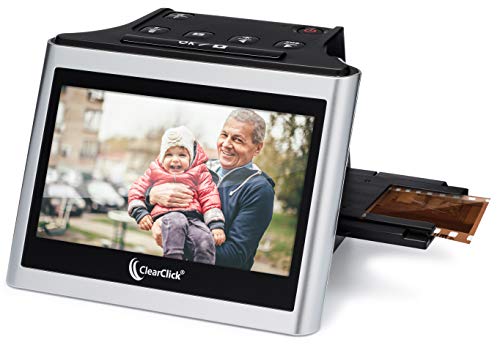
This is the scanner to hand to a parent or grandparent who has a shoebox of mixed slides and wants to see them on a TV. It runs standalone with no computer or driver install, and the 5-inch built-in screen is genuinely large enough to evaluate each frame as it comes off the carrier.
It accepts 35mm, 110, and 126 negatives plus mounted 50mm slides, which covers most home-movie-era archives from the 60s through the early 2000s. The 22-megapixel output is interpolated, so it is not as crisp as a dedicated lab scan, but it is plenty for sharing online or printing standard snapshots.
Useful Highlights
- Standalone operation with no PC required, so non-technical users can run it alone.
- Accepts three negative formats plus mounted slides, covering the bulk of family archives.
- Large built-in preview screen lets you judge each frame before saving.
- Mini HDMI output lets you preview on a living-room TV, which helps when sorting with family.
Points To Keep In Mind
- Interpolated 22MP output is softer than a true optical 22MP scan, so fine grain texture may look smoothed out.
- SD card is not included, so you need to factor that into your setup.
Feature Snapshot
Built With In Mind
Family archivists converting boxes of mixed slides and negatives without wanting to learn new software.
Swap It Out When
Photo enthusiasts chasing maximum sharpness should choose the JJC Film Digitizer for 35mm Slide & Negative paired with a macro lens instead.
This is the kit for people who want to digitize a roll of film using only their phone and a flat surface. The magnetic film holder keeps 35mm and 120 strips aligned while the LED panel underneath provides the backlight the camera needs to capture a clean frame.
Eleven brightness levels let you tune the exposure for dense negatives versus thin positives, which is one of the most common pain points in phone scanning. You will still need a free photo app to invert the image, but the included wireless remote avoids the camera shake from tapping the screen.
Practical Pluses
- 11-step brightness adjustment handles dense negatives and thin positives without overexposure.
- Magnetic 35mm and 120 holder keeps strips flat for sharper phone captures.
- Wireless remote cuts camera shake during capture, improving sharpness on small phone sensors.
Small Caveats
- Final image quality depends heavily on your phone camera, so older budget phones will struggle with fine grain.
- You supply the inversion app, so results vary between different free photo editors.
Core Details
Perfect Match For
Travelers and casual shooters who want to scan a few rolls at a hotel desk or kitchen table without dedicated gear.
Look Elsewhere When
Users working through large archives at speed should pick the ClearClick Virtuoso 2.0, which scans faster with no phone gymnastics.
Sometimes you only need a single replacement sleeve holder to get a long-quiet scanner back in action. This Plustek unit covers 35mm sleeves up to six frames long and a mounted-slide holder up to four frames, which matches the daily workflow most home scanners see.
Because it is a manufacturer-specific replacement part, fit and frame alignment stay consistent with what the scanner was originally engineered for. For Plustek 8100 and 8200i Ai owners, that removes the trial-and-error of third-party carriers.
The Good Stuff
- Manufacturer-spec replacement means original frame alignment is preserved.
- Holds six-frame sleeves and four mounted slides, covering standard scanning sessions.
- Restores a Plustek scanner to like-new carrier condition at a fraction of a new scanner’s cost.
Where It May Fall Short
- Only fits the 8100 and 8200i Ai models, so it does not transfer to newer Plustek scanners.
- Plastic springs inside the holder will wear again with heavy use over time.
Quick Facts
The Right Fit
Plustek 8100 or 8200i Ai owners with cracked or worn factory holders who only need to refresh one scanner.
Where A Sibling Pick Shines
Owners of newer OpticFilm models should grab the Plustek Film Holder Kit instead, since it covers a broader model range.
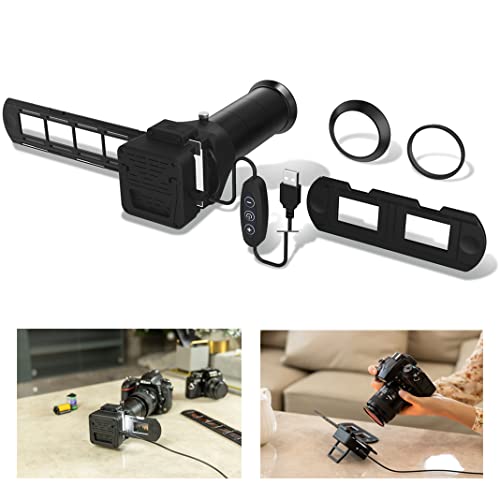
Where the bare Nikon ES-2 replacement requires you to bring your own light source, this version folds the backlight into the rig. The included LED panel sits behind the film so exposure stays consistent shot after shot, which matters when you are processing a long roll through a single camera body.
Like the sibling adapter above, it ships with seven mount rings for the major camera systems, so multi-brand households do not need a second kit. The catch is that you still bring the macro lens and tripod, so this is an upgrade to an existing setup rather than a turnkey option.
Advantages To Know
- Integrated backlight removes the need to source a separate light panel for digitizing.
- Seven included lens adapters cover Canon, Nikon, and Sony bodies in one purchase.
- Consistent illumination across frames means less manual exposure adjustment per shot.
A Few Limitations
- Requires a macro lens and tripod, so it is not a standalone scanning solution.
- Setup is slower than a dedicated scanner for users converting large archives.
Who Will Love This
Multi-brand camera owners who already shoot macro and want a more complete digitizing rig out of the box.
Not Your Match When
Someone without macro glass should consider the JJC Mobile Film Scanner Digitizer Set, since it only needs a phone.
Medium format shooters know the pain of trying to scan 120 strips in a rig built for 35mm. This unit handles both widths and adds a slide rail that lets you adjust the camera-to-film distance from about 10.4 to 18.5 inches, so different focal-length macro lenses can all find focus without re-rigging the setup.
The knob-driven rail moves smoothly and holds position, which removes the wobble you get from improvised rails built from books and clamps. Slide digitizing is not supported here, so this is strictly for negative strips.
A Few Highlights
- Slide-rail focusing range covers most popular macro lens focal lengths.
- Handles both 35mm and 120 film in the same holder, simplifying mixed-format workflows.
- Sturdy rail design holds position under the weight of a full-frame camera and lens.
Trade-Offs To Consider
- No slide-mount support, so 35mm mounted slides need a different scanning path.
- Rail adds desk footprint, so small kitchen-table setups may feel cramped.
Technical Highlights
Made For
Medium format shooters who already own a macro lens and want one rig that covers both 35mm and 120 strips.
Where Another Pick Suits Better
Anyone focused on mounted slides should pick the JJC Film Digitizer Scanner with Backlight, which supports slide formats out of the box.
Where the earlier mobile scanner added an 11-step brightness panel, this version trims back to a simpler LED backlight and an adjustable phone clamp, trading some features for a lower price point. The wireless remote still ships in the box, which keeps phone shake off the captured frame.
It covers both 35mm and 120 strips, so the same kit handles weekend rolls of Tri-X alongside the occasional roll of medium-format Portra. You still need to download a free app to invert the negative image, but the workflow remains straightforward.
The Case For It
- Lower entry cost than the 11-step sibling while keeping the wireless remote.
- Adjustable phone clamp fits a wide range of phone sizes, including most modern cases.
- Handles 35mm and 120 negatives, so one rig serves mixed-format shooters.
Where It Is Less Suited
- No fine-grained brightness adjustment, so dense negatives may need app-side correction.
- Final sharpness depends on your phone camera and how steady the setup is during capture.
Who Should Grab It
Casual smartphone archivists who scan occasionally and do not need granular brightness control.
Consider Something Else When
Heavy archive converters should pick the ClearClick Virtuoso 2.0 for faster batch scanning without phone alignment.
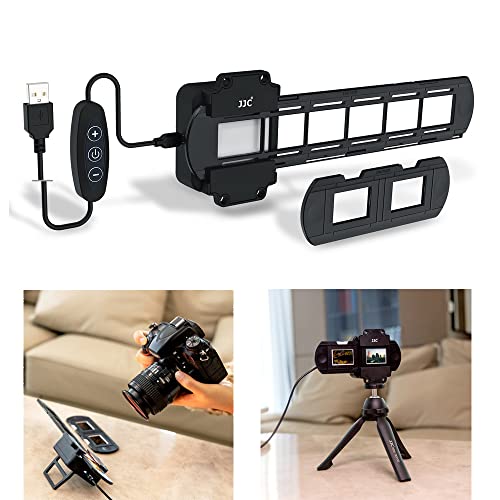
For someone building a custom digitizing rig from scratch, the light source is the single most important component. A mismatched backlight shifts color casts that no amount of editing can fully undo, which is why this panel emphasizes color accuracy: 42 LEDs with a CRI (Color Rendering Index, a measure of how faithfully a light reveals true colors) above 95 and a 6500K daylight color temperature.
Two dimming buttons on the controller let you step through 10 brightness levels, which gives you enough range for both dense negatives and thin slides. It is sold as a standalone panel, so you bring your own camera, lens, and rig.
Useful Touches
- High CRI above 95 means color-accurate scans with minimal manual white-balance correction.
- 6500K daylight color temperature matches what most editing workflows assume as a neutral baseline.
- 10 brightness steps handle a wide spread of negative densities without swapping filters.
Trade-Offs To Consider
- Standalone panel means you still need a camera, lens, and rig to complete a working setup.
- No film holder included, so you pair it with an existing carrier or build a custom mount.
Product Snapshot
Best Suited To
Rig builders and color-conscious shooters who already own a macro lens and want a top-tier light source.
A Better Fit Elsewhere
Casual users wanting a one-box solution should pick the ClearClick Virtuoso 2.0, which pairs a built-in light with the rest of the scanning rig.
Picking A Scanner That Matches Your Archive
The first fork in the road is whether you already own a digital camera with a macro lens. If you do, the JJC Film Digitizer adapters unlock the highest image quality ceiling in this list, especially for 120 medium format where the Plustek and ClearClick units tend to fall short. If you do not, you are choosing between a dedicated standalone scanner like the ClearClick Virtuoso 2.0 for batch work, and a phone-based kit for low-volume or travel use.
Format coverage is the second decision. Most standalone scanners handle 35mm and mounted slides but stumble on 110 or 126. Phone kits handle whatever strip fits the holder, but you give up the consistent framing of a fixed scanner. If your archive mixes 120 and 35mm, the JJC Film Digitizer for 35mm & 120 Format with its slide-rail adjustment is one of the few kits built for both.
A third axis is speed versus control. Standalone scanners win on throughput, since you load a strip and let the machine run. Camera-based rigs win on per-frame control, because you can dial in exposure, white balance, and focus for each shot. For one-time family archive conversions, throughput often matters more. For ongoing shoots, the camera path pays off.
Sorting The Choices Before You Buy
Where Shoppers Go Wrong
The most common mistake is buying a scanner that handles only the film format on top of the pile, not realizing later that 110 or 120 strips need a different rig. Map your archive first: sort negatives by width before choosing a tool, or you end up buying a second scanner within a year.
Another trap is assuming the headline megapixel count tells the whole story. Interpolation (software upscaling that adds pixels without adding real detail) inflates numbers, and a 22MP interpolated scan can look softer than a true 10MP optical scan from a Plustek. Focus on sensor type and optical resolution, not marketing numbers.
What The Higher Tier Buys
Premium scanner tiers earn their keep through color accuracy, dynamic range, and dust/scratch handling. A high-CRI backlight like the JJC Digitizing LED Backlight pays off most when you scan color negatives, where off-color light sources force heavy editing that erodes detail.
Higher-tier camera-based rigs also buy you interchangeable optics, which means a future lens upgrade improves every scan you have already done. For casual one-time conversions, the upgrade rarely pays back. For regular film shooters, it does.
Frequently Asked Questions
Do I need a computer to use a film scanner?
Not always. Dedicated units like the ClearClick Virtuoso 2.0 save directly to an SD card and preview on a built-in screen. Camera-and-rig setups do require a computer to receive the images from your camera or to run inversion software.
Can a phone really scan 35mm film well?
Modern phones can produce surprisingly usable scans, especially with a magnetic holder and even backlight. Results depend heavily on your phone’s camera, lighting, and the inversion app you use, so expect some trial and error on dense negatives.
What is a macro lens and why does it matter?
A macro lens focuses close enough to image a small subject at high resolution, which is exactly what you need to capture a single 35mm or 120 frame at sharp detail. Without one, camera-based digitizing rigs cannot focus on the film plane closely enough.
How do I tell 35mm from 120 film before scanning?
35mm strips are narrow with small rectangular frames, while 120 strips are wider and longer with larger square or rectangular frames depending on the camera. The frame size printed on the negative edge usually identifies the format clearly.
Why do my scans look orange or green?
That color cast usually means the inversion step is missing or the light source is not color-neutral. Use a free inversion app, and consider a high-CRI backlight like the JJC Digitizing LED Backlight to get a cleaner starting point.
Closing Thoughts
The right scanner depends less on spec sheets and more on what is in your archive and what gear you already own. Standalone scanners like the ClearClick Virtuoso 2.0 are the friendliest path for a one-time family conversion. Camera-and-macro-lens digitizers from JJC reward the patient shooter with sharper results and medium-format support. Phone kits sit in between, useful for travel and casual rolls but limited by your phone’s sensor. Match the tool to the job, and the shoebox on your shelf becomes a folder you can actually scroll through.