There’s a shoebox in the closet you keep meaning to deal with. Tucked inside, a stack of 35mm negatives and a handful of mounted slides from vacations, weddings, and that one road trip you still talk about. You finally decided to pull them out, and now the question is what to scan them with. This guide rounds up ten options that handle 35mm photo negatives in different ways, from smartphone-friendly viewers to dedicated film scanners and replacement holders for gear you may already own.
The Leading Options At A Glance

Plustek Film Holder Kit (Negative + Positive) for OpticFilm 72~83 Series

KODAK Mobile Film Scanner, 35mm Negative Scanner & Slide Viewer, App-Based

KODAK SCANZA Film & Slide Scanner, 3.5″ LCD, 35mm, 126, 110, Super 8 & 8mm
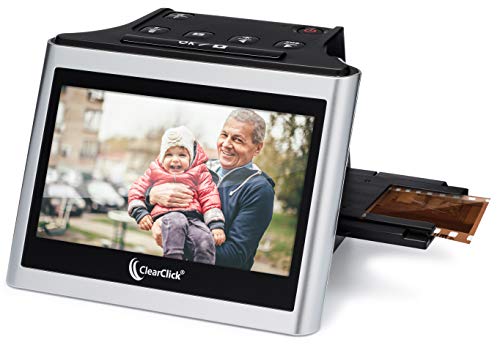
ClearClick Virtuoso 2.0 22MP Film & Slide Scanner with 5″ LCD Screen

OKLILI 35mm Negative Holder for Epson Perfection V500/V550/V600/4490/2450/3170/3200/GT-X750/X770/X820
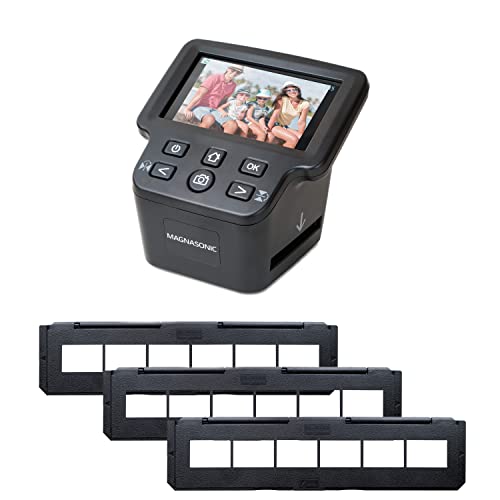
Magnasonic All-In-One 24MP Film Scanner with 5″ Display & HDMI

DigitPro 22MP Film & Slide Scanner with 5″ LCD, Converts 35mm 126 110

KODAK Slide N Scan Film & Slide Scanner, 22MP, 5″ LCD Screen, 135/110/126mm

Plustek OpticFilm 8100 / 8200i Ai Film Holder
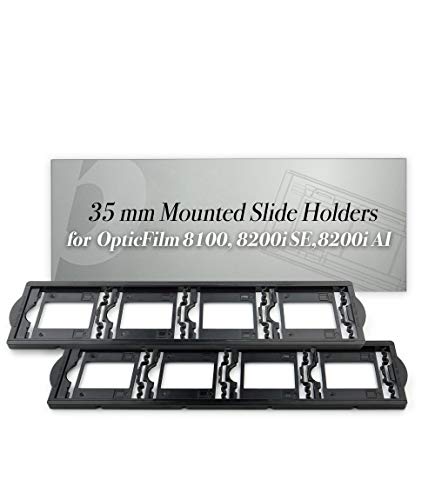
Plustek OpticFilm 7200~9000 Series use 35mm Mounted Slide Holders x 2
More Details On Our Top Picks
You probably already own a Plustek OpticFilm scanner gathering dust in the home office, and now the plastic holders have finally cracked or warped from years of sliding film strips through. This Plustek Film Holder Kit rebuilds the workflow you lost by shipping a fresh negative holder and a fresh positive (slide) holder, both sized for the 7200 through 8300i family of dedicated film scanners.
The fit is the whole story. Each carrier accepts up to a six-frame strip of uncut film or a strip of mounted slides, so you can keep feeding batches through the scanner the way the original accessories allowed. You may want to confirm your exact Plustek model against the compatibility list before ordering, since these holders will not seat correctly in units outside the 72~83 series.
Strengths Worth Knowing
- Replaces both the negative and positive holders you originally received, which means one kit covers your entire workflow rather than forcing two purchases.
- Designed for the Plustek OpticFilm 72~83 series including the 8100, 8200i, and 8300i models that hobbyists typically own.
- Accepts standard strip lengths of up to six unmounted frames or mounted slides, matching the originals so you can keep your scanning rhythm.
- Restores productivity if your old holders warped, cracked, or vanished, since the scanner is unusable without functioning carriers.
Things To Consider
- These holders are not universal accessories, so they fit only the listed Plustek models and nothing else in the lineup.
- Plastic carriers tend to wear with heavy use, so handle the new pieces with the same care as a camera lens to stretch their lifespan.
Key Product Details
Right Fit For
Existing owners of a Plustek OpticFilm 72~83 scanner whose original carriers cracked, warped, or went missing and who need a clean replacement pair to keep digitizing 35mm negatives.
A Better Fit Elsewhere
Shoppers without a Plustek scanner already on the desk should start with the KODAK SCANZA, since it ships as a complete scanning solution and does not require a host unit.
The whole idea here is that your phone already has an excellent camera, so why buy another lens system. The KODAK Mobile Film Scanner uses a fold-flat cardboard platform that holds a strip of 35mm negatives or a mounted slide under a battery-powered LED backlight. You place your phone on top, open the companion app, and the software inverts the colors and corrects orientation before saving the image to your camera roll.
For casual archiving, that approach removes almost every barrier. There are no drivers to install, no SD cards to format, and no learning curve beyond lining up the frame on screen. You may find the resulting files look softer than a dedicated scanner’s output, since the quality ceiling is set by your smartphone lens rather than by the cardboard tray.
Standout Benefits
- No computer, no drivers, and no extra power supply, so the entire setup fits in a kitchen drawer when not in use.
- Battery-operated LED backlight makes the unit portable enough to take to a relative’s house for a shared scanning afternoon.
- The companion app handles color inversion and orientation, which is the fiddly step that usually discourages first-time users from trying negative scanning at all.
Honest Caveats
- Scan resolution tracks whatever camera sits in your phone, so older phones deliver softer results than newer flagships.
- Cardboard construction is not designed for daily heavy use, so the platform may need careful handling if you plan to scan hundreds of frames in a row.
Made For
First-timers with a drawer of family negatives who want a quick, low-commitment way to get those memories onto a phone or cloud drive without buying a full scanner.
Look Elsewhere When
Archivists chasing fine-grain detail from professional 35mm work will get better results from the Magnasonic All-In-One, since a fixed 24MP sensor beats whatever smartphone camera you happen to own.
Few home scanners match the format appetite of the KODAK SCANZA. Inside the box you get adapters for 35mm, 126, 110, Super 8, and standard 8mm film, plus a tray for 35mm mounted slides. That makes it the right answer for households where grandparents left behind a mixed pile of formats rather than a tidy stack of 35mm strips.
A 3.5-inch LCD on the back previews each frame as you go, so you can adjust position before capturing. The included holders slot in from the front and the device saves files to an SD card (not included) without ever needing a computer. Depending on the film stock, you may find exposure settings need a few manual tweaks per batch, since a single global brightness level rarely fits every emulsion in the shoebox.
Noteworthy Benefits
- Handles six film formats from a single unit, which collapses what would otherwise require two or three separate scanners.
- Built-in 3.5-inch LCD means you can preview, capture, and review without tethering to a laptop.
- Saves directly to SD card, so the workflow is genuinely computer-free once the card is in.
Trade Offs
- Quality leans on a built-in camera sensor rather than a flatbed capture, so you should expect convenience-grade output rather than archival-grade scanning.
- An SD card is required and not included, so plan to pick one up before your first session.
Best Suited To
Households sorting through a mixed archive of formats, including 126 and 110 rolls from older cameras alongside standard 35mm work.
Reach For A Different Pick When
Your collection is exclusively modern 35mm and you want a larger preview display, in which case the ClearClick Virtuoso 2.0 with its 5-inch screen is the more comfortable option.
Where the SCANZA gives you a 3.5-inch preview, the ClearClick Virtuoso 2.0 stretches that to 5 inches, which sounds modest on paper but reads as a real upgrade once you spend an afternoon hunched over a tray of slides. The larger panel makes framing judgments easier, especially for older eyes checking whether a slide is in focus or crooked.
The unit accepts 35mm, 110, and 126 negatives alongside 50mm mounted slides, so it covers the usual family-archive formats. A mini HDMI output lets you pipe the preview directly to a television, which is handy for group viewing once the scanning session wraps. You may find the holder design requires a touch more patience than bulkier units, since the smaller format-specific trays need to be aligned carefully before each capture.
Everyday Perks
- 5-inch LCD gives a noticeably larger preview than competing scanners in this price band.
- Mini HDMI output supports direct TV viewing, which turns the device into a living-room slideshow tool once files are saved.
- 22-megapixel (interpolated) capture produces JPEG files that print cleanly at standard snapshot sizes.
Worth Noting
- An SD card is not included, so factor that into your first-session setup.
- Format-specific trays are small and easy to misplace, so a dedicated dish on the desk helps during long sessions.
Key Product Details
Who Will Love This
Hobbyists who want a more comfortable review experience than the smaller 3.5-inch screens on competing models and who occasionally want to share scans on a TV.
Skip It When
You regularly scan odd formats like Super 8 cine film, in which case the KODAK SCANZA’s broader format support will serve you better.
The Epson Perfection scanners were the gold standard for film scanning at home for years, and many still sit in closets with cracked plastic carriers inside. The OKLILI Photo Holder Assembly is the aftermarket fix for exactly that problem, built to replace the original 35mm negative holder and cover in Epson Perfection V500, V550, V600, 4490, 2450, 3170, 3200, GT-X750, GT-X770, and GT-X820 units.
The OEM part numbers 1423040, 1403903, and 1401444 are referenced in the listing, which signals that the geometry is meant to match the originals rather than a near-miss clone. Before clicking buy, you should pull up your scanner’s manual or the original carrier and confirm it matches the photographs, since the wrong fit will misalign every frame you try to capture.
Notable Upsides
- Cross-compatible across a long list of Epson Perfection models, which covers the bulk of consumer Epson film scanners sold over the past two decades.
- Aftermarket pricing typically undercuts the original Epson replacement carrier, which helps when reviving a neglected scanner on a tight budget.
- Restores scanning functionality to a unit that is otherwise unusable for film, since a warped holder scratches the emulsion.
Small Caveats
- Aftermarket parts do not always match OEM tolerances, so the first few scans should be checked for streaks or alignment drift.
- Confirm your specific Epson model is on the compatibility list before ordering, since the wrong generation will not seat correctly.
The Right Fit
Epson Perfection owners whose original 35mm holders cracked, warped, or went missing and who want to put a dormant scanner back into service.
A Better Fit Elsewhere
Shoppers without a working Epson Perfection already on hand should look at the Magnasonic All-In-One instead, which arrives as a self-contained unit rather than an accessory.
The Magnasonic All-In-One pushes the highest native capture resolution in this roundup at 24 megapixels, paired with a 5-inch display and HDMI output for TV playback. The package includes long-tray 35mm negative holders that seat an entire strip without compressing the frames, which makes feeding batches through noticeably faster than the smaller carriers shipped with older scanners.
You get support for 35mm, 126, 110, and Super 8 film plus 135, 126, and 110 mounted slides, with files saved to an SD card (not included) or the built-in memory. Assuming your film stock is in reasonable shape, the captured files hold up well at standard print sizes. Old or scratched negatives will still show those imperfections, since no consumer scanner repairs emulsion damage at the source.
The Upside
- 24MP capture is the highest resolution in this list, which gives more room for crops and larger prints from the same scan.
- Long-tray 35mm holders reduce loading time per strip compared to shorter carriers that hold only a few frames.
- Built-in memory means you can capture a handful of test frames before you even insert an SD card.
A Few Limitations
- An SD card is not included despite being the primary storage path, so plan an extra purchase.
- Resolution is a real spec, but actual detail captured still depends on the original negative quality and exposure.
Feature Snapshot
Perfect Match For
Archivists who want the highest capture resolution available in a dedicated home scanner and who are willing to handle the SD card requirement as a separate purchase.
Where A Sibling Pick Shines
Households chasing the widest format compatibility should pick the KODAK SCANZA instead, since it covers cine formats like Super 8 and standard 8mm that the Magnasonic does not handle.
The DigitPro 22MP scanner pulls together the same core spec sheet as the ClearClick and KODAK Slide N Scan, with a 5-inch LCD, 22-megapixel capture, and the standard family-archive formats (35mm, 126, 110 negatives, 50mm mounted slides, and Super 8 cine film). The internal 128MB of memory and SD card slot give you room to test before committing to larger storage.
For most home users, this is a compact all-rounder rather than a specialty tool. The unit sits comfortably on a small desk, the controls are straightforward, and the bundled adapters cover the formats most households actually own. You may find the menu system takes a few sessions to learn, since the on-screen adjustments for brightness and color balance are not always labeled with plain-language prompts.
What Helps Most
- Internal 128MB of storage provides a quick buffer before you load an SD card.
- 5-inch LCD mirrors the larger preview panels found on competing models.
- Covers 35mm, 126, 110, 50mm slides, and Super 8 cine film in one compact unit.
Trade-Offs To Consider
- An SD card up to 64GB is required for serious capture, and is not included in the package.
- Menu labels tend toward technical wording, which adds a learning curve for first-time users.
Spec Overview
Whose Shelf It Belongs On
Home archivists with limited desk space who want one unit that handles the typical family film formats plus occasional Super 8 reels.
Swap It Out When
You prefer a larger capture resolution for cropping, in which case the Magnasonic All-In-One at 24MP is the natural upgrade.
The Slide N Scan leans into the social side of archiving. Beyond the 22MP capture and 5-inch LCD that you’d expect in this tier, the device ships with a Gallery Mode that cycles through saved images on the built-in screen for family viewing without any extra output. That turns the scanner into a self-contained slideshow once the day’s batches are finished.
Format support covers 135 (35mm), 110, and 126 negatives plus 50mm mounted slides, which lines up with the typical shoebox archive rather than cine film. Files save to an SD card (not included), and the wide viewing angle on the LCD helps when several people are gathered around to spot a favorite frame. You may find the on-device editing tools are limited to brightness and rotation, so heavier color correction belongs on a computer after the fact.
Everyday Advantages
- Gallery Mode turns the scanner into a small slideshow device after the capture session wraps.
- 5-inch LCD has a wide viewing angle, which makes group review more comfortable.
- 22-megapixel capture produces JPEG files ready for sharing or printing at standard sizes.
Where It May Fall Short
- No Super 8 or standard 8mm cine support, so cine film collectors should look at the KODAK SCANZA instead.
- SD card is required and not included with the unit.
Built With In Mind
Families who want to scan and then review images together in the living room without an extra TV or computer in the loop.
Consider Something Else When
You want the highest resolution scan in this tier, in which case the Magnasonic All-In-One at 24MP is the better fit.
The Plustek OpticFilm 8100 and 8200i Ai are widely respected dedicated film scanners, but their workflow leans on the included holders, which can wear or vanish over the years. This replacement kit ships both a 35mm sleeve film holder (supporting up to six-frame strips) and a holder for mounted 35mm slides (four-frame capacity), covering both workflows in a single purchase.
The carriers are sized specifically for the 8100 and 8200i Ai models, so the seating tolerances match the scanner’s internal rails. Assuming your scanner is in working order, the holders restore a smooth feed through the unit. You should confirm the exact sub-model on the listing, since some Plustek variants use slightly different carrier geometry even within the same family.
What Pays Off
- Includes both the sleeve holder and the mounted slide holder in one kit.
- Sized for the Plustek OpticFilm 8100 and 8200i Ai, which keeps the carrier geometry consistent with the originals.
- Six-frame sleeve and four-slide mount capacities match the production accessories, so scanning rhythm stays the same.
Practical Considerations
- Only fits the 8100 and 8200i Ai models, not the broader 7200 to 8300i family covered by the Plustek Film Holder Kit in slot 1.
- Plastic carriers need gentle handling to avoid the warping that prompted the replacement in the first place.
Quick Facts
Who Should Grab It
Owners of the Plustek OpticFilm 8100 or 8200i Ai whose original carriers have warped or broken and who want an OEM-style replacement pair.
Another Choice May Suit
Users on the wider Plustek 7200 to 8300i family should pick the Plustek Film Holder Kit in slot 1, which covers that broader compatibility range.
The final slot covers a small but useful accessory for anyone deep into a slide-scanning project. The Plustek 35mm Mounted Slide Holders arrive as a pack of two, designed for the 8100, 8200i, and 8300i scanners in the OpticFilm family. Having a duplicate carrier means one holder stays loaded while the other cycles through the scanner, which keeps a long session moving without forced pauses.
The carriers accept standard mounted 35mm slides, so they slot into a workflow already optimized for that format. You may find that two carriers are more than enough for casual use but a real timesaver for large slide collections. Confirm your Plustek sub-model before ordering, as the slide holder geometry is calibrated to specific scanners in the 7200 to 9000 series.
Practical Pluses
- Two-pack design lets you rotate loaded and unloaded holders during long scanning sessions.
- Built for Plustek 8100, 8200i, and 8300i dedicated scanners, which are the most common consumer Plustek film scanners still in active use.
- Standard 35mm mounted slide fit, matching the original production accessories.
Where It Is Less Suited
- Only fits the listed Plustek models, so non-Plustek scanners and other Plustek series are not supported.
- Slide carriers tend to scratch with heavy use, so handle the new pieces with the same care you’d give a camera lens.
Made For
Plustek OpticFilm owners working through a large collection of mounted 35mm slides who want a second carrier to keep the workflow moving.
A Better Fit Elsewhere
Shoppers who need both negative and slide holders in one purchase should pick the Plustek Film Holder Kit in slot 1, which ships both carrier types in a single order.
What To Weigh Before Choosing A 35mm Photo Negative Scanner
Picking the right scanner starts with honest answers about what is in the shoebox and how much time you plan to spend. Format coverage is the first filter, since a unit that only handles 35mm leaves 110 and 126 rolls stuck in a closet. Resolution matters less for casual sharing than for archival printing, so the 22 to 24-megapixel tier covers most home needs without overpromising detail that the original film stock never captured.
Workflow shape is the next filter. Standalone units with built-in screens and SD card slots let you scan at the kitchen table without a computer, while flatbed replacements and aftermarket holders only make sense if you already own a Plustek or Epson Perfection. For smartphone-led scanning, the KODAK Mobile Scanner’s app-driven approach removes most of the friction, though the output tracks the camera in your pocket rather than a fixed lens.
Storage and accessories deserve a quiet look too. Most dedicated scanners require an SD card that is not included, and aftermarket holders wear out faster than people expect. Building those into your plan upfront avoids the mid-project pause when the original carrier finally gives up. Consider also how often you realistically scan, since heavy users will justify a higher-resolution unit while occasional archivists are well-served by a more compact, app-driven approach.
Key Considerations Across These Picks
Pitfalls Shoppers Hit
A common mistake is buying on resolution alone and ignoring format coverage, since a 24-megapixel unit that only handles 35mm will not touch the 126 roll your grandfather brought home in 1972. Another trap is assuming every Plustek holder fits every Plustek scanner, when the 7200 to 9000 series actually uses several different carrier geometries. Skipping the SD card purchase is the third classic stumble, since most dedicated scanners save only to SD and ship without one in the box.
Why Top Tier Costs More
Higher-tier models in this category tend to ship with larger preview screens, longer film holders, and slightly higher native capture resolution. The 5-inch LCDs on the ClearClick, Magnasonic, DigitPro, and KODAK Slide N Scan are noticeably easier to review than smaller panels, and long-tray holders cut per-frame loading time. For one-time projects, the upgrades are nice rather than essential. For multi-roll sessions and archival work, those touches translate into real hours saved and cleaner output.
Frequently Asked Questions
What Is A 35mm Negative Scanner?
A 35mm negative scanner is a device that illuminates a strip of 35mm film and captures a digital image of each frame, producing a JPEG you can save to a computer, SD card, or phone. Dedicated units use a built-in camera sensor, while smartphone models rely on your phone’s camera and an app to invert the negative.
Do These Scanners Handle Color And Black And White Film?
Yes. The scanners in this roundup accept both color and black and white 35mm negatives, with the device or companion app handling the color inversion for color negatives. Black and white film simply needs less correction since there are no orange mask layers to invert.
Is A Smartphone App Scanner As Good As A Dedicated Unit?
A smartphone-based scanner like the KODAK Mobile Film Scanner is convenient and cheap, but the output ceiling is set by your phone’s camera lens and the lighting inside the cardboard tray. Dedicated units with fixed sensors and built-in backlights tend to produce more consistent results, especially for archival work.
Do I Need A Computer To Use These Scanners?
Most of the standalone units in this roundup save directly to an SD card and do not require a computer during scanning. The KODAK Mobile Film Scanner sends files straight to your phone via its app. Holders for Plustek and Epson Perfection flatbed scanners, by contrast, do require a computer to drive the capture software.
How Should I Clean And Store The Film Holders?
Gently wipe the plastic carriers with a soft, lint-free cloth and avoid touching the inner rails where the film rests. Store carriers flat in a dry place, since prolonged pressure or heat can warp the plastic and cause scratches on the next batch of negatives you feed through.
Closing Remarks
The right scanner is the one that matches the formats in your archive and the workflow you actually have time for. Standalone units like the KODAK SCANZA or Magnasonic cover most family shoeboxes without ceremony, while the Plustek and Epson holders earn their place if a quality scanner is already sitting on your desk. Match the device to the film you own, give the carriers the same care you’d give a lens, and that shoebox finally turns into files you can actually share.